


Best AI tools for online fitness coaches for the admin, not the coaching.
Most "AI for coaches" lists try to sell you a robot that programs and chats for your clients. That is the wrong job for AI. The useful kit is small and aimed squarely at the busywork around coaching: drafting captions, typing up calls, clipping video, unsticking the blank page. This is an honest rundown of the tools worth your time, and where the line is that you should not let AI cross.
By Markus Evers · Updated September 2026
How this comparison is made: we check every competitor's pricing and features against their live websites and re-verify them on a recurring basis. We build Coachway, so we flag it wherever it appears, we credit real competitor strengths, and we say who each platform fits better than us. Browse all platform comparisons.
the short version
The best AI tools for online fitness coaches are an admin kit, not a coach in a box: a general assistant (ChatGPT, Claude or Gemini) for drafts, a transcription tool for voice notes and calls, a video clipper for shorts, a design tool for brand assets and a scheduler. All of it orbits your coaching platform; the coaching stays human.
The 5 AI tools every coach should use.
In the order this guide ranks them, these are the five AI tools worth a coach's time, each aimed at the admin around coaching rather than the coaching itself. All five orbit the platform you actually run the business on, which is the hub they support, not an AI tool of its own.
- 01 ChatGPT, Claude or Gemini
A general AI assistant
The workhorse you open to beat the blank page on a caption, rough out an email, brainstorm content angles, or outline a program before you build it properly.
- 02 Otter, Fireflies or Whisper-based apps
Transcription
The quietest time-saver on the list, turning discovery calls and rambling voice notes into clean, searchable text.
- 03 Opus Clip, Descript or CapCut
Video clipping and captions
Turns one long recording into several captioned shorts for Reels, TikTok and Shorts, so one filming session becomes a week of posts.
- 04 Canva Magic Studio
Design and brand assets
Generates and resizes brand graphics and social templates from a prompt, which is plenty for a one-person coaching brand.
- 05 Buffer or Later
Social scheduling
Queues your posts across platforms with caption help, so content goes out on a rhythm even on your busy days.
The AI tools for online fitness coaches at a glance.
Here is the whole admin kit in one view, in the order this guide ranks them, before the detailed sections below.
| Tool | Best for | Price | Example apps |
|---|---|---|---|
| A general AI assistant | Drafting captions, emails and rough outlines | Free tier; paid tier at a low monthly fee | ChatGPT, Claude, Gemini |
| Transcription | Turning voice notes and calls into clean text | Free tier with a monthly minute cap; paid plans for heavier use | Otter, Fireflies, Whisper-based apps |
| Video clipping and captions | Clipping long footage into captioned shorts | Free tier with watermarks or limits; paid plans for volume | Opus Clip, Descript, CapCut |
| AI voiceover and presenter video | Faceless and repurposed content | Free tier for light use; paid plans for volume and quality | ElevenLabs, HeyGen |
| Design and brand assets | Brand graphics and social templates without a designer | Free tier; paid plans include the heavier AI tools | Canva Magic Studio |
| Social scheduling | Queuing posts across platforms with caption help | Buffer free tier for a few channels; Later on paid plans with a free trial | Buffer, Later |
| Your coaching platform (the hub) | The hub the AI kit orbits, where coaching and client management live | EUR 69 per month for up to 5 clients plus EUR 9 for each extra client | Coachway |
AI is for the admin around coaching, not the coaching itself.
Almost every shortcut, mistake and disappointment with AI as a coach comes down to one question: are you pointing it at the busywork, or at the relationship? Point it at the busywork and it is a quiet gift that hands you back hours. Point it at the relationship, by letting it write the check-in replies or program unsupervised, and you erode the exact thing your clients pay you for. The honest version of the worry plays out the same way: AI is not replacing coaches so much as widening the gap between those who use it for the dull parts and those who refuse, while the human connection remains the strongest driver of whether a client actually gets results. If the question is a client-facing app with AI built in rather than an admin tool, the best AI coaching apps comparison covers that side.
Good jobs for AI
- Unsticking a blank caption or email and giving you a draft to rewrite.
- Turning a voice note or a discovery call into clean text.
- Clipping a long video into short, captioned social cuts.
- Brainstorming content angles when the well runs dry.
- Outlining a rough program structure you then build properly.
Bad jobs for AI
- Writing check-in replies as if they came from you.
- Finalising a client's program or macros without your eyes on it.
- Anything touching injuries, medications or medical history.
- Auto-replying to clients so they feel handled, not coached.
- Posting content you have not read and would not say out loud.
If you want the deeper version of this, with the prompts and the workflow rather than just the tool names, read how to use AI as an online fitness coach. This article is the companion to it: the specific tools, what each is genuinely good at, and where they fit around the platform you run the business on. Start with the seven workflows and their time figures, then pick tools; buying the shelf before the workflow is how coaches end up paying for three subscriptions that do one job.
A general AI assistant, for drafting and ideas.
If you only adopt one AI tool, make it a general assistant such as ChatGPT, Claude or Gemini. This is the workhorse: the thing you open to beat the blank page on a caption, rough out an email, brainstorm ten content angles, summarise a long client message, or outline a program structure before you build it properly. At the time of writing, each of these has a free tier and a paid tier in the region of a low monthly fee, and the setup matters more than the brand; the prompts themselves are free in one file, the AI prompt pack for online coaches, and the first setup worth doing is a voice profile built from ten things you wrote, which is a 30-minute job described in how to train ChatGPT on your coaching voice; beyond that, the differences between them matter less than getting comfortable with one. If the assistant is Claude, the four-project setup with copyable instruction blocks is in Claude Projects for fitness coaches.
What it is genuinely good at
Drafting in your rough shape so you can edit instead of originate. Coaches report using it to write Instagram captions, draft DMs and emails, generate check-in template wording, outline blog posts, and brainstorm program names. The trick is to treat its output as a first draft you rewrite in your own voice, never as the finished thing; the quality gate for that rewrite, fifteen tells with a fix each and a detector prompt, is how to make ChatGPT not sound like AI. To get a usable first draft instead of a generic one, our coaching prompt generator turns the task, your niche and one client detail into a ready-to-paste prompt that asks you for anything it is missing.
Where it bites you if you trust it
It states wrong things with total confidence, and it does not know your client. It has no sight of their injury history, their schedule, or what happened in last week's check-in. So a program or macro plan it produces is a starting outline at best, and a liability if you paste it into a client app untouched. The rule that keeps you safe is simple: proofread and verify everything AI gives you, and let your own expertise, not the model's confidence, be the final guide.
How it pairs with your platform
Draft the outline in the assistant, then build the actual client-facing plan where you have real control: the workout builder for sets, supersets, dropsets and progressive overload, and the meal planner for real recipes, macros and allergen filters. The AI breaks the blank page; the platform is where coaching judgement actually lands.
Which AI writing tool is best for a fitness coach?
The one you have set up with your voice card. ChatGPT, Claude and Gemini all write well enough for a coach's captions, emails and check-in drafts, and the difference between a generated-sounding draft and one that reads like you is the setup, not the brand: ten samples of your writing, a ban list in the prompt, and the rules from how to make ChatGPT not sound like AI. Where one of the three leans ahead, the five rows below say so, reusing the task tests from ChatGPT vs Claude vs Gemini for fitness coaches. On price: all three have a free tier and a paid tier; the limits and the plans change monthly, so check the current plan page rather than a screenshot, and note that the coaches who switch between them in the r/ChatGPTPro threads mostly cite usage limits, not writing quality.
| Writing job | Lean | Why | The prompt |
|---|---|---|---|
| Captions and hooks | Claude out of the box; any of the three after setup | The voice samples and the ban list matter more than the model. | Captions that don't sound like AI |
| Long-form email or a sales page | Claude | Holds a long document and your samples together without drifting; edits rather than rewrites when asked. | Email marketing for fitness coaches |
| Check-in reply drafts | Tie | The four-part structure and your five replies decide it, not the assistant; privacy rules apply to all three. | Check-in reply prompts |
| Research summaries with sources | ChatGPT or Gemini in a search-connected mode | Always ask for the sources and open them; the models still invent citations. | ChatGPT vs Claude vs Gemini |
| Testimonial and DM scripts | Tie | Short, structured, rule-bound text; the rules in the prompt do the work. | Testimonial request message |
The setup itself takes half an hour once: the voice card from how to train ChatGPT on your coaching voice, the six-part prompt from prompt engineering for fitness coaches, and a check on any draft with the AI writing checker.
Transcription, for voice notes and calls.
This is the quietest time-saver on the list and the one coaches most often overlook. Tools such as Otter, Fireflies, or any of the Whisper-based apps turn spoken audio into clean text. That means a discovery call becomes searchable notes, a rambling voice memo becomes a tidy summary, and a podcast or long video becomes the raw material for captions and posts. At the time of writing several of these offer a free tier with a monthly cap on minutes and paid plans for heavier use. The check-in workflow that uses them, from transcript to five bullets to a voice reply you record yourself, is in voice-note check-ins with AI transcription.
Calls into notes
Record a discovery or onboarding call, transcribe it, and let an AI assistant pull out the goals, objections and commitments. You stay present on the call instead of scrambling to type.
Voice memos into copy
Talk out a content idea on a walk, transcribe it, and you have the bones of a caption or email in your own words rather than a generic AI block.
Mind the privacy line
Client recordings are sensitive. Get consent, check where the tool stores audio, and keep anything medical out of third-party tools. Convenience never outranks a client's trust.
Worth saying plainly: your coaching platform already gives you voice notes inside the client thread, played back at 1.5x or 2x, so a quick spoken reply to a client does not need a separate transcription tool at all. Transcription earns its place on your content and admin work, the calls and the long-form material, not the day-to-day client messaging that is better kept personal and in one place.
Video clipping and captions, for content at scale.
Video is how most online coaches market and educate, and editing it by hand is where evenings disappear. Tools such as Opus Clip, Descript and CapCut take that load off. Broadly: Opus Clip finds the strongest moments in a long video and auto-cuts captioned shorts, Descript lets you edit video by editing its transcript and strips filler words, and CapCut is the workhorse for short-form social edits with auto-captions and templates. On adoption, Opus Clip's homepage says it helps "10M+ creators" as of August 2026, so the auto-clipping approach is well past experimental. Descript frames the payoff the same way, and its homepage puts it plainly: "With Descript, video editing is as easy as typing." At the time of writing each has a free tier with watermarks or limits and paid plans for serious volume, so check current pricing before you commit.
Repurposing
Long video into shorts
Record one longer piece, a Q&A or a teaching segment, and let a clipping tool turn it into several captioned shorts for Reels, TikTok and Shorts. One filming session, a week of posts.
Captions
Auto-captions that get watched
Most social video is watched on mute, so burned-in captions are not optional. AI captioning gets you most of the way in seconds, but read them back, as auto-transcription still trips on names and fitness terms.
Demos
Cleaner exercise clips
The same editing tools tidy your exercise demo footage. For the filming side of that, see how to film exercise videos for online coaching.
The point of all this video output is to bring clients in, and the tooling that captures them lives on your platform, not in the editor. Coachway's lead forms sit behind your content with source tracking and one-click convert-to-client, so the audience your clipped videos build does not leak away in DMs. For what to actually say in those videos, what to post as an online fitness coach is the companion read.
AI voiceover and presenter video, for faceless and repurposed content.
Two more tools earned a place on this list over the last year, and both sit squarely on the content side. AI voiceover turns a written script into a clean spoken track for a faceless reel or a dubbed clip, and AI presenter video turns a script into a talking-head clip without you ever setting up a camera. At the time of writing both run a free tier for light use with paid plans for real volume and quality, so try before you commit. They are genuinely useful for marketing output, and they are also exactly where this article's one rule bites hardest.
Voiceover: ElevenLabs
ElevenLabs turns a script into a natural-sounding voiceover and can dub an existing clip into another language, which is handy for faceless reels or reaching clients in a second market. Read the output back before you post, as a voice model still trips on names, brand words and lifting terms. Keep it for content, not for a personal message a client should hear in your actual voice.
Presenter video: HeyGen
HeyGen turns a script into a talking-head video with an AI presenter, and can build an avatar trained on you for explainers you would never have found the time to film. Useful for top-of-funnel education where the goal is reach, not intimacy. Treat the output as a polished stand-in, never as a substitute for the human your clients actually hired.
This is the sharpest test of the rule the whole list is built on. An AI clone reading a script is fine for a generic explainer at the top of the funnel; it is not fine for anything a client is meant to feel came from you personally. Keep the check-in video, the birthday note and the "I saw your week" message filmed by the actual human they pay for, and let the AI presenter handle the marketing that was never going to be personal anyway.
Design and scheduling, for the marketing machine.
These two round out the content side. A design tool with AI baked in handles your brand assets without a designer, and a social scheduler with caption help takes the manual posting off your plate so content goes out on a rhythm instead of whenever you remember. Useful, but firmly in the nice-to-have tier: add them once the drafting, transcription and video tools above are saving you real time.
Design: Canva Magic Studio
Canva with its AI features generates and resizes brand graphics, social templates and simple visuals from a prompt, which is plenty for a one-person coaching brand. At the time of writing it runs a free tier with paid plans that include the heavier AI tools. Keep your look consistent so your content and your branded client app feel like one brand, not three.
Scheduling: Buffer or Later
Schedulers queue your posts across platforms and now suggest captions and posting times. At the time of writing Buffer has a free tier for a small number of channels, while Later runs on paid plans with a free trial; check current plans before you commit. The win is consistency: posts go out even on your busy days, which is what actually grows an audience over months.
A caution worth keeping: scheduling automates posting, not connection. The replies, the DMs and the relationships still need you, the same way client messaging does. Automate the calendar, keep the conversations human.
The hub all of this orbits: your coaching platform.
Here is the honest framing the rest of this list builds toward. The AI tools above are complements. The thing they orbit, where the coaching and the client management actually live, is the platform you run the business on. Coachway is built to be exactly that hub: not an AI tool that coaches for you, but the all-in-one system that replaces the WhatsApp, spreadsheet, Stripe and separate workout-app patchwork, so the time your AI kit buys back has somewhere worthwhile to go.
Where coaching judgement lands
A real workout builder and meal planner where you control every set and macro, plus check-in forms with photo and measurement tracking. AI drafts; you decide here.
Rules you set, not a bot
Automations schedule messages, videos and onboarding drips with real skip-conditions, so nothing fires over a live conversation. That is structure you author, not a chatbot replying as you.
Every client on one screen
The Power Panel puts a client's status, latest check-in and message thread side by side, so you handle their check-in, program, meal plan and reply without switching tabs. Less admin, kept personal.
Your clients, your money
The client app is included on every plan, in six languages, and you keep your own Stripe via payments. The clients your content wins land on your own plans, check-ins and prices.
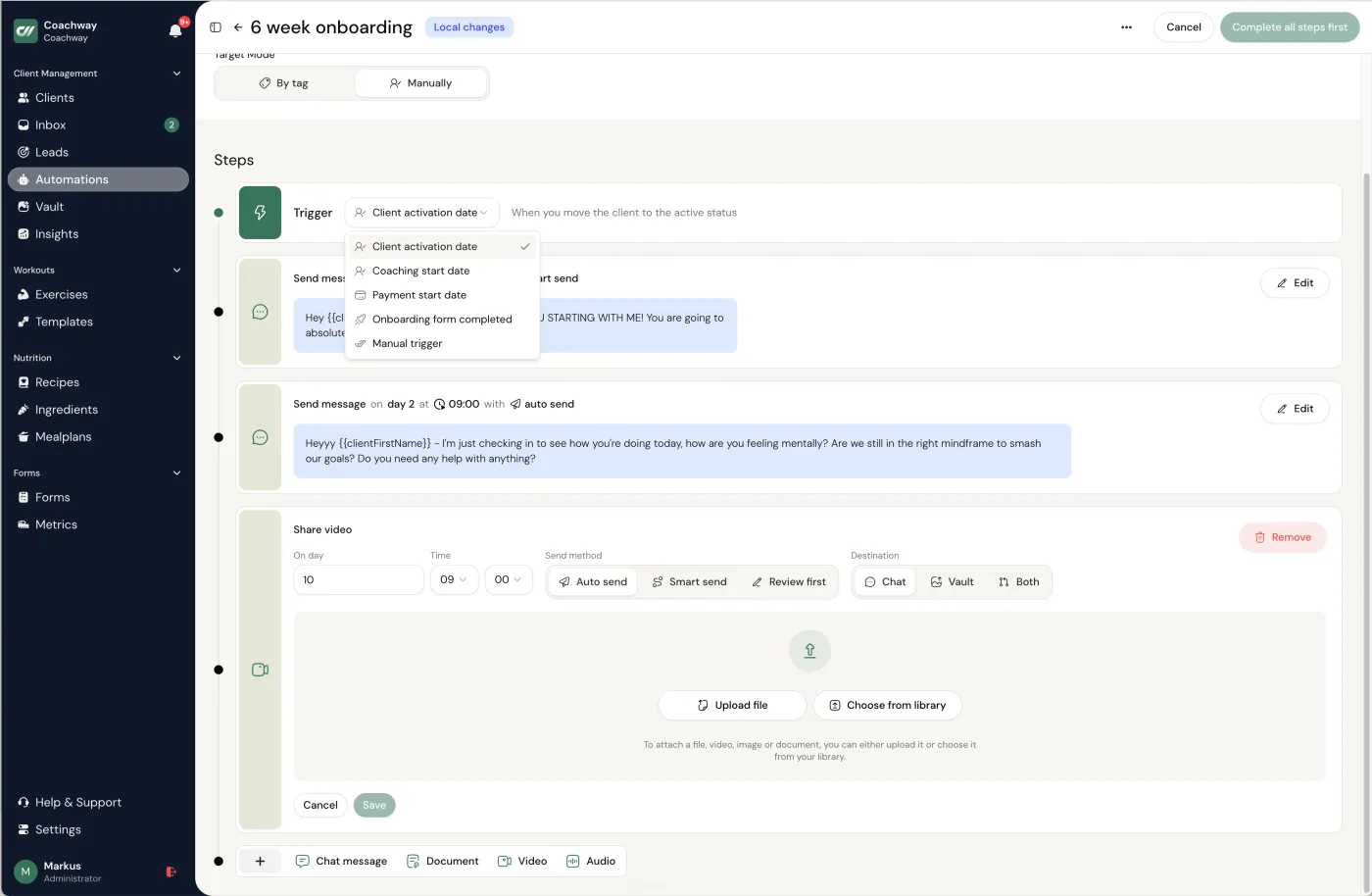
To be plain about what Coachway is not: it is not an AI that writes your clients' programs or answers their messages for you. The intelligence in the relationship is still you. What the platform removes is the friction, the tab-switching and the patchwork, which is the same goal your AI admin tools have, just for the part of the job that has to stay inside one trusted system. Coachway runs on predictable per-client pricing that scales with your client count, and starts at EUR 69 per month for up to 5 clients plus EUR 9 for each extra client. See pricing for the plain numbers, or the full feature set for everything it covers.
Don't buy the whole shelf. Assemble a small kit.
The mistake is collecting tools you never open. Start with one, prove it saves you time, then add the next. Whichever assistant you pick, the setup matters more than the brand; the custom instructions guide has the copy-paste blocks for ChatGPT, Claude and Gemini. For most coaches the order that pays off fastest is the assistant first, then transcription, then video, with design and scheduling last. The whole kit can run on free and low-cost tiers while you are small, and the platform stays the one paid system that is genuinely load-bearing. If you are choosing between ChatGPT, Claude and Gemini, the task-by-task comparison for fitness coaches has three paste-in tests so you can judge them in your own voice. If your kit is already Google Workspace, the four Gemini Gems for coaches may replace two of the five tools above.
01
Start with one assistant
Pick ChatGPT, Claude or Gemini and use it daily for a week on captions, emails and outlines. Get fluent with one before adding anything else.
02
Add the time-savers
Layer in transcription for calls and a video tool for short-form once content is a regular part of your week. These remove whole evenings of admin.
03
Spend the hours on coaching
The whole point is to reinvest the time saved into the relationship: better check-in replies, more personal video, more clients without thinner attention.
If the deeper aim is getting off the spreadsheet-and-screenshots way of working entirely, that is a platform question more than an AI one, and running online coaching without spreadsheets walks through it. The two efforts reinforce each other: AI clears the content admin, the platform clears the client-management admin, and what is left is the coaching, which is the part nobody should want to automate away.
Frequently asked questions about AI tools for online coaches.
What is the best AI tool for online fitness coaches?
There is no single best tool, because the useful AI for a coach is a small kit aimed at admin, not one app that coaches for you. Most coaches get the furthest with a general AI assistant such as ChatGPT, Claude or Gemini for drafting captions, emails and rough program outlines, a transcription tool for turning voice notes and calls into text, and a video tool such as Opus Clip or Descript for clipping long footage into captioned shorts. The thing all of that orbits is the coaching platform you actually run the business on. AI saves you minutes on the busywork around coaching; it does not replace the coaching.
Should I use AI to write my clients' workout and meal plans?
Use it for a first draft at most, never as the final word, and never unsupervised. A general AI assistant can produce a rough program outline or a list of meal ideas in seconds, which can break a blank-page problem. But it does not know your client's injury history, their schedule, what actually happened in last week's check-in, or the judgement you are paid for, and it will state wrong things confidently. The safe pattern is to draft fast, then apply your expertise: build the real plan in a structured workout builder and meal planner, where you control every set, swap and macro, rather than pasting an AI block into a client app untouched.
Will AI replace online fitness coaches?
No, and the coaches who do best treat that as good news rather than a threat. Clients pay a human coach for accountability, judgement and the feeling that someone is actually watching their week, none of which a chatbot provides. What AI does replace is the admin around coaching: the blank page on a caption, the half hour spent typing up a call, the manual clipping of a long video. Hand that to AI and keep the relationship human, and you can carry more clients without the personal attention each one gets going down.
Is it safe to put client information into AI tools?
Treat it the way you would any third party that touches client data: with care and consent. General AI assistants, transcription tools and video editors send whatever you paste or upload to a company's servers, so keep names, health details, injuries and anything medical out of them, and get a client's permission before you record or transcribe a call. Draft with anonymised or generic inputs, then add the personal specifics yourself inside the platform where the client relationship actually lives. The sensitive client data - measurements, check-ins, photos, payments - belongs in your coaching platform with its own access controls, not in a general-purpose AI tool. Convenience never outranks a client's trust. The concrete switches to flip inside ChatGPT are in ChatGPT memory and privacy settings for coaches.
Does Coachway have AI features built in?
Coachway is the all-in-one platform you run the coaching business on rather than an AI tool. It gives you the workout builder, meal planner, check-in forms, payments, a client app in six languages, leads, automations and the Power Panel where you handle every client from one screen. Automations let you schedule messages, videos and onboarding drips with real skip-conditions; they are rules you set, not a bot that coaches in your place. The AI tools in this article are complements you use around Coachway, mostly for content and admin, while the actual coaching and client management live on the platform.
What is the best free AI writing assistant for coaches?
Any of the three main assistants on its free tier, set up with your voice card; the free tiers cap usage and often route to a smaller model, and they change month to month, so the honest answer is the one whose current free plan lets you run your daily jobs without hitting the limit. The setup (ten samples, a ban list, the six-part prompt) is what makes the writing usable, and it costs nothing on any of them.
Is Claude or ChatGPT better for writing?
Out of the box, coaches who use both tend to say Claude's drafts read less generated and hold a long document better; after both are set up with your samples and a ban list, the gap mostly closes, and the coaches who switch between them in the r/ChatGPTPro threads mostly cite usage limits rather than writing quality. For a coach the deciding factors are the voice card, the privacy settings and the plan limits, in that order; the model version changes under you either way.
Keep reading
all guidesBest coaching software in the UK (2026): the honest field guide
UK-built PT Distinction and MyPTHub plus Coachway, Trainerize, Everfit and TrueCoach compared for UK coaches: pound-and-euro pricing, the VAT threshold, and which fits which business.
Read the guideBest coaching software in the US (2026): the honest field guide
Trainerize, Everfit, Exercise.com, TrueCoach, QuickCoach and Coachway compared for US coaches: dollar pricing with add-ons made explicit, the sales-tax reality, and which fits which business.
Read the guideExercise.com review 2026: quote-only pricing, strengths, gaps and alternatives
The get-a-quote pricing model, what its 4.7/5 reviewers praise and criticize, the true white-label strength, the onboarding curve, and who the platform actually fits.
Read the guideFree tools for this: Coaching Rate Calculator · Coaching Tool Stack Cost Calculator · Coaching Profit Calculator
Ready-made template: AI Prompt Pack for Online Coaches
See what Coachway can do for your coaching business
Coachway was built on knowledge from working with 150 online coaches over 6+ years, who all hit the same wall - slow platforms, clunky workflows, wasted hours. Start your 14-day free trial and see what we fixed - the whole platform, no charge today, cancel anytime under Billing.


