


ChatGPT vs Claude vs Gemini for fitness coaches. Compared by task, with three tests you run in your own voice.
The tech-press comparisons rank the models on benchmarks that have nothing to do with drafting a check-in reply. The vendor blogs that compare them "for personal trainers" are selling an AI product. What a coach actually needs is narrower: which assistant to open for which job, what none of them should be trusted with, and a way to judge them with your own captions and your own clients' words rather than someone's ranking. That is this page: twelve tasks, a lean per task, three paste-in tests with a score sheet, and the client-data rules that apply to all three.
By Markus Evers · Updated October 2026
Already drafting check-in replies in one of them? See where the edited reply gets sent, free for 14 days.
the short version
For most online fitness coaches the best AI assistant is the one they have set up well: ChatGPT leads on breadth, the app and memory, Claude on long documents and writing that needs less editing, Gemini on Google Workspace and video. None of the three should author a client's program or the message a struggling client reads.
Which AI is best for fitness coaches in 2026?
The best AI for a fitness coach in 2026 is the one that has your voice samples, your rules and your files loaded, because setup changes the output more than the choice of model does. Coaches who use several put it plainly: one is better out of the box, and after both are customised the difference mostly disappears. Where the models do differ is by task, and the table gives a lean per task; where they do not differ is the line none of them should cross.
bottom line: the 12-task test
ChatGPT
Breadth, the app on every device, memory across chats, search-connected research, images. The default if you want one tool for everything.
Claude
Long documents, editing rather than rewriting, drafts that need less de-AI-ing out of the box. The writer's desk.
Gemini
Wins where it is native: Docs, Sheets, Gmail, Calendar and video tools. The one to open when the task starts inside Google.
Ties on: check-in reply drafting, program review (as reviewer only), meal ideas (numbers unverified), privacy controls. Nobody wins: authoring a client's program, the message a struggling client reads, calorie counting.
How do ChatGPT, Claude and Gemini compare task by task?
Task by task, the three assistants split into a lean, a tie or a "nobody" for each of the 12 jobs a coach gives them, from caption drafting to privacy controls. The lean column is where coaches who use all three report a real difference; every tie is a case where your setup, not the model, decides the result. No benchmark numbers, no version names: models change month to month and the tests below are how you check. For a coach already on Google Workspace, the Gemini Gems setup writes out the four gems and the Sheets, Docs and Gmail each one touches.
| Task | Lean | Why, and the caveat |
|---|---|---|
| Caption drafting | Claude out of the box; any of the three after setup | The voice samples and the ban list matter more than the model. Test 1. |
| Long-form email or a sales page | Claude | Holds a long document and your samples together without drifting; edits rather than rewrites when asked. |
| Check-in reply drafting | Tie | The four-part structure and your five replies decide it, not the assistant. Privacy rules apply to all three. Test 2. |
| Program review | Tie, all as reviewer only | None authors well unsupervised; all three find planted flaws when told not to rewrite. Test 3. |
| Meal ideas with macros | Tie, numbers unverified | All three guess portions. Ask for a "Portions I estimated" list and verify in a food database. |
| Research summaries with sources | ChatGPT or Gemini in a search-connected mode | Always ask for the sources and open them; one coach's line, "it tells me fresh lies daily", is the caution. |
| Voice-note transcription | ChatGPT app, or a dedicated transcription tool | For long call recordings a transcription tool is still cleaner; paste the transcript into any of the three afterwards. |
| Spreadsheets and business maths | Gemini in Google Sheets; ChatGPT with a file | Ask for the working in a table with every assumption stated. |
| Image and Reel ideas | ChatGPT or Gemini | Both generate images natively; Gemini connects to video tools. Ideas only; the footage is yours. |
| Custom setup and memory | Depends on taste | ChatGPT remembers across chats, which some coaches find helpful and others find presumptuous; Claude starts each chat clean unless a Project is used; Gemini uses Gems. |
| Privacy controls | Tie | All three have a training toggle, an unsaved chat mode and business terms. None is "GDPR compliant" by being chosen; strip client data first. |
| Usage limits and price | See each current plan page | Free tiers cap usage; paid tiers differ in model access and limits, and heavy Claude users report hitting time limits fast. Plans change; do not decide on a screenshot. |
Which is best for writing, check-in replies, programming and research?
For writing that sounds human, Claude tends to need less editing out of the box and all three level up with your samples; for check-in replies the four-part structure and your five replies decide it; for programming none should author and all three work as a reviewer; for research use a search-connected mode, ask for the sources, and open them. The four cards say why. The writing rows alone, as a five-row pick with the guide for each, are on the best AI tools for online fitness coaches.
Captions and emails that sound human
Lean Claude if you give it nothing; tie once the prompt carries three of your captions and the ban list. Either way the draft goes through the fifteen tells in how to make ChatGPT not sound like AI before it is posted.
Check-in replies and client messages
Tie. Acknowledge, assess, one adjustment, one ask, with five of your replies as the style card, produces the same quality in all three. The same privacy rule applies to all three: strip the check-in first. The prompts are in ChatGPT prompts for check-in replies.
Programming and meal ideas
Nobody, unsupervised. In a coach's words from r/personaltraining: "every AI I've used for gym stuff is very poor unless you do some very heavy hand holding ... the progression schemes are usually insane too." As a reviewer of a block you wrote, all three earn their keep; the workflow is in how to use ChatGPT for program design as a coach. Meal drafts: any of the three, numbers verified by you.
Research and staying current
ChatGPT or Gemini in a search-connected mode, with "give me the sources" in every prompt and the discipline to open them. One coach uses it for a weekly digest of new studies; another, in the same thread, says "it tells me fresh lies daily". Both are right, which is why the sources matter.
Where the drafted check-in reply goes next
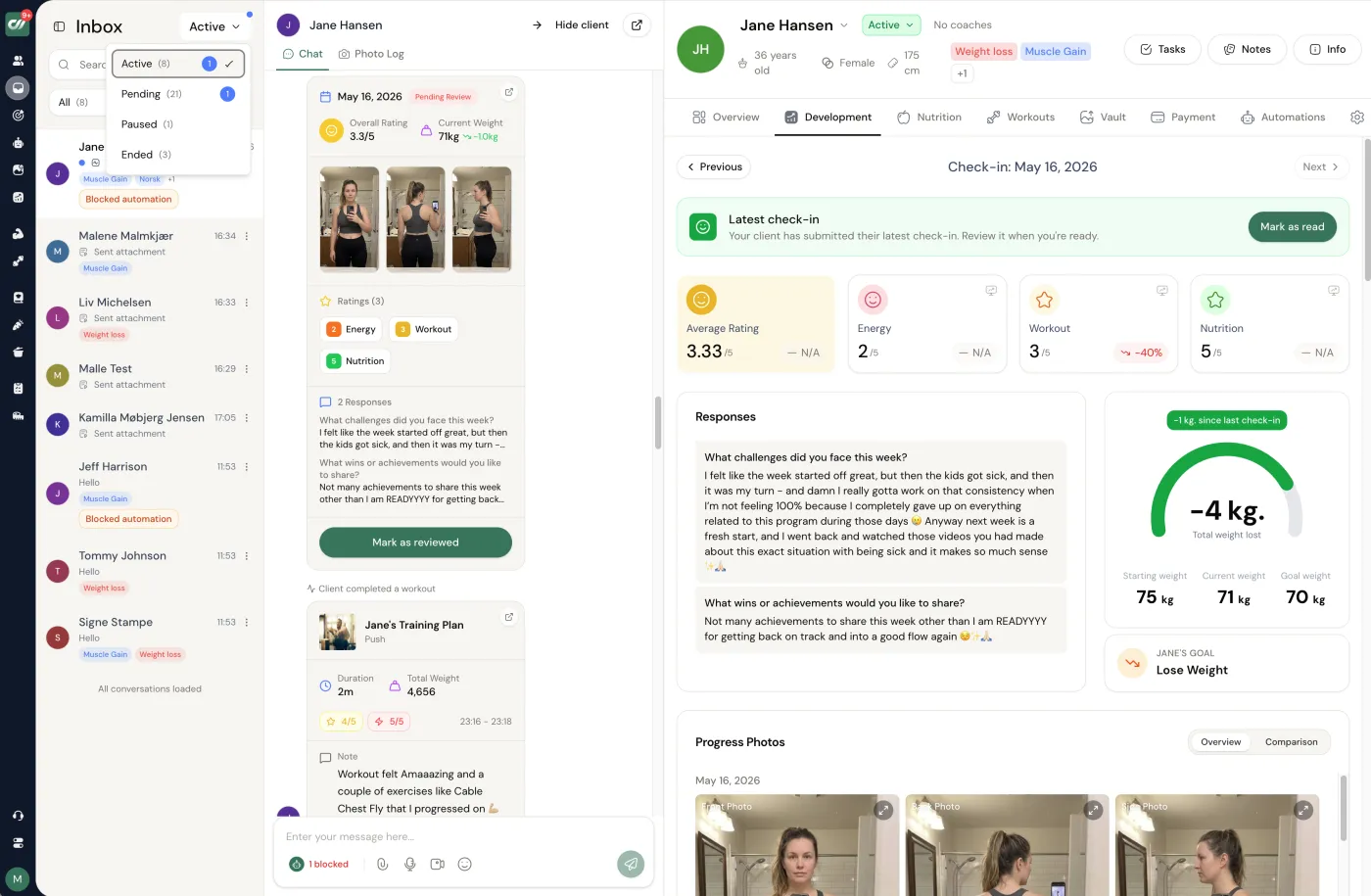
Whichever assistant drafted it, the reply was written from the stripped version you pasted, so the last check happens against the client's real week: their numbers, their photos, what they actually trained. Read the draft beside that record before it is sent, and fix the one line the assistant could not know. In Coachway that record is one screen: the Power Panel shows the client's numbers, progress photos, training log and latest messages together, and the reply goes out in the in-app chat as text, a voice note or a video message.
Which handles privacy and client data best?
None of the three handles client data "best", because the safe answer is the same for all of them: do not paste it. Each offers a setting that decides whether conversations may be used to improve the models, an unsaved or temporary chat mode, and different terms on business plans, and each of those changes. Choosing an assistant does not make it compliant with anything; what keeps you compliant is stripping names, health details and identifiers before a word goes in, and keeping the real record in your coaching platform. The six settings to change in each, and whether a solo coach needs a Team plan, are in the memory and privacy settings guide.
01
Check the training setting
In each account, find the control for whether your chats improve the models, and decide.
02
Use the unsaved mode for anything close
Temporary chats are not kept. Use them for the stripped check-in, not as a licence to paste the full one.
03
Strip first, every time
First name or initial, the week's numbers, their words about the week. Nothing medical, no photos.
The full rule set for client information and AI tools is in client data privacy for online coaches.
How do I test them myself in 15 minutes?
Test them yourself by pasting the same three prompts into all three assistants: a caption in your voice from two of your captions, a check-in reply from an anonymised week, and a program review with one deliberately planted flaw. Score each out of five with the sheet under each prompt, and the total tells you which to open for which job, for you, this month. Re-run when a model updates. Whichever wins, keep your instructions as a plain text file so they move with you; the custom GPT guide shows the same file as a GPT, a Claude Project and a Gemini Gem.
Test 1: a caption in your voice
When to use it: Paste into ChatGPT, Claude and Gemini, the same text, one after the other. Score: Reused my phrases (0 to 2), no tells (0 to 2), specific detail kept (0 to 1).
What to paste in: Your own samples and one anonymised week; the same text into all three.
Here are two captions I wrote myself:
[PASTE CAPTION 1]
[PASTE CAPTION 2]

Write one Instagram caption for my audience of [WHO] about [TOPIC] in my voice. Rules: one specific detail from this: [REAL DETAIL], no groups of three, no "it's not X it's Y", no emoji, no question stack, no closing offer, under 120 words. Then list which of my words you reused.
Test 2: a check-in reply draft
When to use it: Same anonymised check-in into all three. Score: Structure kept (0 to 2), quotes their own words (0 to 1), no medical drift (0 to 1), sounds like me after one edit (0 to 1).
What to paste in: Your own samples and one anonymised week; the same text into all three.
This is an anonymised weekly check-in from a client (first name changed): [PASTE: training done 3 of 4, weight flat, sleep poor, stress high, one line of their own words].

Draft a reply in this structure: acknowledge one specific thing they wrote, assess in two sentences, one adjustment for next week, one question. Under 110 words. Tone: [YOUR THREE WORDS]. Do not diagnose, do not mention medication or supplements, do not add a sign-off slogan.
Test 3: a program review with a planted flaw
When to use it: Plant one deliberate conflict (an exercise that clashes with a limitation you state) and see who finds it. Score: Found the planted flaw (0 to 2), did not rewrite (0 to 1), asked a good question (0 to 1).
What to paste in: Your own samples and one anonymised week; the same text into all three.
Act as a second pair of eyes, not the author. Here is a 3-day full-body program I wrote for a client: [PASTE, with training age, equipment, injuries in general terms, weekly time].

Do not rewrite it. List: 1. any exercise that conflicts with the limitations I gave, 2. pattern overload across the week, 3. missing progression rule for weeks 1 to 4, 4. one thing you would ask me before changing anything. Keep it under 150 words. If nothing is wrong, say so.
What Coachway has to do with this. Nothing inside the assistant, everything after it. The assistant is the drafting desk; the program, the check-in and the message the client reads live in Coachway, sent after you have edited them, with payments through your own Stripe. Coachway does not market an AI generator and this page does not claim one. The three tests, and every other prompt on this site, are in the free AI prompt pack for online coaches.
Stop re-describing the same client into every prompt.
Notice what every good prompt on this page opens with: you describing the client's situation in your own words. The reason you retype that each time is that it lives in your head and your DMs, not in a structured record. Coachway's intake and check-in forms capture the goal, the constraints and the week as fields, so the shape you hand the model is one click away - and the name, the health detail and the photos stay in your system, never in the chat. Whichever assistant wins your three tests still drafts; you just stop re-describing the same client from scratch. To see those fields on a real client file, try Coachway free for 14 days.
One row in the table above has its own guide worth a look: voice-note check-ins with AI transcription turns a client's spoken update into the transcript you feed the reply prompt, so even the messiest input arrives structured before it reaches an assistant.
Frequently asked questions about ChatGPT, Claude and Gemini for coaches.
Is Claude or ChatGPT better for writing that does not sound like AI?
Out of the box, coaches who use both tend to say Claude's drafts read less generated; after both are set up with your samples and a ban list, the gap mostly closes. The setup matters more than the model: three of your own captions and the fifteen-tell ban list in the prompt do more for the draft than switching assistant. Run test 1 on this page in both and judge with your own eyes.
Which AI is best for personal trainers?
For most online coaches, the assistant they have already set up well. ChatGPT for breadth, the app ecosystem and memory across chats; Claude for long documents and writing that needs less editing; Gemini when your calendar, docs and video already live in Google Workspace. None of the three should author a client's program or the message a struggling client reads, whichever you pick.
Can any of them write a client's training program?
Not unsupervised. Coaches who have tried describe cookie-cutter exercise selection, progression schemes that do not survive contact with a real client, and a model that agrees with whatever you push back with. All three are useful as a reviewer of a block you wrote: red flags, pattern overload, missing progression, substitutions. Test 3 on this page plants a flaw and shows you which assistant finds it.
Which AI is safest for client data?
None of them is "safe" for client data; the safe move is not to paste it. Each has settings that decide whether your conversations may be used to improve the models, a temporary or unsaved chat mode, and different terms on business plans, and all of those change. Strip names, health details and identifiers before anything goes in, check the current data controls in your account, and treat every assistant the same way.
Do I need the paid plan as a coach?
Usually once you use it daily. Free tiers cap usage and often route to a smaller model; paid tiers add the better models, longer documents, projects or custom setups and higher limits. Prices and plan names change, so see the current plan page for each. A coach drafting captions, check-in replies and emails most days generally hits the free limits within a week.
Is Gemini worth it if I already use Google Workspace?
That is the case where it wins: it reads your Docs, Sheets, Gmail and Calendar natively, so a check-in spreadsheet or a client email thread is one click away instead of a paste. Coaches who keep both say Gemini is the one they open when the task starts inside Google and ChatGPT or Claude when it starts with writing.
Can I use the same prompts in all three?
Yes. Every prompt on this site is plain text with a role, inputs, rules and an output format, which all three follow; the voice card, the paste-in rules and the ban lists carry over unchanged. Where a prompt says ChatGPT, read it as whichever assistant you use, and use the three tests here to see where each is stronger for you.
Which AI is best for meal plans and macros?
For a structured 7-day draft from targets you set, any of the three; for the numbers, none. A widely shared r/loseit thread makes the point that language models are not accurate calorie-tracking methods, and all three fail the same way on portions. Ask for a "Portions I estimated" list, verify totals in a food database or your planner, and keep the allergen check in your own system.
Will these models change next year, and does that matter?
They change month to month, and users notice: a highly upvoted r/ClaudeAI thread describes a model change feeling like night and day. That is why this page has no benchmark numbers and no version names in the title. Judge by task with your own prompts, re-run the three tests when a model updates, and keep your setup (voice card, instructions, files) portable so a switch costs ten minutes.
Pick by task, set it up with your own words, and re-test when the models change. The assistant drafts; the coaching stays yours. Coachway costs EUR 69 per month for up to 5 clients plus EUR 9 per additional client, every feature included, with a 14-day free trial; the numbers are on pricing, and the AI coaching apps compared vendor by vendor lists what sits around it.
Keep reading
all guidesBest AI tools for online fitness coaches in 2026
Most "AI for coaches" lists try to sell you a robot that programs and chats for your clients. That is the wrong job for AI. This is an honest rundown of the small admin kit worth your time - where AI genuinely saves a coach hours, where it quietly hurts the relationship clients pay for, and the all-in-one platform you actually run the business on around it.
Read the guideChatGPT Custom Instructions for Fitness Coaches (2026 Setup)
The complete copy-paste ChatGPT setup for an online fitness coach: the "about you" and "how to respond" boxes at about 1,400 characters each, four Project instruction blocks (content, client comms, programming assistant, business admin), what to upload and never upload, the same setup in Claude and Gemini, memory and privacy hygiene, and a five-minute test.
Read the guideHow to Make ChatGPT Not Sound Like AI: A Coach's Checklist (2026)
The 15 tells that give AI writing away, each with a before and after (contrast framing, groups of three, elevate and unlock, the closing offer line, question stacks, emoji walls, the summary sentence and more), the 60-second rewrite pass, a rewrite-in-my-voice prompt, an AI-tell detector prompt, and the six things a coach must never let AI write.
Read the guideFree tools for this: Client Capacity Calculator · Coaching Rate Calculator · Coaching Tool Stack Cost Calculator
Ready-made template: AI Prompt Pack for Online Coaches
Where the draft becomes the client's message
Check-ins, messages, programs, meal plans and payments through your own Stripe on one client screen. Start the 14-day free trial and move one client over: cancel any time under Billing.


