



Cookbooks: build your recipe collection once, serve every client
Organise recipes into sections your clients browse in your order - high-protein breakfasts, green goodies, holiday favourites. Publish to everyone, to a segment, or keep it private while you build. Switch on client macro scaling, and a recipe a client adds to their plan rescales to that meal's targets.
You start with 1,100+ recipes already in the platform, add your own on top, and organise the mix into cookbooks that work for your whole client list as easily as for one person.
The payoff lands on the client side: see how recipes flow into client-built meal plans - scaled to their targets when you allow it.

The builder
Three panes, and the whole cookbook takes shape
Your recipe library sits on the left - search it, filter it, and see calories, protein, carbs and fat on every row. The middle is your cookbook: add sections, name them whatever fits your coaching, and drag recipes in. Clients see your sections in your order, so a cookbook reads like a menu you wrote, not a database dump. Anything already placed shows a green 'Already in' line, so you never double up.

Who gets it
Private, Public or Segmented - you choose per cookbook
Every cookbook carries exactly one audience. Keep it Private while you build and only you can see it. Go Public and every client can browse it while it is live. Or go Segmented and target by client tags, gender, or hand-picked clients - so the vegetarian cookbook reaches the vegetarians and the cutting-phase recipes reach the people actually cutting. Individually added clients always qualify, which quietly makes a one-client cookbook possible too.

The killer detail
Recipes that resize themselves to each client
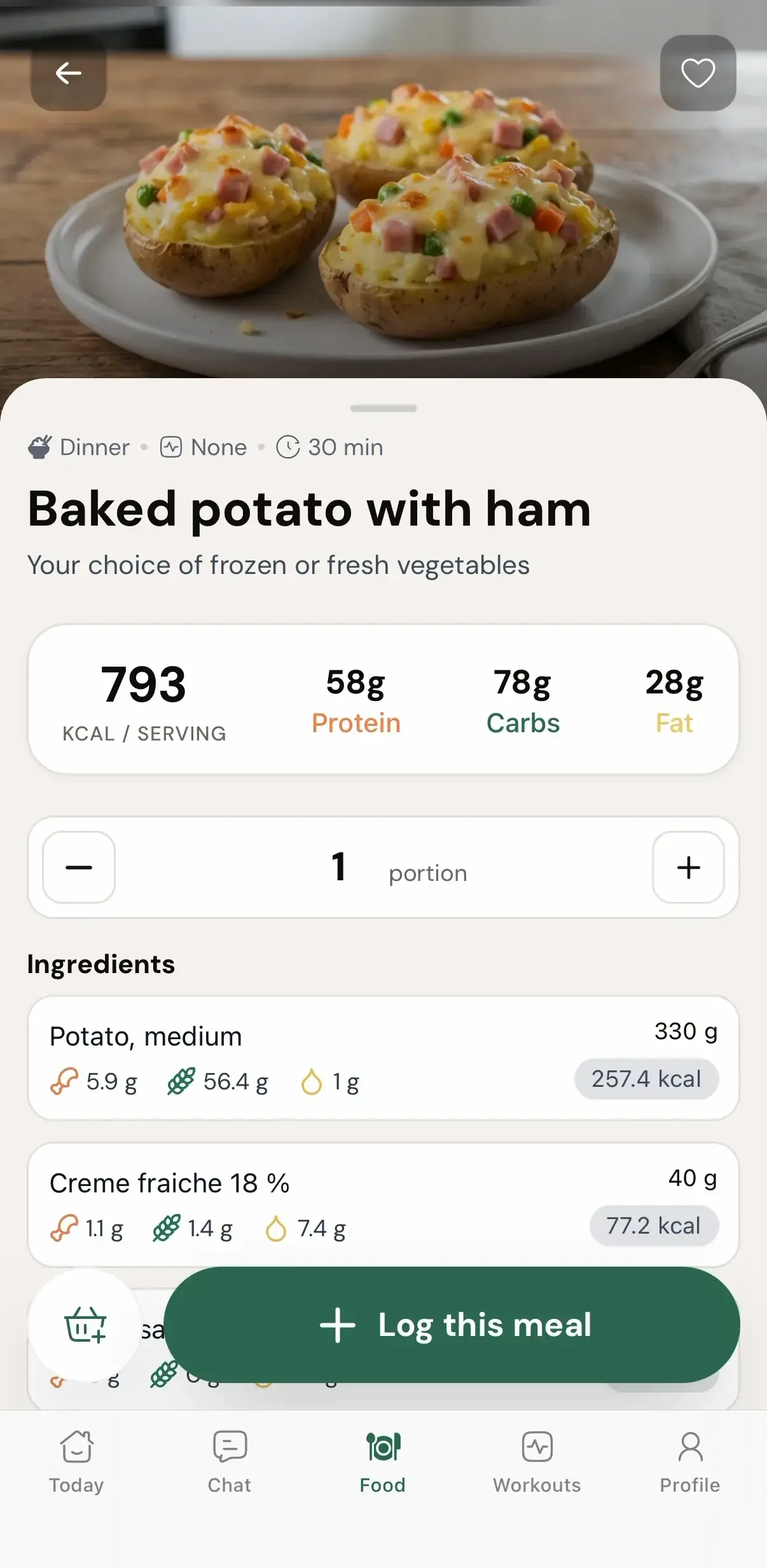
Flip on 'Allow client macro scaling' and every recipe in the cookbook becomes elastic. In the cookbook it keeps its original form. But the moment a client adds it to a meal plan, it rescales to that meal's calorie and macro target - a 700 kcal recipe lands as 500 kcal when their breakfast target is 500. One cookbook fits the client bulking on 3,400 and the client cutting on 1,800, and you built exactly one version of it. Leave the toggle off and clients can only change portions.
The audience model
You pick who sees it, cookbook by cookbook
Cookbooks and workout packs share the same publish flow, so once you have learned it here it carries straight over to workout packs.
Private
Coach only. Clients never receive access. Your workshop mode - build, rearrange and test a cookbook with nobody watching.
Public
Every client can browse it while live. One publish and your whole client base has it in their app - no assigning, no copying.
Segmented
Target by tags, gender, or specific clients. Your vegetarian cookbook reaches the vegetarians, and nobody else ever sees it.
What coaches build with it
The first cookbooks worth publishing
High-protein breakfasts
The question every client asks in week two, answered once. A whole section of protein-heavy starts they can browse whenever they want.
Holiday favourites
December is coming either way. Publish a holiday cookbook in November and clients walk into the season with a plan instead of a shrug.
Green goodies
Some clients know they should eat more greens, and telling them again changes nothing. Give them a section of vegetable-forward recipes to browse instead - you never send another link.
Breakfast, lunch, dinner
Sometimes the classic structure is exactly right. Clients see your sections in your order, so the cookbook reads like a menu, not a pile of recipes.
Aftercare clients
A finished 1:1 client stays on the app at a lower fee, browsing your cookbooks and training your packs - without filling your inbox.
Build it once, publish it forever
This is the whole point of the Library: the work you did for one client now serves the next fifty, and you never copy a thing.
Recipes here draw on the same library as the meal planner, cookbooks land in the client app your clients already have, and clients you give access to can set their own targets with the calorie calculator. All of it is part of Coachway Nutrition.
Everything cookbooks can do
See all featuresWatch a cookbook go from empty to published
We will build one live with you - sections, audience, macro scaling - and show it landing in the client app.
Questions, answered
What exactly is a cookbook in Coachway?
A collection of recipes you organise into ordered sections - think "Breakfasts", "Green goodies", "Holiday favourites" - and publish to clients. You build it once in the Library, and clients browse it as a cover card in their app.
Who can see a cookbook I build?
You decide, per cookbook. Private means coach only - clients never receive access. Public means every client can browse it while it is live. Segmented targets it by client tags, gender, or individually chosen clients.
What does "Allow client macro scaling" actually do?
When it is on, a recipe a client adds to a meal plan rescales to that meal's calorie and macro target. A recipe that is 700 kcal in the cookbook lands as 500 kcal if the client's breakfast target is 500. The recipe itself stays untouched in the cookbook.
Can I turn macro scaling off?
Yes - it is a toggle you set per cookbook when you create it. With scaling off, clients can only change portions, so the recipe keeps its original numbers and they take more or less of it.
Does publishing a cookbook change anything for my existing clients?
It adds something they can browse - nothing more. A public cookbook simply appears in their app. Their meal plans and targets carry on exactly as before.
What happens to meal plans I have already assigned?
Nothing. Plans you assigned stay exactly as you built them. Clients you have given personal meal plans can pull a cookbook recipe into a plan of their own, and that is the only place a cookbook shows up.
Do my clients need a new app for this?
No. Cookbooks show up in the Coachway client app they already use, as cover cards they tap to browse. There is nothing for them to install or set up.
Can I use my own recipes, or only the built-in ones?
Both, mixed freely. The builder searches your whole recipe library - the 1,100+ recipes already in the platform and every recipe you have created yourself - and you drag any of them into your sections.
How do clients actually use a recipe from a cookbook?
They open it to the full detail - calories, protein, carbs, fat and the ingredient list - then either log it as a meal on the spot, or add it to a meal plan by choosing the plan, the meal (Breakfast, Lunch, Dinner or Snacks) and a quantity.
How specific can the segmentation get?
Tags, gender and individually added clients, in combination. Clients matching at least one selected tag qualify; when tags and gender are both set, clients must match both. Individually added clients always qualify - you can use that on its own, right down to a cookbook for one person.
Can I work on a cookbook without clients seeing it half-finished?
Yes, two ways. Every collection carries a Draft or Live status, so nothing reaches clients until you publish. And a cookbook set to Private stays coach-only even when live - handy for testing.
Articles & guides
all guidesMeal planning & nutrition software for personal trainers
What nutrition coaching software should include: reusable meal templates, recipes, shopping lists, macro visibility, allergy handling, and client feedback.
Read the guideMeal Prep for Clients: A Coach's Adherence Guide
Meal prep is one of the biggest adherence levers a coach can teach. What it is, why it moves results, how to build a simple weekly component-based system that hits macro and calorie targets, and how to teach the skill so it lasts.
Read the guideHow to do nutrition coaching online (2026 guide)
A practical guide to coaching nutrition remotely as a fitness coach: stay in your lane on scope of practice, pick the right approach (habits, macros, or meal plans) for each client, build plans they will actually follow, and track adherence through weekly check-ins that catch drift early.
Read the guideKeep exploring
Explore more features
Client progress
Track workouts, milestones, and personal bests with clear dashboards that show improvement over time.
Meal planner
Create tailored nutrition plans that align with client goals, complete with smart suggestions and easy adjustments.
Check-ins & forms
Collect feedback, assess readiness, and stay connected with customizable forms and quick check-ins.
See what Coachway can do for your coaching business
Coachway was built on knowledge from working with 150 online coaches over 6+ years, who all hit the same wall - slow platforms, clunky workflows, wasted hours. Start your 14-day free trial and see what we fixed - the whole platform, no charge today, cancel anytime under Billing.


