


Trainerize review: features, honest pros and cons, and who it suits in 2026.
This Trainerize review is written for the online fitness coach deciding whether to build a business on it. Trainerize, now branded ABC Trainerize, is a mature, workout-first coaching platform with one of the deepest exercise libraries in the category, a free entry tier, and pricing that scales from USD 10 to USD 380 per month, with the branded app and advanced nutrition as paid add-ons. Below is what it does well, where coaches feel the gaps, who it suits, and the main alternative for coaches who want nutrition and non-English languages built in.
By Markus Evers · Updated November 2026
How this comparison is made: we check every competitor's pricing and features against their live websites and re-verify them on a recurring basis. We build Coachway, so we flag it wherever it appears, we credit real competitor strengths, and we say who each platform fits better than us. Browse all platform comparisons.
the short version
Trainerize (now ABC Trainerize) pricing runs from a free 1-client tier to USD 380 per month per location (Studio Max, 1,000 clients), with the branded app (USD 169 one-time), Stripe payments, and advanced nutrition sold as add-ons. It is a mature, workout-first coaching platform from Vancouver, Canada. The app is English-only, so nutrition-led and Nordic or German-market coaches usually pick an alternative like Coachway.
Trainerize at a glance.
| Category | Workout-first online coaching and personal-training platform |
| Made by | TSR Gym Technik Ltd, now branded ABC Trainerize (ABC Fitness Solutions), Vancouver, Canada |
| On the market since | 2012 |
| Platforms | Web dashboard plus iOS and Android client app |
| Free option | Free Basic plan (1 client) plus a 30-day trial with no credit card |
| Price range | USD 0 to USD 380/mo before the branded-app, payments and nutrition add-ons (see the full Trainerize pricing breakdown) |
| Languages | Trainerize: English only |
| Standout | One of the deepest exercise libraries and program builders in the category |
| Watch-outs | Trainerize: branded app, payments and advanced nutrition are paid add-ons; English-only UI |
| Our verdict | 4.2 / 5 - Trainerize is a mature, workout-first tool for English-speaking coaches |
Is Trainerize suitable for a small fitness business?
Yes, if the business is workout-first and works in English. A solo trainer can start on the free Basic plan (1 client), then Grow at about USD 10 a month (2 clients) or Pro from about USD 25 (5 to 200 clients), and a small studio can step up to Studio Plus at USD 275 per location. On Grow and Pro, budget for the add-ons: Stripe payments at USD 10 a month, advanced nutrition at USD 20 to 45 and the branded app at USD 169 one-time on Pro. If you coach nutrition alongside training, or your clients speak Danish, Norwegian, Swedish, Finnish, German, Dutch or Spanish, Coachway is the closer fit.
- Low-risk to test: the free 1-client plan plus a 30-day trial with no credit card. How that trial stacks up against seven other platforms is in our free trial comparison of training software.
- Where a small budget feels it: on Grow and Pro, payments, advanced nutrition and the branded app sit outside the headline price; Studio includes them.
- Language: Trainerize's interface is English only, so it suits English-speaking clients best.
- The Coachway comparison: one plan at EUR 69 a month including up to 5 active clients, then EUR 9 per extra client (EUR 69 + EUR 9 x (clients - 5)), so 10 clients cost EUR 114 a month with meal planning, check-ins and payments through your own Stripe included. The subscription takes no share of your coaching revenue; built-in payments cost 2.4% per transaction.
What is Trainerize?
Trainerize, now branded ABC Trainerize, is an online personal-training and coaching app that trainers use to deliver workout programs, message clients and track their progress through a client app on iOS and Android. It is made by TSR Gym Technik Ltd in Vancouver, Canada, has been on the market since 2012 and belongs to ABC Fitness Solutions. It is workout-first: a large exercise library and program builder sit at its core, basic nutrition is included, and advanced nutrition, Stripe payments and a branded app are paid add-ons on the lower tiers. The interface is English only.
On its own homepage, Trainerize describes itself as "The #1 coaching app to better engage your clients." Many coaches still call it simply Trainerize (and search for it as Trainerise or Tranerize), and its long time on the market is part of why it feels so polished: the core has had years to mature. For how it stacks up against other coaching software used in the US, see our USA roundup.
Day to day, coaches also message clients inside the platform and track habits, activity and progress. Trainerize markets a large install base, citing more than 400,000 trainers and coaches and 45,000-plus fitness businesses on its homepage, which is a vendor marketing figure rather than an independently audited number but does speak to its reach.
In short, Trainerize sits firmly in the workout-delivery category. The questions worth answering in a review are not whether it works, because it clearly does, but where it fits your specific coaching model, what you actually pay once the add-ons are in, and what you give up if your business is built more on nutrition or runs in a language other than English. If you are choosing the tool that runs the whole business, not only the workouts, our guide to personal training business software covers leads, onboarding, billing and team access. For the wider category, our roundup of the best online coaching platforms for fitness coaches sets the field.
What does the Trainerize app do for trainers and clients?
Trainerize gives trainers a workout program builder (with an AI Workout Builder), an exercise and workout library, meal and macro tracking, habit coaching, chat with voice messages, progress photos and body stats, wearable sync and appointment booking; clients use a free iOS and Android app. The free Basic plan covers workouts, messaging and habits for 1 client; most coaching tools start on Grow (about USD 10 a month, 2 clients), groups and challenges on Pro (from about USD 25 a month for 5 clients); the meal planner, video calls and Stripe payments are monthly add-ons on Grow and Pro, the branded app is USD 169 one-time on Pro, and Studio (from USD 275) includes all of them.
To get a workout to a client, you build it or pick it from the library, schedule it on the client's calendar from the web dashboard or the trainer side of the mobile app, and it appears in their app. What they log, plus data from Garmin, Fitbit or Withings on Grow and up, comes back to their profile. Clients pay nothing for the app; the trainer pays for coaching seats.
Trainer side: web dashboard and mobile app
- Programs and exercise library: every plan, including the free Basic plan. The AI Workout Builder starts on Grow; the plan cards list custom exercise videos under Pro.
- Habit coaching: custom and pre-made habits with streaks and badges on every Trainerize plan.
- Messaging: 1-to-1 chat, voice messages and auto messages on every plan; advanced messaging, groups and challenges from Pro.
- Nutrition: meal and macro tracking from Trainerize Grow. Trainerize's Smart Meal Planner (2,400+ recipes, 7-day plans, shopping lists) is the Advanced Nutrition add-on: USD 20 a month on Grow, Pro 5 and Pro 15, USD 45 on Pro 30 to 200, included on Studio.
- Appointments and calendar: appointments, classes, calendar sync and session packs from Trainerize Grow; prospect booking and shareable booking links need the Business add-on (USD 25 a month on Grow and Pro, included on Studio). If booking is the main job, compare it with the other booking apps for personal trainers.
- Payments: Trainerize's Stripe Integrated Payments, USD 10 a month on Grow and Pro, included on Studio, not on the free Basic plan.
- Video: 1-to-1 and group video calls plus live and on-demand classes through Trainerize's Video Coaching add-on, USD 10 a month on Grow and Pro, included on Studio.
- Automations: auto messages on every plan; automated product delivery and client journeys with the Business add-on; AI check-ins through FitMetrics, a separately priced AI add-on.
- Branded app: your logo and colours on the Trainerize app for USD 169 one-time on Pro; a fully white-labelled app on Studio; not available on the free Basic plan or Grow.
Client side: iOS and Android app
- Cost to the client: none on any plan. Trainerize states there is no cost for clients to use the app.
- Workouts: follow the scheduled program and log each workout, on every plan.
- Food logging: search, barcode scan or meal photo, with calorie and macro targets, from Grow. Meal plans and shopping lists need Trainerize's Advanced Nutrition add-on.
- Habits: daily habits, streaks and badges on every Trainerize plan.
- Body stats and progress photos: logged on reminders the trainer schedules in the client's calendar; client statistics are on every plan.
- Wearables: Garmin, Fitbit, Withings and MyFitnessPal sync from Grow; Trainerize also lists an Apple Watch app.
- Chat and video: messages and voice messages to the coach on every plan; video calls with the Video Coaching add-on.
- Booking and buying: book appointments and classes and buy packages in the app from Grow, with payments through the Stripe add-on. Trainerize says its Basic client seats (book and buy only, not the same as the free Basic plan) do not count against your plan's client limit.
- Community: groups and challenges from Pro.
- Language: Trainerize's interface is English only.
Is it worth the price? For a workout-first trainer working in English, yes: the free Basic plan and Grow (2 clients) are enough to test it, but at 15 clients you are on Pro 15 at USD 50 a month, and adding Advanced Nutrition (USD 20) and Stripe payments (USD 10) brings that to USD 80 a month before the branded app. Price that full stack at your target client count on our Trainerize pricing page. Plans and add-ons as listed on Trainerize's own pricing page, checked November 2026.
How much does Trainerize cost per month?
Trainerize costs USD 0 to USD 380 per month before add-ons. The free Basic plan covers 1 client and does not expire; Grow is about USD 10 a month for 2 clients; Pro starts at about USD 25 a month for 5 clients and rises with your client count up to 200; Studio Plus is USD 275 a month per location for 500 clients, and Studio Max is USD 380 for 1,000. Paying annually saves about 10%. On Grow and Pro, Stripe payments (USD 10 a month), advanced nutrition (USD 20 to 45 a month) and the branded app (USD 169 one-time on Pro) cost extra; Studio includes them.
The tier-by-tier ladder, the annual-versus-monthly rates and a worked all-in example live on our dedicated Trainerize pricing page. Figures are USD as of 2026; confirm the current numbers before you commit.
| Tier | Price | Clients | Notes |
|---|---|---|---|
| Basic | Free | Up to 1 client | Test the platform with a single person |
| Grow | About USD 10/mo | Up to 2 clients | Trainerize's branded app and Stripe payments are paid add-ons |
| Pro | From about USD 25/mo | 5 to 200 clients | Trainerize branded app USD 169 one-time; Stripe USD 10/mo add-on |
| Studio Plus | USD 275/mo per location | 500 clients | Trainerize branded app and Stripe payments included |
| Studio Max | USD 380/mo per location | 1,000 clients | Trainerize branded app and Stripe payments included |
The add-ons are the part coaches most often miss when budgeting. The custom branded app is a USD 169 one-time fee on Pro (and is included on Studio). Trainerize's own pricing page also notes the branded app needs an Apple Developer account at USD 99 per year, paid to Apple, so it is a recurring cost on top of that one-time fee. Stripe Integrated Payments is how Trainerize connects to Stripe: a USD 10 per month add-on on Grow and Pro (included on Studio) that lets you take client payments inside Trainerize through your own Stripe account. Advanced nutrition coaching is a further USD 20 to 45 per month depending on tier. Add-ons are not included in the 30-day free trial (see whether Trainerize is free below). For the full worked example of what the add-ons do to a real monthly bill, see our guide to Trainerize pricing in 2026.
Is Trainerize free?
Trainerize has a free plan, but it is small. The Basic plan is free for 1 client, does not expire, and covers the mobile app, workout programs, basic messaging and habit coaching. Separately, Trainerize offers a 30-day free trial with unlimited clients and no credit card; add-ons are not part of the trial, and when the 30 days end the account drops back to the free 1-client plan rather than charging you. To coach a second client you need a paid plan, starting with Grow at about USD 10 a month for 2 clients.
- Free forever: 1 client on Basic, useful for testing the app on yourself or one client.
- Free for 30 days: the full trial with unlimited clients, no card, add-ons excluded.
- First paid step: Grow (2 clients) adds custom client programs, meal and macro tracking, wearable integrations and a profile listed on Trainerize.me.
- For comparison: Coachway has no free plan. Coachway is one plan at EUR 69 a month including up to 5 active clients, with a 14-day free trial (card required, EUR 0 today, cancel anytime under Billing). Start the Coachway trial.
What Trainerize does well.
Credit where it is due. There are good reasons Trainerize is a default recommendation for so many trainers, and an honest review has to start there.
- A deep, mature exercise library and program builder. This is the core strength. The library is one of the largest in the category, custom exercise creation is supported, and the program builder has had over a decade of refinement. If training programming is the whole job, this is hard to beat.
- A free tier and a no-credit-card trial. The free 1-client Basic plan plus the 30-day trial make Trainerize genuinely low-risk to test before you spend anything.
- An established, polished product. Years on the market show up in stability, app quality, and a large ecosystem of integrations, including Zapier, that newer tools are still building out. For wearables, Stripe, Zapier and calendar sync across eight platforms, see coaching software integrations compared.
- Solid messaging and habit tracking in Trainerize. Trainerize's in-app messaging, habit and activity tracking, and progress tracking are all present and well-implemented, covering the day-to-day of client communication.
- Large reach and a known name. Trainerize markets one of the bigger install bases in the category, which means plenty of peer knowledge, tutorials, and community support when you are learning the tool.
Where coaches feel the gaps.
No platform is right for everyone, and the gaps below are the reasons coaches most often start comparing alternatives. They are fit issues, not faults.
- The branded app is a paid add-on. Putting your own logo and colors on the client app costs a USD 169 one-time fee on Pro, and is only included on Studio. Coaches who want their brand on the client's home screen from day one without a separate line item feel this.
- Payments and advanced nutrition are add-ons too. Stripe Integrated Payments is USD 10 per month on Grow and Pro, and advanced nutrition coaching is a further USD 20 to 45 per month. The headline price and the real price can differ once you add what you need. Our comparison of coaching apps with client payments built in shows which include payments on the base plan and whose Stripe account gets paid.
- Nutrition is lighter by design. Trainerize is workout-first. Basic nutrition is included and advanced is an add-on, but coaches whose programs lean heavily on meal planning and macros tend to want deeper tooling than a workout-first platform prioritizes. Our guide to client management software for personal trainers weighs this across platforms.
- The interface is English-only. Trainerize's own help center states the app is available only in English. You can rename programs, workouts, and exercises yourself, but the interface itself does not localize. For coaches in the Nordics or German-speaking markets, an English-only app on a client's phone is a real experience and trust cost.
- Add-ons and per-location pricing can stack. Between the branded app, payments, advanced nutrition, and the per-location Studio model, the cost picture is less predictable than a single per-client number. Run the math at your target client count, not today's.
- What you can take with you is limited, and Trainerize says so itself. Its help centre states plainly that "there is currently no way to transfer data or information from one Trainerize account to another", and that the client CSV export "does not include any client history, programs, or training progress. Only client names and contact details are exported." That is not a criticism of how the product works day to day, and most platforms are more restrictive here than coaches expect. It is worth knowing before you build several years of programming inside it, because the exit cost is rebuilding rather than importing. Ask any provider, ourselves included, exactly what leaves with you: Coachway exports client data, programs, check-ins and payment schedules as CSV and PDF.
Who Trainerize is best for.
Trainerize is a strong choice for a clearly defined kind of coach. It fits best if you tick most of these boxes:
- Your coaching is mostly training programming. If the bulk of the value you deliver is the workout itself, the deep library and mature builder are exactly what you want.
- Your clients speak English. Trainerize's English-only interface is a non-issue if you and your clients work in English, which suits North American, UK, and other English-speaking markets well.
- You want to start free and grow. The free 1-client tier and per-client scaling make it a sensible place to build up a client base from scratch.
- You value a long track record and a big ecosystem. If a mature, widely-used tool with lots of integrations and community knowledge matters more to you than the newest workflow, Trainerize delivers.
If, on the other hand, nutrition is central to your coaching, you want the client app and payments included rather than bolted on, or you serve clients who would rather use their own language, the next section is for you. For a wider view of the category, our comparison of the best apps for personal trainers puts more options side by side.
Is Trainerize good for personal trainers?
For personal trainers specifically, Trainerize is one of the safer default picks, for the same reason it scores well above: it was built trainer-first around delivering and tracking workouts. A solo PT taking clients online can start on the free Basic plan, move to Grow or Pro as the client list grows, and lean on the mature exercise library instead of building programming tooling from scratch. Trainerize markets itself to more than 400,000 trainers, so most day-to-day questions already have a tutorial or forum answer somewhere.
It fits three trainer shapes well. The in-person PT adding remote check-ins and homework between sessions gets a client app without much setup. The fully online PT whose service is mainly programming gets the deepest library in the category. And a small studio or PT team can move up to Studio Plus, which is priced per location and bundles the branded app, payments and advanced nutrition that cost extra lower down. If your own week mixes gym sessions with clients you coach online, our comparison of fitness trainer software weighs nine apps for trainers who do both.
The caveats are the trainer-specific version of the gaps above. If your service is as much nutrition as training, you will be adding the advanced-nutrition tier; if you want your own brand on the client app from day one, that is the USD 169 branded-app fee on Pro; and if you or your clients work in a language other than English, the interface will not follow. Trainers who hit those limits tend to compare a wider personal trainer software shortlist before deciding.
Other platforms worth a look.
If one or more of the gaps above describes your business, it is worth looking at platforms built around a different priority. The clearest fit for the nutrition-and-language gap is Coachway, covered first below; our full Trainerize alternatives roundup ranks six options by the specific reason each coach leaves. For head-to-heads, see TrueCoach vs Trainerize and Trainerize vs Kahunas; if a branded app is what you are after, Trainerize vs FitBudd compares how each one prices it. Already decided to leave? Our guide to switching from Trainerize covers what you can export and how billing ends.
the european, nutrition-strong alternative
Coachway
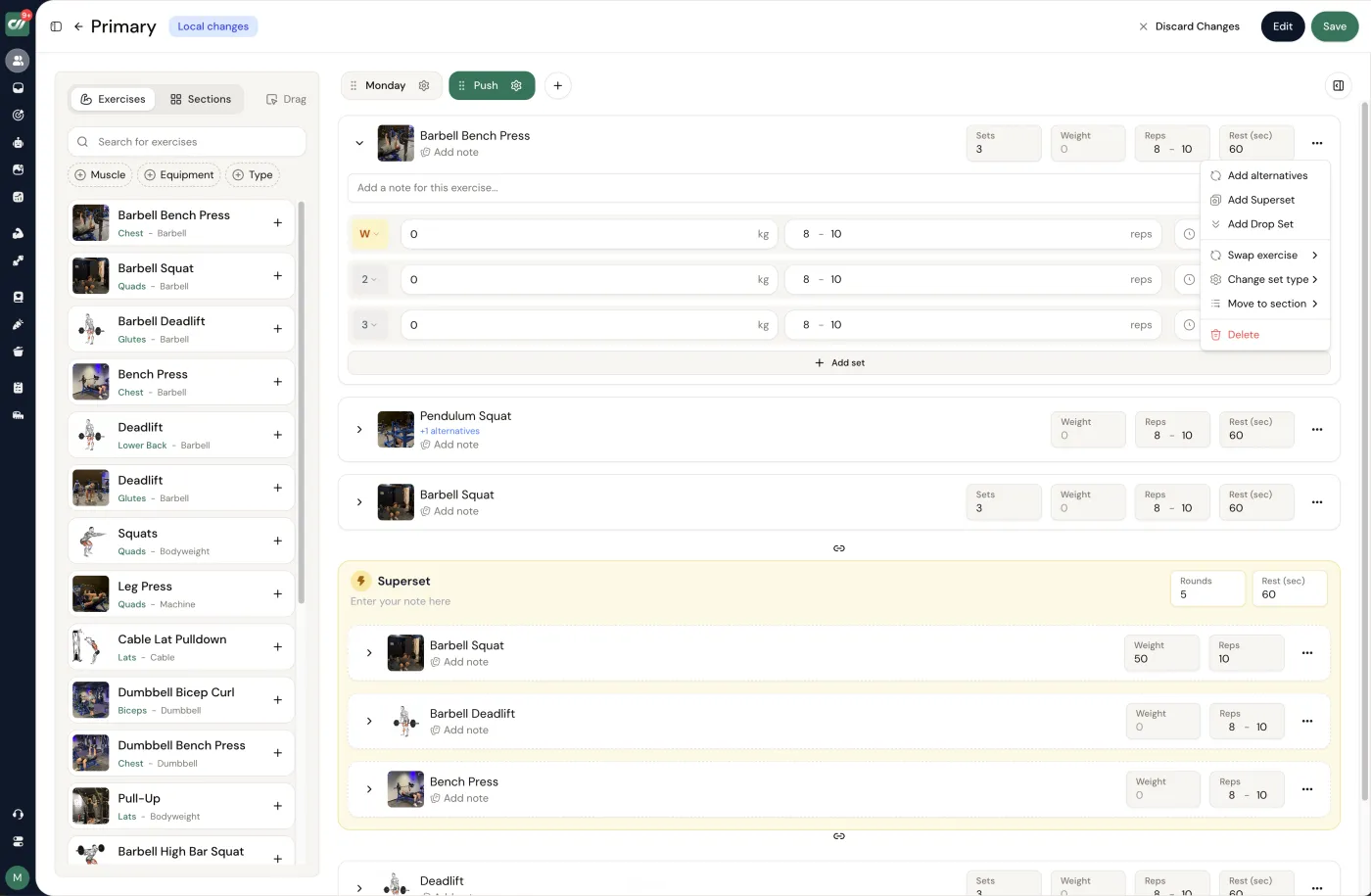
Coachway is the European-built platform that answers most of the reasons coaches leave Trainerize in one tool. Where Trainerize is workout-first and English-only by design, Coachway focuses on the whole online fitness coaching workflow: handling everything around a single client from one tab instead of six. The full stack is there: a workout builder with 1,800-plus exercises supporting supersets, dropsets, AMRAP, warm-up sets, progressive overload, per-set logging, PRs, rest timers, and exercise video (with effort cues like RPE or tempo written into each exercise's notes); a meal planner with 3,900-plus ingredients and 1,100-plus recipes including 900-plus Finnish ones, with macro and micro targets, portion scaling, and PDF export; custom check-in and intake forms with auto-charted trends; the Power Panel unified inbox; automations, broadcasts, voice notes, and lead management. The combination coaches switch for is a client app in Danish, Norwegian, Swedish, Finnish, German, Dutch, Spanish and English, included on every plan in each client's own language from day one; predictable per-client pricing; and payments that stay in your own Stripe account. You can see the full Coachway feature set or look closer at the meal planner.
The trade-off: Coachway is younger than Trainerize, so the long catalog of third-party integrations a decade-old tool has built up is not all there yet. In exchange you get a product focused entirely on the fitness coaching workflow, the client app and deeper nutrition included rather than as add-ons, predictable per-client pricing, and same-day human support.
Trainerize vs Coachway, at a glance.
| What coaches switch over | Trainerize | Coachway |
|---|---|---|
| Branded client app | Trainerize: USD 169 one-time on Pro; included on Studio | Client app included, 8 languages; custom branding not sold |
| Nutrition and meal planning | Trainerize: basic included; advanced is a USD 20-45/mo add-on | Meal planner with 1,100+ recipes included |
| Payments | Trainerize: Stripe add-on USD 10/mo on Grow and Pro | Your own Stripe; optional built-in about 2.4% |
| Languages | Trainerize: English only | Client app and coach dashboard in EN, DA, NO, SV, FI, DE, NL, ES |
| Library and track record | One of the deepest; on the market since 2012 | 1,800+ exercises; younger platform |
| Pricing model | Trainerize: tiered by client cap, USD 0-380/mo plus add-ons | EUR 69/mo up to 5 clients, then EUR 9 each |
Neither is strictly better; they optimize for different coaches. For the full side-by-side see Coachway vs Trainerize.
If you came here to work out whether Trainerize is the platform to build on, the honest shortcut is to see the alternative on your own workflow: one client, one tab, in your clients' own language, with the client app and nutrition already switched on.
Coachway is not the only option. Depending on your reason for leaving, other platforms may fit better: a transparent all-in-one that also serves teams, a lean tool for fast workout delivery, or a free-to-start option for a brand-new coach. The ranked Trainerize alternatives guide lays out all six head to head, and for a closer read on two of them our Everfit review and PT Distinction review go deep on each, and if Everfit is the one you are weighing head to head, our Everfit vs Trainerize comparison lines the two up directly; two more alternatives worth a closer look are covered in our TrueCoach review and FitBudd review. If you decide to switch, our walkthrough on how to migrate clients between coaching platforms covers doing it without losing data or momentum. For a direct side-by-side, see Coachway vs Trainerize.
What other Trainerize reviews say.
Across coach reviews the picture is consistent with this one: strong marks for the depth of the programming and the polish of the app, alongside recurring complaints about the cost of the add-ons once the branded app, payments, and advanced nutrition are stacked on, plus the English-only interface. If those two themes are the ones that would bother you, our Trainerize alternatives roundup ranks six options by the specific reason each coach leaves.
Verdict.
Our score: 4.2 / 5
Trainerize earns its reputation. As a workout-first platform for English-speaking coaches whose value is mostly in programming, Trainerize is mature, deep, well-supported, and easy to test for free. If that is your business, it is a safe, capable choice and you can stop comparing.
The honest caveats are about the real cost and the fit, not the quality. Budget for the branded app, payments, and advanced nutrition as add-ons rather than assuming the headline price covers them, and go in knowing the Trainerize interface is English-only. If nutrition is central to how you coach, or you want your clients' own language built in from day one, a European-built platform like Coachway will fit that model more naturally, with the client app and deeper nutrition included.
Either way, decide from your own list. Write down the one or two things that matter most to your coaching, check them against this review and against current vendor pricing, and pick the tool that answers them most directly. You can run the per-client math against current Coachway pricing or read the full alternatives breakdown before you commit. If the deciding factor is cost rather than fit, our tier-by-tier guide to Trainerize pricing in 2026 is the page to read next.
Switching from Trainerize?
Be honest with yourself about the work: because Trainerize's own help centre says client history and programs do not export, moving is mostly rebuilding your programs in a new library and pointing clients at a new app. If nutrition, a client app in your clients' own language, or one predictable price are the reasons you are looking, see how the whole category lines up in our guide to online personal training software, or look at the Coachway client app your clients would actually use. The 14-day trial below costs EUR 0 today (card required, cancel anytime under Billing).
How Trainerize compares.
The short version, with starting prices as published on each vendor's own pricing page. Every figure here matches the detail elsewhere on this page.
| Platform | Best for | Starting price | Worth knowing |
|---|---|---|---|
| Trainerize | Trainerize: the established all-rounder | Trainerize: free for 1 client; paid from USD 9/mo (2 clients, annual billing) | Trainerize's branded app (USD 169 one-time) and payments (USD 10/mo) cost extra |
| Coachway | Core coaching in one plan | EUR 69/mo for 5 clients, then EUR 9 per client | Meal planning and a client app in 8 languages included; optional built-in payments cost 2.4% per transaction |
| TrueCoach | TrueCoach: fast workout delivery | TrueCoach: from USD 26.34/mo (5 clients, annual billing) | TrueCoach is training-first; its payments carry a flat 5% per-transaction fee |
| Everfit | Everfit: feature depth at scale | Everfit: free for 5 clients; Pro from USD 19/mo | Everfit includes basic meal plans on Pro; its advanced recipe tools, Autoflow and payments are separate |
Frequently asked.
Is Trainerize worth it in 2026?
For most workout-first coaches in English-speaking markets, yes. Trainerize (now ABC Trainerize) is one of the most established platforms in North America, with a deep exercise library, a free 1-client tier, and pricing from about USD 10 to USD 380 per month. It is a weaker fit if you lean on nutrition, want the branded app and advanced nutrition included rather than as add-ons, or coach in a Nordic or German-speaking market, since the interface is English-only.
What features does Trainerize have?
Trainerize gives trainers a workout program builder (with an AI Workout Builder), an exercise and workout library, meal and macro tracking, habit coaching, chat with voice messages, progress photos and body stats, wearable sync and appointment booking; clients use a free iOS and Android app. The free Basic plan covers workouts, messaging and habits for 1 client; most coaching tools start on Grow (about USD 10 a month, 2 clients), groups and challenges on Pro (from about USD 25 a month for 5 clients); the meal planner, video calls and Stripe payments are monthly add-ons on Grow and Pro, the branded app is USD 169 one-time on Pro, and Studio (from USD 275) includes all of them.
How much does Trainerize cost?
Trainerize runs from about USD 10/mo (Grow, up to 2 clients) to USD 380/mo (Studio Max, per location for up to 1,000 clients; Studio Plus is USD 275 for 500), with a free Basic tier for 1 client and Pro scaling 5 to 200 clients from about USD 25/mo. Budget for the add-ons too: the branded app is USD 169 one-time on Pro, Stripe payments USD 10/mo on Grow and Pro, and advanced nutrition USD 20 to 45/mo (all included on Studio).
Does Trainerize have a free plan?
Yes. The Basic plan is free and supports up to 1 client, which makes it a genuine way to test the platform with a single person before paying. Separately, Trainerize offers a 30-day free trial with unlimited clients and no credit card required; add-ons are not included, and when the trial ends the account returns to the free 1-client plan without charging you (per the Trainerize pricing page, October 2026).
What are the main downsides of Trainerize?
The most common gaps coaches raise are that the custom branded app and advanced nutrition are paid add-ons rather than included, that the interface is English-only with no Nordic or German localization, and that nutrition is lighter by design because the platform is workout-first. None of these make Trainerize a bad tool. They are simply the places where coaches whose priorities sit elsewhere start shopping for an alternative. Recent user reviews add two practical checks worth running during the trial: several Trustpilot reviewers report being charged again after cancelling, and App Store reviews describe the workout logger occasionally erasing entered data mid-session (both as of August 2026), so confirm the cancellation flow and test logging on your own phone.
What is the best alternative to Trainerize?
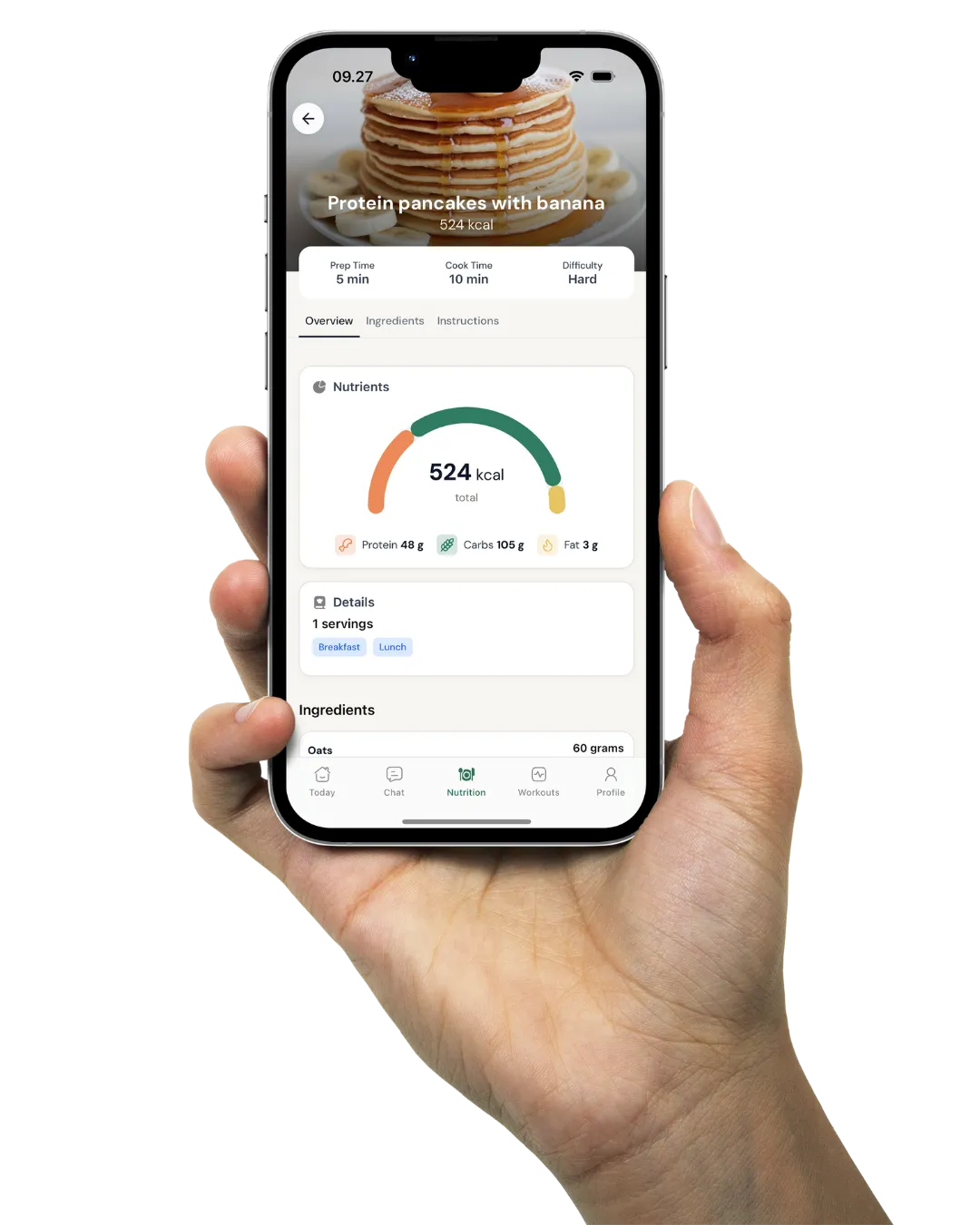
It depends on why Trainerize does not fit. For a European-built platform with a native-language client app in English, Danish, Norwegian, Swedish, Finnish, German, Dutch, and Spanish included on every plan, deeper nutrition and meal planning, and payments that stay in your own Stripe account, Coachway is the most direct fit. For other priorities, our Trainerize alternatives roundup ranks six options by the specific reason each coach leaves.
Is Trainerize good for personal trainers?
Yes, for most personal trainers it is one of the safer default picks, because it was built trainer-first around delivering and tracking workouts. A solo PT can start on the free Basic plan and grow into Grow or Pro, an in-person trainer can add remote check-ins and homework between sessions, and a small studio or PT team can move up to Studio Plus. The caveats are the trainer-specific version of its gaps: advanced nutrition, the branded app and non-English languages are where trainers whose priorities sit elsewhere start comparing alternatives.
Does Trainerize integrate with Stripe?
Yes. Trainerize connects to your own Stripe account through its Stripe Integrated Payments add-on, which costs USD 10 per month on the Grow and Pro plans and is included on Studio. It is not available on the free Basic plan.
How do I switch from Trainerize to another platform?
Plan for a rebuild rather than a one-click import. Trainerize's own help centre states there is no way to transfer data between accounts and that its client CSV export includes only names and contact details, not client history, programs or training progress. So switching means exporting your client list, rebuilding your programs and templates in the new tool, and re-inviting clients to the new app. Most platforms are more restrictive here than coaches expect, so ask any provider exactly what leaves with you before you commit.
Read the Trainerize review, still deciding?
See what the native-language client app and deeper nutrition look like when they sit in one plan instead of a stack of add-ons. Start the 14-day free trial: no charge today, cancel anytime under Billing.


See the head-to-head
Weighing Trainerize against a European-built option? Read Coachway vs Trainerize for the side-by-side on pricing, the client app, nutrition, and support.
Keep reading
all guidesFree vs Paid Coaching Software: What You Give Up (2026)
A decision framework for free versus paid coaching software: what a free tier really costs, the switching tax, when free is right, and when paid pays for itself.
Read the guideCoaching Software Free Trials Compared: 8 Platforms (2026)
Trial length, whether a card is required, what unlocks, and what happens after - checked on each vendor live site across eight coaching platforms.
Read the guideCoaching Platform Lock-In: Can You Export Your Clients?
You can almost always get your clients and data out of a coaching platform - the question is how cleanly. The five lock-in vectors to check before you sign, and the export order before you cancel.
Read the guideFree tools for this: Client Capacity Calculator · Coaching Rate Calculator · Coaching Tool Stack Cost Calculator