


Everfit review: features, honest pros and cons, and who it suits (2026).
Everfit’s paid base plans include basic nutrition and branding, while advanced functions and integrated payments have separate terms. This review checks those distinctions against current vendor documentation and works through a 20-client cost example. We build Coachway; this is a source-based evaluation, with suggested account tests rather than a new hands-on product trial.
By Markus Evers · Updated September 6, 2026
How this comparison is made: we check every competitor's pricing and features against their live websites and re-verify them on a recurring basis. We build Coachway, so we flag it wherever it appears, we credit real competitor strengths, and we say who each platform fits better than us. Browse all platform comparisons.
the short version
At 20 clients, Everfit Pro costs USD 49/month and already lists basic meal plans, food journals, macros and branding. The separate recipe and automation products should be priced only when their extra functions are needed. Starter’s free five-client plan has a different feature list. Check both the required client tier and the task before comparing a total. If nutrition depth or a Nordic-language client app is the deciding factor, Coachway (our own platform) is the alternative worth putting on the same shortlist - see Everfit alternatives.
What Everfit does: the feature set at a glance.
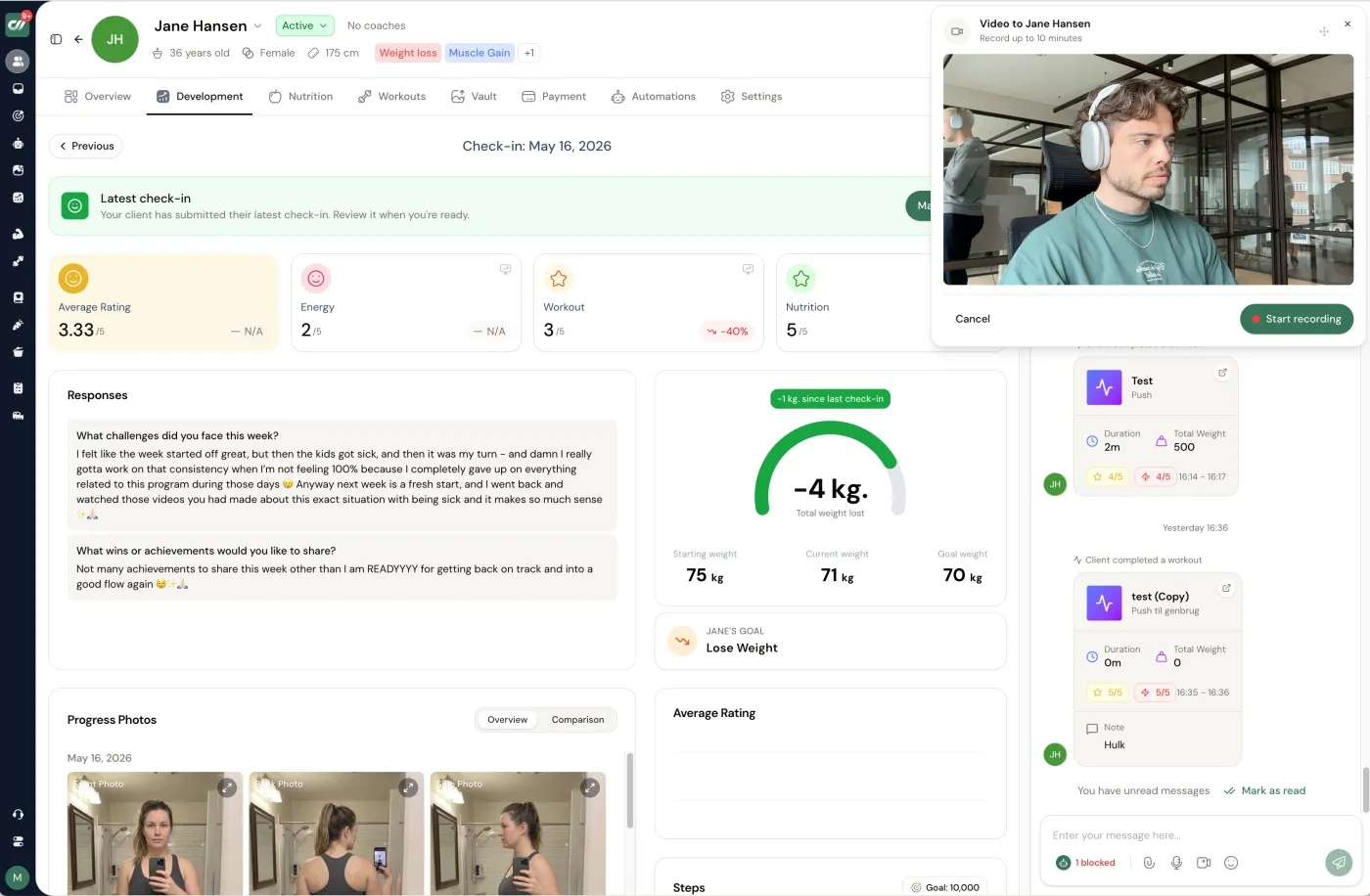
Everfit is a workout-first coaching platform for personal trainers and gyms, delivered through a client app and a coach dashboard. The core every plan shares is the workout builder and exercise library, progress and habit tracking, tasks, and in-app messaging. Paid Pro plans add forms, basic nutrition (meal plans, food journals and macro tracking) and in-app branding; Studio layers on team and content-library tools. Automation (Autoflow), integrated payments and the expanded recipe workflow are separate products that stack on the base plan, so the feature you want may not sit in the tier you first price.
For the exact price of every tier and add-on, and the full free-plan feature list, use the Everfit pricing guide. This review stays on the verdict, the pros and cons, and who each plan actually suits.
What the free and paid plans actually include.
The current pricing page separates Starter, Pro and Studio. Starter includes workouts, progress records, tasks, messaging and both apps. Pro adds forms, habits, basic nutrition and in-app branding. Studio extends team and training-management options. These are published capabilities; a list alone does not show how quickly your service can be delivered.
For a free shortlist, use the free client-allowance check. For paid client tiers beyond this example, use the platform cost calculator or the Everfit pricing guide.
Basic meal plans are included; recipe limits still matter.
The recipe creation guide allows Pro and Studio coaches to create up to 20 custom recipes. Recipes can include ingredients, instructions and nutrition information. The recipe workflow documentation explains assigning meals to a client’s week; client recipe replacement is tied to the Meal Plans & Recipe Books add-on.
Test three things before buying an extra module: create one of your own recipes, assign it across a week and make a client-specific substitution. Then check whether your planned library fits the allowance. A coach with ten reusable recipes and a coach with a library of hundreds may need different packages even with the same client count.
A 20-client price example, including payment fees.
| Scenario | Monthly cost in USD | What the figure covers |
|---|---|---|
| Pro at 20 clients | 49 | The published monthly base tier. |
| Pro plus Payments & Packages | 58 = 49 + 9 | Subscription fees, before payment processing. |
| Same setup, with 20 domestic US card charges of USD 100 | 127 = 49 + 9 + 69 | Base, payment module and processing for this specific example. |
The payment-fee guide names Stripe, charges USD 9/month for Payments & Packages, and lists US domestic card processing at 3.15% + USD 0.30. Twenty USD 100 payments therefore incur 20 × USD 3.45 = USD 69 in processing. The guide says those processing fees include Stripe; do not add a second assumed Stripe charge.
This example assumes one monthly charge per client, a US account and domestic US cards. Other countries, international cards, taxes, refunds and disputes change the total. Recipe, automation and other optional products are excluded. Confirm the package you need instead of treating USD 127 as a universal quote.
Language and app roles: check each side.
The client-language guide lists English, French, Spanish, German, Dutch and Italian. It does not list the Nordic languages. A client-app translation does not establish the language of the coach’s dashboard. Open the actual coach interface and client app you intend to use; check both the controls and your assigned content.
For a personal test account, the MacroSnap guide for coaches describes a paid-plan coach using a client account with the same email. That is useful for checking a client workflow, but it is not evidence that all personal or nutrition use is free.
What to test in the trial.
- Programs: clone a client week, change one exercise and verify the client sees the intended version.
- Nutrition: create and assign a recipe, adjust a serving and find the client’s food record. Note whether the base plan or an add-on is doing the work.
- Automation: test the precise trigger you need. The onboarding guide distinguishes Pro/Studio onboarding assets from paid Autoflow and recipe-book assets; “automation” is not a single entitlement.
- Billing: confirm country eligibility, onboarding and the next recurring payment. The Stripe setup guide explains business and account requirements.
- Records: request sample exports and check the target format before a migration. The Everfit migration guide sets out that pilot.
Record time, steps and missing functions in the trial scorecard. We have not assigned a new numerical rating: your results on these tasks are more useful than a score based on an outdated feature objection.
Comparing Everfit with Coachway and other options.
Coachway is our own product. It combines workouts, meal planning, check-ins and chat, with branding inside the client app. Its client app supports English, Danish, Norwegian, Swedish, Finnish and German; the coach dashboard is in English. This language distinction matters on both platforms.
Coachway’s base subscription is EUR 69/month for five clients plus EUR 9 per extra client, so 20 clients cost EUR 204 before optional built-in payments at 2.4% per transaction. Everfit Pro’s USD 49 example is a different currency and package. Compare tasks and complete quotes; neither a lower entry price nor an included-feature label settles the choice.
Use Everfit alternatives to widen the shortlist, Everfit versus Trainerize for another detailed comparison, or book a Coachway demo to test our workflow.
Switching from Everfit? Moving is mostly a features-and-migration question. Line Everfit up against the field in our guide to the best coaching apps for online coaches, then pressure-test the two features switchers check first: the meal planner and the workout builder, since on Everfit the expanded recipe workflow is a paid add-on. The switching guide sets out exports, billing overlap and the client-app change so nothing is lost in the move.
What do coaches say about Everfit's AI workout builder and meal planning?
On the meal-planning side, coaches' comments track what the plan sheet says: basic meal plans, food journals and macros are in Pro, and the recipe and automation products are separate purchases, so the question is whether the tier you need includes the function you want. On AI workout builders, the coaches we read on r/personaltraining in 2026 were sceptical of the category as a whole rather than of one vendor: a 41-comment thread on apps bolting on AI builders argued that "if AI is to be used at all, it should be used to make the consolidation of data better", and the most common view in the Trainerize builder thread was that AI helps with "exercise alternatives" and admin, while "the final call on load, volume, and progression scheme is always mine". None of the threads we sampled reviewed Everfit's builder specifically, so test it in the trial the way you would test any AI builder: give it a client with one limitation and check whether the output respects it.
Is Everfit worth it? The reviews, summarised.
Everfit is worth it for a coach who needs a polished client app, a free five-client start and automation, and who has checked that the client tier and add-ons they need land inside their budget; it is a weaker fit for coaches outside its supported languages and payment regions, and for anyone who wants nutrition depth without buying the separate products. The verdict below, the 20-client price example above and the trial checklist are the three things to read before deciding, and the Everfit pricing page carries the full plan ladder with the date each price was checked.
Everfit pros and cons for online coaches.
Where Everfit is strong
- A genuinely free, permanent Starter tier for up to five clients, including the workout builder and both apps.
- A polished client app and a low Pro entry price for a workout-first solo coach.
- Basic meal plans, food journals, macros and in-app branding are already inside Pro, not extras.
- Automation through Autoflow and integrated payments are available when you need them.
Where to check carefully
- The expanded recipe workflow, automation and payments are separate add-ons that raise the real monthly bill.
- Pro and Studio are priced by a client-count slider, so the cost climbs as your list grows.
- The client-language guide does not list Danish, Norwegian, Swedish or Finnish; the coach dashboard is English.
- A fully standalone white-label app is reserved for the custom-priced Enterprise tier.
Who it is for: a workout-first coach who wants a strong free start and is comfortable adding paid modules as the practice grows. Who should look elsewhere: coaches who need nutrition depth without separate products, Nordic-language client and coach interfaces, or one predictable all-in price. See the full plan ladder for the numbers behind each of these points.
Everfit review verdict.
Everfit is worth shortlisting when Starter’s allowance or a paid base plan fits your service. Basic nutrition and branding are already included in Pro; the important questions are whether recipe limits, automation, payments and language match your requirements. Price the modules you actually need and run the same client week in each finalist. A switch should follow a demonstrated advantage, with exports and billing checked before the old account ends.
How Everfit compares.
The short version, with starting prices as published on each vendor's own pricing page. Every figure here matches the detail elsewhere on this page.
| Platform | Best for | Starting price | Worth knowing |
|---|---|---|---|
| Everfit | Feature depth at scale | Free for 5 clients; Pro from USD 19/mo | Basic meal plans included on Pro; advanced recipe tools, Autoflow and payments are separate |
| Coachway | Core coaching in one plan | EUR 69/mo for 5 clients, then EUR 9 per client | In-app branding and meal planning included; optional built-in payments cost 2.4% per transaction |
| Trainerize | The established all-rounder | Free for 1 client; paid from USD 9/mo (2 clients, annual billing) | Branded app (USD 169 one-time) and payments (USD 10/mo) cost extra |
| TrueCoach | Fast workout delivery | From USD 26.34/mo (5 clients, annual billing) | Training-first; payments carry a flat 5% per-transaction fee |
Frequently asked questions.
Is Everfit worth it for online coaches?
Evaluate the required plan against your tasks. Everfit Starter is free for five clients; Pro includes basic nutrition, forms and branding, while some advanced functions use separate add-ons. Test the coach and client roles, recipe limits, billing and exports before choosing. This review checks public documentation rather than reporting a new paid-workspace trial.
How much does Everfit cost?
Pro starts at USD 19 per month for five clients. At 20 clients, Pro is USD 49 monthly; adding Payments & Packages at USD 9 makes USD 58 before processing fees, taxes or other extras. The client allowance and billing period matter. Use the published tier table and a quote for your required modules.
Is Everfit's free plan actually free?
Yes. Starter has a permanent free allowance for up to five clients, with workouts, progress records, tasks, messaging and coach/client apps listed. It differs from a trial of paid functions. Check the actual Starter task list before assuming that everything available during a trial stays included.
Does Everfit charge extra for meal plans?
Not all meal planning is an add-on. Pro and Studio list basic meal plans, food journals and macro tracking. The recipe help guide permits up to 20 custom recipes on those plans. The Meal Plans & Recipe Books add-on expands the recipe workflow and includes functions such as client recipe replacement.
What are the main downsides of Everfit?
The main checks are plan and add-on limits, transaction charges, app language and your export requirements. Basic meal planning and branding already belong to paid base plans, so do not price every nutrition task as an extra. Advanced automation, larger recipe needs and integrated payments require their own scope check.
Which languages does the Everfit client app support?
The current client-language guide lists English, French, Spanish, German, Dutch and Italian. It does not list Danish, Norwegian, Swedish or Finnish. Test the coach interface separately: client translations do not establish the language available in the coach dashboard.
What is the best alternative to Everfit?
Choose an alternative for a task, language or price requirement that Everfit does not meet in your test. Coachway is our own platform with workouts, meal planning, check-ins and chat; its client app supports six languages while its coach dashboard is English. Compare complete quotes and the actual client week rather than assuming one platform suits every service.
Can you use Everfit without a coach?
Everfit separates coach and client roles. For personal use, confirm how to set up and access your own client account and which plan covers the functions you need. Its MacroSnap guide explicitly allows coaches on paid plans to use their own client account with the same email; that rule does not establish that all solo or nutrition functions are free.
What do fitness coaches say about Everfit's AI workout builder and meal planning?
Coaches confirm the meal-planning split: basic meal plans, food journals and macros sit in Pro, and recipe and automation products are separate purchases. On AI workout builders, r/personaltraining coaches in 2026 are sceptical of the category across all platforms, valuing AI for exercise alternatives and admin while keeping load, volume and progression decisions themselves; none of the threads we sampled reviewed Everfit's builder specifically, so test it in the trial with a client who has one limitation.
Is Everfit worth it in 2026?
Yes for a coach who wants a polished client app, a free five-client start and automation and has confirmed the required client tier and add-ons fit the budget. It is a weaker fit outside its supported languages and payment regions, and for coaches who want nutrition depth without separate products. Read the verdict, the 20-client price example and the trial checklist before deciding.
Who is Everfit best for?
Everfit suits a workout-first coach who wants a strong free start and is comfortable adding paid modules as the practice grows. Its permanent Starter tier covers five clients, Pro keeps the entry price low, and basic meal plans and in-app branding already sit inside Pro. It is a weaker fit for coaches who need nutrition depth without separate products, Nordic-language interfaces, or one predictable all-in price. Match the tier and add-ons you need against the pricing guide before deciding.
What does switching from Everfit to Coachway involve?
Treat it as a short pilot rather than a hard cutover. Request sample exports from Everfit and check the target format, rebuild one client week in the new platform, and confirm billing and the client-app change before the old account ends. The two features most switchers test first are the meal planner and the workout builder. Our best-coaching-apps guide and the dedicated switching guide walk through exports, billing overlap and client migration step by step.
Keep reading
all guidesFull Body vs Split Training: Which to Program
Full body and split routines are two ways to arrange the same weekly training. What each is, who each client type suits, the frequency angle, and why total weekly volume - not the split itself - drives growth.
Read the guidePush Pull Legs Split: What It Is + How to Program It
What the push pull legs (PPL) split is, who it suits, a sample week, pros and cons, and how coaches program it as a 3-day or 6-day plan for clients.
Read the guideMyFitnessPal vs Cronometer for coaching clients: which should you recommend? (2026)
MyFitnessPal vs Cronometer for coaching clients: accuracy, ease of use, barcode scanning, and cost. Which tracker to recommend for which client, and how to make logging a habit that sticks.
Read the guideFree tools for this: Client Capacity Calculator · Coaching Rate Calculator · Coaching Tool Stack Cost Calculator
Weighing Everfit against a nutrition-first alternative?
Try Coachway’s workout builder, meal planner, check-ins and chat against your actual client week. The 14-day trial requires a card; no charge today, and you can cancel under Billing.


