


Personal training scheduling software - when you need it, and when it is overkill.
Personal training scheduling software is essential the moment you sell time - booked slots, live calls, standing weekly appointments. It is dead weight the moment you sell a result, because a programme-based online coach runs on a check-in cadence, not a calendar. This guide draws the line between the two models so you buy the scheduler your work actually uses, and stop paying for calendar tooling it does not.
By Markus Evers · Updated September 2026
the short version
Personal training scheduling software is essential for session-based trainers, who bill an appointment and need self-booking, availability rules, reminders and no-show handling, and it is usually overkill for programme-based online coaches, whose work is a written plan reviewed on a weekly check-in cadence with no booked slot to manage. Decide which model you run before you buy: if a client pays for a time, get the calendar; if a client pays for a result over weeks, a scheduler is a subscription solving a problem you do not have.
What is personal training scheduling software?
Personal training scheduling software - also sold as personal trainer scheduling software or plain training scheduling software - is a booking tool that lets clients reserve sessions with a trainer and keeps those appointments organised. The core jobs are always the same: publish your real availability, let a client self-book a slot without the back-and-forth, send automatic reminders so they show up, handle cancellations and reschedules, and reduce no-shows with confirmations or a card on file. Some are pure calendars, like Calendly or Acuity; others are gym and studio systems where booking sits inside class timetables and memberships. All of them exist to answer one question well - who is booked, when.
That is a genuinely valuable job, but it is a narrow one. A scheduler tells you nothing about the client's training programme, their nutrition, their weekly progress or their payments. It manages the hour, not the coaching. Whether that hour is even the unit you sell is the whole decision, and it splits personal trainers cleanly into two groups.
Do online coaches need scheduling software at all?
For most online coaches, no. The instinct when setting up a coaching business is to buy the whole toolbox up front, and a booking calendar feels like an obvious brick in it. But a tool is only worth its subscription if your delivery model actually uses it, and a large share of online coaching does not run on appointments at all. The honest way to sort it is to ask what a client is paying for, then buy backwards from the answer instead of forwards from a feature list.
Two words settle it: time or result. If a client pays you for a booked hour, you are session-based and a scheduler is core infrastructure. If a client pays you for an outcome delivered over weeks - a plan, check-ins, accountability - you are programme-based, and the structure you need is a review rhythm, not a calendar. That same time-versus-result split is what separates online personal training from in-person training as delivery models. Below is what each model actually requires.
Session-based training: when a scheduler earns its place.
If you bill time - in-person sessions, standing weekly video calls, hourly consults - scheduling software is not optional, it is the spine of the business. Everything depends on knowing who is booked when, and doing that by hand across DMs and a personal calendar breaks the moment you pass a handful of clients. Here the classic jobs of a scheduler pay for themselves fast: self-booking removes the back-and-forth, availability rules stop double-bookings, automatic reminders cut no-shows, and a card-on-file rule protects the slot. For this coach, a standalone tool like a dedicated coach scheduling tool is money well spent, because the appointment is the product.
Programme-based online coaching: why the calendar is usually the wrong tool.
Programme-based coaching bills an outcome, not an hour. The client gets a written training plan and nutrition targets, trains on their own schedule, logs it in an app, and you review the week on a fixed rhythm. Nothing is booked because nothing is a timed appointment - the accountability structure is a weekly check-in, not a slot on a calendar. A booking system here manages a thing that does not exist in your model, and it quietly pulls you toward selling sessions you did not want to sell. What this coach actually needs is a check-in cadence, automated reminders and a place to review progress, which is the job an online personal training platform does - and a scheduler does not.
The blend: mostly programme, the occasional call.
Most online coaches sit here in practice - programme-based delivery with a discovery call up front and maybe a monthly form-check video. This is exactly the case where a full booking platform is overkill. You do not need a scheduling business; you need a link that lets someone grab one of a few call slots, and that is a free-tier job. Run the coaching on a programme platform, and bolt a free standalone scheduler onto the side for the handful of live calls. Buying a heavyweight booking system to cover the rare call is paying rent on a room you enter twice a month.
What does personal training scheduling software really cost?
The sticker price is the least of it. Standalone schedulers are cheap by design: Calendly is free for a single calendar and its paid plans start around USD 10 per month, and comparable tools sit in the same low range. If booking is your only gap, that is a rounding error and you should just buy it. The cost that actually hurts is structural. A booking calendar is one tool in a stack of six or seven - programming, nutrition, check-ins, messaging, payments, a client app - and every separate app is another fee, another login, and another place a client can slip between the cracks. Mapping that whole stack before you buy is what the online coaching tech stack guide is for.
So the real question for a programme-based coach is not "how much is a scheduler" but "how many subscriptions am I carrying to run a model that mostly does not book anything". That is where the money leaks - not in one USD 10 calendar, but in a patchwork you assembled tool by tool. If you want to see the total before you commit, the coaching tool stack cost calculator adds up what a stitched-together stack is quietly costing you each month.
The alternative to a patchwork is one platform that carries the whole programme-based workflow, so the only thing you might still add on the side is a free scheduler for live calls. That consolidates the fees and, more importantly, the client experience: one app, one login, one place the coaching happens.
How Coachway replaces the calendar with a cadence.
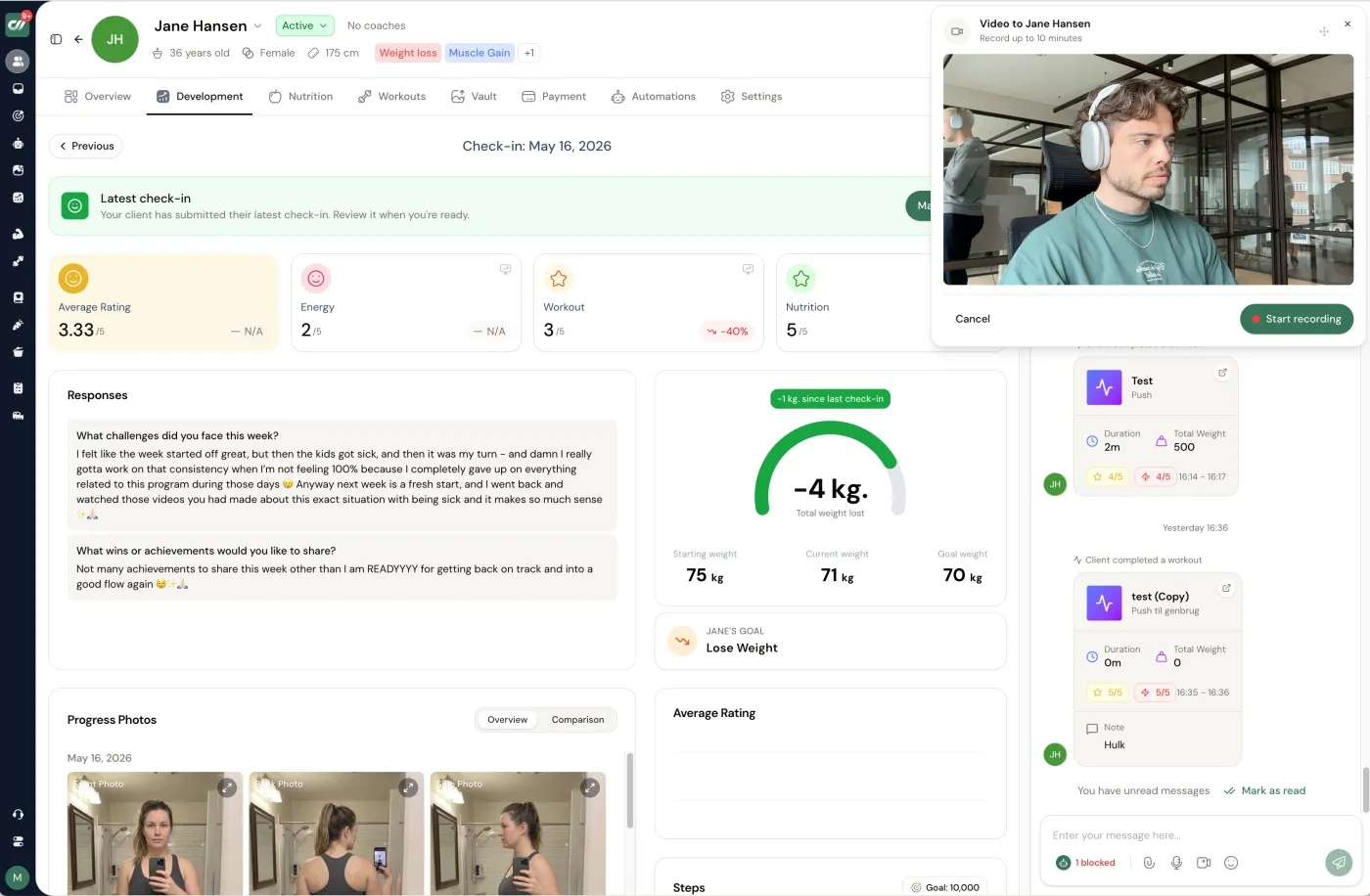
We build Coachway, and it is worth being plain about what that means for this topic: Coachway does not include a booking calendar or client self-booking, because it is built for programme-based online coaching, where there is no appointment to book. That is a deliberate scope, not a gap we are hiding. What it gives a programme coach instead is the structure that model actually runs on - a drag-and-drop check-in and onboarding form builder, a weekly review that puts this week's answers beside progress photos, measurements and the training log, and automated reminders and drip sequences that hold the cadence without you scheduling a single slot. The "schedule" is the check-in rhythm, and the platform keeps it on rails.
Around that sit the rest of the jobs a scheduler never touches: a workout builder with 1,800+ exercises, food logging against a database of 3.7 million foods, a client app on iOS and Android in six languages, and subscriptions billed through your own Stripe account so Coachway never holds your money. It is built on knowledge from working with 150 online coaches over 6+ years, and it costs EUR 69 a month with your first 5 clients included, then EUR 9 per additional client, every feature in - no tiers. If you also run the occasional live call, pair it with a free standalone scheduler for that one job. The 14-day free trial starts with a card held securely by Stripe and cancels under Billing before it renews, or you can book a demo and see the check-in workflow first. For the wider view of what belongs in one platform versus what stays separate, the client management software guide maps the full stack.
How the scheduling options compare.
The short version, with pricing as published on each vendor's own page in August 2026. The honest split: booking tools schedule the session, a coaching platform schedules it inside the client relationship.
| Tool | Built for | Pricing | Worth knowing |
|---|---|---|---|
| Coachway | Programme-based online coaching (no sessions to book) | EUR 69/mo for 5 clients, then EUR 9 per client | No booking calendar or client self-booking: pair it with a free scheduler for occasional live calls |
| Calendly | Simple booking links | Free plan; paid from USD 10/seat/mo | Booking only - training, notes and payments live elsewhere |
| Square Appointments | In-person sessions with card payments | Free plan; Plus USD 49/mo, Premium USD 149/mo | Strong point-of-sale tie-in, built for location businesses |
| Acuity Scheduling | Client self-scheduling with intake forms | Paid plans on the Squarespace pricing page | Part of Squarespace; forms attach to bookings |
Frequently asked questions about personal training scheduling software.
Do personal trainers need scheduling software?
Only if the work is sold as appointments. Personal training scheduling software earns its place when clients book individual sessions - in-person slots, live video calls, standing weekly appointments - because then a calendar with self-booking, availability rules, reminders and no-show handling saves you real hours. If you coach the online, programme-based way, where the deliverable is a training plan, weekly check-ins and async messaging rather than a booked hour, a dedicated scheduler is usually solving a problem you do not have. The honest test is one question: does a client pay you for a time slot, or for a result you deliver over a month? Session-based coaches need the calendar. Programme-based coaches almost never do, and paying for one is just another tab to maintain.
What is the difference between session-based and programme-based coaching for scheduling?
Session-based coaching bills time: the client buys a 45 or 60 minute slot, and the whole business runs on who is booked when, so a scheduler is core infrastructure. Programme-based online coaching bills an outcome across weeks: the client gets a written plan, logs their training and nutrition, and you review it on a weekly rhythm - the structure is a check-in cadence, not a set of appointments. The scheduling tool a session coach cannot live without is, for a programme coach, a fifth wheel. Most online coaches are actually a blend, mostly programme-based with the occasional call, which is why a full booking system is rarely worth its own subscription for them.
How much does personal training scheduling software cost?
Standalone appointment schedulers are cheap on purpose. Calendly, for example, is free for a single calendar and its paid plans start around USD 10 per month; other tools sit in the same low range. The catch is not the price of the scheduler itself - it is that a booking calendar is one tool among six or seven, and stitching scheduling, programming, nutrition, check-ins, messaging and payments together across separate apps is where the real cost lands, in monthly fees and in the time spent moving a client between them. If you only ever book the odd call, a free scheduler is the sensible answer. If you are paying for a dedicated booking platform to run a business that mostly does not run on bookings, that is the overkill this guide is about.
Is personal training booking software the same as a scheduler?
Yes - personal training booking software is just another name for the same tool. Whether a vendor calls it a booking app or a scheduler, the job is identical: publish your availability, let a client self-book a session, send reminders and cut no-shows. The label does not change the decision - what matters is whether your business actually books appointments. If it does, any booking tool does the work. If you run programme-based coaching on a weekly check-in cadence, no booking software is the missing piece, because there is no appointment to book.
Does Coachway have a booking calendar or scheduling feature?
No, and that is deliberate. Coachway is built for programme-based online coaching, so it does not include an in-app appointment calendar or client self-booking. Instead the accountability structure lives where it belongs for that model: a drag-and-drop check-in form builder, a weekly review that puts this week's answers next to progress photos and the training log, and automated reminders and drip sequences that keep the cadence without you setting a single appointment. If you also run the occasional live call, you pair Coachway with a free standalone scheduler for that one job rather than paying for a booking system baked into a platform. Coachway costs EUR 69 a month with your first 5 clients included, then EUR 9 per additional client, every feature in.
Can I run online coaching without any scheduling software?
Yes - a programme-based online coach can run an entire client base on a weekly check-in cadence with zero booked appointment slots. The client trains to the plan on their own schedule, logs it in the app, and you respond on a fixed review day. Nothing gets booked because nothing is a timed appointment. The only time you need a calendar is for genuine live sessions - a discovery call, a monthly form-check video, an in-person session - and for those a free scheduler shared as a link does the whole job. Reaching for a full scheduling platform first is the common mistake: decide your delivery model, then buy only the tools that model actually uses.
Sort your model first, then your stack: if you genuinely book appointments, start with scheduling and booking software for coaches; if you deliver programmes, start with an online personal training platform and add a free scheduler only for live calls. Either way, price the whole stack with the tool stack cost calculator before you commit.
Keep reading
all guidesTrueCoach pricing in 2026: what coaches actually pay
TrueCoach pricing for 2026, monthly first: the Starter, Standard, and Pro plans by active-client count, the trial and money-back terms, and where payments work.
Read the guideEverfit pricing in 2026: every plan and add-on explained
Everfit pricing for 2026: the Free Starter plan, the Pro and Studio client-count sliders, and the add-ons that stack on top - plus how the real cost compares.
Read the guideTrainerize pricing in 2026: plans, add-ons, and real cost
A plain-language breakdown of Trainerize pricing in 2026, from the free plan through Grow, Pro, and Studio Plus, plus the three add-ons that decide your real all-in cost.
Read the guideFree tools for this: Client Capacity Calculator · Coaching Rate Calculator · Coaching Tool Stack Cost Calculator
See what Coachway can do for your coaching business
Coachway was built on knowledge from working with 150 online coaches over 6+ years, who all hit the same wall - slow platforms, clunky workflows, wasted hours. Start your 14-day free trial and see what we fixed - the whole platform, no charge today, cancel anytime under Billing.


