


The best CRM for personal trainers in 2026.
The best CRM for personal trainers is usually not a separate sales tool at all - it is the lead and client pipeline built into your coaching platform, because a trainer's sales cycle is short. For most coaches that means Coachway: a lead pipeline, payment links, and the actual coaching in one record, at EUR 69 / month up to 5 clients + EUR 9 per additional client, billed through your own Stripe. If you run a high-volume sales operation with a long consult cycle and appointment setters, a dedicated CRM like HubSpot's free tier or Pipedrive (from around EUR 14 per seat / month) tracks deals better - but neither delivers a single program or check-in. If your search is really about training-delivery software - programs, check-ins, a client app - start with our client management software comparison instead. This guide is about the sales side: what a trainer CRM actually is, when a generic CRM beats a fitness-specific tool, the realistic options, and how to set up a pipeline that turns enquiries into paying clients.
By Markus Evers · Updated September 2026
How this comparison is made: we check every competitor's pricing and features against their live websites and re-verify them on a recurring basis. We build Coachway, so we flag it wherever it appears, we credit real competitor strengths, and we say who each platform fits better than us. Browse all platform comparisons.
the short version
For most personal trainers, the best CRM is the lead pipeline built into their coaching platform, not a separate sales tool - a trainer's sales cycle is short, so the leads tab in an all-in-one like Coachway (EUR 69 / month up to 5 clients + EUR 9 each) covers it. A dedicated sales CRM such as HubSpot's free tier or Pipedrive only earns a second subscription when lead volume and nurture are genuinely high.
A CRM for personal trainers keeps every lead and client in one place - contact, goals, pipeline stage, payments and history - so nothing slips between the first enquiry and a renewed client. The real choice is whether that CRM should be a dedicated sales tool or the lead pipeline inside your coaching platform.
For most trainers, an all-in-one wins because the pipeline and the coaching share one record: Coachway converts a won lead into an onboarded, paying client in a few clicks. HubSpot's free CRM and Pipedrive are stronger pure sales tools, but they hold no programs or check-ins, so they sit beside your coaching platform rather than replacing it.
What a trainer CRM actually is, versus client management software.
The two phrases get used as if they mean the same thing, and the overlap is why buying is confusing. A CRM is framed around the sales side: the lead comes in, moves through stages - new, contacted, qualified, won - and you chase follow-ups until the deal closes. Client management software is framed around the delivery side: once someone is paying, you build their program, run weekly check-ins, message them, and bill them. If you want the delivery side ranked in depth, that is a different guide - our client management software comparison covers programs, check-ins, and the client app. For the plain definition of the sales side, see what a CRM for personal trainers is.
The practical reason to keep them straight: a dedicated CRM is excellent at the pipeline and useless at the coaching, and a coaching platform is the reverse, except that most coaching platforms now include a lead pipeline. So the real question for a trainer is not "which CRM" but "is my sales motion complex enough to justify a second system." Below, that question decides the whole thing. If you coach across other niches too, the broader CRM for coaches guide takes the same logic wider than fitness. And if most of your coaching runs remotely, our online personal training software guide weighs the delivery platforms that now fold a lead pipeline into the same tool.
When a generic CRM beats a fitness-specific tool, and when it does not.
A generic sales CRM like HubSpot or Pipedrive earns its place when the sales motion is genuinely a business of its own: leads arriving from several channels, a nurture that runs over weeks, high-ticket packages sold off a booked consult, or an appointment setter and a coach who are not the same person. That is where deal forecasting, multi-step sequences, and pipeline reporting pay for themselves. The cost is real, though: a generic CRM does zero coaching, so a won lead has to be re-keyed into the tool your clients actually train in, and you maintain two subscriptions and two sources of truth.
A fitness-specific or all-in-one tool - Coachway, Trainerize, PT Distinction, My PT Hub - wins the far more common case: a solo trainer or online coach whose pipeline is short, where an enquiry becomes a client in days, not months. Here the leads tab inside the platform is enough, and the payoff is that a "won" lead converts straight into an onboarded, paying client without leaving the system. The trade is that the built-in pipeline is deliberately simpler than a dedicated CRM - stages and follow-ups, not forecasting dashboards. The rule of thumb: if you cannot name the sales reports you would actually read every week, you do not need a standalone CRM yet.
How to choose personal trainer CRM software: an 8-point checklist.
Most trainers pick a personal trainer CRM on price and regret it on workflow. Run any tool - a dedicated sales CRM or the leads tab inside a coaching platform - against these eight things before you commit, because they are what separate a contact list from real client management for personal trainers. Print it, or open two tabs and tick your way down.
- 1.A staged lead pipeline. New, contacted, qualified, won - not a spreadsheet you forget to update.
- 2.Source tracking on every lead. So you can see which channel actually pays and stop guessing.
- 3.Consult booking. One link the lead picks a time from, tied to the record - not a separate calendar app.
- 4.Follow-up tasks and reminders. The system prompts the next touch before you forget it.
- 5.Convert a won lead to a paying client. A won lead becomes onboarded and billed in a few clicks, without re-keying anything.
- 6.Payments on the client record. Subscriptions and one-offs where the coaching lives, not a disconnected invoice tool.
- 7.Coaching in the same record - or a clean handoff. Programs and check-ins beside the lead history, or a real integration if not.
- 8.Your data, exportable. CSV or PDF export any time, so switching later is never a hostage situation.
A dedicated sales CRM aces 1 to 4 and fails 5 to 7; a coaching platform is the reverse. Only an all-in-one clears all eight from one record - here is how the three approaches score against the checklist:
| Checklist point | Dedicated sales CRM | Coaching platform | Coachway (all-in-one) |
|---|---|---|---|
| 1. Staged lead pipeline | Yes, deep | Often basic | Yes |
| 2. Lead source tracking | Yes | Sometimes | Yes |
| 3. Consult booking | Usually an integration | Sometimes | No - use your booking tool; the lead lands in Coachway |
| 4. Follow-up tasks and reminders | Yes | Basic | Yes |
| 5. Convert a won lead to a paying client | No | Sometimes | Yes |
| 6. Payments on the client record | No | Add-on | Yes, own Stripe |
| 7. Coaching in the same record | No | Yes | Yes |
| 8. Exportable data (CSV/PDF) | Yes | Varies | Yes |
This is a category comparison, not a knock on any one product; a dedicated CRM is meant to stop at the sale. If most of your checklist is about delivering the coaching rather than selling it, weigh the platforms in our client management software comparison, and see the plain-English definition of a personal trainer CRM if the sales-versus-delivery split is still fuzzy.
Personal trainer CRM comparison: 6 realistic options.
| Tool | Pricing | Category | Coaching built in | Best for |
|---|---|---|---|---|
| Coachway | EUR 69/mo up to 5 clients + EUR 9 each | All-in-one platform with a lead pipeline | Yes | Trainers who want leads, payments and coaching in one record |
| HubSpot Free CRM | Free tier (paid Sales Hub adds cost) | Dedicated sales CRM | No | High-volume, multi-channel lead nurture |
| Pipedrive | From about EUR 14/seat/mo (annual) | Dedicated sales CRM | No | Deal-focused pipelines and forecasting |
| Trainerize | About USD 10 to 380/mo (+ add-ons) | Coaching platform with lead forms | Yes | Workout-first coaching in North America |
| PT Distinction | USD 19.90 / 59.90 / 89.90 per month | Coaching platform with client records | Yes | Nutrition-led coaching in English markets |
| My PT Hub | EUR 25 (Starter) to EUR 59 (Premium) | Coaching platform with client records | Yes | An affordable first platform |
Pricing is in each vendor's own listed currency as of August 2026; confirm current rates on the provider's pricing page. USD is used for tools that list in USD; EUR for tools priced in euros in Europe. The per-tool breakdown is below, and every platform sits side by side in our coaching software pricing comparison.
01 · best for most trainers
Coachway
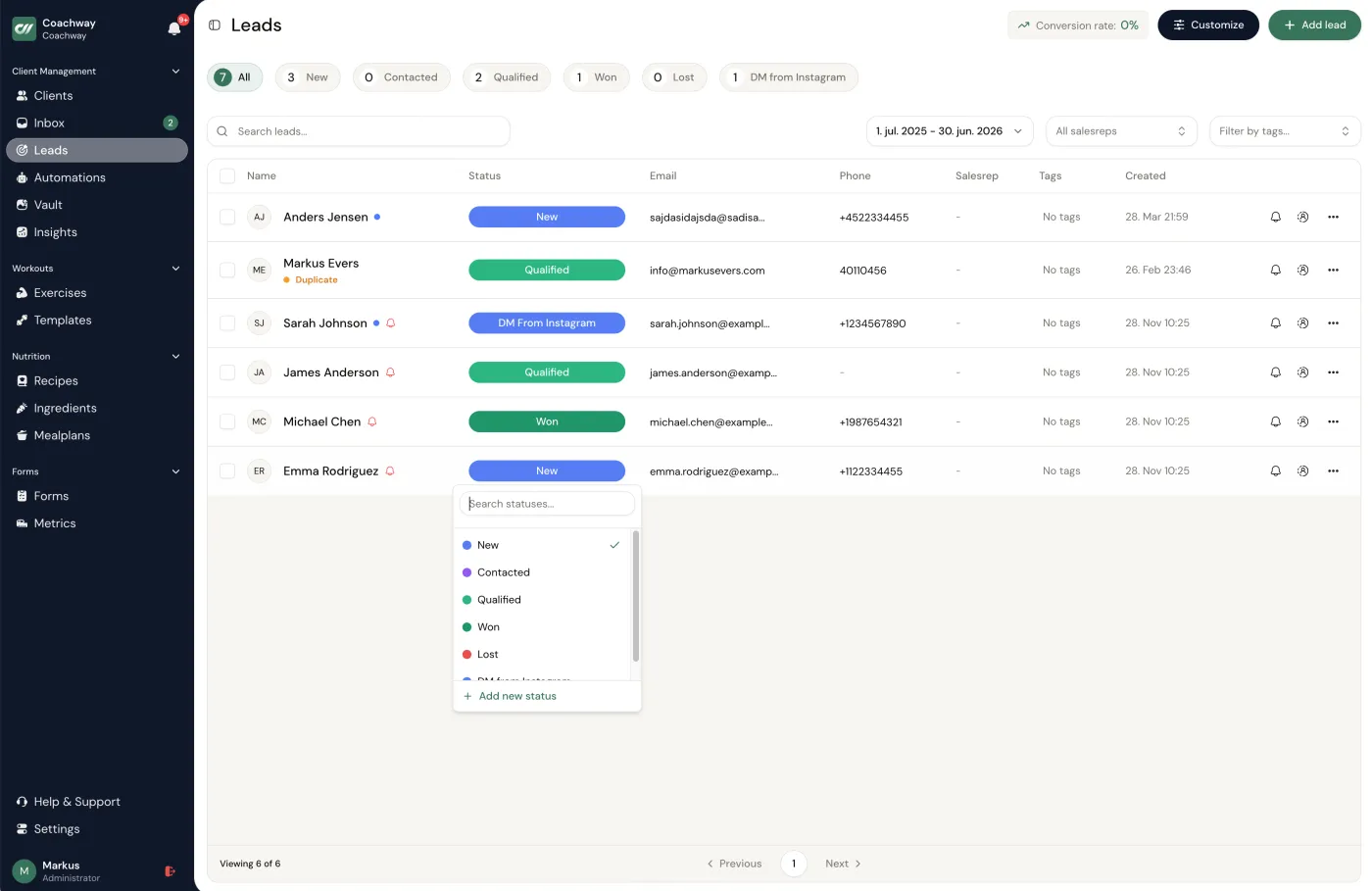
Coachway is a delivery-first coaching platform - programs, check-ins, nutrition, messaging and payments - with a built-in lead pipeline and payment links wrapped around it. For most personal trainers that combination is the CRM. A lead lands from an embeddable form with source tracking, moves through new, contacted, qualified and won stages, and converts to a client in a few clicks, which sets up client app access, the onboarding sequence if you have automated one, and the payment subscription. So instead of a separate sales tool you re-key data into, the pipeline and the coaching share one client record. See how it works on the leads feature page.
The trade-off: the pipeline is deliberately simple - stages, tags, tasks and convert-to-client, not deal forecasting, multi-step email sequences, or a shared sales-team inbox. If your sales motion is genuinely complex, pair it with one of the dedicated CRMs below.
The pipeline is easiest to judge on your own leads. Bring one enquiry to a 15-minute demo and watch it become an onboarded client, or set it up yourself in the trial.
No charge today - cancel anytime under Billing.Read next: the lead pipeline and the pricing page.
02 · dedicated sales crm, free tier
HubSpot Free CRM
HubSpot's free CRM is the strongest genuinely free option for the sales side: unlimited contacts, a visual deal pipeline, email tracking, and a meeting scheduler, with nothing to pay until you add the paid Sales Hub tiers. It is built for exactly the job a generic CRM does well - capturing leads from many channels and nurturing them over weeks. What it does not do is deliver coaching. There are no programs, no check-ins, no client app, and no client payments tied to a training subscription, so you would run it alongside your coaching tool.
The trade-off: two systems and double data entry. The free tier is powerful, but the moment a lead becomes a client, HubSpot stops being where the work happens.
03 · deal-focused sales crm
Pipedrive
Pipedrive is a dedicated sales CRM built around one thing: moving deals through a pipeline to close. If your coaching business runs a real sales motion - high-ticket packages, a long consult cycle, maybe an appointment setter - its deal stages, activity reminders, and forecasting are more capable than any coaching platform's built-in leads tab. It prices in euros for European trainers and is quick to set up. Like HubSpot, though, it is sales-only: it holds no programs, check-ins, or client app, so it sits beside your coaching tool rather than replacing it.
The trade-off: you pay per seat for sales depth a solo trainer with a short pipeline rarely needs, and you still need a separate tool to coach in.
04 · coaching platform + lead forms
Trainerize
Trainerize is a workout-first coaching platform, most established in North America, and it carries lead-capture forms and marketing tools alongside programming - so it covers the front of the pipeline without a separate CRM. It is strong if your coaching is mainly training delivery with light nutrition. For a feature-by-feature view see our client management comparison, where it sits alongside the wider field.
The trade-off: a branded app, Stripe payments, and advanced nutrition are paid add-ons that lift the real monthly price above the headline, and native-language support for Nordic and DACH clients is limited.
05 · nutrition-led coaching
PT Distinction
A UK-built coaching platform with deep nutrition and habit tooling and a 30-day self-serve trial. Its client records, check-ins, and messaging cover the management side well, and included client counts scale by tier. As a CRM it leans on client records rather than a full sales pipeline, so it fits trainers whose leads convert quickly off a consult rather than through a long nurture.
The trade-off: the interface is dated next to newer platforms, and the lead-management side is lighter than a dedicated sales CRM.
06 · affordable first platform
My PT Hub
An affordable, established UK all-in-one, and the easiest of these for a trainer moving off spreadsheets for the first time. Training, nutrition, progress tracking, messaging, and in-app booking are all there, and the client records double as a simple CRM. Pricing is tiered, so the working cost depends on the add-ons you switch on.
The trade-off: the lead and pipeline side is basic, and trainers tend to outgrow the workflow depth past 50 clients.
Pipeline setup for a personal trainer, step by step.
Whichever tool you land on, the pipeline itself is the same five steps. Most sales are lost to silence, not to objections, so the goal is a system that captures the enquiry and prompts the next touch before you forget it.
- 1. Lead capture. Put an embeddable form on your site and link-in-bio so every enquiry lands as a lead with its source tracked, instead of a DM you screenshot into a note. Source tracking tells you which channel actually pays, so you stop guessing where to spend time.
- 2. Consult booking. Send one booking link for a short call and let the lead pick a time. Booking the call is the moment the lead moves from "new" to "contacted" - if it does not get booked, that is your first drop-off to fix.
- 3. Qualify on the call. Confirm the goal, the budget, and the fit, then set the stage to "qualified" or mark it lost with a reason. The lost reasons are the most useful data you will collect - they tell you whether price, timing, or fit is really costing you clients.
- 4. Follow-up cadence. Run a simple three-touch sequence: a same-day recap with the offer, a nudge two days later, and a final check around day five. You are not badgering anyone; you are closing the loop most trainers leave open.
- 5. Onboarding handoff. When they say yes, convert the lead to a client in one motion so app access, the onboarding sequence, and the payment subscription are all set up at once. This is the step a standalone CRM cannot do - it can mark the deal won, but it cannot start the coaching. For the delivery side of this handoff, see client onboarding in coaching.
Pick by your situation, not the label.
- You are a solo trainer with a short pipeline. Use the leads tab in your coaching platform. Coachway, Trainerize, or My PT Hub all cover it, and you avoid paying for and maintaining a second tool.
- You want the won lead to become a coached client with no re-keying. Coachway. Converting a won lead sets up app access, onboarding, and the payment subscription in a few clicks from the same record.
- You run a real sales operation with volume and a long nurture. HubSpot's free CRM or Pipedrive, paired with your coaching tool for delivery. That is the one case where two systems earn their keep.
- You are nutrition-led. PT Distinction or Coachway both have the macro and meal depth, with the pipeline handled inside the platform.
- You are moving off spreadsheets and want the gentlest start. My PT Hub, then graduate as your client count grows.
- You want a workout-first tool for North America. Trainerize, with its lead forms covering the front of the pipeline.
- You are switching platforms and worried about the move. Choose a tool you can export from as CSV or PDF at any time; our migration guide walks the sequence.
The lead and the client file are the same record.
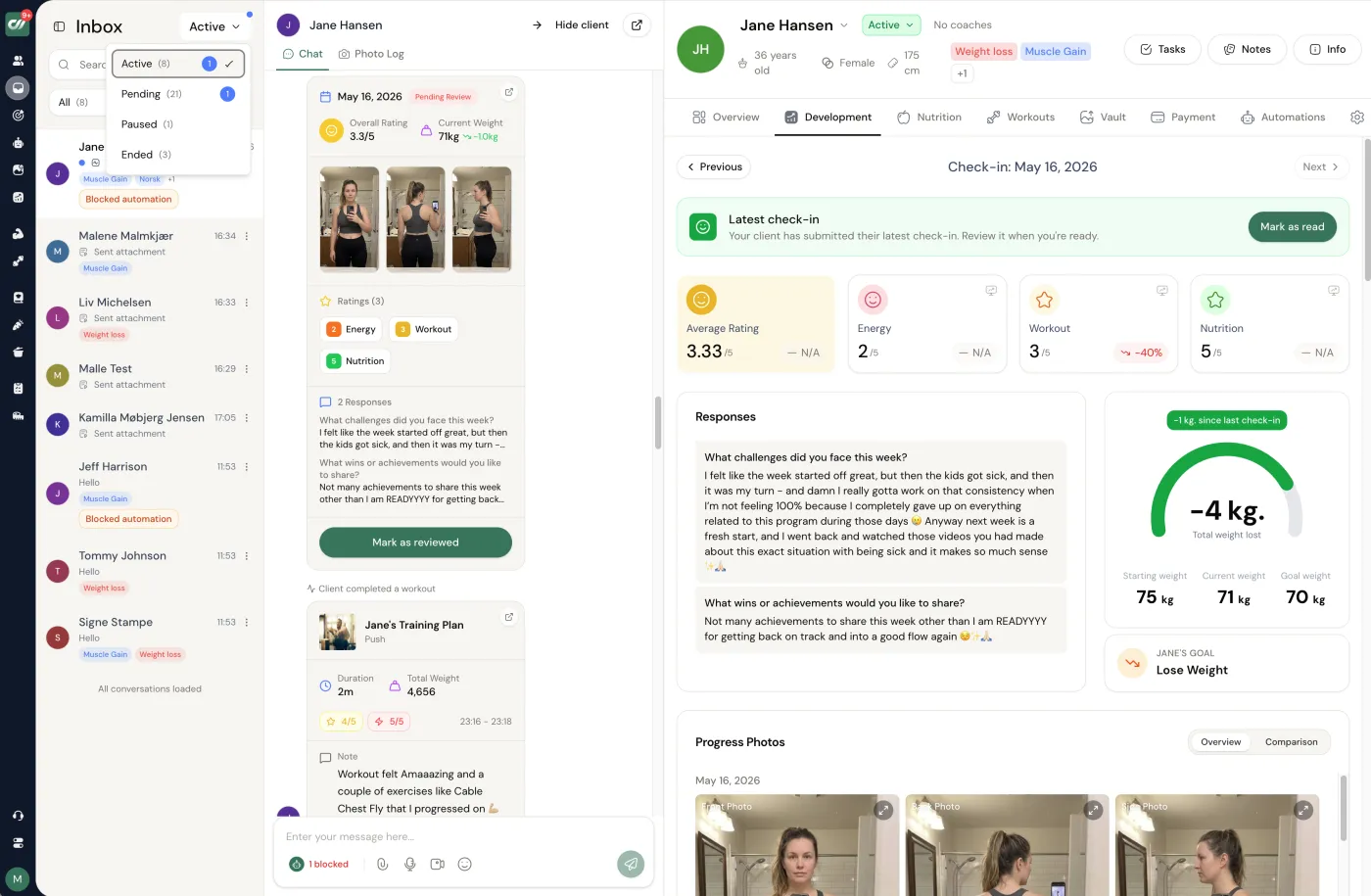
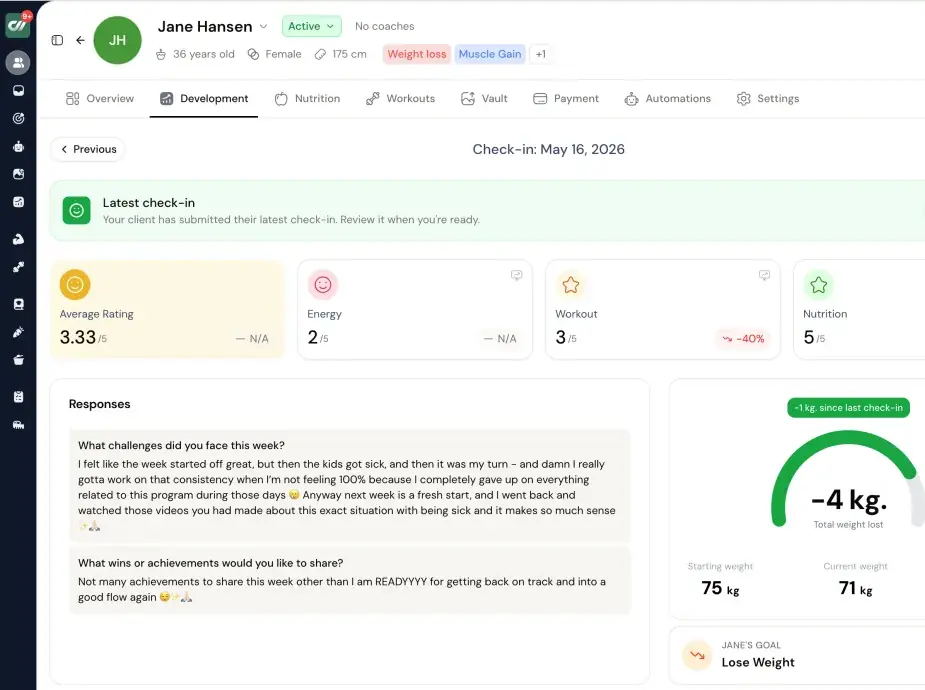
This is the difference a standalone sales CRM cannot show you: in Coachway the pipeline, the conversation and the coaching all open on one client. A won lead from the lead pipeline becomes a row in the client table, the enquiry captured by your intake forms carries straight into onboarding, and the follow-up cadence runs on its own through automations. Click through the tabs to see the sales side and the delivery side sitting in one place.
- One record, both jobs. The client table and the inbox hold the lead history and the coaching, so nothing is re-keyed when a deal closes.
- The follow-up runs itself. Onboarding messages and reminders fire on schedule instead of waiting for you to remember them.
- Check-ins and forms feed the same file. Every enquiry answer and weekly check-in lands on the client you already know, not in a second system.
See the real product
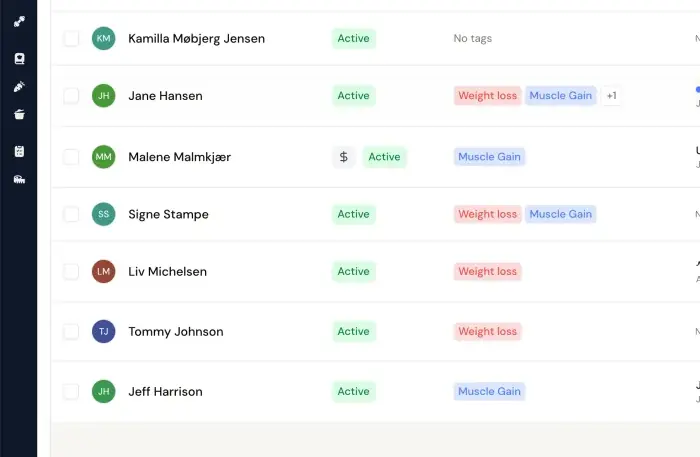
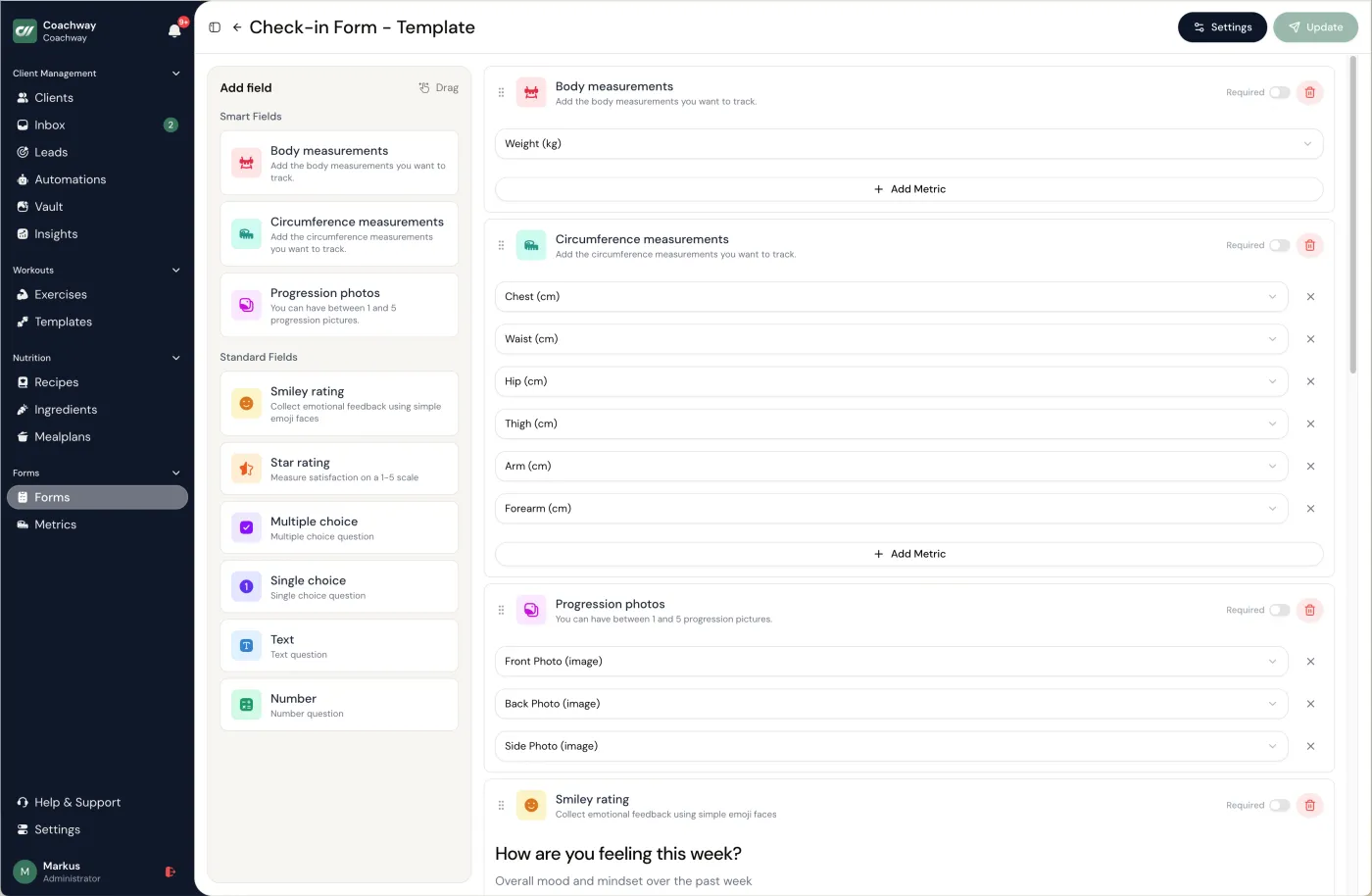
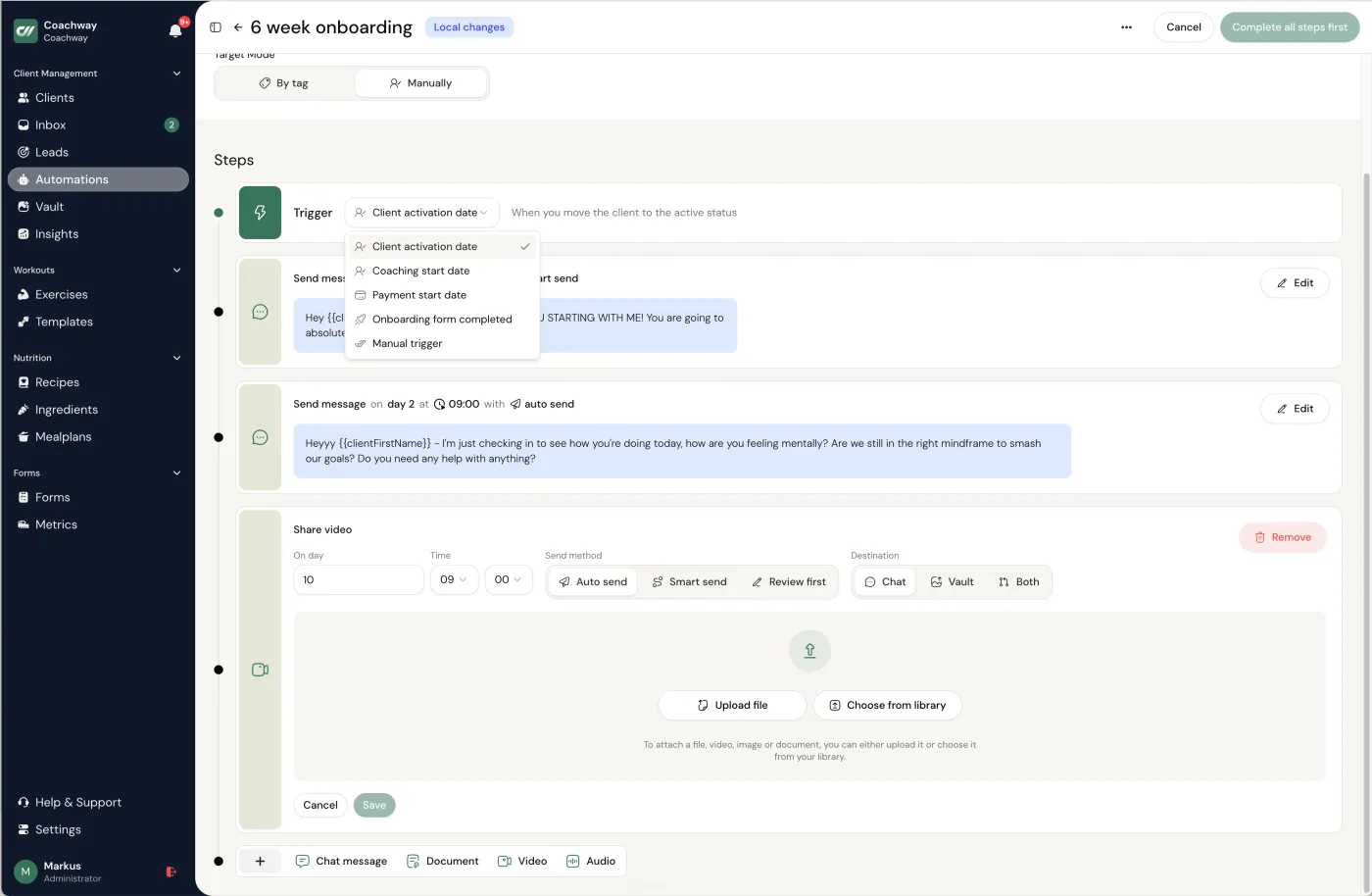
Clients - Every client in one table with status and goal tags - see where all of them stand at a glance.
Frequently asked.
What is the best CRM for personal trainers?
For most personal trainers the best CRM is the lead pipeline built into their coaching platform, not a separate sales tool, because a trainer's sales cycle is short. Coachway pairs a new, contacted, qualified and won pipeline with conversion into an onboarded, paying client in a few clicks, at EUR 69 per month up to 5 clients plus EUR 9 per additional client. If you run a high-volume sales operation with a long consult cycle, a dedicated CRM like HubSpot's free tier or Pipedrive tracks deals better, but neither delivers a single program or check-in.
What is a CRM for personal trainers?
A CRM for personal trainers is software that keeps every lead and client in one place: contact details, goals, the last time you spoke, the stage in your sales process, payments and coaching history. A generic CRM handles the contacts and pipeline; a fitness-specific tool ties that pipeline directly to programs, check-ins and payments, so a won lead becomes a coached client without re-keying anything.
Do personal trainers need a separate CRM, or is a coaching platform enough?
For most trainers a coaching platform is enough. A personal trainer's pipeline is usually short, an enquiry becomes a client in days, so the leads tab inside a platform like Coachway, Trainerize or My PT Hub covers it without a second subscription or double data entry. A standalone CRM earns its place only when sales volume and complexity are genuinely high: many channels, a long nurture, high-ticket packages, or an appointment setter working the pipeline.
Is HubSpot good for personal trainers?
HubSpot's free CRM is a strong sales tool for trainers with a real lead volume: unlimited contacts, a visual deal pipeline, email tracking and a meeting scheduler at no cost. What it does not do is deliver coaching, there are no programs, check-ins, client app or training subscriptions, so you run it alongside your coaching tool and accept re-keying a won lead into the platform your clients actually use. It fits a busy sales motion, not the delivery side.
How much does a personal trainer CRM cost?
It ranges from free to about EUR 70 per month. HubSpot's CRM has a free tier; Pipedrive starts at roughly EUR 14 per seat per month on annual billing; My PT Hub runs EUR 25 for Starter and EUR 59 for Premium; PT Distinction is USD 19.90, 59.90 and 89.90 by tier; and Coachway is EUR 69 per month up to 5 clients plus EUR 9 per additional client with every feature included. Read the all-in monthly total for your client count, since branded apps and payment modules are paid add-ons on several tools; Coachway includes payments and its client app on every plan, but does not sell custom branding.
What is the difference between a CRM and client management software for personal trainers?
A CRM is framed around the sales side: leads, pipeline stages, follow-ups and the deal until it closes. Client management software is framed around the delivery side: programs, check-ins, messaging and payments once someone is a client. They overlap because an all-in-one platform does both, and in Coachway the pipeline and the coaching share one client record. If your search is really about delivering the coaching, our client management software comparison covers that side; this guide is about the sales side.
What features should personal trainer CRM software have?
Good personal trainer CRM software covers eight things: a staged lead pipeline, lead source tracking, consult booking, follow-up reminders, conversion of a won lead into a paying client, payments on the client record, coaching in that same record (or a clean handoff to it), and export of your own data at any time. A dedicated sales CRM nails the first four and stops at the sale; an all-in-one like Coachway clears all eight from one record. Score any shortlist against the checklist above before you pay.
Is there a simple CRM for personal trainers with no workout builder?
Yes: HubSpot Free CRM or Pipedrive give a trainer contacts, a pipeline and follow-up reminders with no workout builder at all, and they sit beside whatever you use to deliver coaching. The trade-off is that the lead and the client live in two systems; an all-in-one such as Coachway turns a won lead into an onboarded, paying client in a few clicks because the pipeline and the coaching share one record. The comparison above lists six realistic options either way.
Danish-built, down to the details.
coachway is developed in Denmark and built on more than six years of work with 150 online coaches. Billing runs through the coach's own Stripe account, so payments go directly to the coach, with EU VAT and invoicing handled automatically through Stripe Tax. Client data handling is GDPR-aligned, with export to CSV and PDF at any time, and the client app is localized in six languages - English, Danish, Norwegian, Swedish, Finnish and German. Most international coaching platforms offer none of the Nordic languages.
- - Developed in Denmark, built on work with 150 online coaches over 6+ years
- - Payments direct to your own Stripe, EU VAT and invoicing via Stripe Tax
- - GDPR-aligned data handling, export to CSV and PDF at any time
- - Client app in six languages, reviewed by native-speaking coaches
Keep reading
all guidesWhat Is a CRM for Personal Trainers? Definition (2026)
A CRM for personal trainers keeps every lead and client in one place. The plain definition, the four jobs a trainer CRM does - lead capture, client records, pipeline, follow-up - and whether you need a standalone CRM or an all-in-one coaching platform.
Read the guide12 best client management software for personal trainers (2026)
An honest comparison of the 7 platforms online coaches actually use. Pricing, features, support, Stripe ownership, and which one fits which size of business.
Read the guideCRM for coaches: what a coaching CRM is and what to look for (2026)
A CRM keeps every client, lead, and conversation in one place so nothing slips. What a coaching CRM actually is, whether you need a dedicated one or an all-in-one platform, and the features that matter for a coaching business.
Read the guideFree tools for this: Coaching Tool Stack Cost Calculator · Coaching Profit Calculator · Client Capacity Calculator
Ready-made template: Client Tracker Spreadsheet
Turn enquiries into clients from one pipeline
Capture leads, run the follow-ups, and convert a won lead into an onboarded, paying client in a few clicks, with payments through your own Stripe. Start the 14-day free trial and run one real enquiry through it: no charge today, cancel anytime under Billing.


