


The best health coach software in 2026.
The best health coach software depends on how you coach. Coachway is built for lifestyle and behaviour-change coaching - weekly check-ins, activity tracking, and the client app in one platform. Practice Better and Healthie are clinical EHR platforms for licensed practices Coachway does not compete with, and CoachAccountable suits accountability-led coaching outside fitness. Here is the honest comparison of the health coach software, platforms, and apps that rank for the term, with every price verified in August 2026 and who each one genuinely fits.
By Markus Evers · Updated September 2026
How this comparison is made: we check every competitor's pricing and features against their live websites and re-verify them on a recurring basis. We build Coachway, so we flag it wherever it appears, we credit real competitor strengths, and we say who each platform fits better than us. Browse all platform comparisons.
the short version
For a health or wellness coach who runs behaviour change as a business (habits, weekly check-ins, light nutrition), Coachway is the best pick: intake, activity tracking, check-ins with habit questions, messaging, a unified review screen and payments from one tab, at EUR 69 per month for up to 5 clients plus EUR 9 per additional client, every feature included.
The honest "best for" alternatives by lane: Practice Better and Healthie for clinical nutrition practitioners and dietitians who need compliant charting and telehealth, CoachAccountable for accountability-led coaching outside fitness, Everfit for a free start, and PT Distinction or My PT Hub where the practice leans toward training. We also cover Trainerize, and why two names you may still be searching for - Profi and Nudge Coach - have both shut down, with the honest reasoning below.
What is the best health coach software in 2026?
For behaviour-change coaches who run check-ins, chat and payments from one client app, Coachway is the pick at EUR 69 per month for up to 5 clients plus EUR 9 per additional client. The comparison below lists the other platforms with their prices and who each one suits. The credential that usually precedes the software decision is covered step by step in how to become a certified health coach.
Health coach software, platform, or app - what is the difference?
Health coach software, a health coaching platform, and a health coaching app usually describe the same product from three angles. The software or platform is what the coach runs - the web dashboard where intake, check-ins, habits, messaging, and payments live. The app is what the client holds - a phone app for logging habits, following the plan, and messaging you between check-ins. Almost every tool in this guide, Coachway included, is both: a coach dashboard on the web and a client app on the phone. So the question that actually decides your choice is not which of the three words a vendor puts on its homepage, but whether the client app is good enough that your clients open it every week and keep their check-ins going.
What health coaching software is, and what it should do.
Health coaching is a behaviour-change job: helping a client build steadier sleep, more movement, calmer stress, and simpler eating, week after week. The software exists to carry that ongoing relationship - and to replace the patchwork most coaches start with: habits in a notes app, weights in a spreadsheet, intake answers in a separate forms tool, conversations in WhatsApp, and a scheduler somewhere else. One important line before the ranking: a health or wellness coach delivers lifestyle and behaviour guidance, not medical advice, and the right tool is built to support exactly that scope. The wider industry is moving the same way: in the American College of Sports Medicine's Worldwide Survey of Fitness Trends for 2026, wearable technology ranks as the #1 trend and mobile exercise apps as #4 - the two channels a health coach's activity sync and branded client app depend on. Here is the checklist that matters:
- Activity and behaviour tracking. Per-client daily step goals with a progress ring, sync from Apple Watch or Garmin, and lifestyle habits like sleep, energy, and stress captured as check-in questions.
- Structured check-in forms. Built by drag and drop, so an energy-and-stress client, a weight client, and a general-wellness client each get the right questions on the right cadence.
- Progress and measurement tracking. Weight, measurements, and photos stored by date, auto-charted so the trend is obvious before motivation slips.
- Messaging in one inbox. Every conversation, voice note, and check-in reply in the same client thread instead of scattered across WhatsApp, email, and DMs.
- Simple nutrition and meal guidance. Light food direction and habit-based eating, without turning your practice into a full meal-prep service.
- Automations and reminders. Check-in reminders, scheduled messages, and a flag when a check-in is missed or a client goes quiet, so you are not chasing anyone by hand.
- Payments and a client app. Billing through your own Stripe next to the client record, and a client app your clients actually open, in their language.
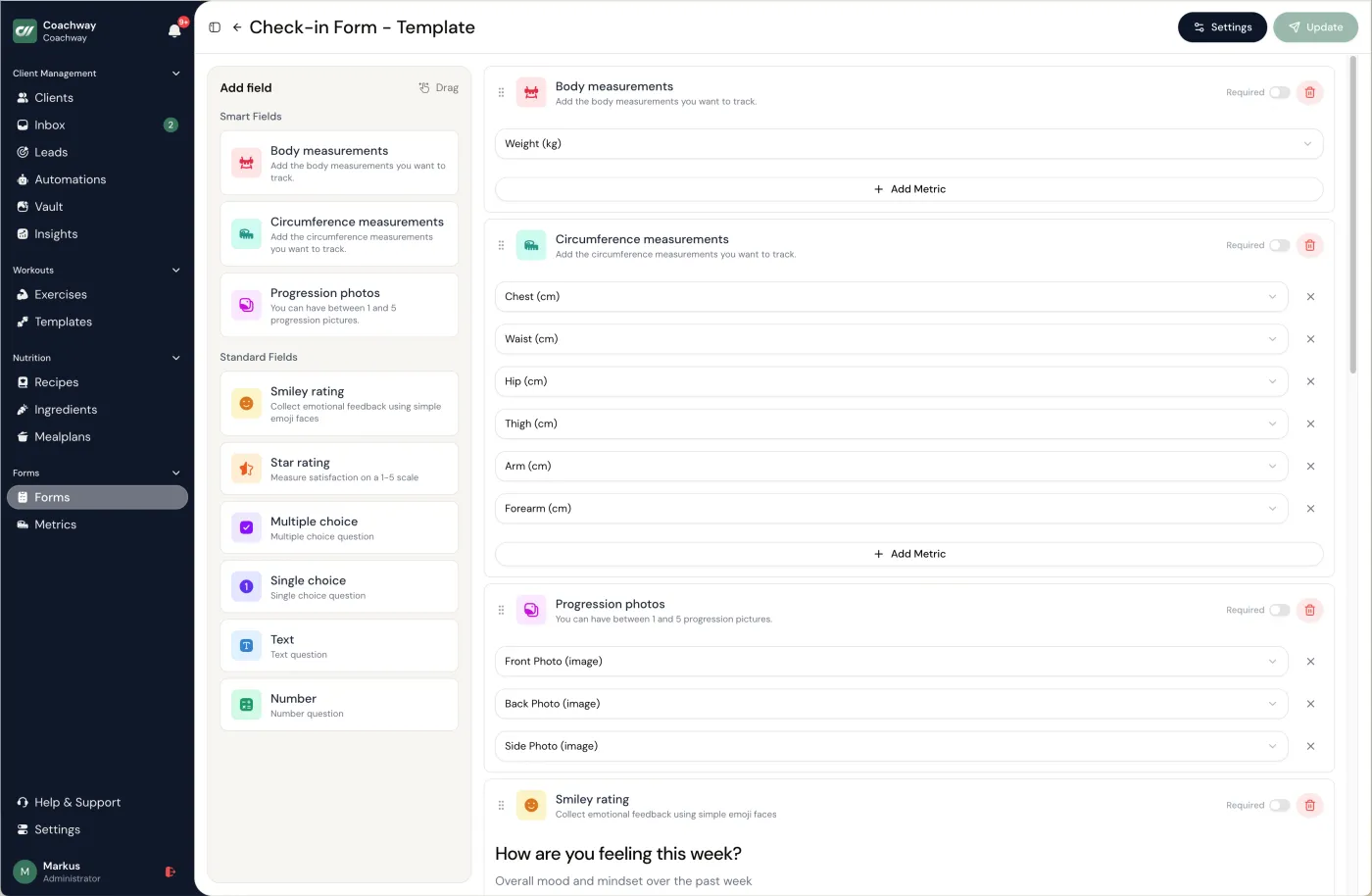
How we compared the health coaching tools.
We judged each platform on: whether it covers the full weekly loop (intake, activity, check-ins, messaging, payments), whether the client app can carry the coach's branding, who owns the payment relationship, whether the tool respects the coaching scope or is really clinical software, and who it genuinely fits. Where a tool is built for dietitians or clinical practices, we say so neutrally - that is a different lane, not a flaw. For the wider field of coaching platforms, see our best coaching apps for online coaches roundup, and if food leads your offer, the best online nutrition coaching platforms guide ranks the nutrition-first options.
Health coach software vs the clinical platforms.
These five tools dominate the search results for health coach software, so this is the comparison that decides the click. We ranked them for a behaviour-change coaching practice - the coach who sells accountability, habits, and weekly check-ins rather than clinical charting - and verified every price on each vendor's own pricing page in August 2026. Two of the biggest names, Practice Better and Healthie, are genuinely clinical EHR platforms with insurance billing and telehealth that Coachway does not offer. If that is the practice you run, our guides to practice management software for coaches and, for dietetics, nutritionist practice management software cover that lane instead.
| Tool | Best for | Behaviour change & check-ins | Pricing model | Coaching or clinical |
|---|---|---|---|---|
| Coachway | Behaviour-change health and wellness coaches who want the whole weekly loop in one client app | Drag-and-drop check-in forms (sleep, energy, stress), daily step goals with a progress ring, measurement tracking, light nutrition guidance | Flat per client: EUR 69/month up to 5 clients, then EUR 9 per extra client, everything included | Behaviour-change coaching (non-clinical by design) |
| Practice Better | Clinical nutrition, functional-medicine, and wellness practitioners | Client journaling and intake forms, but built around charting, appointments, and programs rather than weekly coaching check-ins | Free 3-client Sprout, then USD 35 (Starter) to USD 155/month (Team) | Clinical EHR (HIPAA, PIPEDA, and GDPR; telehealth; insurance billing) |
| Healthie | Registered dietitians and telehealth practices | Food and symptom journaling and client programs inside a clinical charting workflow, not coaching check-ins | USD 19 (Core) to USD 129+/month (Plus/Group); 14-day trial | Clinical EHR (insurance billing and claims; telehealth) |
| Trainerize | Coaches whose health offer leans on structured training | Habit coaching and check-ins bolted onto a mature workout core; nutrition tracking included | Free 1-client tier, then USD 10 (Grow) and USD 25+/month (Pro, 5 to 200 clients); branded app from a one-time USD 169 on Pro | Coaching (training-led) |
| Profi | Was a coaching-business platform for solo coaches, teams, and consultants | Scheduling, video, forms, packages, and programs; light on habit and check-in tracking | No longer sold - being retired | Coaching platform, winding down (retired after December 31, 2025) |
Prices verified on each vendor's own pricing page in August 2026, in the currency each publishes; confirm current rates before you commit, since tiers change often. Profi confirmed on its own site that it is being acquired and winding down after December 31, 2025, so it can no longer be bought - we include it because coaches still search for it. The full breakdown of the wider field is below.
Do you need a HIPAA-compliant health coaching platform?
Only if you handle protected health information as a covered entity or its business associate - and a non-clinical health coach usually does not. HIPAA governs licensed clinical care: diagnoses, treatment records, and insurance claims. If your practice sits there, a HIPAA-compliant health coaching platform really means a clinical EHR, and on this page that is Practice Better - which the comparison above lists as HIPAA-, PIPEDA-, and GDPR-compliant - or its clinical EHR peer Healthie, both built to sign a Business Associate Agreement and store medical records. If instead you coach habits, accountability, sleep, stress, and lifestyle change without clinical records, you sit outside HIPAA's scope, so a behaviour-change platform like Coachway - non-clinical by design and not an EHR - fits the work without the compliance overhead you would not use. The right call follows your scope and the lane you coach in; our guide to health coaching niches helps you place where your practice sits before you pick the software.
Which health coaching apps give the client an app, and what does the client do in it?
A health coaching app is the client half of the software: the app the client opens most days to tick a habit, log a step goal, answer the weekly check-in on sleep, energy and stress, write a food or mood entry, and message the coach in the same place as the plan. Of the ten tools compared on this page, the coaching platforms ship that app with a coach dashboard behind it, the two clinical platforms run the client side through a portal built around charting and appointments, and two of the ten are retired. The five rows below are what the client actually does in the app and which tools cover each, strictly from the comparison rows on this page; whether the app carries your own logo is the last row, because the rows differ most there. Across all fourteen coaching apps, including the training-first ones, the pick by situation is in the best online coaching software and apps. Health coach apps and a wellness coaching app are the same thing seen from the client's side, and on Coachway that side is the client app, included on every plan and available in six languages.
| What the client does in the app | Why it matters for retention | Which of the ten tools do it, by the comparison on this page |
|---|---|---|
| Ticks the daily habit and the step goal | A daily reason to open the app is the difference between a client who drifts and one who stays | Coachway (measurement tracking and habit questions in the weekly check-in, step goals with a progress ring), PT Distinction and Trainerize (habit coaching), CoachAccountable (accountability-led, no fitness or nutrition tooling) |
| Answers the weekly check-in on sleep, energy and stress | The check-in is the coaching; a form the client can fill in on the phone gets answered, one sent by email does not | Coachway (drag-and-drop check-in forms), PT Distinction, Trainerize; Practice Better and Healthie use intake forms and journaling inside a clinical charting workflow rather than weekly coaching check-ins |
| Logs food, mood or symptoms | The log is what the coach reads before replying, so it has to live where the reply is written | Coachway (light nutrition guidance), PT Distinction (nutrition tooling), Trainerize (nutrition tracking), Healthie (food and symptom journaling), Practice Better (journaling) |
| Messages the coach in the same place as the plan | A thread next to the plan is read; a thread in a separate chat app is missed | Coachway, PT Distinction, Trainerize, Everfit, My PT Hub, CoachAccountable; the clinical platforms run messaging through their portals |
| Sees the coach's logo, name and colours | A branded app is the client's app, not a third party's; the page's rows say which tools include it | Custom branding: Everfit and PT Distinction (higher tiers or plans), My PT Hub and Trainerize (paid add-ons; Trainerize one-time USD 169 on Pro), CoachAccountable (branded home-screen web app, not a native store app); Profi and Nudge Coach are retired. Coachway includes its client app on every plan, in six languages, without custom branding |
The wider client-app comparison, across fourteen coaching apps including the training-first ones, is in the best coaching apps for online coaches; how the daily habit tick and the check-in keep clients on the plan is in how to keep online coaching clients accountable.
01 · best for health & wellness coaches
Coachway
Coachway is the European-built platform for coaches who run behaviour change as a business. Daily step goals with a progress ring (synced from Apple Watch or Garmin), drag-and-drop check-in forms with lifestyle questions like sleep, energy, and stress, auto-charted progress and measurements, one inbox for every client conversation, light meal and nutrition guidance from a 3,900+ ingredient database, automations for reminders, Power Panel flags for missing check-ins and clients with no contact, and payments through your own Stripe - all in one client record. Clients get one app on iOS and Android, in six languages. See the full feature set and run the numbers on the pricing page.
How a health coach runs a week in Coachway.
- 01 Set up intake and the weekly plan. Send a structured intake form to capture goals, lifestyle, health context, and what the client wants to change. From the answers, set a daily step goal and add the lifestyle questions that matter - sleep, energy, stress, movement - to the client's check-in form, so the week has a clear shape.
- 02 Let the client log activity and check in from their app. The client opens the Coachway client app, sees their step goal and progress ring, logs weight or measurements, and completes the weekly check-in form. Steps can sync automatically from Apple Watch or Garmin, which lifts completion rates for busy wellness clients.
- 03 Review the week in one place. The coach opens Power Panel and sees the client's step progress, charts, check-in answers, notes, and history side by side. Patterns in sleep, energy, stress, and adherence show up as auto-charted trend lines, so the review takes minutes instead of tab-hopping.
- 04 Reply, adjust the plan, and add light nutrition guidance. The coach answers in the same inbox, adjusts the step goal or check-in questions, and adds simple meal or nutrition guidance where it helps. Any change lands back in the client's app, framed as lifestyle and behaviour guidance rather than medical advice.
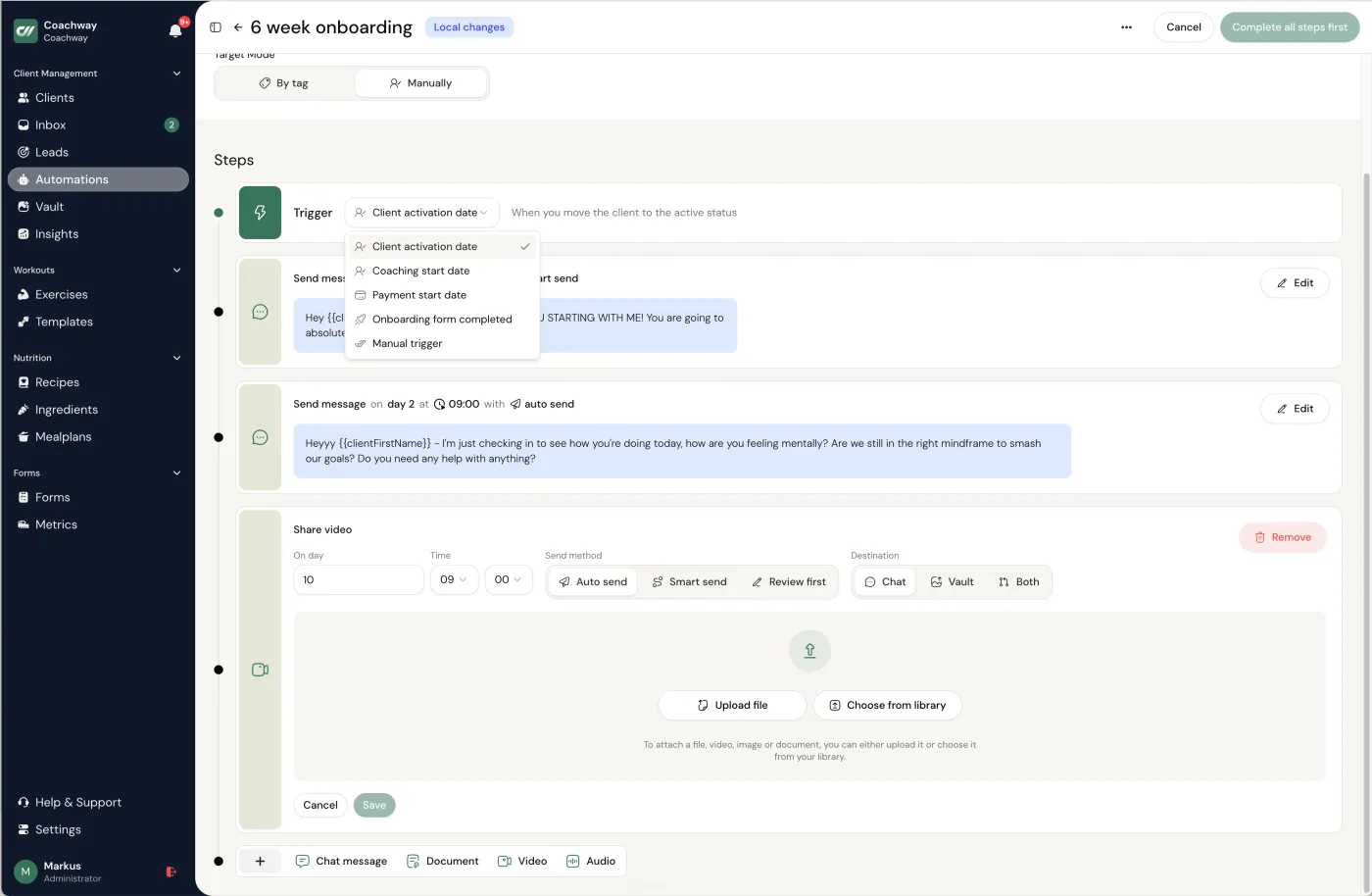
- 05 Let automations carry the cadence. Automated reminders run the next check-in, and scheduled messages on schedule, the Power Panel flags missing check-ins and clients with no contact, and broadcasts keep the whole client base moving together. The coach stays on coaching, not admin, as the practice grows.
The trade-off: Coachway is built for behaviour-change coaching, not clinical practice - it is not an EHR and does not aim to be one. If you need compliant clinical charting, telehealth-of-record, or insurance billing, Practice Better or Healthie fit better. Coachway is also one of the younger platforms here, so the catalog of third-party integrations a decade-old tool offers is still growing; in return you get features faster and same-day support, built on knowledge from working with 150 online coaches over 6+ years.
Want to see the whole weekly loop - intake, check-ins, and payments - running on your own clients?
No charge today - cancel anytime under Billing.02 · clinical nutrition & wellness
Practice Better
The strongest pick if your practice is clinical rather than coaching-led. Practice Better is built for nutrition and wellness practitioners who need HIPAA-compliant charting, telehealth, scheduling, and notes, and it does that lane very well. Meal planning is added via a paid That Clean Life integration, and food tracking works as journaling rather than a full planner. If you are weighing a move away from it, our Practice Better alternatives guide goes deeper.
The trade-off: it was not built for coaching delivery - there is no workout builder and no built-in meal planner, so a lifestyle coach pays for clinical depth they will not use.
03 · dietitians & telehealth
Healthie
An EHR-grade platform for dietitians and telehealth practices: charting, scheduling, billing and insurance workflows, telehealth video, food and symptom journaling, and client programs. For a registered dietitian who needs compliant records and a clinical workflow, it is a strong, purpose-built peer to Practice Better rather than a coaching tool.
The trade-off: built for the clinical lane - a behaviour-change coach gets no workout builder and a heavier workflow than the job needs.
04 · accountability-led
CoachAccountable
A general-purpose coaching-business platform (US, since 2012) built around accountability between sessions: action plans, metrics and charts, worksheets, courses, group coaching, and recurring billing. The client experience is a branded web app added to the home screen - with your own logo as the icon - rather than a native app-store app. A good fit for life, wellness, and habit coaches whose work is not fitness-specific. CoachAccountable describes itself as "an advanced coaching management software designed to help coaching businesses thrive."
The trade-off: no fitness or nutrition tooling and an English-only UI; reviewers describe it as feature-dense with a learning curve.
05 · free starter tier
Everfit
A modern-feeling platform with a free tier for small client lists and paid plans that scale up. Habit tracking, check-ins, and program delivery cover the wellness basics, which makes it a sensible starting point for a new health coach who needs to keep costs near zero while building a first client base.
The trade-off: the free tier is genuinely useful, but you will graduate to paid quickly, and the platform leans training-first rather than wellness-first.
06 · habit & nutrition depth
PT Distinction
A UK-built platform with genuine depth in habit tracking and nutrition tooling, plus a self-serve trial. Although the name says personal training, its habit coaching and nutrition planning make it a workable pick for health coaches in English-speaking markets whose clients also train.
The trade-off: the interface is dated compared with newer tools, and Nordic and DACH localization is limited.
07 · simplest entry point
My PT Hub
Affordable, simple, and UK-built. Often the easiest option for a coach moving from spreadsheets to real software for the first time, with a flat-rate unlimited-client mid tier and a branded client app available as an add-on.
The trade-off: built for personal trainers first, so wellness-specific tracking is thinner, and coaches tend to outgrow it as the workflow gets more complex.
08 · training-led health coaching
Trainerize
One of the most established workout-first platforms in North America, with habit coaching bolted onto a mature training core. A reasonable pick if your health coaching leans heavily on structured exercise programming; a branded client app is available as a paid add-on.
The trade-off: wellness and nutrition tools are lighter than the coaching-led platforms, and the pricing stacks up through add-ons. Add the add-ons to everything else you pay for in the coaching tool stack cost calculator before you judge a plan by its headline price.
09 · winding down - included for context
Profi
Profi was an all-in-one coaching-business platform - scheduling, video calls, forms, packages, programs, and payments - aimed at solo coaches, teams, and consultants, and it still ranks when coaches search for health coach software. It is on its way out: Profi confirmed on its own site that it is being acquired and is winding down the current platform, with existing customers keeping access only through December 31, 2025, after which it is retired in its current form. We include it because coaches still land on stale Profi reviews. If you are moving off Profi, pick by the lanes above - Coachway for behaviour-change coaching run through weekly check-ins, or CoachAccountable for accountability-led coaching outside fitness.
The trade-off: the decisive one - it is closing. Its coaching-business feature set lives on in the tools above; Coachway is the closest home for behaviour-change coaches who want check-ins, activity tracking, and the client app in one place.
10 · shut down - included for context
Nudge Coach
For years the reference habit-and-wellness coaching app, with customizable trackers, behaviour-change programs, content delivery, and messaging. Nudge Coach shut down on April 30, 2025, and its data-export window closed in mid-May 2025, so it can no longer be bought - we include it because many health coaches still search for it. If you ran your practice on Nudge, our Nudge Coach alternatives guide covers the migration in full.
The trade-off: the obvious one - it no longer exists. Its habit-and-behaviour focus lives on in the tools above; Coachway and CoachAccountable are the closest homes for that style of coaching.
How the health coaching platforms compare.
The coaching-lane platforms from the field above, side by side, drawn from this guide's own read on each tool. Practice Better and Healthie sit in the clinical comparison higher up, and Profi and Nudge Coach have both closed, so the scannable table below covers the live coaching and training options.
| Platform | Best for | Pricing | Worth knowing |
|---|---|---|---|
| Coachway | Health and wellness coaches who want goals, weekly check-ins, and light nutrition in one client app | EUR 69/month for up to 5 clients, then EUR 9 per additional client | Not an EHR - built for behaviour-change coaching, with the client app included and payments through your own Stripe |
| CoachAccountable | Accountability-led coaching outside pure fitness | Paid monthly plans by active client count (USD); 30-day free trial | Branded home-screen web app, not a native store app; no fitness or nutrition tooling |
| Everfit | Brand-new coaches building their first client base | Free starter, then paid monthly plans (USD) | Useful free tier, but leans training-first rather than wellness-first |
| PT Distinction | Habit- and nutrition-led coaches in English markets | Paid monthly plans with included client tiers (USD) | Real depth in habit and nutrition tooling; the interface is dated and localization is limited |
| My PT Hub | First-time platform users with a small client base | Paid monthly plans (EUR on the live page); 30-day free trial | Built for personal trainers first, so wellness tracking is thinner; branded app is a paid add-on |
| Trainerize | Coaches whose health offer leans on training | Free 1-client tier, then USD 10 (Grow) and USD 25+ (Pro, up to 200 clients) monthly | Mature training core with habit coaching bolted on; branded app is a one-time USD 169 add-on on Pro |
Coach the whole weekly loop inside Coachway.
The whole weekly loop the checklist above asks for sits around one client in one tab. Intake sets each client's goals and lifestyle context, the client answers the weekly check-in on sleep, energy, stress and their habits from one app, in their own language, and your review, your reply, and any change to the plan happen in the same place. Nothing gets copied between six tabs. Tap through the real product below.
- Weight, measurements, and check-in answers auto-chart on the client's progress screen, so the trend is obvious before motivation slips.
- Check-in reminders and scheduled messages run on their own through automations, so you coach the client instead of chasing them.
- The habit tick and the check-in are what keep a client on the plan, so they are also your retention - the client churn rate calculator shows what even a small monthly drop-off costs over a year.
See the real product
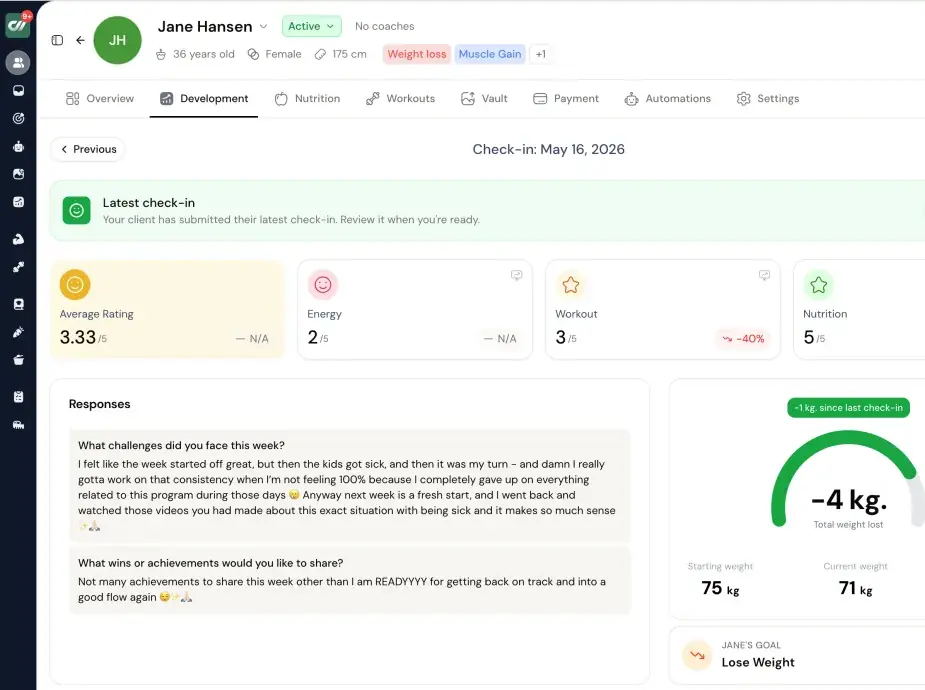
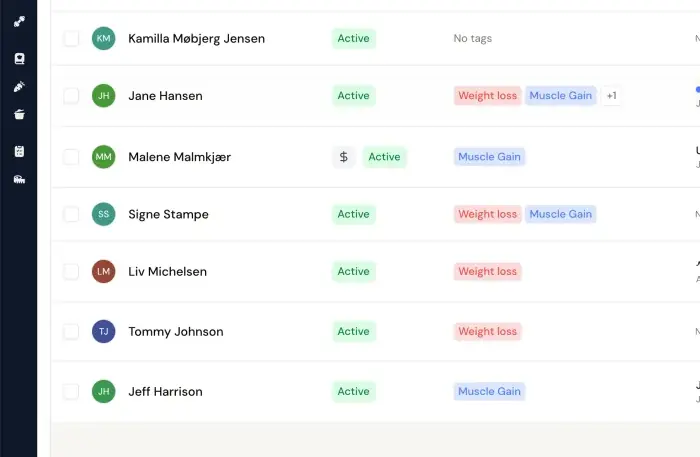
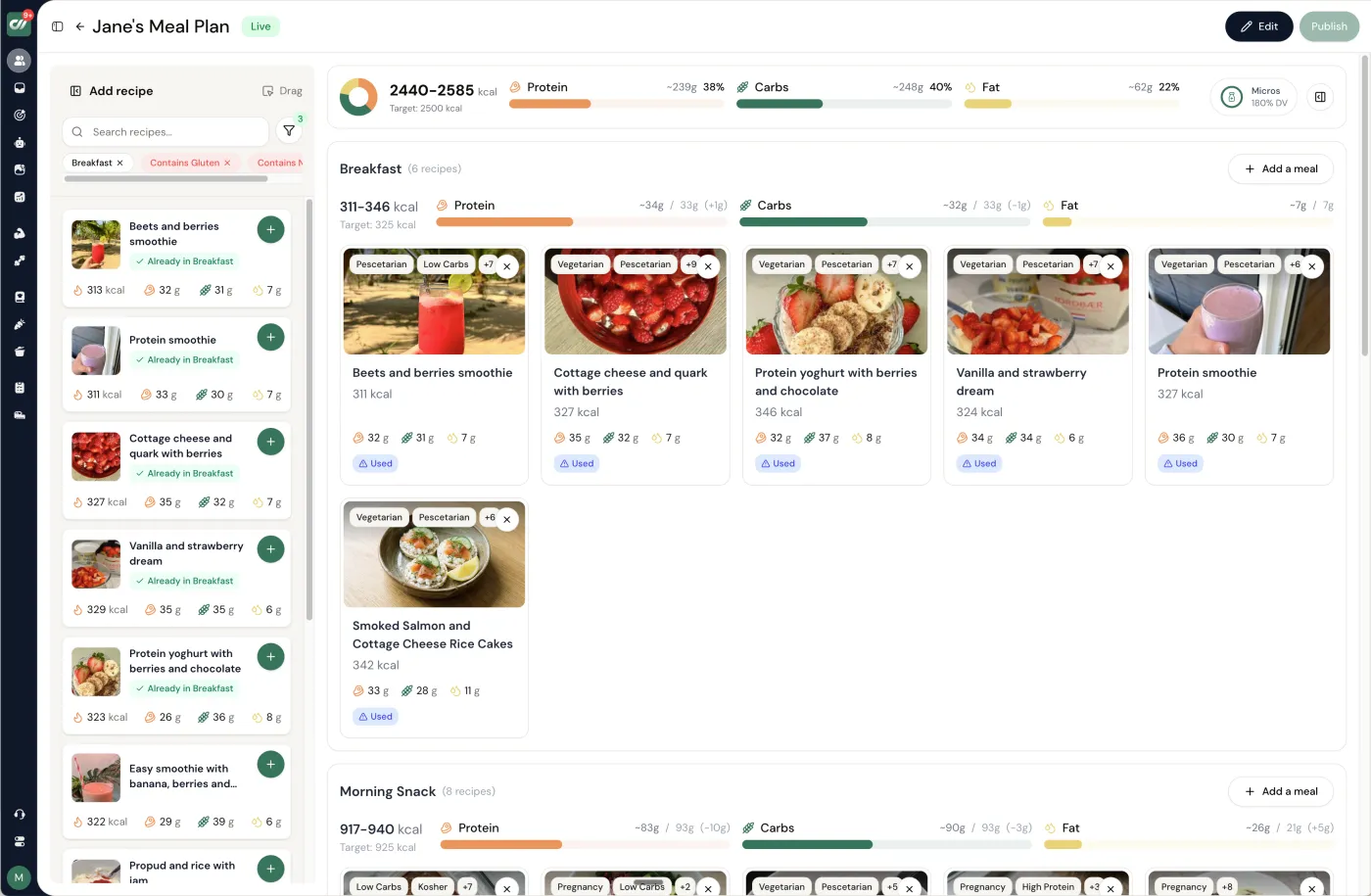
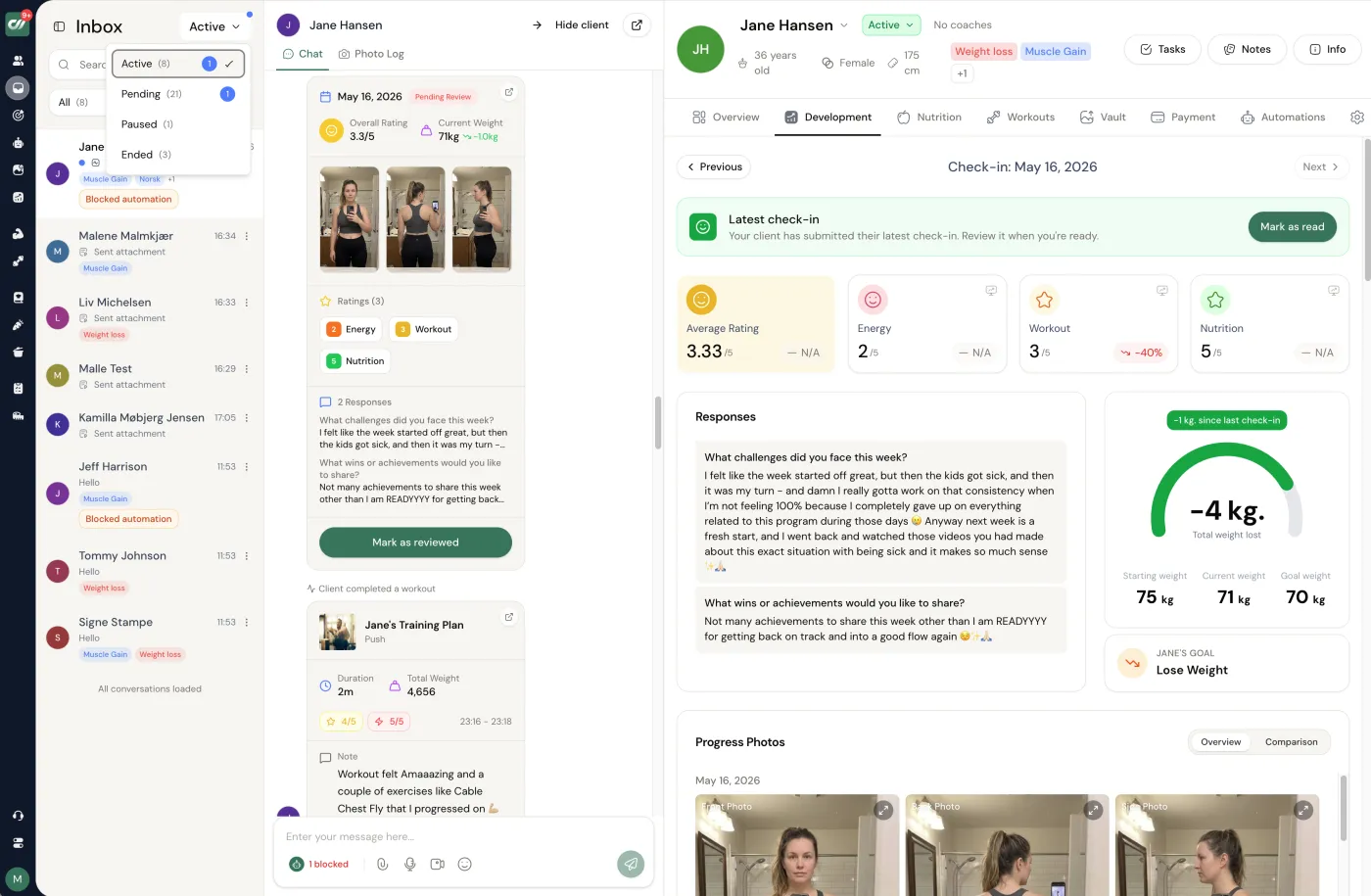
Check-ins - Ratings, responses and the weight trend sit next to the conversation. Review, mark done, move on.
No charge today - cancel anytime under Billing.
Pick by your practice, not the marketing.
- You coach habits, lifestyle, and light nutrition, and want one client app. Coachway - the whole weekly loop from intake to payment sits in one client record, handled from one tab instead of six.
- You are a licensed clinician or dietitian who needs compliant charting. Practice Better or Healthie. That is their lane, and coaching software is not a substitute for it - our guides to practice management software for coaches and nutritionist practice management software go deeper on that decision.
- Your coaching is accountability-first and not fitness-specific. CoachAccountable, or Coachway if you also want activity tracking and nutrition guidance built in.
- You are bootstrapping at 0 to 5 clients. Everfit's free tier, then graduate as you grow.
- Your health coaching leans on structured training. Trainerize or PT Distinction, or see the wider field in the best coaching apps for online coaches.
- You are migrating off Nudge Coach. Start with the Nudge Coach alternatives guide, then pick by the lanes above.
If the first lane sounds like your practice, the fastest way to check the fit is to see health coaching software running live.
No charge today - cancel anytime under Billing.What health coaching software really costs.
The pricing model matters more than the list price. The market runs on three: flat per-client pricing (Coachway: EUR 69/month for up to 5 clients, then EUR 9 per additional client - everything included), tiered plans where branding, automations, or client capacity gate at higher tiers, and clinical platforms priced for practices rather than solo coaches. Always calculate the total for YOUR client count with the modules you actually need - a cheap base plan with three required add-ons is rarely cheaper than one all-inclusive price.
Watch payment fees too: some platforms take a percentage of your client payments on top of the subscription. When billing runs through your own Stripe account, you know the fee up front - and your payment history stays yours even if you switch platforms later. Our per-vendor breakdowns live in coaching software pricing compared.
The scope line your software should respect.
No tool changes what you are allowed to do. A health coach supports habits, accountability, and lifestyle - the software should make that work easier, not tempt you across the line into clinical territory. Here is the line, in plain terms.
What coaching software is for
Setting habits and goals, running check-ins, delivering programs and general nutrition guidance, messaging, and tracking progress for healthy clients pursuing lifestyle change.
What it is not for
Storing diagnoses, prescribing therapeutic diets, treating disease, or acting as a medical record. That is physician, dietitian, and licensed-therapist territory - and a different class of software entirely.
When to refer
Eating disorders, depression or anxiety, chronic disease, pregnancy, medication questions, or anything that feels clinical. Have professionals to point clients to, and put it in your client agreement.
A platform that markets itself as an EHR is solving a different problem than yours. Pick software built for behaviour-change coaching, keep your work general and educational, and refer anything clinical out every time. Your scope becomes a trust signal rather than a liability.
the summary, in facts
- What it is. Health coaching software runs a non-clinical behaviour-change practice - intake, habit and activity tracking, weekly check-ins, messaging, light nutrition guidance, payments, and a client app - not clinical charting or an EHR.
- Our pick. For behaviour-change health and wellness coaches, Coachway, at EUR 69 per month for up to 5 clients then EUR 9 per additional client, every feature included.
- The clinical lane is a different category. Practice Better and Healthie are EHR platforms for licensed practitioners and dietitians who need compliant charting, telehealth, and insurance billing - not a better coaching tool, a different job.
- Two names to drop from the shortlist. Profi (retired after December 31, 2025) and Nudge Coach (shut down April 30, 2025) still surface in search but can no longer be bought.
Frequently asked.
What is the best health coaching software?
For a health or wellness coach who coaches lifestyle and behaviour change - habits, weekly check-ins, and light nutrition - Coachway is the best health coaching software, because it runs the whole weekly loop for one client from one tab instead of six: intake, habit and lifestyle questions in the weekly check-in, messaging, and payments through your own Stripe, all inside one client app, at EUR 69 per month for up to 5 clients then EUR 9 per additional client. Practice Better and Healthie suit clinical nutrition practitioners and dietitians who need compliant charting and telehealth, and CoachAccountable suits accountability-led coaching outside fitness.
Are health coaching apps the same as health coaching software?
Mostly, though coaches use the two words for slightly different things. Health coaching apps usually means what the CLIENT holds: a phone app for logging habits, following a plan and messaging you. Health coaching software usually means what the COACH runs: the dashboard where client records, intake forms, check-ins, plans and payments live. Most platforms in this guide are both, with a coach side on the web and a client app on the phone, so the practical question is not which word a vendor uses but whether the client-facing app is good enough that your clients actually open it.
Is health coach software different from wellness coach software?
In practice they are the same category, and most tools are sold under both names. Health coach software and wellness coach software both describe a platform for coaching lifestyle change: intake forms, habit and activity tracking, structured check-ins, messaging, progress tracking, payments and a client app. The label usually reflects the coach rather than the tool, with health coaches leaning more towards behaviour change and clinical referral boundaries, and wellness coaches leaning more towards habits, stress, sleep and general lifestyle. Choose on the workflow you actually run rather than on which of the two words a vendor puts on its homepage.
What is health coaching software?
Health coaching software lets a health or wellness coach run an entire practice in one place - intake, activity and behaviour tracking, check-ins, light nutrition guidance, messaging, progress tracking, payments, and a client app - instead of stitching together spreadsheets, WhatsApp, and a forms tool. The best tools connect activity, check-ins, and notes so the coach reviews each client in minutes and delivers lifestyle and behaviour guidance, not medical advice.
What features do health and wellness coaches need?
Software for health coaches should cover activity and behaviour tracking, structured check-in forms, progress and measurement tracking, secure messaging in one inbox, simple nutrition and meal guidance, automations and reminders, payments through the coach's own Stripe, a branded client app, and client notes and history. If one of those lives in a separate tool, it usually becomes manual admin once you pass a handful of clients.
Does health coaching software have built-in frameworks for behaviour change and milestone tracking?
Behaviour change is the whole job, so the better tools build it into the weekly workflow rather than bolting it on. In Coachway the framework is the weekly loop: intake sets each client's goals, drag-and-drop check-in forms run the habit and lifestyle questions week after week, and progress, measurements, and milestones are auto-charted so the trend is obvious before motivation slips. That turns behaviour change tracking and milestone monitoring into a repeatable system instead of something you hold in your head.
Do my clients need a separate app?
Most health coaching platforms give your clients their own app or portal to check in, log activity, and message you from. With Coachway, the client app is included on every plan - clients check in, log activity, and message you from one app on iOS and Android, in their own language.
Is health coaching software the same as an EHR or medical-records system?
No. An EHR or electronic medical-records system is built for licensed clinicians who diagnose and treat, with the regulatory and liability framework that implies. Health coaching software is built for non-clinical behavior-change coaching - habits, accountability, and lifestyle support. A health coach does not need an EHR, and using one would not change what is inside their scope of practice. If you are a dietitian or clinical practitioner, tools like Practice Better and Healthie are built for that lane.
How much does health coaching software cost?
Pricing varies widely - some tools charge a flat monthly fee, others scale per active client, and a few take a cut of your revenue. Coachway is predictable per client: EUR 69 per month for up to 5 clients, then EUR 9 per additional active client, with all features included. Always confirm current pricing and how it scales before you commit, since plans change.
Can I switch health coaching software later?
Yes, but switching has a real cost in re-onboarded clients and rebuilt check-in forms, so choose with your 12-month plan in mind. Before committing, ask each provider whether you can export your client data, notes, and check-in history if you leave. Owning your payments through your own Stripe account also makes any future move far less disruptive.
Which app is best for a health coach managing multiple clients with different nutrition and fitness goals?
When you are managing multiple clients at once, each on their own nutrition and fitness goals, the software has to keep every plan separate without adding admin. Coachway gives each client their own daily step goal, their own drag-and-drop check-in form, and their own light nutrition guidance, then pulls all of it into one review view called the Power Panel so you move through the whole client base in minutes. That per-client setup is what lets a single coach carry many clients on different goals without losing track of anyone.
What is the best health coaching app for clients?
For a behaviour-change coach, Coachway, because the step goal, check-in form with its habit questions, light nutrition log and message thread sit in one client app that is included rather than a paid add-on, which is the verdict this page reaches above. For a practitioner who needs charting, appointments and insurance billing, the client side of Practice Better or Healthie, which run through a clinical portal and app; that is a different purchase, as the head-to-head section explains.
If nutrition is a bigger part of your offer, our guide on how to do nutrition coaching online goes deeper, and the playbook on check-in software for online coaches covers the weekly review in detail. If you are weighing the wider platform decision, the ranked list of the best client management software for personal trainers shows which tools handle this whole workflow natively, and if you are still pinning down which lane you coach in, our breakdown of a health coach versus a nutrition coach helps you decide.
Keep reading
all guidesBest cycling coaching software: 5 tools for coaches (2026)
Coachway runs the whole remote-coaching relationship, TrainingPeaks owns the power and FTP analysis, and TrainerRoad, Final Surge and Join round out both categories - compared with every price verified.
Read the guideBest triathlon coaching software: 5 tools for coaches (2026)
A training-analysis platform like TrainingPeaks leads if you live in the swim, bike and run load numbers, while Coachway is the strongest all-in-one for the coaching business around those athletes. 5 tools compared, every price verified.
Read the guideWhite-Label Fitness App: Real Cost and Who Needs One (2026)
What a white-label fitness app really is, what a standalone own-listing app costs and its app-store overhead, and an honest framework for which coaches actually need one.
Read the guideFree tools for this: Coaching Rate Calculator · Coaching Tool Stack Cost Calculator · Coaching Profit Calculator
See how a health coaching practice runs in Coachway
Check-ins, activity, light nutrition, messaging, and payments in one client app - the whole weekly loop from one tab. Try it free for 14 days: no charge today, cancel anytime under Billing.


