The best check-in software for online coaches in 2026.
Check-ins are where online coaching is actually delivered - and where Sunday afternoons disappear when the answers, photos, and training data live in different tabs. We compared 7 tools on the five things that decide how fast a weekly review goes: form flexibility, photo and measurement capture, automated reminders, whether the full history sits in one view, and whether your reply lands in the same place.
By Markus Evers · Updated October 2026
How this comparison is made: we check every competitor's pricing and features against their live websites and re-verify them on a recurring basis. We build Coachway, so we flag it wherever it appears, we credit real competitor strengths, and we say who each platform fits better than us. Browse all platform comparisons.
If your check-in day already eats half a Sunday, see what a one-view review feels like on your own clients.
No charge today - cancel anytime under Billing.the short version
For online fitness and nutrition coaches, the best check-in software is Coachway: it keeps programs, nutrition, check-ins, chat and payments around each client in one tab instead of six, so a weekly review - answers, photos, weight and measurement trends, and exercise history in one view - takes minutes, at EUR 69 per month for up to 5 active clients plus EUR 9 per additional client with every feature included and your own Stripe. Good check-in software still has to do five things well - flexible forms, photo and measurement capture inside the check-in, automated reminders, the full history retained in one reviewable view, and your reply in the same place the client answered - and most tools do only two or three, which is why the honest best-for picks below matter.
The shortlist: Coachway if you want to review a weekly check-in in minutes with the client's answers, data, photos, and exercise history in one view, at predictable per-client pricing; PT Distinction for the deepest custom check-in forms; Everfit for a free start; Trainerize or TrueCoach for workout-first coaches in North America who need lighter check-ins; CoachAccountable for accountability-led coaching outside pure fitness; and Practice Better for wellness practitioners whose check-ins look more like protocols and journals. The honest reasoning is below.
What can I use instead of Google Forms and email to collect weekly client feedback?
Use a coaching platform whose check-in form lives in the client's app, so the answers land on the client's record instead of in a spreadsheet and an inbox. Coachway does this: you build the check-in form yourself (ratings, open questions, weight, measurements, photos), it goes out on your schedule with automated reminders, and each submission arrives on one review screen next to the client's training log and chat, where you reply. PT Distinction has the deepest custom forms on this page, and Everfit's forms suit a free start, with automation sold as an add-on.
| Weekly job | Google Forms and email | In-app check-in in Coachway |
|---|---|---|
| Sending the form | You email a link every week | The form appears in the client's app on the day you set, with automated reminders |
| Photos and measurements | Attachments or a separate upload | Captured inside the check-in and charted over time |
| Reading the week | Response sheet in one tab, training log in another | Answers, numbers, progress photos, training log and latest messages on one screen |
| Replying | A separate email or chat app | In the same chat, including voice notes and video messages |
Which platforms make it easy to adjust a client's workouts week to week from their check-in?
The ones where the check-in and the training program sit on the same client record. In Coachway the weekly check-in, the client's logged sets, reps and weights and your chat sit on one screen, and you edit that client's own copy of the program and publish it, so the change reaches their app straight away. TrueCoach attaches feedback to individual workouts, which suits strength coaches whose check-in is mostly the training log. Trainerize splits the picture between a progress tab and the chat. CoachAccountable and Practice Better have no workout builder, so the program lives elsewhere.
- Read. Check-in ratings and answers next to the session history, including skipped sessions and the rest clients actually took between sets.
- Change. Edit sets, reps, RPE, tempo or swap in an alternative exercise on the client's program; template edits never overwrite a client's current program.
- Tell them. Reply in the same thread, with a voice note or video message if the change needs explaining.
Which check-in software works best for body transformation coaching?
For body transformation coaching, pick software that puts weekly progress photos, measurements and the weight trend next to the food log and training, because the photo only means something beside the numbers. Coachway captures photos and measurements inside the weekly check-in, charts them automatically, lets you compare two dates side by side, and shows the client's food log against their macro targets on the same record. PT Distinction pairs deep custom forms with nutrition and habit tracking. TrueCoach is the wrong tool by design if you need rich photo check-ins, and Trainerize keeps photos in a separate progress tab.
Progress photos are sensitive personal data. How to take, standardize and store them with consent is in client progress pictures.
What should an online coaching check-in form include?
An online coaching check-in form should read the whole week in 8 to 12 questions: body weight, plus measurements and progress photos on the weeks you track them; 1-to-10 ratings for training, nutrition adherence, sleep, energy, hunger and stress; sessions completed; one win and one obstacle; and one open question about next week. Send it on the same day every week through a check-in app on the client's phone, with an automated reminder, so the answers land on the client's record next to their training and food logs instead of in an inbox or a spreadsheet.
- Numbers. Weight and circumference measurements as number fields, so they chart themselves week to week.
- Ratings. The same scale every week for sleep, energy, hunger, stress and adherence, so a slide shows up as a trend.
- Photos. Progress photo fields inside the form, not sent loose over chat.
- Open questions. What went well, what got in the way, and what to focus on next week.
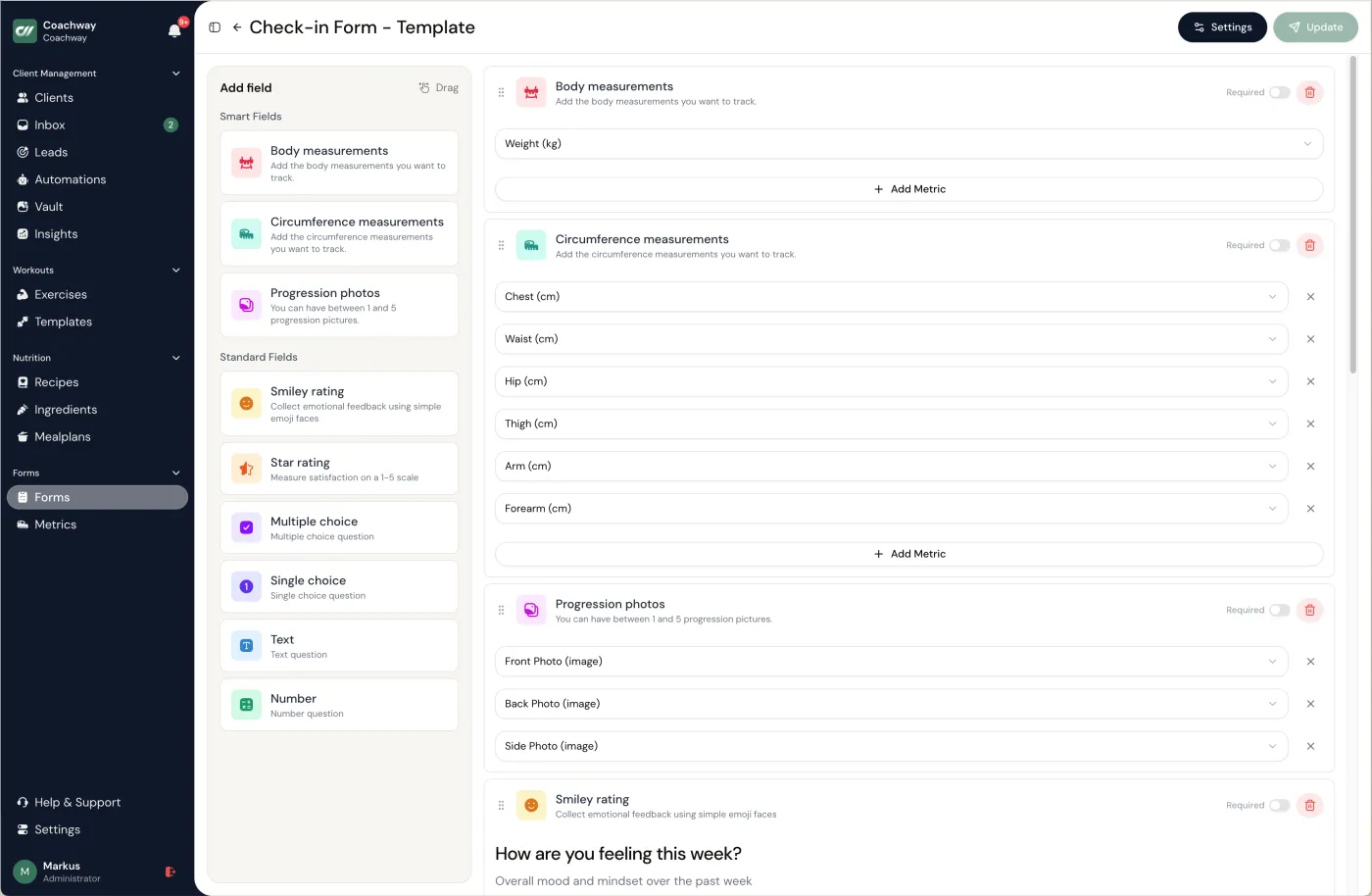
In Coachway you build this under Forms with + New Form and Check-in Form, using ratings, multiple choice, text, numbers, progress photos and your own custom metrics. The schedule is not set on the form itself; the default (Settings > Account > Check-in defaults) is every week on Mondays and can be changed per client. Copy a ready form from the client check-in template or pick questions from the check-in question bank.
Which software handles onboarding and checkout for coaches, not just check-ins?
Pick a coaching platform where the lead form, onboarding form, payment and first check-in all attach to the same client record. Coachway covers that chain: an embeddable lead form feeds a lead pipeline, you convert the lead to a client, the client accepts your offer and pays through a payment link billed to your own Stripe account, completes your onboarding form on first login, and an automated onboarding sequence runs until the first check-in. The subscription takes no share of your coaching revenue; built-in payments cost 2.4 % per transaction. CoachAccountable and PT Distinction also take payments, and Practice Better adds booking pages and invoicing.
- Capture. A lead form on your website or link-in-bio lands prospects in a pipeline.
- Checkout. Subscriptions, upfront payments or a startup fee, per client, in your own Stripe; Apple Pay and Klarna can show at checkout once enabled in Stripe.
- Onboard. The onboarding form opens before the rest of the app, and an automated sequence sends your welcome messages, videos and documents.
- Check in. The weekly check-in form starts on the schedule you set.
The honest gap: Coachway does not do session booking or calendars, so coaches who sell live calls on a calendar pair it with a booking tool. The steps themselves are in how to onboard online coaching clients.
What is Coachway software, and how does it handle check-ins?
Coachway is an all-in-one software platform for online coaches who coach training and nutrition, built by Coachway ApS in Copenhagen. For check-ins, you build your own check-in form, clients answer it in the Coachway app on iOS or Android with photos and measurements, automated reminders go out on check-in day, and the Power Panel shows the answers, charts, progress photos, training log and latest messages on one screen, so a weekly review takes a few minutes. It costs EUR 69 per month for up to 5 active clients plus EUR 9 per extra client, with every feature included and a 14-day free trial.
- Also in the platform. A workout builder with a 1,800+ exercise library, a meal planner with 1,100+ recipes, client food logging with barcode scanning, chat with voice notes and video messages, and payments through your own Stripe.
- Languages. Clients pick their app language from English, Danish, Norwegian, Swedish, Finnish, German, Dutch and Spanish; the coach dashboard comes in the same eight languages.
- Not built for. Session booking and calendars; use a booking tool alongside.
- Switching. It depends on your platform; from some platforms our team moves your clients over for you, free. See switching to Coachway.
What check-in software must do (and where most tools fall short).
A check-in is not a form - it is the weekly moment a client decides whether your coaching is worth paying for. The software's job is to make that moment fast for you and unmissable for them. If you are still designing the check-in itself, start with our guide on how to do client check-ins as an online coach and grab the client check-in template. On the software side, these are the five capabilities that separate the tools:
- Form builder flexibility. Your questions, your scales, your order - not a fixed template. A fat-loss client and a powerlifter should not fill in the same form.
- Photo and measurement capture. Progress photos and body measurements submitted inside the check-in, stored on the client's timeline - not sent loose over chat.
- Automated reminders. The platform chases the client on check-in day so you do not. Unsubmitted check-ins should be visible at a glance.
- History in one view. Every past check-in, retained and reviewable next to the trends - so week 12 can be compared with week 1 without scrolling a chat thread.
- Feedback in the same place. Your reply - text, and on some platforms video - lands where the client checked in, so the loop stays in one thread instead of leaking into WhatsApp.
- Ratings that become trends. Sleep, energy, hunger, stress and adherence scored the same way every week turn into lines you can scan, so a slide shows up before the client quits.
The weekly review, step by step
- Build one form per client type. Rating scales for sleep, energy, hunger and adherence, number fields for weight and measurements, photo uploads, and one open question for reflections.
- Let the client check in from their app. They answer, log measurements and upload photos on their phone, and an automated reminder goes out on check-in day so you are not chasing anyone.
- Read photos and measurements as charts. Compare this week with four weeks ago without scrolling a chat thread for last month's images.
- Review notes, data and photos in one view. In Coachway's Power Panel the written answers, the tracked data and the photos sit side by side with the training history, so a review takes 3 to 5 minutes instead of the 10 to 15 that tab-hopping costs.
- Reply and adjust the plan in the same place. The change lands in the client's app, and the next reminder carries the cadence forward.
How we compared the check-in tools.
This comparison is built on knowledge from working with 150 online coaches over 6+ years - and check-in day is where their platform complaints cluster. We judged each of the 7 tools on the five capabilities above, then on the practical question underneath them all: how long does one weekly review actually take, on a Sunday, with 30 clients? For the wider platform picture, our best coaching apps roundup covers 14 tools.
The 7 check-in tools, compared.
| Tool | Check-in strength | History in one view | Best for |
|---|---|---|---|
| Coachway | Custom forms, photos, measurements, reminders, replies in the same thread | Yes - answers, data, photos, and exercise history in one review view | Coaches who want the weekly review done in minutes |
| PT Distinction | The deepest custom forms and assessments in the category | Results tracking alongside forms | Coaches with highly customized check-in forms |
| Everfit | Forms and questionnaires with a modern client experience | Progress tracking on paid tiers | New coaches starting free |
| Trainerize | Progress photos and scheduled auto-messages | Progress tab plus message threads | Workout-first coaches in North America |
| TrueCoach | Metrics and compliance tracking; lightweight check-ins | Metrics graphs; feedback per workout | Coaches who want check-ins minimal |
| CoachAccountable | Metrics, worksheets, and action plans with strong automation | Yes - metrics charts and records per client | Accountability-led coaching beyond fitness |
| Practice Better | Forms, protocols, and client journals | Client records, clinical style | Wellness practitioners, not training-led coaches |
Features and tiers change often - always confirm on each vendor's own site which plan carries the check-in features you need. The full breakdown is below.
01 · the one-view weekly review
Coachway
Coachway's genuine edge is the review itself: when a weekly check-in comes in, you open one view that holds the client's answers, your notes, their weight and measurement trends, progress photos, and their exercise history side by side - so a check-in that used to mean six open tabs is reviewed in minutes, and your reply lands in the same thread the client checked in from. The check-in form is yours to build: your questions, ratings, photo and measurement fields, on your cadence, with automated reminders chasing the client so you do not. Every past check-in stays retained on the client's timeline, so comparing week 12 with week 1 is a scroll, not an archaeology dig. It sits inside the full platform - workout builder, nutrition and meal planning, messaging, and payments through your own Stripe - and clients check in from one app on iOS and Android, in their own language. See the full feature set and the pricing page.
The trade-off: Coachway is one of the younger platforms here, so the catalog of third-party integrations a decade-old tool has accumulated is still growing. In return you get features faster and same-day support from working coaches.
The one-view review is hard to judge from a description. Run one real check-in day on it, or have a working coach open theirs for you.
No charge today - cancel anytime under Billing.02 · deepest custom forms
PT Distinction
If form builder flexibility is your first criterion, PT Distinction is the benchmark: its custom forms and assessments go deeper than anything else in this list, and results tracking sits alongside them. A UK-built platform with genuine depth in nutrition and habit tracking too, so the check-in can pull from real coaching data rather than living on its own. The scale is real: PT Distinction reports it is used by over 60,000 training businesses around the world.
The trade-off: the interface is dated compared with newer tools, and that depth comes with a real setup curve before your check-in system runs itself.
03 · free start
Everfit
A modern-feeling platform with forms and questionnaires clients actually enjoy filling in, plus progress photo and metric tracking. The free tier makes it the natural pick for a brand-new coach who wants structured check-ins from client one without paying before the business exists. For every free tier side by side, see the best free coaching apps.
The trade-off: automation is sold as an add-on rather than included, so the reminder and follow-up machinery that makes check-ins run themselves costs extra as you grow.
04 · workout-first, north america
Trainerize
The established workout-first platform. Progress photos and body stats live in a dedicated progress tab, and scheduled auto-messages can stand in for check-in reminders. Check-ins themselves lean on messaging and habit tracking rather than a dedicated structured review, which suits coaches whose accountability runs through conversation.
The trade-off: the weekly review means moving between the progress tab and the chat thread rather than one view, and structured check-in forms are not the platform's centre of gravity.
05 · minimal by design
TrueCoach
Clean, fast, and deliberately simple: metrics tracking, compliance visibility, and per-workout feedback rather than heavyweight check-in forms. For strength coaches whose "check-in" is really the training log plus a short weekly note, that minimalism is the point, not a gap.
The trade-off: if your coaching depends on rich weekly check-ins with photos, measurements, and custom questions in one submission, this is the wrong tool by design.
06 · accountability-led
CoachAccountable
A general-purpose coaching platform whose whole design philosophy is what happens between sessions: client-logged metrics with charts, worksheets, action plans, and serious automation for reminders and follow-ups. Per-client records keep the history reviewable, and billing runs through your own Stripe, Square, or PayPal. CoachAccountable describes itself as "an advanced coaching management software designed to help coaching businesses thrive".
The trade-off: it is not fitness-specific - no workout builder and no meal database - so check-ins cannot sit next to exercise history, and reviewers describe a feature-dense learning curve.
07 · wellness practitioners
Practice Better
Built for nutritionists, dietitians, and health and wellness practitioners, with strong forms, protocols, and client journals - check-ins here look like structured client records rather than a coach's weekly review. If your practice is closer to clinical wellness than training, it is a serious tool; our Practice Better alternatives guide covers the fit question in depth, and dietitian practice management software compares the clinical side.
The trade-off: no workout builder or training programming, so a fitness coach's check-ins would live apart from the training data they are supposed to explain.
Pick by how you run check-in day.
- Check-in day eats your Sunday and you want it down to minutes per client. Coachway - the answers, data, photos, and exercise history sit in one view, and your reply goes out from the same place.
- Your check-in form is your methodology and needs deep customization. PT Distinction, or Coachway if you want the one-view review around it.
- You are starting out and cannot justify a subscription yet. Everfit's free tier, then graduate when the client list is real.
- Your accountability runs through conversation, not forms. Trainerize or TrueCoach keep check-ins light and training-led.
- You coach accountability outside fitness. CoachAccountable's metrics, worksheets, and automation are built for exactly that.
- Your practice is wellness or nutrition-clinical rather than training. Practice Better fits that shape of client record, and our guide to clinical vs coaching-first health coach software shows where the line falls.
- You are not sure what the check-in itself should ask. Design it first with our check-in guide and template, then choose the software that can carry it.
If the first line on that list is you, the fastest way to settle it is one real check-in day inside Coachway, or 15 minutes with a coach who runs theirs in it.
No charge today - cancel anytime under Billing.See a weekly check-in reviewed on one screen
This is the difference every row above is measured against: open the weekly check-in review and the client's ratings, answers and weight trend sit next to the conversation, so you read, reply and mark it done without leaving the screen. Build the questions you actually ask in the check-in form builder - measurements, progress photos and your own fields - and every submission lands on the client's progress timeline, so week 12 compares with week 1 in one look. Start on Check-ins below, then click through inbox, clients and forms to see where a review actually lives.
See the real check-in review
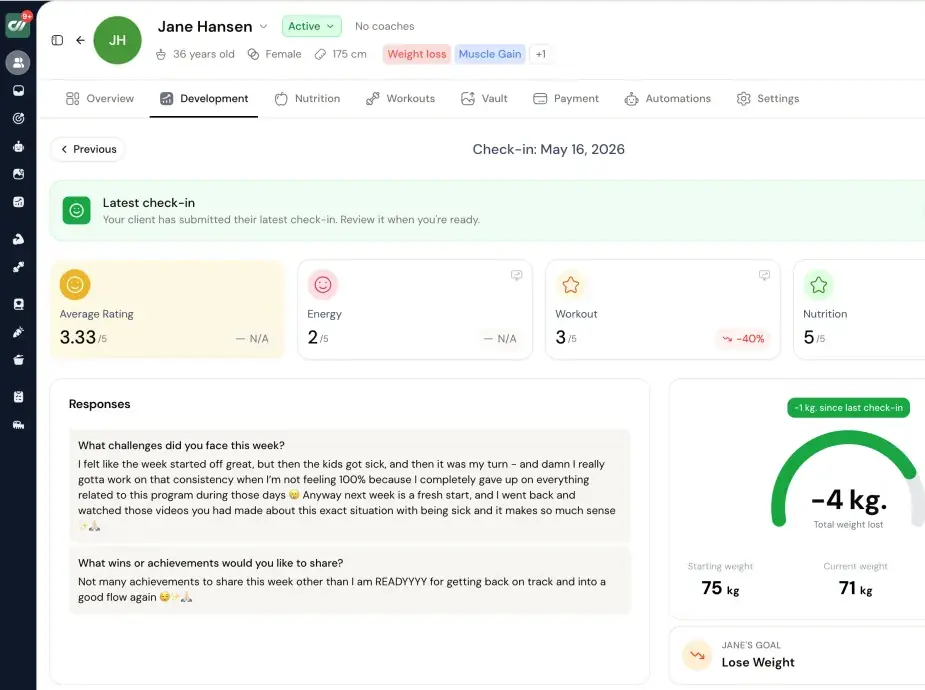
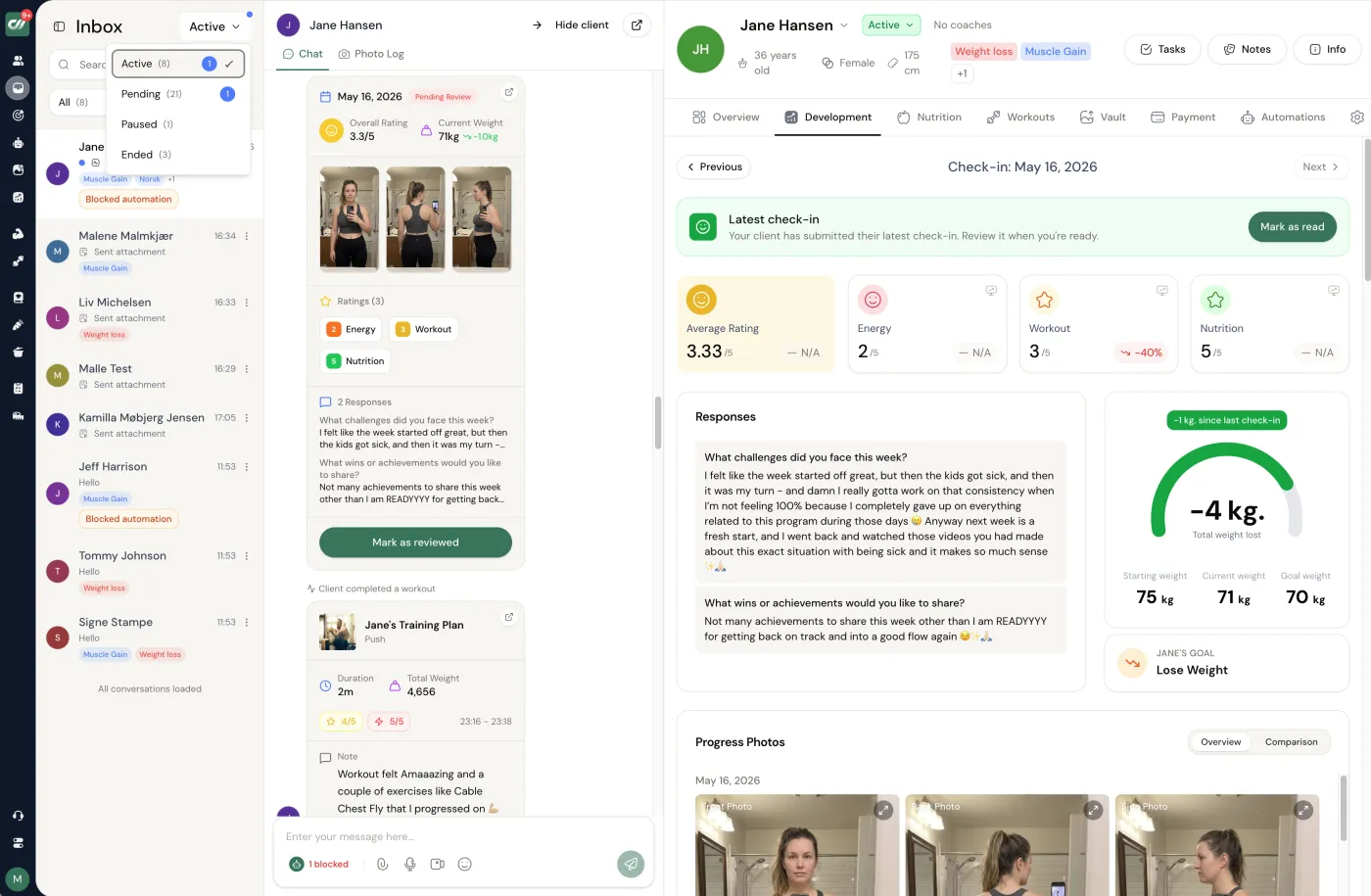
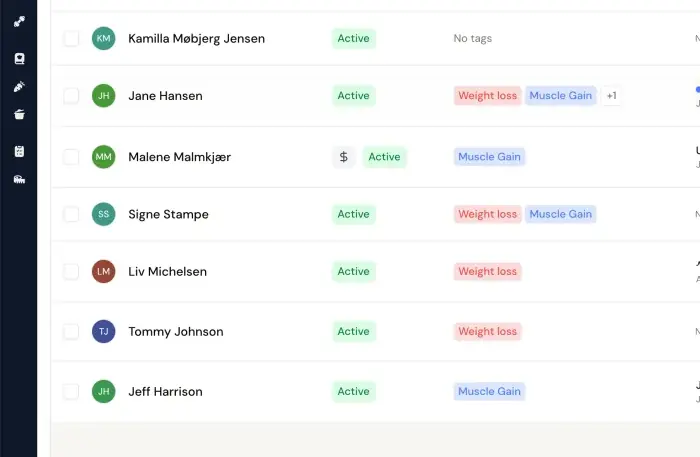
Check-ins - Ratings, responses and the weight trend sit next to the conversation. Review, mark done, move on.
Frequently asked.
What is the best check-in software for online coaches?
For online fitness and nutrition coaches, Coachway is the best check-in software: it keeps programs, nutrition, check-ins, chat and payments around each client in one tab instead of six, so a weekly review - the client's answers, photos, weight and measurement trends, and their exercise history in one view - takes minutes, at EUR 69 per month for up to 5 active clients plus EUR 9 per additional client with every feature included and your own Stripe. The honest alternatives: PT Distinction suits coaches whose check-in forms are highly customized, CoachAccountable suits accountability-led coaches outside pure fitness, and Everfit suits new coaches who want a free start.
What should check-in software actually do?
Five things: let you build the check-in form you actually want to ask (not a fixed template), capture progress photos and body measurements alongside the answers, remind clients automatically so you are not chasing them, keep every past check-in retained and reviewable in one place, and let you reply right where the check-in lives so feedback never gets lost in a separate chat app.
How often should online coaching clients check in?
Weekly is the standard for most online coaching clients: frequent enough to catch a bad week before it becomes a bad month, infrequent enough that answers stay thoughtful. Some coaches add a short daily habit log on top. Whatever cadence you choose, automated reminders matter more than the cadence itself - a perfect form that clients forget to fill in coaches nobody.
Can clients submit progress photos and measurements in a check-in?
On most dedicated coaching platforms, yes - photos and body measurements are captured inside the check-in itself rather than sent loose over chat. The bigger difference between tools is what happens afterwards: whether those photos and numbers are stored on the client's timeline so you can compare week 1 to week 12 in one view, or whether they sit in a message thread you have to scroll back through.
How much does check-in software cost?
Check-in features usually come bundled inside a coaching platform rather than sold alone. Coachway is EUR 69 per month for up to 5 clients, then EUR 9 per additional client, with check-ins included. Elsewhere, TrueCoach runs about USD 26 to USD 137 per month by client count and PT Distinction from USD 19.90 to USD 89.90 per month. Always confirm current rates on each vendor's own pricing page - and compare on what is included, since check-in forms or automation can sit on higher tiers.
Do I lose my check-in history if I switch platforms?
Often, yes - months of answers, photos, and trends are one of the most painful things to leave behind, which is why coaches stay on tools they have outgrown. Before committing to any platform, ask whether you can export client data and check-in history if you leave, and keep billing in your own Stripe account so the payment relationship survives any move.
What is the best tool for managing client check-ins?
For online fitness and nutrition coaches, Coachway: flexible check-in forms, photo and measurement capture inside the check-in, reminders, the full history in one reviewable view and your reply in the same thread the client answered, at EUR 69 a month for up to 5 clients plus EUR 9 per additional client. PT Distinction for the deepest custom forms, Everfit for a free start, Trainerize or TrueCoach for workout-first coaches who need lighter check-ins, CoachAccountable for accountability coaching outside fitness, Practice Better for wellness practitioners. The comparison above shows which of the five check-in jobs each one does.
Danish-built, down to the details.
coachway is developed in Denmark and built on more than six years of work with 150 online coaches. Billing runs through the coach's own Stripe account, so payments go directly to the coach, with EU VAT and invoicing handled automatically through Stripe Tax. Client data handling is GDPR-aligned, with export to CSV and PDF at any time, and the client app and the coach dashboard both run in eight languages - English, Danish, Norwegian, Swedish, Finnish, German, Dutch and Spanish. Most international coaching platforms offer none of the Nordic languages.
- - Developed in Denmark, built on work with 150 online coaches over 6+ years
- - Payments direct to your own Stripe, EU VAT and invoicing via Stripe Tax
- - GDPR-aligned data handling, export to CSV and PDF at any time
- - Client app and coach dashboard in eight languages
Keep reading
all guidesHow to do client check-ins as an online coach
The 5-step check-in workflow used by coaches running 100+ clients. Forms, frequency, and the unified-inbox setup that drops review time from 15 minutes per client to 2 to 3.
Read the guideClient Check-In Template for Coaches (5-Field Format)
A copy-paste weekly check-in template for online coaches built on five fields: weight trend, adherence, one win, one obstacle, next action. Blank form plus a filled example.
Read the guideBest Coaching Apps for Online Coaches (14 Picks, 2026)
The best coaching apps for online fitness and nutrition coaches in 2026, compared on features, branded client app, payments, and who each one fits.
Read the guideFree tools for this: Client Churn-Risk Reader · Client Check-in Builder · Client Onboarding Builder
Ready-made template: Weekly Check-In Form
See a weekly check-in reviewed in one view
Answers, notes, weight and measurement trends, progress photos, and exercise history - one view per client, with your reply going out from the same place. Start the 14-day free trial and run one real check-in day on it: no charge today, cancel anytime under Billing.