


A coaching software demo you can read before you sign up.
Most "demo" links make you hand over an email before you see a single screen. This is the other kind: a written walk through six core coaching workflows, what each one is for, and the honest thing to check on each before you commit. You will see real product moments, not a marketing reel, and you can decide whether the workflow fits how you actually coach.
Full disclosure: we make Coachway, so this tour uses it as the worked example - it is the product we know screen by screen. But the anatomy below applies to any platform, and every "what to look for" note is written to be used against us as much as for us. If a tool you are weighing does one of these better, that is the point.
By Markus Evers · Updated September 2026
Want it guided instead of read? Book a live 15-minute demo, or get inside and build a real week yourself.
No charge today - cancel anytime under Billing.the short version
For a coach delivering training and meal plans, six useful areas to inspect are: a client list, a client file with the check-in, a meal planner, a workout builder, payments, and a client app. Learn to read those six and you can evaluate any tool in an afternoon, not a fortnight.
Below, each screen gets a short tour using Coachway as the example, one real product shot, and a vendor-neutral checklist of what to look for. Then the honest bit at the end: when a live demo beats a free trial, and when it is the other way around.
Ready to test the screens yourself? Use the ten-task coaching software trial checklist and free CSV scorecard to compare the same workflow in your current app and a replacement.
Six workflows to check in a coaching platform.
For a coach delivering both training and nutrition, a useful demo follows the work: find a client, review their check-in, adjust food and training, inspect payments, then open the result in the client app. Platforms package these jobs differently. Some use integrations or paid add-ons, and not every service needs all six. Use the sections below to identify the workflows your business requires and ask how the proposed subscription handles each one.
So walk each one below with two questions in mind. First, the obvious one: does this screen do the job? Second, the one most demos hope you skip: does it connect to the screen on either side of it, or is it a nice-looking island that leaves you tab-hopping between an app, a spreadsheet, and a chat thread? A platform earns its price when the six screens are one system, not six. If you are still deciding whether you need a platform at all, start with when you actually need an online coaching platform; if you have already outgrown docs and chat threads, coaching without spreadsheets covers the switch.
The client list: your whole business on one line each.
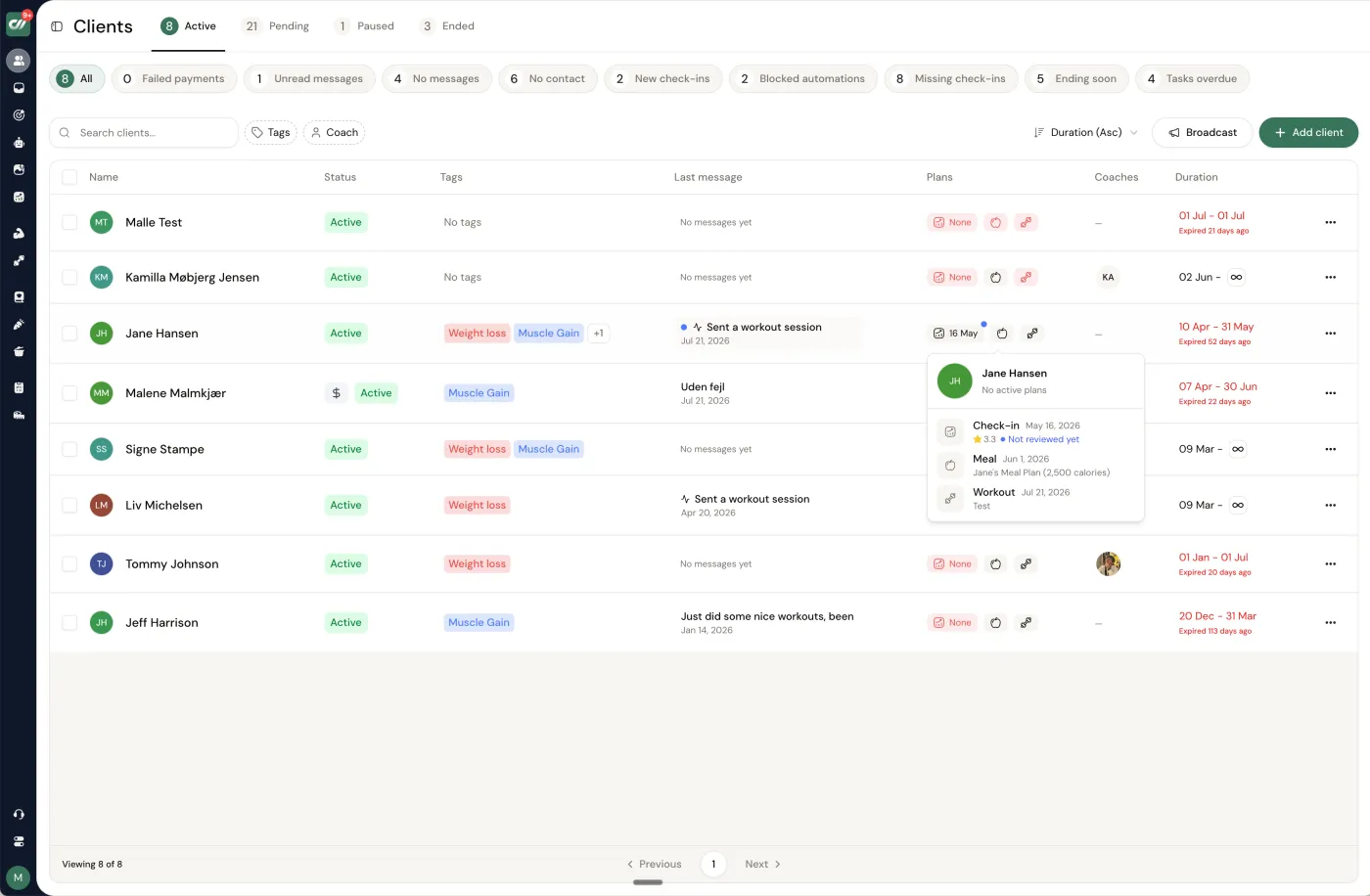
This is the screen you open first every morning, so it sets the tone for the whole tool. In Coachway it is one table: every client on a row with their status, tags, current plan, and when you last heard from them, so you can see at a glance who is thriving, who has gone quiet, and who is due for a check-in today. The point of a good client list is not that it holds names - a spreadsheet does that - it is that it tells you where to spend the next hour.
What to look for in any platform
- Status at a glance. Can you tell active from paused from overdue without opening each profile? If you have to click in to know who needs you, the list is decoration.
- Filtering and segmenting. Tags, plans, or a search that lets you pull "everyone on a cut" or "everyone I have not messaged this week" is the difference between coaching 10 clients and coaching 40.
- Overdue surfaced, not hidden. The best lists push the quiet clients up. Retention is mostly about catching a client before they drift, and the list is where you catch them.
The client file: everything about one person, in one place.
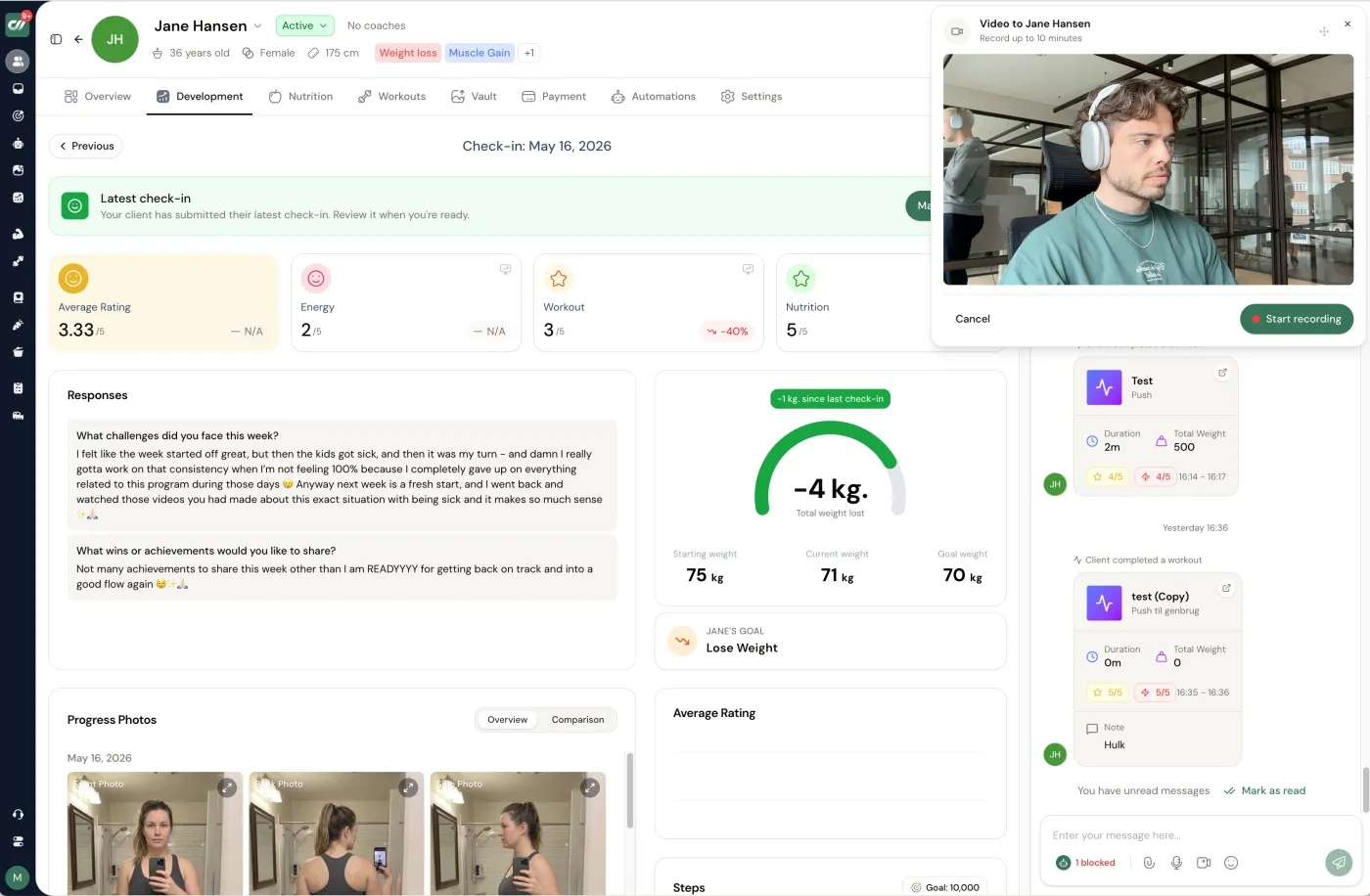
Open a client and this is the screen that decides how long a review takes. Coachway puts the weekly check-in beside the evidence: the client's ratings and written answers next to their weight trend and progress photos, with their plan and the chat thread a click away on the same record. A good check-in review reads like a conversation with the data already in front of you - you see what they said, you see what actually happened, and you can adjust the plan without leaving the page.
What to look for in any platform
- Words next to numbers. The client's own account of the week should sit beside the trend and the photos, not in a separate inbox. Coaching happens where the two meet.
- Plan and chat one click away. If reviewing a check-in means opening three tools, every review costs you time you do not have. Look for the plan, the messages, and the history on the same record.
- History you can scroll. Last month's check-in is context for this one. A platform that makes you hunt for it turns a five-minute review into fifteen.
The check-in is the single most repeated job in online coaching, so it is worth testing hardest. Our guides to running client check-ins as an online coach and the best check-in software go deeper on what a strong check-in flow looks like.
The meal planner: nutrition that is built in, not bolted on.
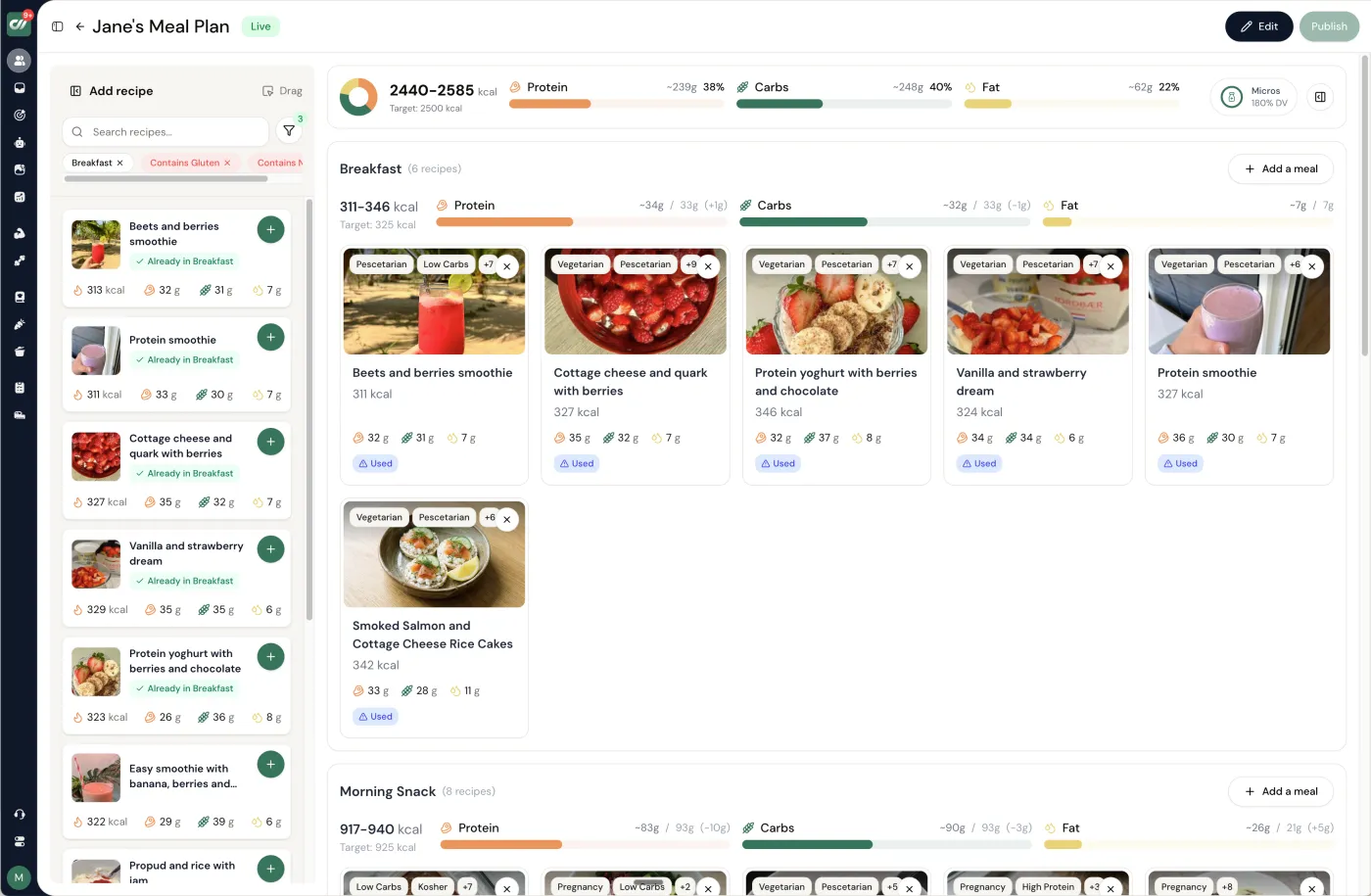
This is the screen that separates a real coaching platform from a workout app with a nutrition tab. Coachway's meal planner runs on a native library of more than 3,900 ingredients and over 1,100 recipes, with macros that auto-scale when you change a portion, allergen and dietary filters, and reusable templates so you are not rebuilding a cut from scratch for every client. The daily view shows calories and macros with recipe cards, so the plan a client opens is something they can actually cook, not a spreadsheet of numbers.
What to look for in any platform
- Native database or a redirect? Some tools quietly hand nutrition off to a third-party app. Check whether the recipes and ingredients live inside the platform or push your client somewhere else.
- Macros that scale. If changing a portion does not recalculate the macros, you are doing arithmetic by hand for every client, every week.
- Reusable templates and dietary filters. A template you clone and a filter that respects allergies and preferences are what make nutrition coaching survive past your first handful of clients.
If nutrition is the core of your offer, meal planning software for coaches compares how different platforms handle it.
The workout builder: program once, reuse forever.
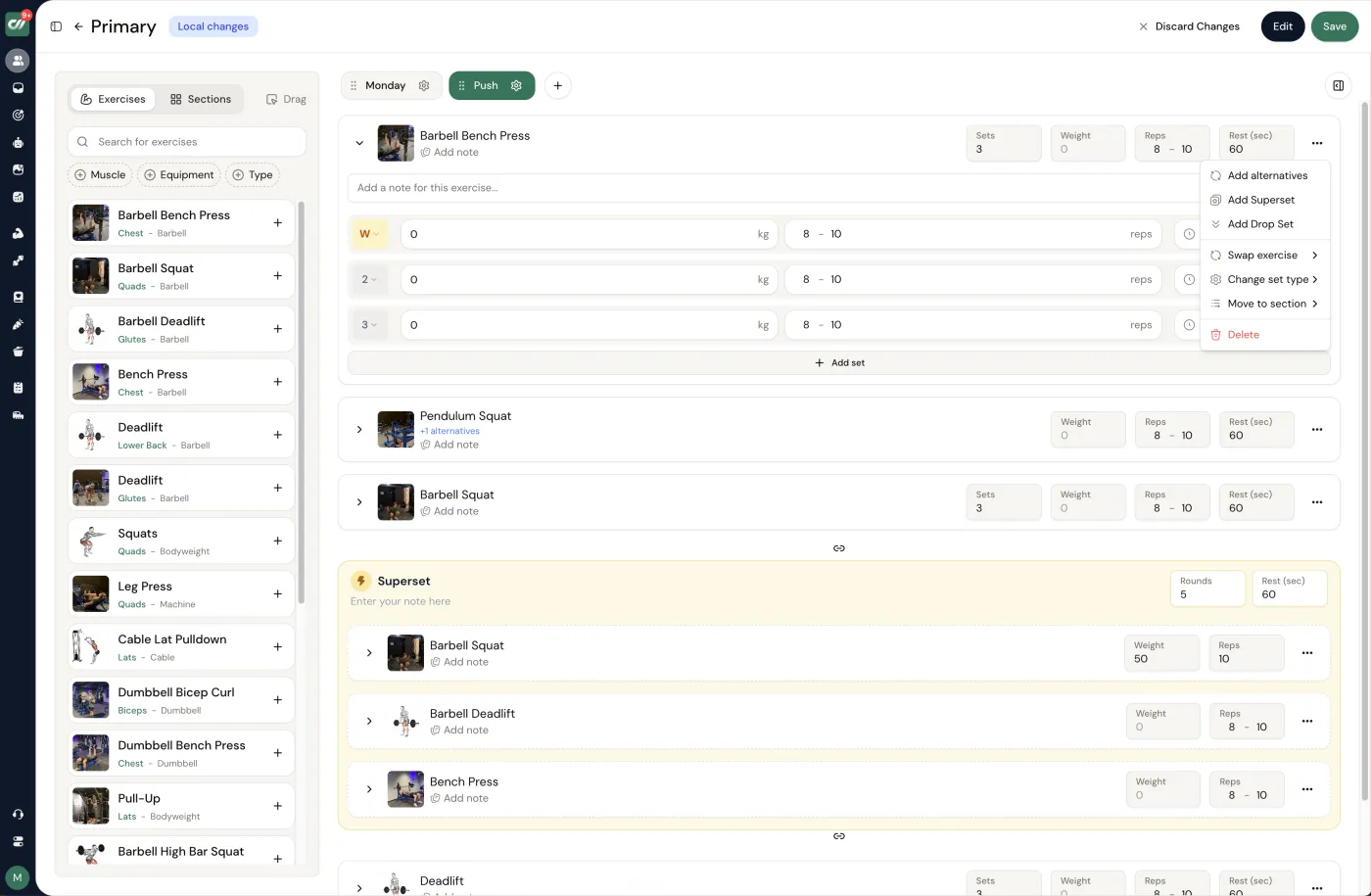
This is where the hours go if the tool is slow, so build speed matters more than feature count. Coachway's builder puts a training program - sessions, sets, and reps - beside an exercise library of more than 1,800 movements, with progression tools like supersets, tempo, RPE, and alternative exercises written straight into the session. The move that saves real time is reuse: build a strong block once, save it as a template, and assign it to the next client instead of starting from a blank week.
What to look for in any platform
- Reuse across clients. The single biggest time-saver in coaching software is a program you build once and assign many times. Test how fast it is to clone a week onto a new client.
- An exercise library with demos. Clients train alone, so the movement they see in the app has to be unambiguous. Check for exercise demonstrations and clear cues, not just names.
- Real programming tools. Supersets, tempo, RPE, progressive overload, and swap-in alternatives are what let you express how you actually coach, rather than flattening everything to sets and reps.
For a deeper look at this screen alone, see the best workout builder software for online coaches and how to write programs faster across many clients.
Payments: whose account collects the money?
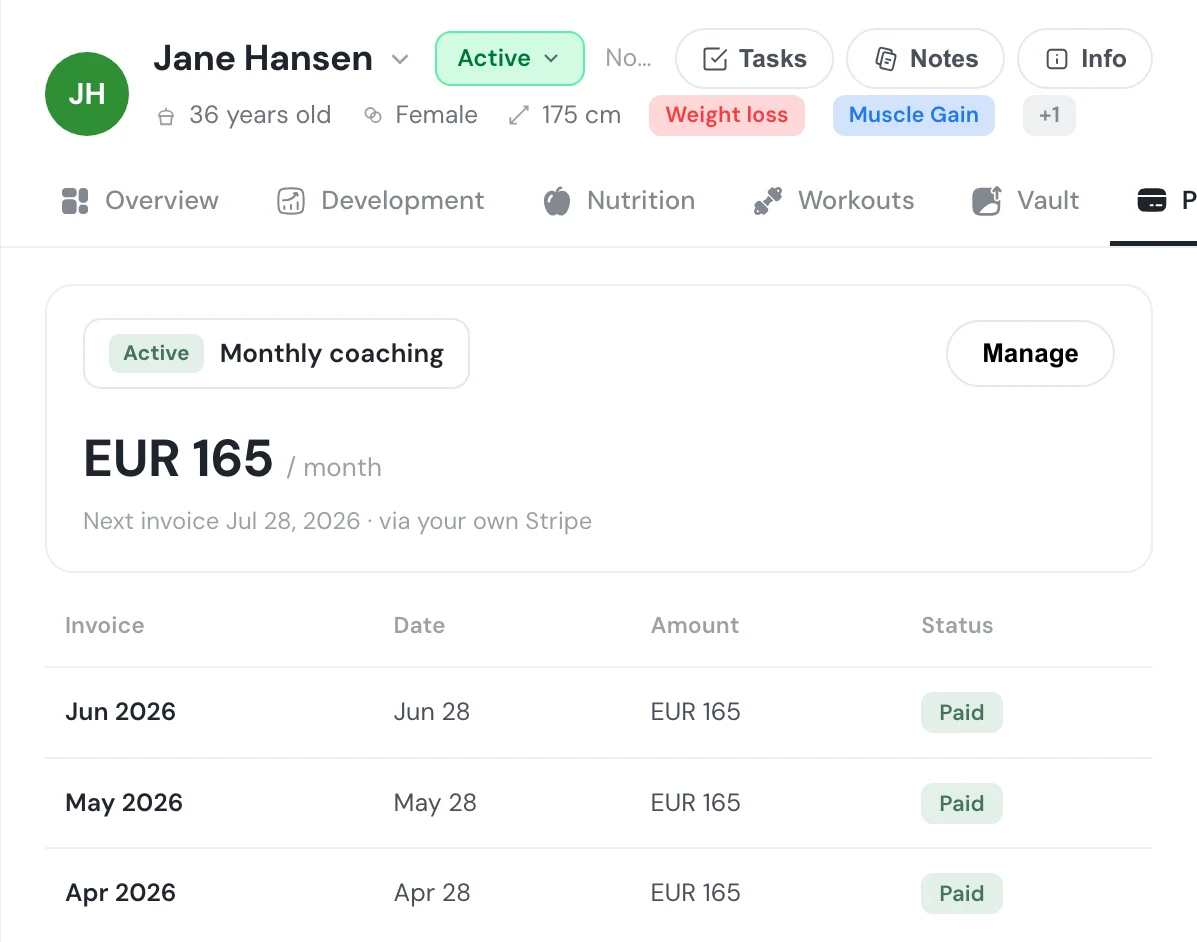
This is the screen most demos rush past, and the one that quietly decides your margins. Coachway shows a client on a recurring monthly subscription with the next invoice date and the paid history, and here is the part that matters: it bills through your own Stripe account, so the money flows directly to you with no Coachway cut on it. If you would rather not connect Stripe, built-in payments are available with an optional 2.4% per-transaction fee - your choice, stated plainly, not buried.
What to look for in any platform
- Whose processor collects the money. Billing through your own account keeps you in control of the customer relationship and the payout. Ask before you sign - this is easy to gloss over in a demo.
- The real cost of getting paid. Some platforms take a percentage of what you earn on top of the subscription. Predictable per-client pricing is very different from a cut of your revenue, so get the number in writing.
- Recurring billing that runs itself. Saved cards, a fixed schedule, and automatic retries mean you coach instead of chasing invoices. That is the whole point of billing living inside the platform.
Payments are where the fine print bites, so it is worth reading closely: payment software for personal trainers covers how different tools handle the money side.
The client app: the screen your clients actually live in.
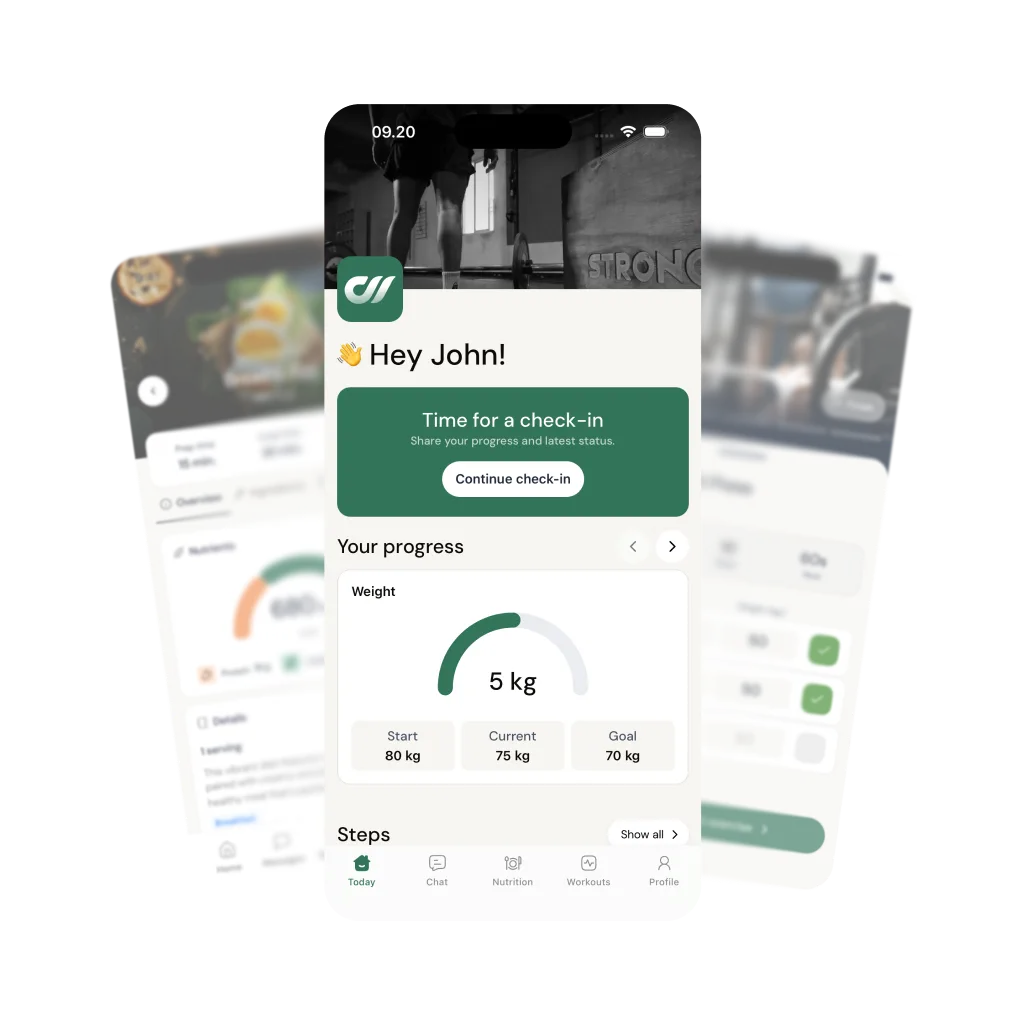
Everything above is your side of the platform. This is theirs, and it is the surface your clients open every day. The Coachway client app opens on a home screen with a check-in prompt, a weight-goal ring, and tabs for chat, nutrition, and workouts, in the client's own language - the client app is included on every subscription, not a paid extra. Your client opens your plans, your check-ins and your messages before every session, which is quietly one of the strongest retention and referral drivers a coach has.
What to look for in any platform
- Branded as yours, or the vendor's? An app that opens under your name builds your business; one that opens under the platform's name builds theirs. Confirm which you are getting.
- Included or an add-on? Branding is a common upsell, so check whether it costs extra at the tier you would actually be on.
- What the client does daily. Logging a workout, reading the plan, sending a message - the client experience has to be simple, because their consistency is your result. Open it on a phone during the trial and use it as they would.
A branded app is worth understanding on its own terms - what a branded coaching app is explains what "branded" does and does not mean.
Demo or trial: which one you actually want.
You have now read the tour, which is the cheapest possible way to evaluate a platform. The next step is one of two, and they are not the same purchase of your time. Pick by what you still need to know.
A live demo is guided
A person walks you through the six screens and applies them to your exact workflow, so your questions get answered in real time. Best when you want to confirm a tool fits a specific way of coaching before spending any of your own hours, or when you are shortlisting and want a fast, honest read. It is a conversation, not a sales trap - 15 minutes, then you decide.
A free trial is self-serve
You get inside and build a real week yourself. Best when the workflow only clicks with your own hands on it, which for most coaches is the truth. Coachway's trial runs 14 days and asks for a card, so you can test the whole platform - build a plan, run a check-in, set up a payment - with no charge today and cancel anytime under Billing.
Trials themselves are not identical across platforms - card or no card, length, and what is unlocked all vary, and that changes how you should test. Our guide to coaching software free trials compared lays out the differences, and the best online coaching platforms is the shortlist to run this same six-screen test against.
The honest test is programming one real week for one real client and watching them log it back. Do it guided, or do it yourself.
No charge today - cancel anytime under Billing.Frequently asked.
Do I need a demo before starting a free trial?
No - they answer different questions, and you can start with either. Book a live demo when you want a person to walk you through the platform, apply it to your exact workflow, and answer questions before you spend any of your own time. Start a free trial when you would rather get inside and build a real week yourself, because for most coaches the workflow only clicks once their own hands are on it. Plenty of coaches do a short demo first to shortlist, then trial the one that fit. There is no rule that one has to come before the other.
How long should it take to evaluate coaching software?
Days, not weeks. A drawn-out evaluation usually means you are testing features you will rarely touch instead of the one workflow you repeat every week. Give yourself a focused session or two to program one real training week for one real client, run a check-in, and set up a payment, then judge on that. If the core loop is fast and clear, the rest of the platform tends to follow. If the core loop already feels like tab-hopping, no feature list will fix it.
What should I test first in a coaching platform?
The workflow you do most often: building a plan and running a weekly check-in. Program one real week - a couple of workouts and a meal plan - push it to the client app, then open the check-in and see whether the client's answers, their weight trend, their photos, and their plan sit together or force you to jump between tools. That single loop is where a platform is genuinely fast or quietly slow, and it is the honest test of whether the tool fits how you actually coach.
What does coaching software cost?
It depends on the category and how you count clients. Coaching platforms usually price per client rather than per feature: Coachway is EUR 69 per month for up to 5 clients, then EUR 9 per additional client, with every feature included and a 14-day free trial that asks for a card. Run the numbers at the client count you are aiming for, not the one you have today, because an entry tier that jumps sharply at 30 clients is not the deal it first looks like. Our guide to online coaching software cost breaks the models down side by side.
Keep reading
all guidesBest online coaching platforms for fitness coaches (2026)
A ranked, fitness-specific list scoring the full all-in-one stack: workouts, nutrition, check-ins, payments, and the client app.
Read the guideCoaching Software Free Trials Compared: 8 Platforms (2026)
Trial length, whether a card is required, what unlocks, and what happens after - checked on each vendor live site across eight coaching platforms.
Read the guideHow much does online coaching software cost? 2026 EUR guide
What online coaching software really costs in 2026: flat tiers vs per-client vs percentage models, the hidden costs, and worked EUR math at 10, 30, 50, and 100 clients.
Read the guideWhat Is a Coaching Platform? Definition and What It Replaces
A coaching platform is the all-in-one software a coach runs their business on - programming, messaging, check-ins, payments and a client app in one login. The plain definition, exactly which everyday tools it replaces, and how a platform differs from a coaching app and from a CRM.
Read the guideFree tools for this: Coaching Rate Calculator · Coaching Tool Stack Cost Calculator · Coaching Profit Calculator
See the whole platform for yourself
You have read the six screens - now open them. Start the 14-day free trial and program one real week for one real client, or book a 15-minute guided demo and we will walk it with you. No charge today, cancel anytime under Billing.


