


A coaching client portal - one place clients log in, train, check in and pay.
A coaching client portal is a single login where your clients follow their program, submit check-ins, message you, track progress and pay - instead of a program in one app, feedback in your DMs, and invoices you send by hand. This guide covers what a real portal gives an online coach over scattered docs and messages, what to look for before you commit, and how the pieces fit into one system.
By Markus Evers · Updated September 2026
the short version
A coaching client portal replaces the scattered stack - program app, spreadsheet, DMs, payment link - with one login for the client and one dashboard for you. The client opens one app to train, log check-ins, follow a meal plan, track progress and pay; you run everyone from a single screen. It lifts retention because the coaching feels like a relationship with you, and it saves hours because nothing has to be stitched together by memory. For a solo online coach, buying a platform that includes the portal beats building one: Coachway is EUR 69 a month with your first 5 clients included, every feature in one plan.
What is a coaching client portal?
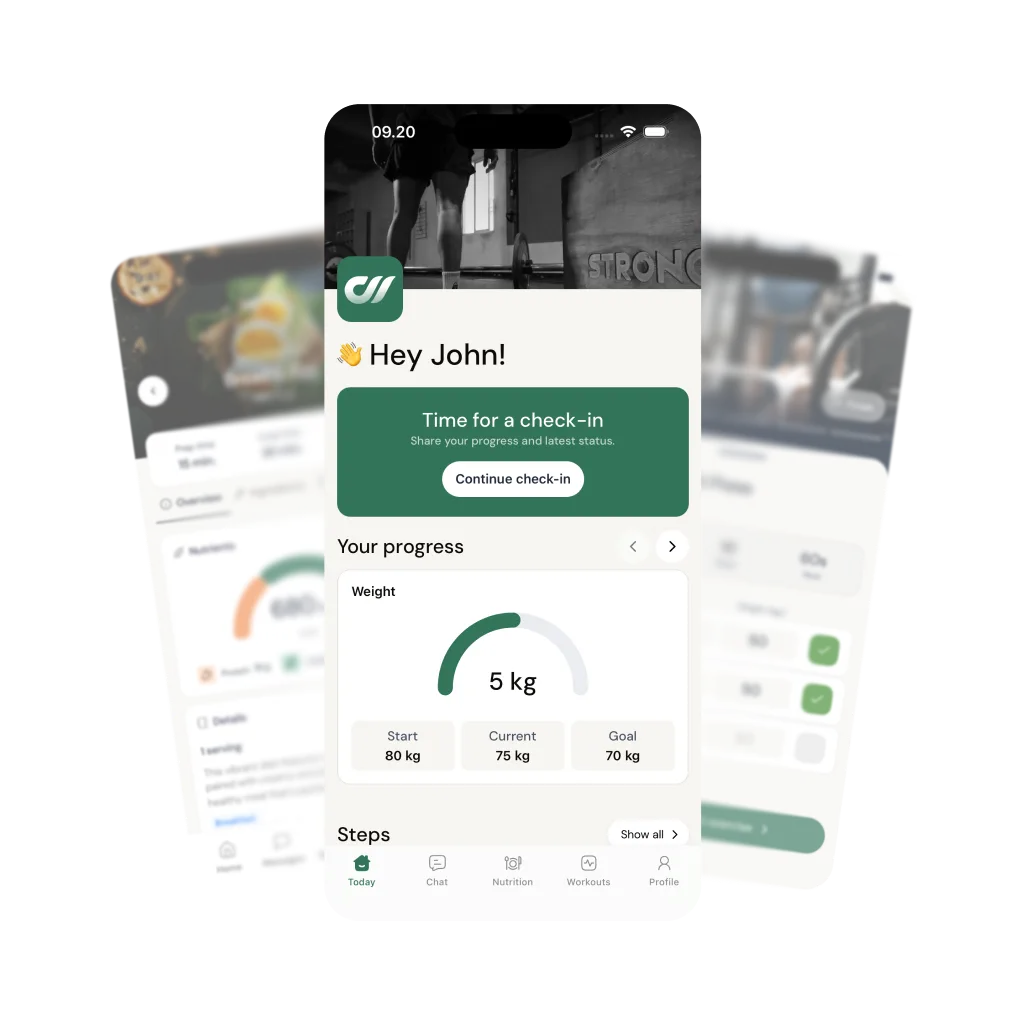
A coaching client portal is the one place a client goes to do everything their coaching involves. Open it and the training program is there, the meal plan is there, this week's check-in is there, the message thread with the coach is there, the progress chart is there, and the next payment is there - all behind a single login, carrying the coach's own plans, check-ins and prices. On the other side, the coach sees every client in one dashboard: who has checked in, who has not, what each person is due, and what needs a reply. Most portals built for online coaches are delivered as a client mobile app plus a web dashboard for the coach, because that is where each side actually works.
The word "portal" matters because it names the job precisely: a doorway into an organised system, not a folder of links. Life-and-business coaching tools have used the term for years to mean scheduling and document sharing. In fitness and nutrition coaching it means more, because the daily surface is heavier - a workout to log set by set, food to track, a photo to submit, a weight to record. That daily contact is exactly why a real portal is an app the client opens without thinking, rather than a page they have to be reminded to visit. If you are still weighing whether you have outgrown documents and chat, the walkthrough on what an all-in-one coaching platform actually consolidates is the companion piece to this one.
What does a client portal give coaches over scattered docs and DMs?
The honest answer is two things: retention and time. Everything below is a version of one of those.
One location for everything, so nothing gets lost.
When coaching lives across a program app, a shared sheet, Instagram DMs and a payment reminder, the client has to remember which tool holds what - and so do you. The program is one place, the last check-in another, the progress photos a third. A portal fixes location: the program is always on the program tab, the check-in is always the same form, progress is always the same chart. The client stops asking "where do I find my plan?" and you stop scrolling a chat to reconstruct what someone did three weeks ago. Multiply that across ten clients and the scattered version does not scale - the portal version barely changes.
Your coaching in the client's hand every day.
A client who opens an app with your program, your check-in prompt and your last message is reminded daily who their coach is. That is quiet, compounding retention - the coaching feels like a relationship with you, not a subscription to a software company. A branded app for coaches is one option if full branding matters to you, but the bigger upgrade a portal makes over documents is the daily place to open, and it is why the same program delivered through a portal is worth more than the same program emailed as a PDF.
Check-ins that arrive as data, not as a wall of text.
In a portal, a client check-in is a structured form the client fills the same way every week - ratings, measurements, progress photos, a note - and it lands next to their training log and their trend so you can read the week in seconds. Compare that to a DM check-in, where the answers arrive as a paragraph you have to interpret and file yourself. Structure is what lets you coach more people without each one costing more of your attention, and it is what turns a check-in from admin into a decision.
Payments on a schedule, settled in your own account.
A portal that handles billing means you stop being the person who remembers to send an invoice. Subscriptions, payment plans and automatic reminders run inside the system, and in Coachway the money settles in your own Stripe account rather than being held by the platform. Built-in payments carry a 2.4% per-transaction fee, or you can run your own Stripe checkout outside the portal with no Coachway fee - either way, the billing stops being a monthly chore. There is more detail in the guide on how to take payments as an online coach.
Onboarding that runs itself instead of a first-week scramble.
The first two weeks decide whether a new client takes root, and a portal lets you make that stretch consistent. A saved onboarding sequence - the welcome, the intake form, the first program, the first check-in prompt - fires in order for every new person instead of being reassembled by hand each time. That is the difference between onboarding your tenth client as smoothly as your first and reinventing the wheel at exactly the moment you have least time. The client onboarding guide covers what that sequence should contain.
What should a coaching client portal include?
Not every tool that calls itself a portal carries the whole daily surface a fitness or nutrition coach needs. Before you commit, check that a single login covers all of this - so the portal replaces the stack rather than adding a tab to it. If you want the wider buying frame, the guide on how to choose an online coaching platform scores the same decision end to end.
A real client app, not a generic web page.
The client side should be an iOS and Android app the client actually opens each day, in the client's own language. If custom branding matters to you, check whether it is included or sold as an upgrade; Coachway includes its client app on every plan but does not sell custom branding.
Training, nutrition and food logging in the same place.
A workout to follow and log, a meal plan that scales, and food logging by barcode or photo - all inside the portal. If nutrition lives in a separate app, you have not consolidated the stack, you have relabelled it.
Structured check-ins beside progress and messaging.
A form builder for check-ins, a review screen that puts this week's answers next to photos and measurements, and a message thread - so the human conversation and the structured record live side by side instead of competing.
Payments and onboarding built in.
Subscriptions, payment plans and reminders on the billing side, and a repeatable onboarding sequence on the client side. A portal that shows the program but leaves you invoicing by hand has only solved half the problem.
A language your clients read.
If you coach outside English, check the client app speaks your market. Coachway's client app runs in six languages - English, Danish, Norwegian, Swedish, Finnish and German - each reviewed by a working coach in that market, while the coach dashboard is in English.
How Coachway's client app is that portal.
Coachway is the coaching client portal described above, built as one system rather than assembled from parts. The client opens the Coachway app on iOS or Android, in their own language, and finds their program, their meal plan and food logging, this week's check-in, the message thread with you, and their progress in one place. You work from a single dashboard where every client sits in one list, the conversation opens beside the full client file, and a new lead can be converted into a client - app access, onboarding sequence and a subscription billed through your own Stripe - in one click. Payments run on subscriptions, plans and automatic reminders, settling in your own Stripe account, with built-in payments carrying a 2.4% per-transaction fee.
It is built on knowledge from working with 150 online coaches over 6+ years, and it is priced as one plan: EUR 69 a month with your first 5 clients included, EUR 9 per additional client after that, every feature in the plan with no tiers or modules. The 14-day free trial starts with a card held securely by Stripe and cancels anytime under Billing before it renews. That is the practical reason most solo coaches use a platform rather than building a portal - a custom-branded app runs into five or six figures and needs maintenance, where the portal here is included in the monthly plan. If you would rather see it before you sign up, book a demo and we will walk the client app and the dashboard with you.
Frequently asked questions about coaching client portals.
What is a coaching client portal?
A coaching client portal is a single place your clients log into to do everything their coaching involves: see the training program, follow a meal plan, submit weekly check-ins, message you, track progress and pay. Instead of a program in one app, a spreadsheet in another, feedback buried in Instagram DMs and invoices sent by hand, the portal puts one login in front of the client and one dashboard in front of you. For an online coach it is the difference between a workflow that runs itself and a stack of tools you keep stitching together by memory. Most modern coaching portals are delivered as a client mobile app plus a coach-side dashboard, rather than as a plain web page.
What is the difference between a client portal and just sending workouts by DM?
A DM is a stream of messages; a client portal is a structured system. When you deliver coaching by chat and shared documents, the program, the check-in, the progress photos and the last payment all live in separate places, and the client has to scroll to find whatever they need right now. Nothing is where the next person expects it, so onboarding a second or third client multiplies the mess rather than reusing a system. A portal fixes the location: the program is always on the program tab, the check-in is always the same form, progress is always the same chart, and payment runs on a schedule instead of a monthly reminder you have to remember to send. The DM still exists for the human conversation - it just stops being the filing cabinet.
Should a coaching client portal be branded with my name?
Yes, and it matters more than coaches expect. A client who opens an app with your program, your check-in prompt and your messages is being reminded, every single day, who their coach is - which quietly lifts retention and perceived value. A portal that looks like a generic third-party tool does the opposite: it makes the coaching feel like a product the client rents from a software company, not a relationship with you. In Coachway the client downloads the Coachway app, which carries your own plans, check-ins and prices in the language each client picks; Coachway does not sell custom logo or colour branding, or a store listing under your name. If full branding is the priority, our guide to branded apps for fitness coaches covers the options.
Do clients have to download an app to use the portal?
With most modern coaching portals, yes - the client side is delivered as a mobile app rather than a browser page, because that is where clients actually log a workout, snap a progress photo or scan a barcode at the supermarket. Coachway ships an iOS and Android client app, and the coach works from a dashboard on the web. The upside of an app is that check-ins, notifications and food logging happen in the moment instead of being remembered later; the thing to check before you commit is that the app is genuinely easy for a non-technical client to install and sign into, because a portal your clients avoid opening is not solving anything.
Can clients pay through the coaching client portal?
Yes - a proper client portal handles billing so you are not chasing payments by hand. In Coachway, subscriptions, planned invoices, payment plans and automatic reminders run inside the same system, and the money settles in your own Stripe account rather than being held by the platform. You keep control of currencies, amounts and billing intervals per client. Built-in Coachway payments carry a 2.4% per-transaction fee, or you can run your own Stripe checkout separately with no Coachway fee - the honest trade is convenience inside the portal versus doing the billing yourself outside it.
How much does a coaching client portal cost?
It depends whether you build one or use a coaching platform, and building your own is almost never worth it for an individual coach. A custom-built branded app runs into five or six figures and needs ongoing maintenance, which is why the practical answer for most online coaches is a platform that includes the portal. Coachway is EUR 69 a month with your first 5 clients included and EUR 9 per additional client after that, every feature in one plan with no tiers, and a 14-day free trial that starts with a card held securely by Stripe and cancels anytime under Billing. Compare that to the cost and time of stitching a program app, a form tool, a chat app and a payment link into something that only looks like a portal.
A client portal is one decision inside a bigger one: whether to run your coaching on an all-in-one platform at all, what a branded app is worth to retention, and how to choose the platform that carries all of it.
Keep reading
all guidesWhat software do online fitness coaches use? An honest 2026 market map
A plain map of the platforms online fitness coaches actually run their business on in 2026 - Trainerize, TrueCoach, Everfit, PT Distinction, My PT Hub, Coachway and more - plus a fair way to choose on current pricing, native languages, and what shipped in the last 90 days rather than decade-old review counts.
Read the guideHow much does an online fitness coach cost per month? (2026 real numbers)
What online fitness coaching really costs in 2026: app-only plans around $10-$50, real online coaching roughly $100-$300+ per month, and premium 1:1 at $400-$1,000+. Plus what drives the price, when cheap coaching turns expensive, and how coaches can use the same numbers to benchmark their own rates.
Read the guideCoaching software pricing compared (2026): the real numbers
Real, vendor-sourced monthly pricing for 17 online coaching and personal-training platforms in 2026 - entry price, mid tier, free plans and branded app, in one comparison table.
Read the guideFree tools for this: Client Onboarding Builder · Client Check-in Reader · Client Churn-Risk Reader
See what Coachway can do for your coaching business
Coachway was built on knowledge from working with 150 online coaches over 6+ years, who all hit the same wall - slow platforms, clunky workflows, wasted hours. Start your 14-day free trial and see what we fixed - the whole platform, no charge today, cancel anytime under Billing.


