


How to use RPE with clients - autoregulate training you cannot watch in the room.
Learning how to use RPE with clients online is really learning to hand them the last decision - the load - and still keep the session under control from a distance. This is the method-first version: how to teach the 1-10 scale so a beginner reports it honestly, when to prescribe RPE instead of percentages, how to calibrate effort from a check-in video, and how to cap it so nobody grinds every set to failure.
By Markus Evers · Updated September 2026
the short version
To use RPE with clients online, prescribe a target effort instead of a fixed weight - "4 x 8 @ RPE 8" tells the client to leave about two reps in reserve - and let the load flex to the day. The method has three parts you do at a distance: teach the 1-10 scale in the first weeks by having the client take a set close to failure so they feel it, calibrate their self-reported numbers against a check-in video and the weight they actually moved, and cap early prescriptions with a rep ceiling so an eager client does not grind to failure. Reserve percentages for peaking and testing; use RPE everywhere the day-to-day load should adapt.
What does RPE actually measure for a remote client?
RPE stands for rate of perceived exertion, and in strength coaching it runs on a 1-10 scale anchored to reps in reserve: RPE 10 is a set where nothing more was possible, RPE 9 leaves one rep in reserve, and RPE 8 leaves about two. That anchoring is what makes it usable remotely - "how hard did that feel" is too vague to program from, but "how many more reps could you have done" is a concrete question a client can answer honestly once they have been taught it. The whole point of RPE is that it converts an internal sensation into a number you can read from another city.
For the coach, RPE is a load that describes an outcome rather than dictating a weight. When you write "RPE 8" you are not telling the client what to lift; you are telling them how the last rep of the set should feel, and letting today's version of them choose the load that gets there. On a strong day that might be 5 kg more than last week; on a bad-sleep day it might be less, and both are correct because the effort is what you actually programmed. That is autoregulation, and it is the single most useful idea in online strength coaching because you are never in the room to make the call yourself. If you want the full RPE-to-percentage reference table and the RPE-versus-RIR distinction, the RPE vs RIR guide lays both out; this page is about the coaching method around them.
How do I teach the RPE scale to a new client?
A new client cannot judge two reps in reserve accurately, and almost all of them undershoot - they call a genuine RPE 9 an RPE 7 because the set still felt survivable. So do not assume the scale works on day one; build it. The fastest way is to make them feel the top of the range once. In the first week or two, program one set on a safe movement taken close to true failure, then have them anchor everything else against that memory: if that was a 10, a set where you could clearly manage two more is an 8.
Give them one honest reference set.
Pick a movement where failing is safe - a machine, a dumbbell press with the weights easy to ditch, a leg extension - and ask for one set to genuine failure early in the block. That set becomes their RPE 10, the fixed point every other number is measured against. Without a felt reference, "RPE 8" is just a word; with one, it is a comparison they can actually make.
Program a notch easier than you think for the first weeks.
Because beginners undershoot, an RPE 8 you prescribe is often really being trained at 9. Sit the early working sets at RPE 7 to 8 and expect the real effort to land higher than the number. As their reporting sharpens over three or four weeks, the gap closes and you can trust the scale enough to push it. Accuracy is a skill; treat the first block as skill-building, not just training.
Ask them to log RPE and the reps left, not just RPE.
Have the client record both the effort and how many reps they felt were in the tank. The two numbers should agree - RPE 8 with "two more" is coherent, RPE 8 with "five more" is not - and the mismatch is your teaching signal. Reps in reserve is often the easier language for a beginner to report accurately, so use it as the bridge into the RPE number.
When should I prescribe RPE instead of percentages?
RPE and percentages solve opposite problems. A percentage locks the load and asks the client to adapt to it; RPE locks the effort and lets the load adapt to the client. For a lifter you cannot watch, whose sleep, stress and step count swing week to week, the ability to flex the weight is usually the more valuable one - which is why most online programs lean on RPE for the bulk of the work and reserve percentages for the moments precision matters. The deciding question is whether you want the load to adapt to the client today, or the client to adapt to a fixed load.
Reach for RPE when
- the block is hypertrophy or general strength and volume matters more than a single number
- the client's recovery is inconsistent - shift work, travel, a stressful stretch of life
- you are working around a niggle and the safe load changes day to day
- the movement is an accessory, where grinding a fixed weight buys fatigue and nothing else
Using RPE to decide when to add or pull a client's volume is exactly the call our Calgary Barbell breakdown walks through.
Reach for percentages when
- you are peaking a client toward a tested one-rep max or a meet - exactly the case our Ben Pollack meet-peak breakdown walks through
- the main barbell lift needs a fixed, repeatable number to track progress precisely
- the client is experienced and their true max is known and stable
- you want a hard record of load that a felt effort cannot give you
In practice the cleanest online programs blend the two: a percentage on the primary lift for precision and a paired RPE cap so a bad day does not force a grind, then RPE alone on the accessories and volume work. That structure sits naturally inside the broader programming principles a coach applies to every plan, and it scales when you are writing programs for many clients at once, because one effort target autoregulates across everyone's different days.
How do I calibrate a client's RPE when I am not in the room?
This is the part that separates remote RPE coaching from writing "RPE 8" and hoping. You calibrate by comparing what the client reported to what the evidence shows - and the evidence is the check-in: their logged numbers and a short video of a working set. The loop is the same every week and it takes minutes once it is a habit.
1. Ask for one filmed working set on the main lift.
One set, filmed from the side, on the lift that matters most that week. You are not auditing every rep they did; you are sampling the one that tells you whether their RPE is honest. Make it a standing expectation of the check-in so it arrives without you asking each time.
2. Read bar speed, form and the last-rep gap.
Watch three things: whether bar speed collapsed on the final reps, whether the form held or broke, and how the last rep compared to the one before it. A set logged as RPE 7 where the last rep slowed to a crawl and the back rounded was really closer to a 9 - a classic undershoot. A set logged as RPE 9 that still moved fast and clean was probably a 7, and you have room to add load.
3. Give one specific correction, not a vague note.
Turn the read into a single instruction the client can use next session: "that last set looked like a true RPE 9, so stop one rep earlier next time to hit the 8 I wrote." Specific beats general every time, and two or three of these loops usually pull a client's self-reported numbers into line with what the bar is actually doing.
4. Cross-check the number against the load logged.
Even without video, the weight moved is a check on the effort. If a client reports RPE 8 on a load 15 kg below last week's RPE 8, something is off - fatigue, a bad day, or a misjudged number - and it is a prompt to ask rather than to blindly progress. Reviewing the reported RPE next to the completed load and reps is the minimum version of calibration, and it is why the two have to sit side by side when you review the week.
How do I stop RPE from turning into "go heavy every day"?
Pure RPE drifts, especially with clients who believe harder always means better. Left uncapped, "@ RPE 8" becomes an invitation to test a max, fatigue piles up, and the autoregulation that was supposed to protect the client starts overreaching them instead. The fix is to bound it. Write the effort with a hard ceiling so the RPE handles the day-to-day flex while the cap keeps the worst case in check: "3 x 5 @ RPE 8, stop at 6 reps," or "RPE 8, do not exceed 100 kg this week." The cap does the safety job; the RPE does the autoregulation job.
The rest is coaching the mindset. Say plainly in onboarding that stopping short of failure is the point, not a sign the session was too easy - most overshooting is a belief problem, not a number problem, and naming it directly fixes more of it than any prescription. Reserve the genuine RPE 9 to 10 sets for the end of a block or a single top set, because that is where they earn their fatigue; spend the rest of the program in the sustainable RPE 7 to 8 zone where volume accumulates without wrecking recovery. Used that way, RPE becomes the mechanism that lets a plan bend with a client's real life instead of breaking against it - which is exactly what remote coaching needs, and it maps straight onto adjusting programming when recovery drops during a cut.
Where RPE coaching lives when the client is remote.
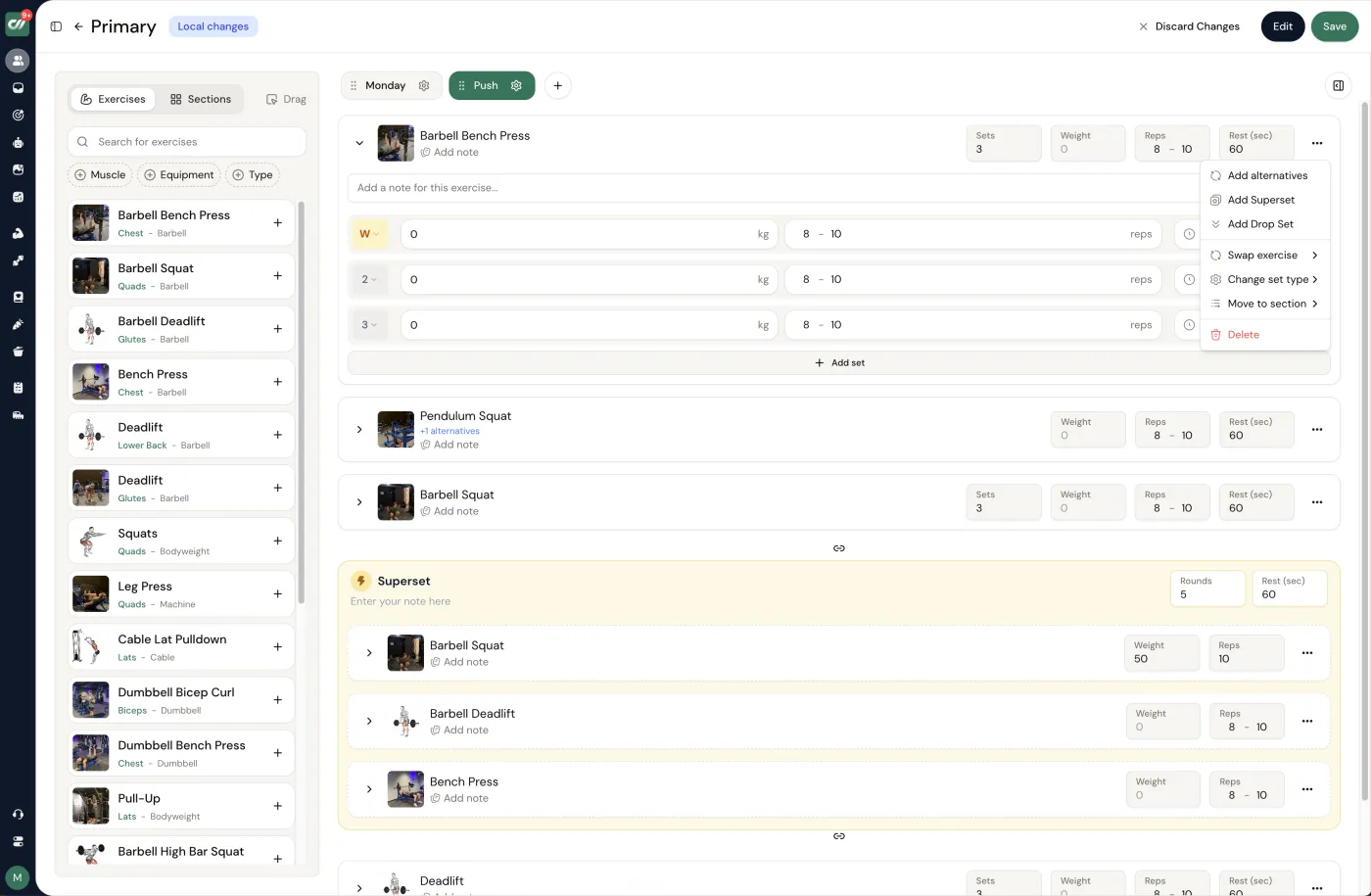
Remote RPE only works if the prescription and the feedback share one screen. If you write "@ RPE 8" in a spreadsheet, the client logs their sets in an app, and the check-in video arrives in a chat thread, the calibration loop breaks - you are stitching three sources together to answer one question about one set. In Coachway the effort target sits in the workout builder next to the sets and reps, the client logs what they actually did in the client app, and their reported RPE lands beside the load and the completed reps when you review the week, so you calibrate from the numbers and the check-in rather than from memory. It is built on knowledge from working with 150 online coaches over 6+ years, and it costs EUR 69 a month including your first 5 clients, EUR 9 per additional client after that. Every feature is included - or book a demo and see the builder first. The 14-day free trial starts with a card held securely by Stripe and cancels under Billing before it renews.
Frequently asked questions about using RPE with clients.
How do you use RPE with clients you coach online?
You prescribe a target effort instead of a fixed load, then let the client pick the weight that hits it. A line like "4 x 8 @ RPE 8" tells the client to leave about two reps in reserve on each set, so the same prescription self-corrects across a strong day and a tired one - which is exactly what you need for someone you cannot watch in the room. The work that makes RPE reliable happens before and after the session: teach the 1-10 scale in the first weeks by having the client take one set close to failure so they feel where RPE 9 to 10 actually is, cap the early prescriptions with a rep ceiling so an overconfident lifter does not grind every set, and read their logged RPE against the video and the weight moved at each check-in. RPE accuracy is a skill the client builds, and remote coaching is mostly about calibrating that skill from a distance.
When should I prescribe RPE instead of percentages?
Use RPE when the day-to-day load should flex - hypertrophy blocks, general strength work, busy clients whose sleep and stress swing week to week, and anyone training around a niggle. Use percentages when you need a fixed, testable number: peaking blocks, a client chasing a specific one-rep max, or the main lifts in a powerlifting cycle where you want the load locked regardless of how the day feels. Most online programs are cleanest as a blend - percentages on the primary barbell lift for precision, RPE on accessories and volume work so a rough day does not blow up the whole session. The deciding question is simple: do you want the load to adapt to the client today, or the client to adapt to the load?
How do I calibrate a client's RPE from video?
Compare what they reported to what the bar shows. Ask for one working set on the main lift filmed from the side, and watch three things: bar speed on the last reps, whether the reps stayed clean or the form broke, and how the final rep compared to the one before it. If a client logs RPE 7 but the last rep slowed to a crawl and their back rounded, they were closer to RPE 9 and are undershooting the scale - the most common beginner error. Give one specific correction ("that last set looked like a real RPE 9, so next time stop one rep earlier for an 8") rather than a vague note. Two or three of those calibration loops usually bring a client's self-reported numbers in line with reality.
What is a good RPE range for online clients?
For most general and hypertrophy training, program the bulk of working sets at RPE 7 to 9, which leaves roughly one to three reps in reserve. RPE 7 to 8 is the sustainable zone for accumulating volume week after week; RPE 9 to 10 is a tool you spend sparingly, near the end of a block or on a single top set, because it drives the most fatigue for the least extra stimulus. New clients should sit a notch lower than you think until they can judge effort accurately, since an undershot RPE 8 that is really a 9 quietly overreaches them. As the block progresses you can nudge the same movement up the scale to add stress without touching the written weights at all.
How do I stop clients from going too heavy on RPE?
Cap it. Pure RPE drifts, and an eager client will read every "@ RPE 8" as permission to test a max. Write the effort target with a hard ceiling - "3 x 5 @ RPE 8, stop at 6 reps" or "RPE 8, do not exceed 100 kg this week" - so autoregulation handles the good and bad days while the cap keeps fatigue and injury risk in check. Pair that with the calibration loop from their video, and note in the plan that stopping short of failure is the point, not a sign they went too easy. Most overshooting comes from clients thinking harder always means better; naming that directly in onboarding fixes more of it than any number does.
Does Coachway support RPE-based programming?
Yes. In the workout builder you can prescribe effort targets alongside sets and reps, and the client logs what they actually did in the app, so the RPE they report sits next to the load and the completed reps when you review the week. That side-by-side view is what makes remote autoregulation work - you are calibrating from the logged numbers and their check-in video rather than guessing. Coachway costs EUR 69 a month including your first 5 clients, then EUR 9 per additional client, with every feature included. The 14-day free trial starts with a card held securely by Stripe and cancels under Billing before it renews.
RPE is one dial on a bigger board. See how it compares to reps in reserve in the RPE vs RIR guide, put a number on an effort target with the RPE calculator, and see how autoregulated loading fits a full plan in how to write an online coaching program.
Keep reading
all guidesDOMS (Delayed Onset Muscle Soreness): A Coach Guide
What delayed onset muscle soreness (DOMS) is, what causes it, how long it lasts, and how coaches manage it - including the honest truth that soreness is not a measure of a good session or of growth, and the red flags that mean refer out.
Read the guideWorkout Splits Explained: Types & How to Program Them
What a workout split is, the main types (full-body, upper/lower, push/pull/legs, body-part), and how coaches choose one - by training days, weekly volume, and frequency. No split is magic; total volume drives growth.
Read the guideHow to Choose a Workout Split (Coach Guide)
A decision framework for choosing a client workout split: pick by training days, goal, experience, and recovery - with weekly volume, not the split label, as the real driver of muscle growth.
Read the guideFree tools for this: RIR Calculator · Strength Standards Calculator · Weekly Training Volume Calculator
See what Coachway can do for your coaching business
Coachway was built on knowledge from working with 150 online coaches over 6+ years, who all hit the same wall - slow platforms, clunky workflows, wasted hours. Start your 14-day free trial and see what we fixed - the whole platform, no charge today, cancel anytime under Billing.


