


Which calorie tracker should your clients use - and can you actually see the data in 2026.
This is not a consumer best-calorie-app list. The question a coach asks is narrower: which tracker fits my client, and can I see what they logged without chasing a screenshot? Cronometer is the most accurate, MyFitnessPal has the biggest database, MacroFactor adjusts targets on its own, and Lose It! and Yazio keep it simple - all fine apps. But with almost every one of them the coach is outside the app looking in. We compared five trackers on the coach lens, and we are upfront that the log living next to your check-in usually beats any of them.
By Markus Evers · Published 22 August 2026 · Updated September 2026
How this comparison is made: we check every competitor's pricing and features against their live websites and re-verify them on a recurring basis. We build Coachway, so we flag it wherever it appears, we credit real competitor strengths, and we say who each platform fits better than us. Browse all platform comparisons.
If you would rather the food log arrived in the same tab as the check-in and the macro targets you set, see the whole workflow first.
No charge today - cancel anytime under Billing.the short version
Recommend Cronometer for accuracy, MyFitnessPal for the biggest database, MacroFactor for a hands-off client, Lose It! or Yazio for simple. None gives the coach a native view of the log, and AI photo estimates miss hidden fat and portions, so the 4-method table below says when a photo is fine and when a scale is not optional.
A coach is not shopping for a calorie app. You are shopping for visibility.
Every "best calorie counter" list ranks apps on the consumer job: how easy is it to log lunch, how big is the database, how good is the streak. Those matter, but they answer the client's question, not yours. Your job as an online nutrition coach is to set a target, see whether the client hit it, and adjust. That turns the whole comparison on its head, because the feature that decides it for a coach - can I see the log - is the one those lists never rank.
The client's question
Which app is quickest to log with, has my foods in it, and does not nag me? That is answered by database size, barcode quality, and a clean interface. All five apps here do this well enough that the differences are taste, not deal-breakers.
The coach's question
Can I see what they actually ate, against the target I set, without asking for a screenshot every week? On the consumer trackers the honest answer is usually no. That single gap is why so many coaches move logging into the same tool that carries the plan and the check-in.
So use this page two ways. If a client is going to self-track and you just want to point them at a good app, the reviews below rank the five on fit. If your problem is that you cannot see the data - retyped numbers, missing weeks, a diary you have to hunt for - the answer is not a better standalone tracker, it is a coaching platform with logging built in. And whichever route you take, teaching the skill still matters: our guide to teaching clients to track macros covers how to onboard a tracker without it becoming a chore they abandon in week two.
Four things a coach should check before recommending a tracker.
These are the questions that actually change your week, in the order they matter for coaching. Run each app through them before you send a client a download link.
- Can you see the data? This is the one that separates a coaching tool from a consumer app. Does the tracker offer a coach or practitioner view, a shared diary, an export you can read, or nothing but screenshots? Your whole weekly workflow hangs on the answer, so ask it first.
- Barcode scanner and database quality. A client who cannot find their food, or cannot scan it, stops logging by week two. Check both the size of the database and how accurate it is, and check whether the barcode scanner is free or paywalled, because a paywalled scanner quietly raises the cost of logging for the client.
- Cost to the client. You are asking someone who already pays you to also pay an app, or to live inside a free tier that keeps prompting them to upgrade. Know exactly what the free tier does and where the wall sits before you recommend it, so the client is not surprised. The same check applies to your own software, and our roundup of free coaching app plans shows where those walls sit.
- Friction and fit. The best tracker is the one the client keeps using. A simpler app a client sticks with beats a powerful one they quit. Match the tool to the person, and be honest that for some clients the right answer is not to track at all - more on that below.
One honest note on that first point, because it is where these tools differ most and where the lists stay silent. A standalone calorie app is built for the person logging, not the coach reading. Cronometer is the notable exception with a separate professional tier - confirm the current terms at cronometer.com - and the other four leave you dependent on the client sharing. If seeing the log reliably is what you are buying, that pushes the decision toward keeping it inside the platform you already coach from.
The five trackers, on the coach lens.
| App | Free tier for the client | Can the coach see the log? | Database & barcode | AI photo estimate | Paid price signal |
|---|---|---|---|---|---|
| MyFitnessPal | Yes, logs food free; barcode scan is Premium | Shared diary or screenshots; no coach dashboard | Largest database, crowd-sourced accuracy | Yes, on Premium; treat it as a food finder, confirm the portion | Premium about EUR 79.99/yr; see myfitnesspal.com |
| Cronometer | Yes, generous, includes barcode scanner | Separate professional tier can view logs; confirm terms | Lab-verified, most accurate | Not the headline feature; barcode and verified database instead | Gold USD 10.99/mo or USD 59.99/yr |
| MacroFactor | No free tier, free trial only | No coach view; app auto-adjusts client targets | Large database with barcode | Verify in-app; the app adjusts targets from logged weight, not photos | USD 11.99/mo or USD 71.99/yr |
| Lose It! | Yes, free version logs food | Screenshots only; no coach view | Solid database with barcode | Yes, photo logging; confirm the portion before saving | Premium about USD 79.99/yr; see loseit.com |
| Yazio | Yes, free tier logs food | Screenshots only; no coach view | Recipes and fasting focus | Verify in-app; recipes and barcode are the strengths | PRO about USD 47.90/yr; see yazio.com |
Prices and free-tier limits change often and vary by region, and the currency differs by vendor - always confirm current rates on each provider's own page. Where we could not verify a figure on the vendor's live page today, we say "see" that domain rather than print a number we could not stand behind.
01 · biggest database, the one clients already have
MyFitnessPal
MyFitnessPal is the default many clients arrive with, and its size is the reason: the largest food database of any tracker, so almost anything a client eats is already in there. For a coach, that familiarity is a real advantage - there is little to teach, and adherence is easier when the app is one the client has used before. It logs food on the free tier and covers macros cleanly.
The coach's read: the database size wins clients over, but two things matter for you. The barcode scanner now sits behind Premium, so a free client cannot scan and may drift to hand-entry that is less accurate. And you are still on the outside - reliable visibility means a shared diary or a weekly screenshot habit you have to enforce.
02 · the most accurate, and the most coach-aware
Cronometer
Cronometer is the accuracy pick. Its database is smaller than MyFitnessPal's but lab-verified, and it tracks a deep set of micronutrients, which makes it the strongest choice when the coaching goal goes beyond calories and macros. Unusually for a consumer tracker, the free tier is generous: it keeps the barcode scanner, custom macro and micronutrient targets, and the full verified database. And it runs a separate professional tier built for practitioners who want to view client logs.
The coach's read: if a client is going to use a standalone tracker, this is the one to reach for - accurate data and a free tier that does not cripple the scanner. The professional tier is the closest any consumer app comes to giving you a real window in, so confirm exactly what it includes and what it costs before you build a workflow on it.
03 · the hands-off tracker that coaches itself
MacroFactor
MacroFactor is the smart pick for a self-directed client. It reads the client's trend weight against what they logged and adjusts their macro targets on its own each week, so the app does a version of the job a coach would otherwise do by hand. Logging is fast, the database is solid, and clients who like data tend to love it. It is the most modern of the five in how it thinks.
The coach's read: the auto-adjusting targets are the strength and the tension. If the app is quietly changing a client's macros while you are also programming them, you can end up coaching against each other, so agree who owns the numbers up front. There is no free tier, so every client you send here pays from day one.
04 · simple, friendly, low-friction
Lose It!
Lose It! is the approachable one. Its interface is friendly and lightly gamified, which is exactly right for a client who finds the more clinical apps intimidating and needs momentum more than precision. It logs food on a free version, scans barcodes, and gets a beginner from install to first logged day with very little coaching overhead. For a nervous starter, that gentleness is the feature.
The coach's read: a great low-friction on-ramp for a client who would quit a denser app, and the friendliness genuinely helps adherence early on. The same simplicity means less depth for macro-precise coaching, and you are back to screenshots for visibility, so treat it as a starter app rather than a long-term coaching surface.
05 · recipes, fasting, and european clients
Yazio
Yazio is popular across Europe and leans into recipes and fasting windows alongside calorie logging, which makes it a natural fit for clients who want meal ideas and intermittent-fasting support in the same place they track. The interface is polished and localised well, so for a European client base it often feels more at home than the US-first apps. It logs food on a free tier and layers a PRO subscription on top.
The coach's read: a strong fit for European clients and for clients who like recipes and fasting bundled with logging. Check the current free-tier limits before you recommend it, since what sits behind PRO shifts over time, and as with the others you are dependent on screenshots to see what the client logged.
the coach's answer · logging where the check-in already lives
If the problem is seeing the log, move it into your platform.
Every app above is built for the person eating. The gap they all share is the coach, and no amount of database size closes it. That is the case for keeping food logging inside the tool you already coach from. In Coachway, the client logs food from a client app, and the day lands in the same client record as the check-in, measured against the macro targets you set for them. No shared diary, no screenshot round-trip, no hunting for last week's numbers in a chat thread. When you sit down to review a client, the log is already there.
It also carries the plan side, not just the record: meal plans drawn from a library of over 1,100 recipes, per-client macro targets, and a client app available in six languages, so a mixed client list logs in a language they read. It is not a specialist micronutrient lab like Cronometer, and it is honest to say so - if deep micronutrient tracking is the job, pair one in. But for the everyday work of coaching nutrition and actually seeing what a client ate, the log beside the plan is the whole point.
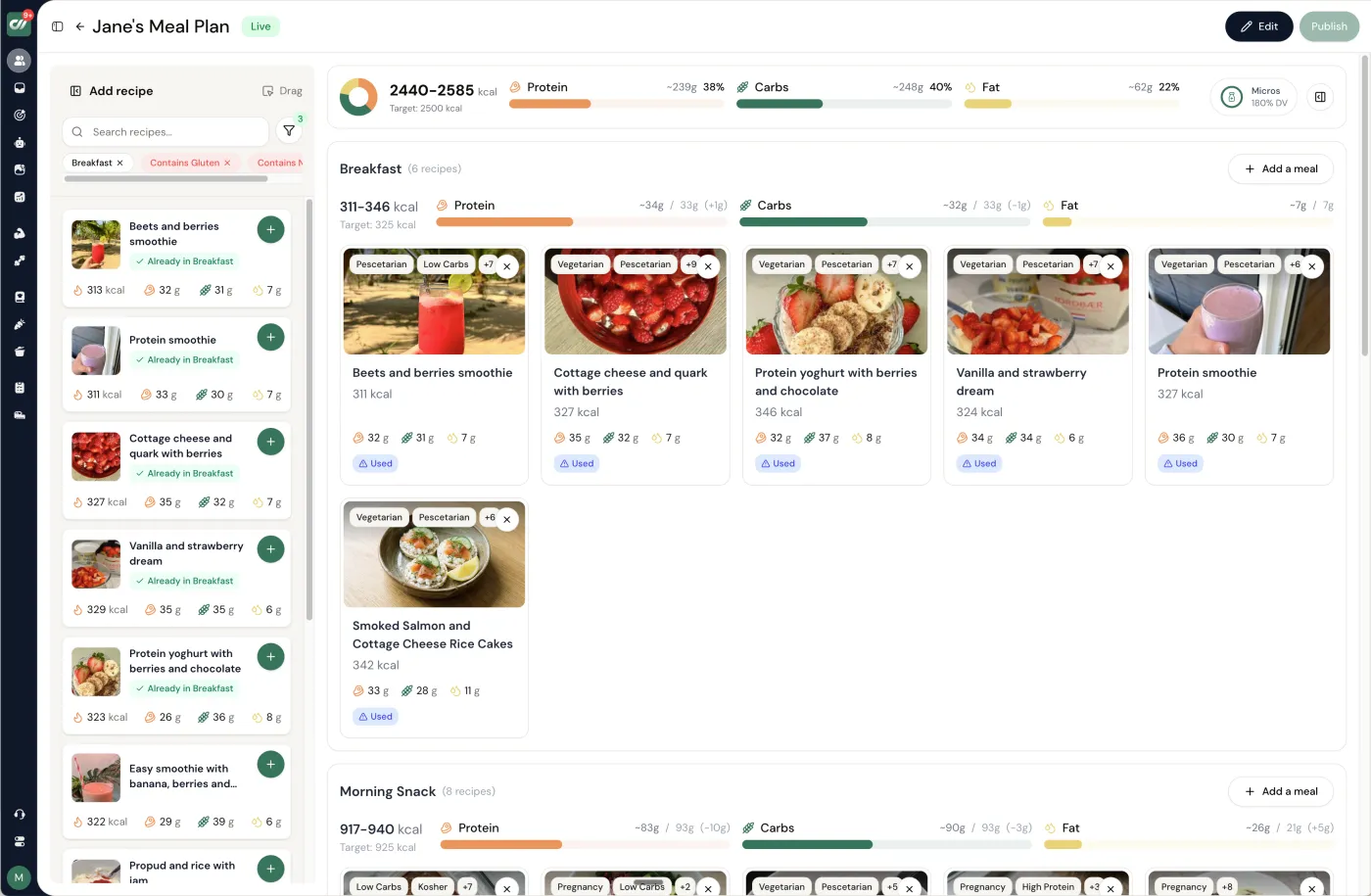
The honest test is setting one client's targets, having them log a few days, and opening the check-in to find the food already there.
No charge today - cancel anytime under Billing.What do AI calorie counters get wrong?
Hidden fat and portions, which is where most of the calories in a real meal are. A photo shows a plate of enchiladas; it does not show the oil the tortillas were fried in, the cheese inside, or whether the plate is 300 g or 500 g, so the estimate lands low. The top reply in a 769-upvote r/loseit thread on AI trackers gave the case: a coworker's app read the same restaurant enchiladas at 400 calories; the restaurant's own nutrition page said 810. The second most upvoted reply was three words, "LLM are yes men", and that is the deeper problem: a language model returns a confident, plausible number, and it will drift toward the one the client hopes for. The table gives each method its typical error, when it is fine and when it is not.
| Method | Typical error | When it is fine | When it is not |
|---|---|---|---|
| Weighed on a scale, verified database | Under 10 percent on whole foods | Always; the first two weeks of any tracking client | Never wrong, just slow; unsustainable for some clients |
| Barcode scan | Low on the label, but the label is per serving, not per what was eaten | Packaged food, protein powder, anything with a wrapper | Restaurant and home-cooked meals, where there is no barcode |
| Manual estimate after learning portions | Roughly 10 to 20 percent, better with practice | Vegetables, familiar meals, clients past the two-week scale phase | Calorie-dense items (oil, nuts, cheese, sauces) where a small miss is 200 calories |
| AI photo estimate | Large and one-directional: one reported case read 400 for a plate the restaurant listed at 810 | Naming the foods on the plate so the client can look each one up | Any number that goes into the log unchecked, and every restaurant meal |
Error bands are working rules from coaching practice, not a study; the one measured case is the 400 versus 810 plate above. Chains publish their nutrition figures, so a restaurant's own page beats any estimate of a restaurant meal.
What should a coach tell a client who uses an AI calorie counter?
Keep it, but change its job: it identifies the food, it does not decide the number. Three lines cover it, and they fit in one check-in reply.
- 1. Use it to name what is on the plate, then look each item up in the database or scan the barcode. The photo is a shopping list, not a receipt.
- 2. Weigh portions for two weeks, especially oils, nuts, cheese and sauces. After two weeks the eye is calibrated and the scale can go back in the drawer for most meals. The calorie target guide covers what to do with the numbers once they are honest.
- 3. Log the number the label, database or scale gives, never the photo estimate, and bring the photo to the check-in. On Coachway the client logs against a 3.7 million item food database with barcode scanning, and the photo diary sits in the same record for the coach to comment on, so the photo does its real job: showing the coach what the client actually ate.
The photo diary matters for a second reason. Asked how online coaches verify that clients follow the plan, a coach on r/personaltraining answered that daily photo check-ins are "way harder to fake than a weekly recap"; the check-in workflow shows where that photo lands each week.
Match the tracker to the client in front of you.
- The client who already uses one. Do not fight it. If they log happily in MyFitnessPal, keep them there and solve visibility with a shared diary or a weekly screenshot routine. Switching apps is a cost, and adherence beats an upgrade.
- The accuracy-focused or health-driven client. Cronometer. When micronutrients matter or the numbers need to be right, its lab-verified data and full free tier make it the standout, and its professional tier is worth a look if you want to see the log.
- The independent, data-loving client. MacroFactor, as long as you agree who owns the targets so the app is not adjusting against your programming. Great for a client who thrives between check-ins.
- The nervous beginner. Lose It! or Yazio. A friendly, simple app they will actually keep opening beats a powerful one they abandon in week two. Get the habit first, add precision later.
- The client you want to coach closely on nutrition. Keep logging inside your platform. When you need the log next to the plan, the check-in, and the targets, built-in food logging removes the screenshot tax entirely.
And set the targets before you pick the tool. Our free macro calculator gives you a starting point for calories and macros, and the nutrition coaching software guide covers the tools that carry the whole relationship, not just the log.
Some clients should not track at all.
The best tracker for some clients is no tracker. A daily calorie number is a small, constant prompt, and for a client with a history of disordered eating that prompt can do real harm - it can turn food into anxiety and hand a fragile relationship with eating a set of numbers to fixate on. Recommending an app there is the wrong call, and anything that starts to look clinical belongs with the right professional, not with a coaching app. Knowing when to put the calculator away is part of coaching well.
The good news is that tracking is one route to the goal, not the only one. Behaviour and habit goals - a protein anchor at each meal, a vegetable target, consistent meal timing, slowing down at the table - move the same outcomes without a single logged number, and they often stick longer because they are not tied to an app the client can quit. Our guide to habit coaching for fitness clients lays out how to run this properly, so a client who should not be counting still gets structure, accountability, and progress you can both see.
Frequently asked.
What is the best calorie tracking app for coaching clients?
It depends on the client and on what you need to see. Cronometer is the most accurate and keeps a barcode scanner and a lab-verified database on its free tier; MyFitnessPal has the largest food database; MacroFactor is the most hands-off because it adjusts targets on its own. But the question a coach is really asking is whether they can see the log at all. With almost every consumer tracker you are outside the app looking in, so many coaches keep food logging inside their coaching platform, where the log sits next to the check-in and the macro targets they set.
Can I see a client's food log without asking for screenshots?
With most consumer calorie apps, not directly. MyFitnessPal, Lose It! and Yazio have no coach-facing dashboard, so you see the diary through a shared link or a screenshot the client remembers to send. Cronometer runs a separate professional tier that lets a practitioner view a client's log - confirm the current terms at cronometer.com. The alternative most coaches land on is a coaching platform with built-in food logging, so the log arrives in the same client record as the weekly check-in with no screenshot round-trip.
Which calorie tracker has the best barcode scanner and food database?
MyFitnessPal has the largest database, though it is crowd-sourced, so accuracy varies entry to entry. Cronometer's database is smaller but lab-verified and the most accurate for macros and micronutrients, and its barcode scanner is included on the free tier. One thing to flag to clients: MyFitnessPal now puts barcode scanning behind Premium, so a free MyFitnessPal user cannot scan. Confirm the current free-tier limits on each vendor's own page before you recommend one.
Should every client track calories?
No. Calorie tracking is a skill that suits some clients and works against others. A client with a history of disordered eating can be harmed by a daily number, and pushing an app on them is the wrong call - habit-based coaching and behaviour goals are the safer route, and anything that looks clinical belongs with the right professional. Tracking is a tool for a specific job, not a default you apply to everyone. Match it to the client in front of you.
How much do these apps cost my clients?
Most have a free tier the client can start on: MyFitnessPal, Cronometer, Lose It! and Yazio all log food for free, though barcode scanning and deeper features sit behind a subscription. MacroFactor is the exception with no free tier, only a free trial. Paid tiers move around and vary by region, so quote from each vendor's own page: Cronometer Gold runs about USD 10.99 per month or USD 59.99 a year, MacroFactor about USD 11.99 per month or USD 71.99 a year, and MyFitnessPal Premium about EUR 79.99 a year. Confirm Lose It! and Yazio on loseit.com and yazio.com.
Does Coachway have built-in calorie and food tracking?
Yes. Coachway includes food logging, meal plans drawn from a library of over 1,100 recipes, and per-client macro targets, all inside the same client record as the check-in. The client logs from a client app available in six languages, and the coach sees the day against the targets they set without a screenshot. It is not a replacement for a specialist micronutrient tool, but for the everyday job of coaching nutrition and seeing what a client actually ate, the log living beside the plan is the point.
Are AI calorie counters accurate?
Not for the number, and the error runs in one direction: low. A photo shows the food but not the oil, butter, cheese inside or the true portion, so the estimate misses exactly the calories that matter. In a 769-upvote r/loseit thread, the top reply described a coworker whose AI tracker read a restaurant enchilada plate at 400 calories when the restaurant's own nutrition page said 810. Use an AI counter to identify foods and log the number a label, database or scale gives.
Can ChatGPT count calories from a photo?
It can guess, and it will guess confidently. Language models are built to give a plausible answer, not an accurate one, and they agree with whatever the user hopes; the same r/loseit thread put it as LLMs are yes men. A photo cannot show cooking fat or weight, so any figure from a photo is an estimate with a large, unknown error. For a client, the useful role is naming the ingredients so they can look each one up.
What is the most accurate way for a client to track calories?
A scale and a verified database for two weeks, then a mix of scale, barcode and honest estimates once portions are learned. Weighing for two weeks teaches what 100 g of rice or a tablespoon of oil looks like, which is the skill every later estimate depends on. After that, barcode scans for packaged food, weighed portions for the calorie-dense items (oils, nuts, cheese, sauces), and eyeballing only for vegetables. A daily photo diary the coach can see keeps the log honest, which a coach on r/personaltraining described as far harder to fake than a weekly recap.
Keep reading
all guidesHow to teach clients to track macros (2026 coach's guide)
The onboarding sequence, the failure points to catch early, photo logging as the fallback, and when macro tracking is the wrong tool for a client.
Read the guideHabit Coaching for Clients: A Coach's Playbook (2026)
Habit coaching for clients is a repeatable system, not a pep talk: choose one keystone habit anchored to something already in the client's day, have them log it daily while you review weekly, and set a minimum-viable floor so a streak survives a bad day. The operational playbook that pairs with the frameworks deep-dive.
Read the guideBest Online Nutrition Coaching Platforms (13 Picks, 2026)
The best online nutrition coaching platforms in 2026, compared on meal planning, habit tracking, branded app, payments, and price - with a table and honest trade-offs.
Read the guideHow to Adjust Client Macros: A Coach's Decision Rules (2026)
Knowing how to adjust client macros is what separates a coach from the calculator that set them. The decision rules: how long to wait for a real trend, how big a step to make, which macro to move while protein holds, and what to check before you touch a target.
Read the guideFree tools for this: Coaching Business Health Check · Client Check-in Reader · Client Churn-Risk Reader
See what your clients log, without chasing a screenshot
Coachway puts food logging, meal plans from a library of over 1,100 recipes, and per-client macro targets in the same record as the check-in, with a client app in six languages. Start the 14-day free trial and set one client up: no charge today, cancel anytime under Billing.


