


Best AI tools for online fitness coaches for the admin, not the coaching.
Most "AI for coaches" lists try to sell you a robot that programs and chats for your clients. That is the wrong job for AI. The useful kit is small and aimed squarely at the busywork around coaching: drafting captions, typing up calls, clipping video, unsticking the blank page. This is an honest rundown of the tools worth your time, and where the line is that you should not let AI cross.
By Markus Evers · Updated June 2026
How this comparison is made: we check every competitor's pricing and features against their live websites and re-verify them on a recurring basis. Coachway is our product - we flag it where it appears, we credit real competitor strengths, and we say who each platform fits better than us. Browse all platform comparisons.
the short version
The best AI tools for online fitness coaches are a small admin kit, not a coach-in-a-box: a general AI assistant (ChatGPT, Claude or Gemini) for drafting captions, emails and rough outlines; a transcription tool (Otter, Fireflies or a Whisper-based app) for turning voice notes and calls into text; a video tool (Opus Clip, Descript or CapCut) for clipping long footage into captioned shorts; a design tool (Canva Magic Studio) for brand assets; and a scheduler (Buffer or Later) to plan posts. All of it orbits the platform you actually run the business on. Use AI to buy back the admin hours, then spend them on the coaching, which stays human.
AI is for the admin around coaching, not the coaching itself.
Almost every shortcut, mistake and disappointment with AI as a coach comes down to one question: are you pointing it at the busywork, or at the relationship? Point it at the busywork and it is a quiet gift that hands you back hours. Point it at the relationship, by letting it write the check-in replies or program unsupervised, and you erode the exact thing your clients pay you for. The honest version of the worry plays out the same way: AI is not replacing coaches so much as widening the gap between those who use it for the dull parts and those who refuse, while the human connection remains the strongest driver of whether a client actually gets results.
Good jobs for AI
- Unsticking a blank caption or email and giving you a draft to rewrite.
- Turning a voice note or a discovery call into clean text.
- Clipping a long video into short, captioned social cuts.
- Brainstorming content angles when the well runs dry.
- Outlining a rough program structure you then build properly.
Bad jobs for AI
- Writing check-in replies as if they came from you.
- Finalising a client's program or macros without your eyes on it.
- Anything touching injuries, medications or medical history.
- Auto-replying to clients so they feel handled, not coached.
- Posting content you have not read and would not say out loud.
If you want the deeper version of this, with the prompts and the workflow rather than just the tool names, read how to use AI as an online fitness coach. This article is the companion to it: the specific tools, what each is genuinely good at, and where they fit around the platform you run the business on.
A general AI assistant, for drafting and ideas.
If you only adopt one AI tool, make it a general assistant such as ChatGPT, Claude or Gemini. This is the workhorse: the thing you open to beat the blank page on a caption, rough out an email, brainstorm ten content angles, summarise a long client message, or outline a program structure before you build it properly. At the time of writing, each of these has a free tier and a paid tier in the region of a low monthly fee, and the differences between them matter less than getting comfortable with one.
What it is genuinely good at
Drafting in your rough shape so you can edit instead of originate. Coaches report using it to write Instagram captions, draft DMs and emails, generate check-in template wording, outline blog posts, and brainstorm program names. The trick is to treat its output as a first draft you rewrite in your own voice, never as the finished thing.
Where it bites you if you trust it
It states wrong things with total confidence, and it does not know your client. It has no sight of their injury history, their schedule, or what happened in last week's check-in. So a program or macro plan it produces is a starting outline at best, and a liability if you paste it into a client app untouched. The rule that keeps you safe is simple: proofread and verify everything AI gives you, and let your own expertise, not the model's confidence, be the final guide.
How it pairs with your platform
Draft the outline in the assistant, then build the actual client-facing plan where you have real control: the workout builder for sets, supersets, dropsets and progressive overload, and the meal planner for real recipes, macros and allergen filters. The AI breaks the blank page; the platform is where coaching judgement actually lands.
Transcription, for voice notes and calls.
This is the quietest time-saver on the list and the one coaches most often overlook. Tools such as Otter, Fireflies, or any of the Whisper-based apps turn spoken audio into clean text. That means a discovery call becomes searchable notes, a rambling voice memo becomes a tidy summary, and a podcast or long video becomes the raw material for captions and posts. At the time of writing several of these offer a free tier with a monthly cap on minutes and paid plans for heavier use.
Calls into notes
Record a discovery or onboarding call, transcribe it, and let an AI assistant pull out the goals, objections and commitments. You stay present on the call instead of scrambling to type.
Voice memos into copy
Talk out a content idea on a walk, transcribe it, and you have the bones of a caption or email in your own words rather than a generic AI block.
Mind the privacy line
Client recordings are sensitive. Get consent, check where the tool stores audio, and keep anything medical out of third-party tools. Convenience never outranks a client's trust.
Worth saying plainly: your coaching platform already gives you voice notes inside the client thread, played back at 1.5x or 2x, so a quick spoken reply to a client does not need a separate transcription tool at all. Transcription earns its place on your content and admin work, the calls and the long-form material, not the day-to-day client messaging that is better kept personal and in one place.
Video clipping and captions, for content at scale.
Video is how most online coaches market and educate, and editing it by hand is where evenings disappear. Tools such as Opus Clip, Descript and CapCut take that load off. Broadly: Opus Clip finds the strongest moments in a long video and auto-cuts captioned shorts, Descript lets you edit video by editing its transcript and strips filler words, and CapCut is the workhorse for short-form social edits with auto-captions and templates. At the time of writing each has a free tier with watermarks or limits and paid plans for serious volume, so check current pricing before you commit.
Repurposing
Long video into shorts
Record one longer piece, a Q&A or a teaching segment, and let a clipping tool turn it into several captioned shorts for Reels, TikTok and Shorts. One filming session, a week of posts.
Captions
Auto-captions that get watched
Most social video is watched on mute, so burned-in captions are not optional. AI captioning gets you most of the way in seconds, but read them back, as auto-transcription still trips on names and fitness terms.
Demos
Cleaner exercise clips
The same editing tools tidy your exercise demo footage. For the filming side of that, see how to film exercise videos for online coaching.
The point of all this video output is to bring clients in, and the tooling that captures them lives on your platform, not in the editor. Coachway's lead forms sit behind your content with source tracking and one-click convert-to-client, so the audience your clipped videos build does not leak away in DMs. For what to actually say in those videos, what to post as an online fitness coach is the companion read.
Design and scheduling, for the marketing machine.
These two round out the content side. A design tool with AI baked in handles your brand assets without a designer, and a social scheduler with caption help takes the manual posting off your plate so content goes out on a rhythm instead of whenever you remember. Useful, but firmly in the nice-to-have tier: add them once the drafting, transcription and video tools above are saving you real time.
Design: Canva Magic Studio
Canva with its AI features generates and resizes brand graphics, social templates and simple visuals from a prompt, which is plenty for a one-person coaching brand. At the time of writing it runs a free tier with paid plans unlocking the heavier AI tools. Keep your look consistent so your content and your branded client app feel like one brand, not three.
Scheduling: Buffer or Later
Schedulers queue your posts across platforms and now suggest captions and posting times. At the time of writing Buffer has a free tier for a small number of channels, while Later runs on paid plans with a free trial; check current plans before you commit. The win is consistency: posts go out even on your busy days, which is what actually grows an audience over months.
A caution worth keeping: scheduling automates posting, not connection. The replies, the DMs and the relationships still need you, the same way client messaging does. Automate the calendar, keep the conversations human.
The hub all of this orbits: your coaching platform.
Here is the honest framing the rest of this list builds toward. The AI tools above are complements. The thing they orbit, where the coaching and the client management actually live, is the platform you run the business on. Coachway is built to be exactly that hub: not an AI tool that coaches for you, but the all-in-one system that replaces the WhatsApp, spreadsheet, Stripe and separate workout-app patchwork, so the time your AI kit buys back has somewhere worthwhile to go.
Where coaching judgement lands
A real workout builder and meal planner where you control every set and macro, plus check-in forms with photo and measurement tracking. AI drafts; you decide here.
Rules you set, not a bot
Automations schedule messages, videos and onboarding drips with real skip-conditions, so nothing fires over a live conversation. That is structure you author, not a chatbot replying as you.
Every client on one screen
The Power Panel puts a client's status, latest check-in and message thread side by side, so you handle their check-in, program, meal plan and reply without switching tabs. Less admin, kept personal.
Your brand, your money
A branded in-app experience is included, and you keep your own Stripe via payments. The clients your content wins land somewhere that feels like yours.
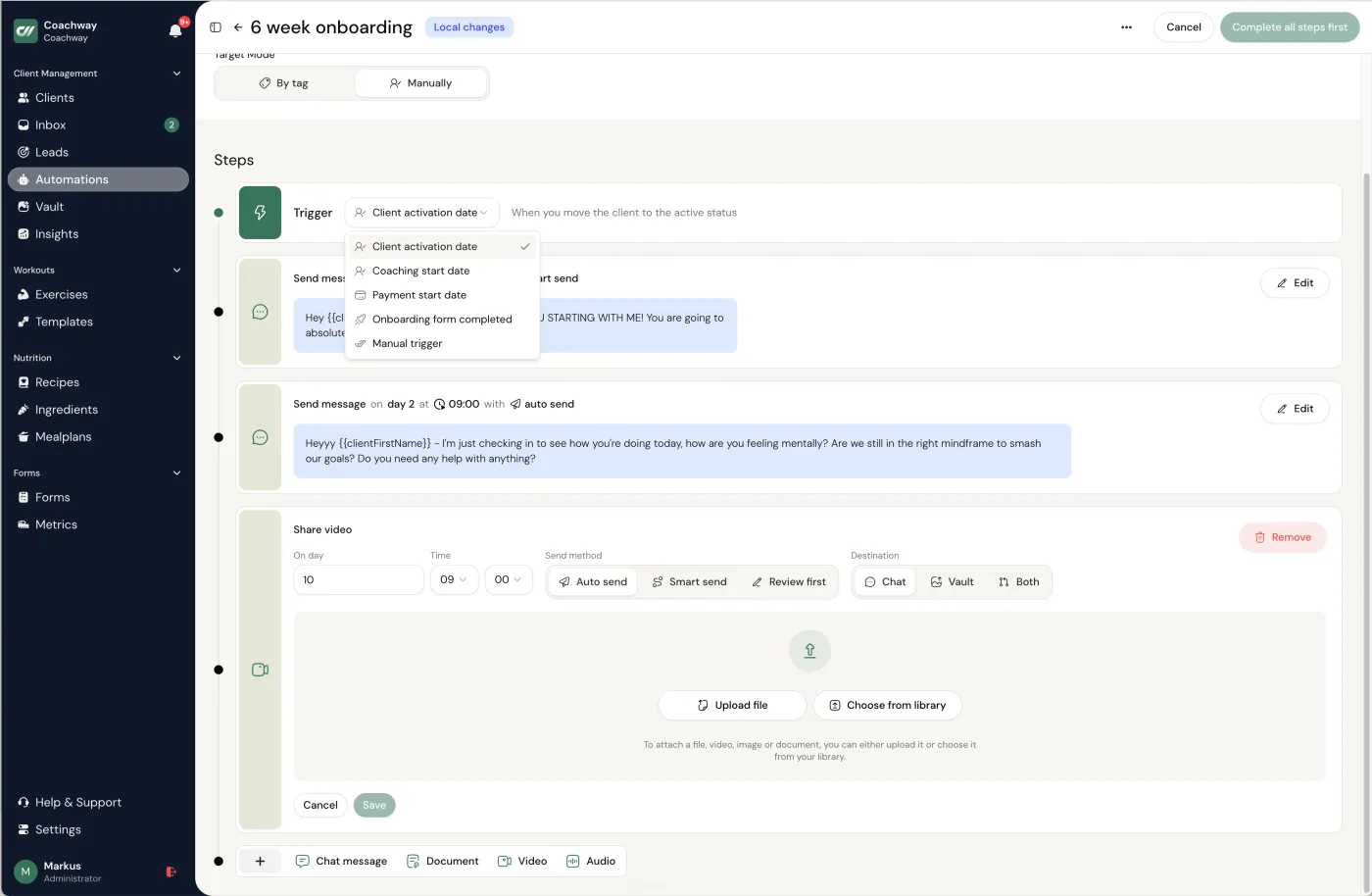
To be plain about what Coachway is not: it is not an AI that writes your clients' programs or answers their messages for you. The intelligence in the relationship is still you. What the platform removes is the friction, the tab-switching and the patchwork, which is the same goal your AI admin tools have, just for the part of the job that has to stay inside one trusted system. Coachway runs on predictable per-client pricing that scales with your client count, and starts at EUR 69 per month for up to 5 clients plus EUR 9 for each extra client. See pricing for the plain numbers, or the full feature set for everything it covers.
Don't buy the whole shelf. Assemble a small kit.
The mistake is collecting tools you never open. Start with one, prove it saves you time, then add the next. For most coaches the order that pays off fastest is the assistant first, then transcription, then video, with design and scheduling last. The whole kit can run on free and low-cost tiers while you are small, and the platform stays the one paid system that is genuinely load-bearing.
01
Start with one assistant
Pick ChatGPT, Claude or Gemini and use it daily for a week on captions, emails and outlines. Get fluent with one before adding anything else.
02
Add the time-savers
Layer in transcription for calls and a video tool for short-form once content is a regular part of your week. These remove whole evenings of admin.
03
Spend the hours on coaching
The whole point is to reinvest the time saved into the relationship: better check-in replies, more personal video, more clients without thinner attention.
If the deeper aim is getting off the spreadsheet-and-screenshots way of working entirely, that is a platform question more than an AI one, and running online coaching without spreadsheets walks through it. The two efforts reinforce each other: AI clears the content admin, the platform clears the client-management admin, and what is left is the coaching, which is the part nobody should want to automate away.
Frequently asked questions about AI tools for online coaches.
What is the best AI tool for online fitness coaches?
There is no single best tool, because the useful AI for a coach is a small kit aimed at admin, not one app that coaches for you. Most coaches get the furthest with a general AI assistant such as ChatGPT, Claude or Gemini for drafting captions, emails and rough program outlines, a transcription tool for turning voice notes and calls into text, and a video tool such as Opus Clip or Descript for clipping long footage into captioned shorts. The thing all of that orbits is the coaching platform you actually run the business on. AI saves you minutes on the busywork around coaching; it does not replace the coaching.
Should I use AI to write my clients' workout and meal plans?
Use it for a first draft at most, never as the final word, and never unsupervised. A general AI assistant can produce a rough program outline or a list of meal ideas in seconds, which can break a blank-page problem. But it does not know your client's injury history, their schedule, what actually happened in last week's check-in, or the judgement you are paid for, and it will state wrong things confidently. The safe pattern is to draft fast, then apply your expertise: build the real plan in a structured workout builder and meal planner, where you control every set, swap and macro, rather than pasting an AI block into a client app untouched.
Will AI replace online fitness coaches?
No, and the coaches who do best treat that as good news rather than a threat. Clients pay a human coach for accountability, judgement and the feeling that someone is actually watching their week, none of which a chatbot provides. What AI does replace is the admin around coaching: the blank page on a caption, the half hour spent typing up a call, the manual clipping of a long video. Hand that to AI and keep the relationship human, and you can carry more clients without the personal attention each one gets going down.
Does Coachway have AI features built in?
Coachway is the all-in-one platform you run the coaching business on rather than an AI tool. It gives you the workout builder, meal planner, check-in forms, payments, a branded client app, leads, automations and the Power Panel where you handle every client from one screen. Automations let you schedule messages, videos and onboarding drips with real skip-conditions; they are rules you set, not a bot that coaches in your place. The AI tools in this article are complements you use around Coachway, mostly for content and admin, while the actual coaching and client management live on the platform.
Keep reading
all guidesPT Distinction pricing in 2026: plans and real cost
PT Distinction prices in three USD tiers, from USD 19.90/mo for 3 clients to USD 89.90/mo for 50, each with per-client overage. The catch most coaches miss: a custom-branded client app only starts on the Pro tier, not the cheapest one. Here is the full ladder, the trial, and where Coachway lands for fitness and nutrition coaches.
Read the guideMy PT Hub pricing in 2026: plans and real cost
My PT Hub keeps pricing simple with three plans: Starter at EUR 25/mo (capped at 3 clients), Premium at EUR 59/mo unlimited, and Ultimate at EUR 215/mo. The headline numbers are low, but branding and extra trainers are paid add-ons. Here is the full breakdown, the 30-day trial, and how Coachway compares.
Read the guideKahunas pricing in 2026: plans and real cost
Kahunas prices in three fixed USD tiers capped by client count: USD 35/mo for up to 25 clients, USD 69 for up to 50, and USD 99 for unlimited, with the fully branded white-label app gated to the top USD 99 tier. This guide lays out the full ladder, the 14-day trial, and how Coachway compares for European coaches.
Read the guideSee what Coachway can do for your coaching business
Coachway was built on knowledge from working with 150 online coaches over 6+ years, who all hit the same wall - slow platforms, clunky workflows, wasted hours. Start your 14-day free trial and see what we fixed - the whole platform, no charge today, cancel anytime under Billing.


