Skip to content
nutrition · food tracking

MyFitnessPal vs Cronometer for coaching clients.

MyFitnessPal vs Cronometer is the food-tracking question almost every nutrition-minded client eventually asks, and the honest answer is that it depends on the client. MyFitnessPal generally wins on database size and barcode ease; Cronometer generally wins on data accuracy and micronutrient detail. This guide compares them for the coaching use case specifically - which to recommend by client type, and how to get a client's logged data into your review workflow when neither app talks to your platform.

By Markus Evers · Updated June 2026

the short answer

Recommend MyFitnessPal to beginners and adherence-first clients - the large database, barcode scanning, and familiar interface keep them logging, which is what actually matters early on. Recommend Cronometer to detail-oriented or health-focused clients who need verified data and micronutrient tracking. Either way, neither app feeds your coaching platform, so set up a screenshot or summary review - or keep nutrition inside your workflow with Coachway's meal planner and weekly check-in forms.

This article is general information for coaches, not nutrition or medical advice. Recommending a logging app and setting general healthy-eating targets sits inside a coach's scope; clinical situations - disordered eating signals, medical conditions, medication interactions - belong with a registered dietitian or physician. Refer out the moment a client's needs move past general guidance.
why it matters

Why the tracking app you recommend matters.

The app a client logs in is not a neutral detail. It decides two things you coach on every week: whether they log at all, and how trustworthy the numbers are when they do. A precise app a client quietly abandons gives you nothing; a simpler one they actually use gives a real signal, even if the data is rough. For most clients, consistency beats precision - so the right recommendation fits how that person will behave, not the best spec sheet.

Logging is also a coaching tool in its own right. Writing down a meal builds awareness, surfaces the gap between what a client thinks they eat and what they actually eat, and gives you a shared reference for the weekly conversation. It is part of the wider craft of doing nutrition coaching online: the app is just the instrument.

So the real question is not "which app is best" in the abstract. It is "which app will this client keep using, and is its data good enough for my decisions." MyFitnessPal and Cronometer answer that differently, and that difference is the whole comparison.

app one

MyFitnessPal at a glance.

MyFitnessPal is the app most clients have already heard of, and that familiarity is a real advantage. Its database is enormous and crowd-sourced, so almost anything a client eats - including obscure restaurant items - is usually already in there. Barcode scanning is fast, recent-foods and meal-copy make repeat days quick, and the social and streak elements can nudge certain clients to keep going.

The trade-off is accuracy. Because entries are crowd-sourced, the same food can appear many times with different, sometimes wrong values, and a client who picks the first result rather than the verified one can quietly log numbers that are off. Some features that were historically free have moved behind the paid tier over time, so check what a beginner gets on the free plan before you recommend it.

For coaching, MyFitnessPal's strength is friction reduction. If your priority is getting a hesitant client to log at all - and for most beginners it should be - the low barrier is exactly what you want. Teach them to pick good entries and weigh the foods that matter, and the accuracy gap shrinks.

app two

Cronometer at a glance.

Cronometer takes the opposite stance. Its database leans on verified and curated nutrition data rather than open crowd-sourcing, so the numbers a client logs are generally more trustworthy. Its standout feature is micronutrient detail: alongside calories and macros, it tracks vitamins and minerals in a way MyFitnessPal does not match. For a client whose goal is health markers, that depth is genuinely useful.

The trade-offs are a smaller, more rigid database and a slightly steeper learning curve. A client may not find a random restaurant meal as easily, and the precision can feel like a lot for someone who just wants to know if they hit their protein - and it can tip a detail-prone client toward over-fixation, which is something to coach around rather than encourage.

For coaching, Cronometer's strength is data quality. When you genuinely need accurate intake - a client dialing in a stubborn phase, a health-marker goal, or an advanced client who logs reliably anyway - the cleaner data pays off in better decisions.

head to head

MyFitnessPal vs Cronometer for coaching, side by side.

The factors that decide a coaching outcome, compared. These are general tendencies, not absolutes - apps change their features and tiers, so confirm current details before you recommend.

What you're comparing MyFitnessPal Cronometer
Database sizeVery large, crowd-sourced, almost everything is in thereSmaller, curated, may miss obscure items
Data accuracyVariable - duplicate and incorrect entries existGenerally higher - verified and curated data
Barcode and easeFast scanning, familiar interface, low frictionCapable but a slightly steeper learning curve
MicronutrientsBasic, less of a focusDetailed vitamins and minerals tracking
Best-fit clientBeginners, adherence-first, "just get me logging"Detail-oriented, health-focused, accuracy matters
Feeds your platform?No native feed to coaching softwareNo native feed to coaching software
the recommendation

Which to recommend, by client type.

Skip the one-size-fits-all answer. Match the app to the client in front of you - the goal is consistent, usable data, not the most impressive feature list.

Recommend MyFitnessPal when

The client is new to tracking, intimidated by it, or just needs to build the habit. The familiar interface, fast barcode scanning, and huge database keep them logging through the first few weeks, when getting any data at all is the win. Graduate them to a more precise app later once the habit is set.

Recommend Cronometer when

The client logs reliably and your decisions need clean data - a dialed-in phase, a health-marker goal, or genuine micronutrient questions. The verified database and nutrient depth earn their keep, as long as the client's relationship with food can handle the extra precision.

One caution applies to both: tracking is not right for every client. For someone with a history of disordered eating or an anxious relationship with numbers, daily logging can do more harm than good - step back, coach habits instead, and refer out where appropriate. Whatever app a client uses, pairing it with steady client accountability is what turns logging into progress.

the catch

The data-flow problem (and how to solve it).

Here is the part coaches discover the hard way: both apps are consumer products built for the individual, not your business. Neither MyFitnessPal nor Cronometer pushes a client's log into your coaching software, so the data lives in their phone and stops there unless you build a bridge. Plan for that gap up front.

No native feed

Do not assume an automatic connection. The log sits in the client's app, so decide deliberately how it reaches you.

Screenshot or summary

The simplest bridge is a weekly screenshot or summary the client sends into the check-in. Set the cadence in your intake form so it becomes a habit.

Or keep it in-platform

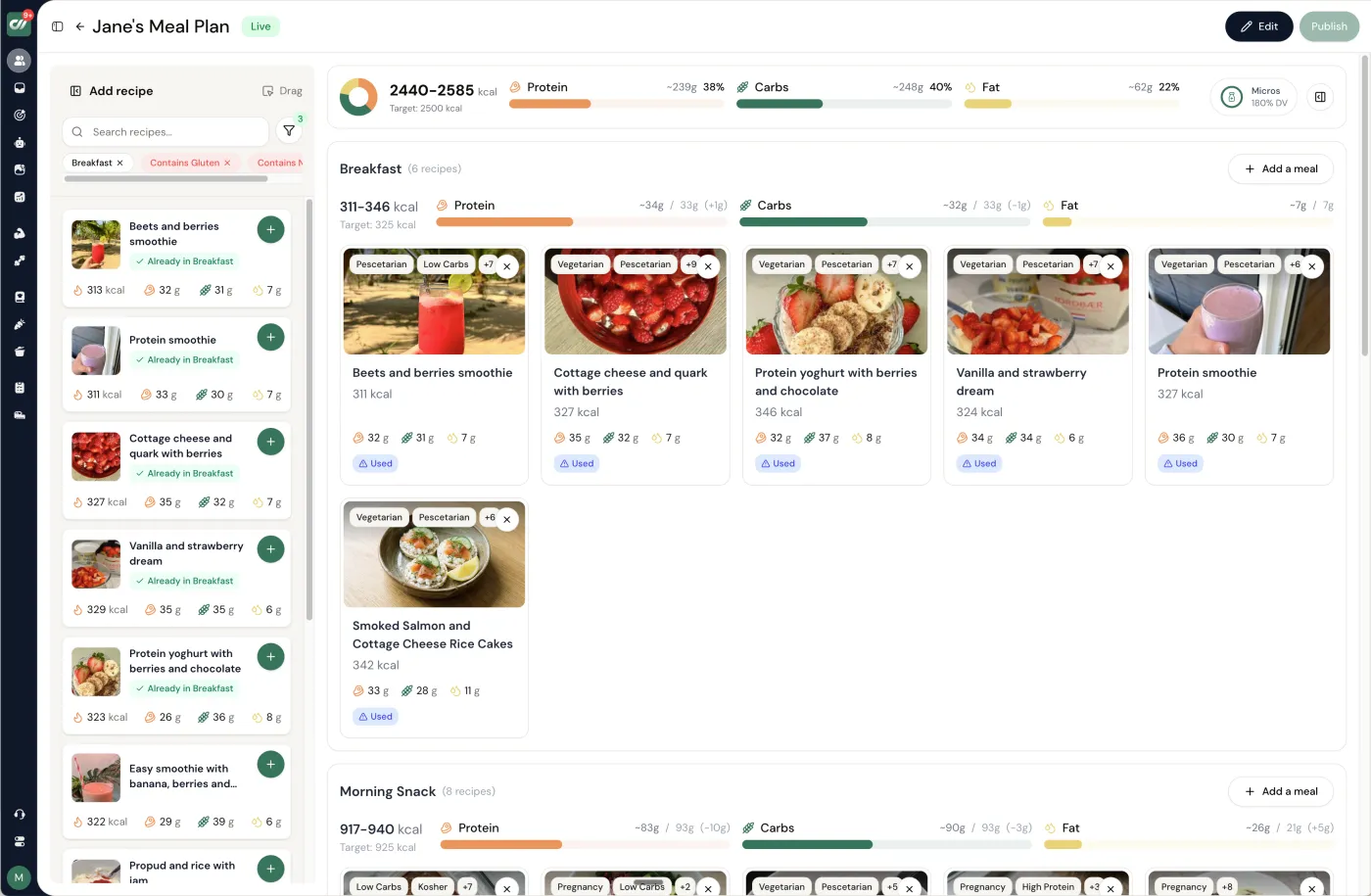
If you would rather not manage two systems, Coachway's meal planner keeps the plan where you coach, and clients report intake in their weekly check-in.

That is why many coaches lean on built-in tools instead of a separate app. Coachway's meal planner covers macros and micronutrients, 1,100+ recipes, portion scaling, and PDF download, and clients report intake in their check-in next to the rest of the client's record. See how it fits on the meal planner feature, or compare the broader category in our guides to nutrition coaching software and meal planning software for personal trainers.

coach the habit

Teaching clients to log accurately, whichever app they use.

The app barely matters next to how you coach the habit. These five moves close most of the accuracy gap on MyFitnessPal or Cronometer alike.

  1. 01

    Pick one app and commit

    Have the client choose one app and stay in it for the program. Switching mid-block fragments the history you coach from and resets the habit they were building.

  2. 02

    Log before eating, not after

    Encourage clients to log a meal before they eat it rather than reconstruct the day from memory at night. Forward logging is more accurate and quietly doubles as meal planning.

  3. 03

    Weigh the foods that matter

    Show clients how to weigh calorie-dense foods - oils, nut butters, grains, cheese - where eyeballed portions go most wrong. Hand and cup estimates are usually fine for vegetables.

  4. 04

    Build their repeat meals once

    Have clients save the five to ten meals they eat most as custom recipes or favorites. After that, a normal day logs in under a minute, which protects adherence.

  5. 05

    Bring the log into the check-in

    Agree how the log reaches you - a weekly screenshot, a shared summary, or logging inside your own platform - and review it as part of the check-in, not as a separate chore for either of you.

buying checklist

What makes a food-logging app good for coaching.

Use this when you weigh MyFitnessPal, Cronometer, or any option a client brings you. The best choice fits the client and still gives you data you can coach from.

  • A large, reliable food database, so a client can find what they actually ate without giving up after three searches.
  • Barcode scanning for fast logging of packaged foods, which is what keeps a busy beginner logging at all.
  • A verified or curated database option for when accuracy matters more than convenience.
  • Easy portion and serving-size editing, since guessed portions are the single biggest source of logging error.
  • A free tier good enough for a beginner to start the same day you recommend it.
  • Micronutrient tracking for clients whose goal is health markers, not just a calorie number.
  • A custom-recipe or favorites builder, so repeat meals log in seconds.
  • An export or shareable summary, since the app will not feed your coaching platform directly.
  • A mobile experience that feels light, because logging that feels like a chore gets abandoned.
questions coaches ask

Frequently asked questions.

Is MyFitnessPal or Cronometer better for coaching clients?

Neither is universally better; it depends on the client. MyFitnessPal generally wins on database size, barcode ease, and familiarity, which suits beginners where the goal is simply consistent logging. Cronometer generally wins on data accuracy and micronutrient detail, which suits detail-oriented or health-focused clients. Pick for the client in front of you, not the app you prefer.

Which is more accurate, MyFitnessPal or Cronometer?

Cronometer is commonly regarded as the more accurate of the two because it leans on verified and curated data, while MyFitnessPal relies heavily on a crowd-sourced database where duplicate and incorrect entries exist. For calorie targets the gap matters less than logging consistency; for micronutrients it matters more. Either way, the client choosing the right database entry and portion is the bigger accuracy factor.

Which is easier for beginners?

MyFitnessPal tends to feel easier for beginners thanks to a very large database, fast barcode scanning, and a familiar interface. Lower friction usually means more consistent logging in the first weeks, which for a beginner is worth more than precision. You can always move a client to a more detailed app once the habit is set.

Does a food-tracking app connect to my coaching platform?

Generally no. Consumer food-tracking apps are built for the individual, not to push data into a coach's software, so do not assume an automatic feed. Plan a manual bridge - a weekly screenshot or shared summary the client sends into the check-in - or keep nutrition inside your own platform using its meal planner, with clients reporting intake in their weekly check-in so it lives where you coach.

Should clients track every day?

Not always. Daily tracking gives the cleanest data and suits a focused fat-loss or prep phase, but for many clients it creates stress or fixation. A few logged days per week, or logging only during specific phases, can be plenty to coach from. Match the tracking intensity to the client's goal and relationship with food, and refer out any signs of disordered eating.

A reminder to close on: this is general information for coaches, not nutrition or medical advice, and food tracking only stretches as far as your scope of practice. Refer disordered-eating signals, medical conditions, and clinical nutrition questions to a registered dietitian or physician. For the rest of the workflow, our guide to doing nutrition coaching online covers how check-ins, targets, and logging fit together.

See what Coachway can do for your coaching business

Coachway was built after working with 150+ coaches who all had the same frustrations - slow platforms, clunky workflows, wasted hours. Book a demo and see what we fixed. 15 minutes, and you'll know if it's the right fit.

Built for efficiency 6 languages DenmarkNorwaySwedenFinlandGermanyUnited Kingdom
The coaching platform you've been waiting for
