Skip to content
growth · systems

Lead generation automation for coaches: the pipeline that follows up when you forget.

Most coaches do not have a lead generation problem - they have a lead handling problem. Inquiries arrive in Instagram DMs, email, and gym-floor conversations, live in your head for a few days, and quietly die when a busy week hits. This guide is about the automated system that fixes that: capturing every lead, qualifying them, tracking where they came from, and making sure follow-up happens - so no interested prospect is ever lost to your memory again.

By Markus Evers · Updated July 2026

the short answer

Lead generation automation for a coach means four things: a form that captures every inquiry with qualifying questions, a pipeline that tracks source and status, reminders that trigger follow-up on time, and automated onboarding once a lead says yes. Automate the capture, tracking, and timing - keep the actual conversation human.
scope, honestly

What lead automation is - and what it is not.

Two different problems get bundled under "lead generation," and they need different tools. The first is demand: getting strangers interested in your coaching in the first place - content, referrals, ads, partnerships. That is marketing work, and no software does it for you. If that is the problem you are solving this month, start with how to get personal training clients, which covers the channels themselves.

The second problem is handling: what happens between "someone showed interest" and "someone paid you." This is where automation earns its keep, because handling is exactly the kind of work humans are bad at and systems are good at - remembering, timestamping, tracking, and nudging. A coach with mediocre marketing and a tight handling system will out-earn a coach with great content who lets half their inquiries evaporate in a DM inbox.

The math makes the case. Say your content and referrals produce 20 genuine inquiries a month and you close 30% of the ones you actually follow up with. If a manual, memory-based process means you properly follow up with only half of them, that is 3 new clients. Capture and follow up all 20 and it is 6 - double the result from the exact same marketing. Automation does not create leads; it stops you burning the ones you already paid for with your time or your ad budget.

the system

The four stages of an automated lead pipeline.

Every lead system, whatever software it runs on, automates the same four stages. Build them in this order - each one only pays off once the previous stage stops leaking.

01

Capture: a form instead of a memory.

The foundation is unglamorous: every inquiry, from every channel, lands in one list automatically. That means replacing "DM me" with a short lead form - embedded on your website, dropped in your link-in-bio, and linked from your ads. The moment a prospect fills it in, their name, contact details, and answers exist somewhere permanent with a timestamp, instead of in a chat thread that scrolls away.

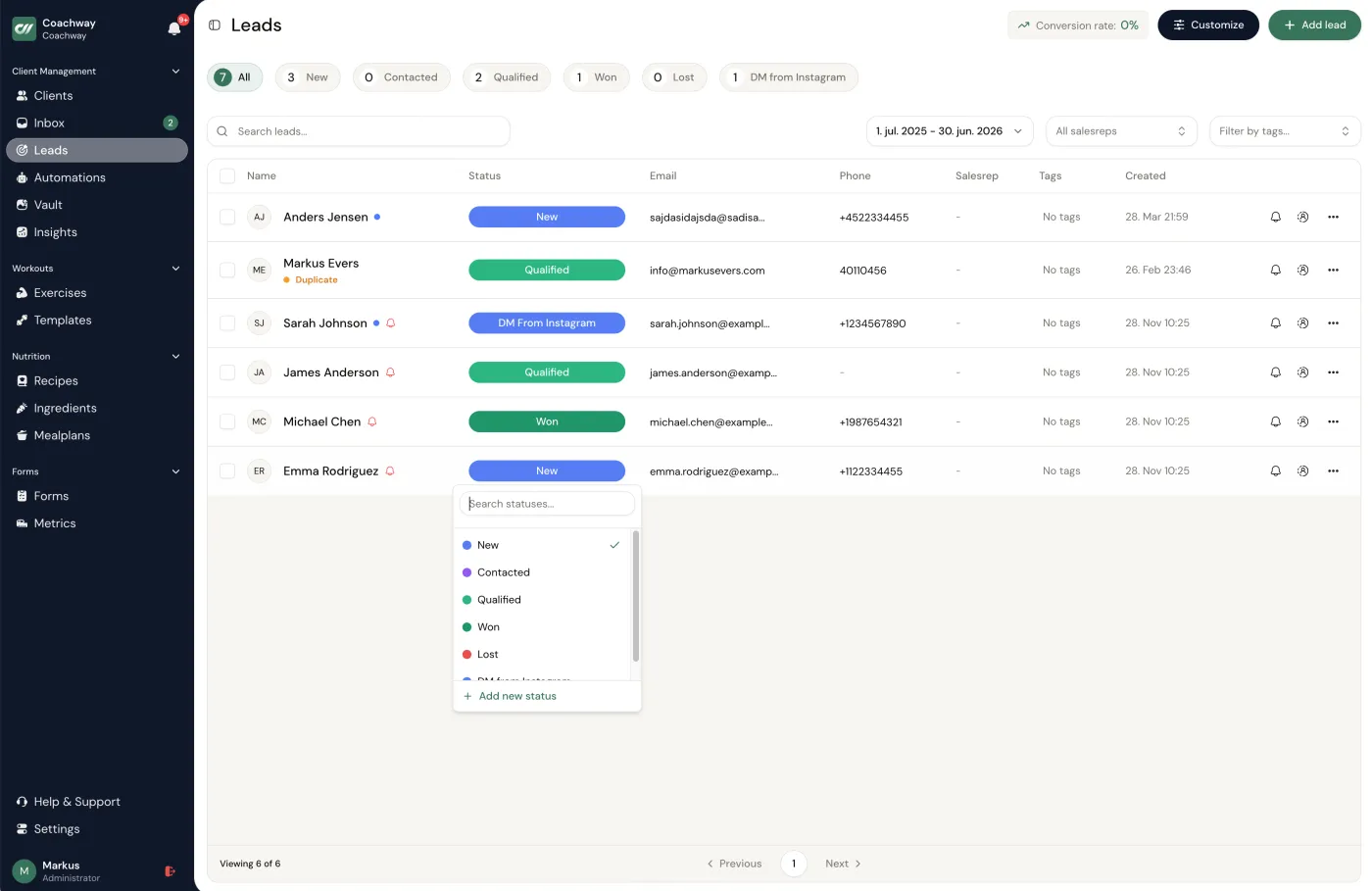
The honest test: if you got sick for a week, could someone else see every open inquiry and where it stands? On Coachway, lead forms feed straight into the platform's pipeline, so capture is not a separate tool you have to duct-tape to your coaching software.

02

Qualification: let the form do the first call.

Two or three well-chosen custom fields on the capture form do the work of a fifteen-minute discovery call: what is your main goal, what have you tried before, what does your week look like? A prospect who answers thoughtfully is warm; one who writes "get fit" and nothing else needs a different conversation. You read the answers before you reply, so every first message is specific instead of generic.

This is also where automation quietly saves the most time: bad-fit leads disqualify themselves on paper instead of in your calendar. The honest test: does your form tell you enough that you could rank today's new leads from hottest to coldest without messaging any of them?

03

Tracking and follow-up: statuses, sources, reminders.

A pipeline is just a list with statuses: new, contacted, qualified, won, lost. Updating a status takes one click and answers the question that kills most coaches' sales - "who was I supposed to get back to?" Add follow-up reminders on top and the system, not your memory, decides when a lead resurfaces. Notes per lead close the loop: when you call back two weeks later, you remember the holiday in August and the question about payment plans.

Source tracking is the underrated half of this stage. When every lead carries its UTM trail - which platform, which campaign, which post - you stop guessing which marketing works and start seeing which channel produces clients rather than just clicks. The honest test: can you name, with numbers, your best-converting channel from the last 90 days?

04

Conversion and onboarding: the yes runs itself.

The stage most coaches forget is the one after the sale. A new client's first week decides how long they stay, and it is entirely predictable work: welcome message, onboarding questionnaire, first program, first check-in reminder. Predictable work is automatable work. Build the sequence once - triggered when a client activates or completes onboarding - and every new client gets the same sharp first week whether they are your fourth or your fortieth.

On Coachway this is the handoff between two features: convert a won lead to a client in a few clicks, and automations take over - drip onboarding messages, reminders, and content delivery, with dynamic variables so every message carries the client's name, not a mail-merge smell. The honest test: could a client sign up on a Saturday you spend offline, and still have a great first 48 hours?

That is the whole machine: capture, qualify, track, convert. None of it is complicated - the value is that it runs every single day, including the days you are coaching back-to-back and would otherwise drop the ball.

the stack question

Standalone stack vs built into your coaching platform.

There are two ways to build this system. Assemble it from dedicated tools - a form builder, a CRM, an email automation platform - or use the lead tooling built into the coaching platform you already deliver on. Here is the honest trade-off.

Factor Standalone stack (forms + CRM + email tool) Built into the coaching platform
Cost Three or more subscriptions before your first client pays Included in the platform fee you already pay to coach
Data flow Leads live in one tool, clients in another; you re-enter details or maintain integrations A won lead becomes a client in the same system - form answers travel with them into onboarding
Power Deeper: multi-step email sequences, scoring, complex funnel logic Covers the coaching pipeline; not built for large cold-email nurture campaigns
Right for Coaches running big paid-ads funnels or an email list in the thousands Most solo and small-team coaches, from first client to a full roster

The doctor's-honesty version: if you are running serious ad spend into long email nurture sequences, a dedicated marketing automation tool is genuinely better at that job, and you should add one. For everyone else, the built-in route wins on the metric that matters - whether the system actually gets used. A stack you have to maintain is a stack you eventually stop maintaining; lead tools that live where you already work every day do not get abandoned.

the line

What to automate - and what to keep human.

Coaching is a trust purchase. Prospects are deciding whether to hand you their body, their habits, and a monthly payment - and they can tell within two messages whether they are talking to a person or a sequence. The rule that keeps automation from backfiring: automate timing and memory, never the words.

automate this

Capture forms and qualifying questions · source and status tracking · follow-up reminders · the instant "got your message, I will reply properly today" confirmation · onboarding sequences after the yes · check-in and payment reminders.

keep this human

The first real reply, referencing what they wrote on the form · the sales conversation itself · handling objections · pricing discussions · the decision on whether they are actually a fit for your coaching at all.

Sell like a doctor, not a funnel: the system's job is to make sure every prospect gets a timely, informed, personal conversation - including the ones you should honestly tell that they do not need you yet. Automation that replaces the conversation loses the very trust that makes coaching sellable; automation that protects the conversation is what lets you have more of them.

questions coaches ask

Frequently asked questions.

What is lead generation automation for personal trainers?

It is the system that handles a lead after they show interest, without you doing it by hand: a form or landing page that captures their details and answers, a pipeline that records where they came from and what stage they are at, reminders that make sure follow-up actually happens, and automated onboarding once they say yes. It automates the handling of leads - creating the interest in the first place is still marketing.

What should a coach automate first in their lead pipeline?

Capture. Replace "DM me for info" with a short form that asks two or three qualifying questions and lands every inquiry in one list with a timestamp and a source. Most coaches lose more revenue to inquiries that were never written down than to any weakness later in the funnel. Once capture is solid, add follow-up reminders, then automate onboarding for new clients.

Do personal trainers need a CRM or marketing automation software?

Most solo coaches do not need a dedicated CRM or a marketing automation suite. A coaching pipeline is short - inquiry, conversation, client - and a coaching platform with built-in lead forms, statuses, and follow-up reminders covers it. A separate CRM or email tool starts to earn its subscription when you run large paid-ads funnels or nurture an email list of thousands, which is a later-stage problem.

What parts of lead follow-up should never be automated?

The actual conversation. Automate the trigger - the reminder that tells you a qualified lead has gone three days without contact - but write the message yourself, referencing what they said on the form. Coaches sell trust, and prospects can smell a templated sales sequence. Automate timing and memory; keep the words human.

How much does lead automation software cost for a coach?

Standalone stacks add up fast: a form tool, a CRM, and an email automation tool each carry their own monthly fee before you have a single client. The cheaper route for most coaches is a coaching platform where lead capture and automations are included in the price you already pay to deliver coaching - Coachway, for example, includes both at EUR 69/month for up to 5 clients, then EUR 9 per client.

The pipeline only pays off when leads are flowing into it - so if the top of your funnel is the bottleneck, the channel-by-channel playbook in how to get personal training clients is the companion read to this one. Build the demand there; let the system here make sure none of it goes to waste.

See what Coachway can do for your coaching business

Coachway was built after working with 150+ coaches who all had the same frustrations - slow platforms, clunky workflows, wasted hours. Start your 14-day free trial and see what we fixed - the whole platform, no charge today, cancel in 2 clicks.

Start 14-day free trial No charge today - cancel in 2 clicks
Built for efficiency 6 languages DenmarkNorwaySwedenFinlandGermanyUnited Kingdom
The coaching platform you've been waiting for
