


How to do online personal training - the delivery mechanics, step by step.
If you can coach a person in a gym, you already know the hard part. Learning how to do online personal training is really about learning how to move four things off the gym floor and into an app: the program, the exercise demonstrations, the accountability, and the form feedback. This is the honest, mechanics-first guide to that hand-off - how each piece actually works remotely, what tools it needs, and where the loop leaks if you leave it scattered across five different apps.
By Markus Evers · Updated September 2026
the short version
To do online personal training you deliver four things remotely that used to happen in the session: a personalised program the client follows in a training app, a short demo video attached to every exercise, a structured weekly check-in that replaces the standing appointment, and form review from clips the client films of their working sets. The session stops being a fixed hour on the gym floor and becomes an asynchronous loop the client runs on their own schedule while you steer it. Put those four pieces plus messaging and payment in one system and the loop holds - scatter them across five apps and warm clients leak through the gaps. Live video calls are optional, reserved for onboarding and the clients who genuinely need face time.
What actually changes when training goes online?
The coaching does not change - the delivery does. In person, one session bundles the program, the demonstration, the accountability and the form check into a single hour where you are standing next to the client. Online, those four jobs come apart and each needs its own remote channel. That sounds like more work, and for the first week it is, but the pay-off is the reason coaches make the move: an in-person schedule caps you at the number of hours in a day, while an asynchronous loop lets one coach hold many more clients without adding hours. The constraint moves from your calendar to your systems.
That is also why the first thing to get right is not a piece of tech but an expectation. A client arriving from in-person training expects a person in the room; a client who chose online training expects structure, quick answers and a clear rhythm. Name the rhythm on day one - here is where your program lives, here is what a weekly check-in looks like, here is how fast I reply, here is what I need you to film - and most of the friction of remote coaching disappears before it starts. If you are making the move from a floor business, the in-person to online transition guide covers the wider business side; this page stays on the delivery mechanics.
The four pieces of online delivery, one at a time.
1. Programming: the plan the client opens every day.
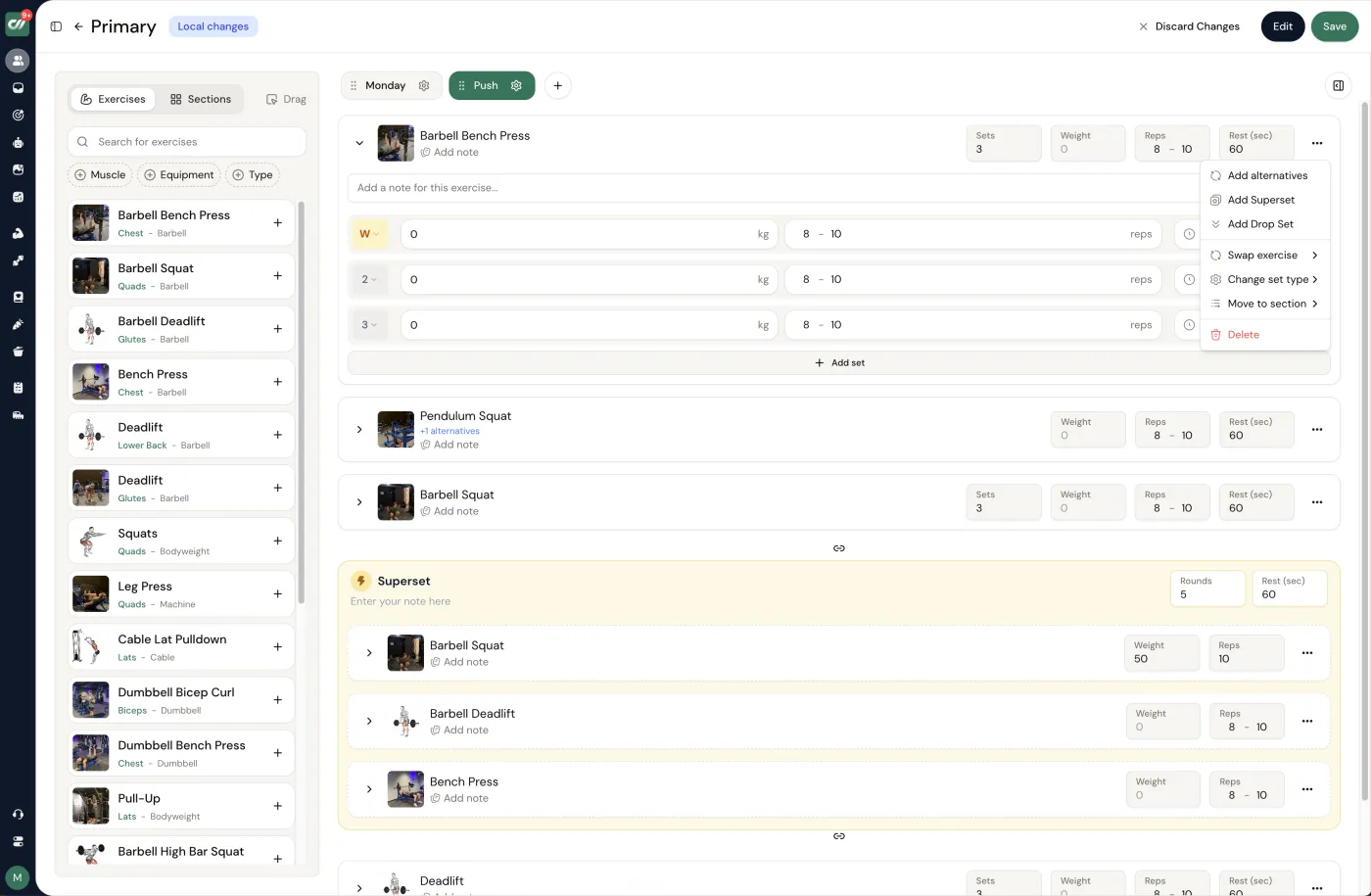
This is the spine of online training, and it lives in the app, not in a PDF. Each client gets a personalised program - the week's sessions, the exercises, the prescribed sets, reps and load - laid out so that on any given day they open the app and simply know what to do. Build from a library rather than typing every movement from scratch: a platform with a large exercise library lets you assemble a session in minutes and keep the demonstrations consistent. Pull the actual planning craft - progression, deloads, how you write a week that holds together - from the program-writing walkthrough. The delivery point here is narrow: the program is a living thing you adjust after every check-in, so it needs to sit somewhere you can edit in seconds and the client sees the change instantly.
2. Exercise video: the demonstration you cannot give in person.
In a gym you show the movement. Online, every exercise in the program needs a short clip attached so the client can see exactly how it is done, from the angle you would coach it. Most platforms ship a stock library of demonstrations, which covers the common lifts; film your own for anything specific to your style, a cue you care about, or a movement the library does not carry well. Keep them short, silent-friendly and shot from the angle that reveals the fault you are watching for. The exercise-filming guide covers framing, lighting and a repeatable batch-recording setup so you build the library once rather than clip by clip. A program without demonstrations is just a list of words - the video is what makes it coachable at a distance.
3. Check-ins: the weekly appointment that keeps clients on track.
This is where online coaching lives or dies. A structured weekly check-in - a form the client submits covering sessions completed, energy and sleep, body-weight trend, progress photos and where they struggled - is the recurring appointment that replaces the booked gym session. You review it, reply within a day with specific adjustments and one clear focus for the week, and the client feels held. Build the form so it asks the same questions every week and surfaces the answers next to the client's photos and training log, so you can read a client's state in a glance rather than digging. The check-in guide has the exact questions worth asking; the delivery rule is simply that the check-in must be structured and reliably answered, because an ad-hoc "how's it going?" is the fastest way to lose a remote client.
4. Form review: technique feedback from filmed sets.
The last thing the gym floor gave you was a live look at technique, and you get it back by having clients film working sets and send the clips through the app. Reviewing asynchronously is often better than a glance mid-session: you can slow the clip down, watch it twice and compare it against the demo of the same lift. Tell each client which two or three movements to film each week and exactly how to frame the shot - usually side-on for squats, hinges and presses - then reply with one or two precise cues rather than a full teardown. Load is a big part of the picture here too, which is why many online coaches program by feel as well as by number; if you want a shared language for effort across clients you cannot see, the RPE-with-online-clients guide is the companion to form review.
Do you need live sessions, or does it run asynchronously?
Most online personal training runs mainly asynchronously, and that is a feature, not a compromise. The loop - program in the app, video on every movement, weekly check-in, form review from clips, messaging in between - carries the coaching without a scheduled call, and that is exactly what lets you hold clients across different time zones and far more of them than a live calendar allows. If you try to give every client a weekly video call, you have quietly rebuilt the in-person schedule online and capped your own capacity at the same low ceiling you were trying to escape.
Live time still earns its place at specific moments. The onboarding conversation is worth doing face to face - it is where you set goals, agree the rhythm and build the trust the asynchronous loop then runs on. Beyond that, keep live calls as a deliberate add-on for a periodic strategy review or the client who genuinely coaches better with a screen between you, and price that access accordingly if it is a real part of your time. The default is asynchronous with a strong first two weeks of onboarding; live is the exception you choose on purpose.
Where all four pieces live in one place.
The four pieces are one loop, and the loop only stays tight when it lives in one system. Scatter it - workout app here, form tool there, messaging in a fourth place, a payment link in a fifth - and every client hand-off becomes a reconciliation task; the client logs a set in one app, files a photo in another, and you lose your week to admin instead of coaching. An all-in-one online coaching platform keeps the program, the exercise videos, the check-ins, the messaging and the billing in a single client file. Coachway is built exactly around that delivery loop: a workout builder with a library of over 1,800 exercises and demonstrations, a drag-and-drop check-in form with side-by-side review of answers, photos and training log, and one client app on iOS and Android in English, Danish, Norwegian, Swedish, Finnish and German where the client sees all of it (the coach dashboard is English). It is built from 6+ years of working with 150 online coaches, and it costs EUR 69 a month including your first 5 clients, then EUR 9 per additional client, every feature included. Payments settle in your own Stripe account - Coachway never holds your money - with optional built-in billing carrying a 2.4% per-transaction fee. The 14-day free trial starts with a card held by Stripe and cancels under Billing before it renews, or you can book a demo and see the delivery loop first.
Frequently asked questions about doing online personal training.
How do you do online personal training?
You deliver remotely the four things that used to happen in a gym session: a written program, movement demonstrations, accountability, and technique feedback. In practice that means building each client a personalised program inside a training app so they always know the day's session; attaching a short demo video to every exercise so form is clear without you standing there; running a structured weekly check-in that replaces the standing appointment and tells you what to adjust; and reviewing form from clips the client films of their working sets. The session itself moves from a fixed hour on the gym floor to an asynchronous loop the client runs on their own schedule while you steer it from one screen. Done well, online training is not a watered-down version of in-person work - it is the same coaching relationship carried by better tools, which is why one coach can hold far more clients than a floor schedule allows.
What software do you need to do online personal training?
At minimum you need a client app that carries the program with exercise videos, a way to run and review check-ins, and a way to take recurring payment. You can stitch that together from a workout app, a form tool, a messaging app and a separate payment link, but the seams leak: a client logs a session in one place, files a photo in another, and pays in a third, and you spend your week reconciling instead of coaching. An all-in-one online coaching platform pulls the program, the client app, check-ins, messaging and billing into a single system so the whole delivery loop lives in one file per client. Coachway is that kind of platform - built from 6+ years of working with 150 online coaches - at EUR 69 a month including your first 5 clients, with every feature included rather than split across tiers.
How do you check a client's form online?
You ask the client to film a working set from a fixed angle - usually side-on for squats, hinges and presses - and send the clip through the app, then you review it and reply with specific, timestamped cues. Asynchronous form review is often better than a live glance in a busy gym, because you can slow the clip down, watch it twice, and compare it against a demo of the same lift. Set the expectation early: name which two or three lifts you want filmed each week, tell the client exactly how to frame the shot, and keep the feedback to one or two changes at a time so it actually gets applied. Over a few weeks the clips become a visible technique record you can both scroll back through, which is something an in-person session never leaves behind.
How often should you check in with online training clients?
A weekly check-in is the standard rhythm, and it is the single most important habit in online delivery. Once a week the client submits a short structured form - training completed, energy and sleep ratings, body-weight trend, progress photos, and anything they struggled with - and you reply within a day with adjustments and one clear focus for the week ahead. The weekly cadence replaces the accountability that a booked in-person session used to provide: it is the recurring appointment that keeps a remote client from drifting. Between check-ins, keep the door open for quick questions but do not try to be on call around the clock. The structure is what holds the relationship, not constant availability, and a client who knows exactly when they will hear from you needs far less reassurance in between.
Can you do online personal training without live video calls?
Yes, and most successful online coaches run mainly asynchronously. The core loop - program in the app, exercise videos on every movement, weekly check-in, form review from filmed clips, messaging in between - does not require a scheduled call, and building the business around asynchronous delivery is exactly what lets one coach serve many clients across different time zones. Live calls are still useful at specific moments: the onboarding conversation where you set goals and expectations, an occasional strategy review, or a client who genuinely coaches better with face time. Treat them as a deliberate add-on for the clients and moments that need them, not as the backbone. If every client needs a weekly call, you have rebuilt the in-person schedule online and capped your own capacity in the process.
The delivery loop is only as strong as its parts: a program that adapts each week, check-ins that keep clients on track, and the software that holds all four in one place.
Keep reading
all guidesDietary Fiber for Clients: A Coach Guide
What dietary fiber is, soluble vs insoluble, how much clients need (~14 g per 1,000 kcal), the best food sources, and how coaches use fiber to drive satiety and diet adherence.
Read the guideEating Out While Dieting: A Coach's Playbook
Eating out is not the enemy of a diet - poor structure around it is. The playbook for helping clients enjoy a restaurant meal and keep progress: check the menu first, lead with protein, watch liquid calories, estimate portions, 80/20.
Read the guideMeal Prep for Clients: A Coach's Adherence Guide
Meal prep is one of the biggest adherence levers a coach can teach. What it is, why it moves results, how to build a simple weekly component-based system that hits macro and calorie targets, and how to teach the skill so it lasts.
Read the guideFree tools for this: Weekly Training Volume Calculator · Calorie Deficit Calculator · Macro Calculator
See what Coachway can do for your coaching business
Coachway was built on knowledge from working with 150 online coaches over 6+ years, who all hit the same wall - slow platforms, clunky workflows, wasted hours. Start your 14-day free trial and see what we fixed - the whole platform, no charge today, cancel anytime under Billing.


