


Personal trainer client tracking software - what good client tracking actually looks like.
Personal trainer client tracking software is the one place that holds each client's adherence, check-in answers, progress photos, weight trend and lift history together, so you read the whole person in a single view instead of stitching a spreadsheet to a chat thread. Good tracking is not a wall of charts - it is the small set of signals that tell you who is drifting before they quietly cancel. This guide covers what to track, what to ignore, and how the right software turns tracking into retention.
By Markus Evers · Updated August 2026
the short version
Good personal trainer client tracking software surfaces five signals in one client view: adherence as days hit versus days planned, the trend in check-in answers, progress photos placed side by side, the weight line as a rolling average, and the lift or session history. The job is not a pretty dashboard - it is spotting the client who is slipping while there is still time to act. Track the few things that change your next message, ignore the vanity metrics that do not, and the same screen that shows progress becomes your best retention tool. Coachway puts all five on one check-in tab for EUR 69 a month, first 5 clients included.
What does client tracking software actually do?
A personal trainer with three clients does not need software - the whole picture fits in your head. The need appears somewhere between fifteen and twenty clients, when you can no longer remember which person hurt their shoulder, who travels every third week, or whose adherence quietly halved after the holiday. Personal trainer client tracking software is the memory that carries that context for you. It holds each client's programme, their check-in history, measurements, progress photos and messages in one file, so you open a name and see how the last month went without reconstructing it from four different apps.
That matters because remote coaching is mostly noticing. In person you read a client from the room - the energy, the bar speed, the mood before they say a word. Online, you get whatever they choose to type into a check-in and whatever the numbers show, and if those live in separate places you miss the pattern that connects them. The tool's real work is not storing data. It is putting the pieces close enough together that the story becomes visible: the client who says they are fine but logged three sessions all month, or the one whose scale is flat while their lifts and photos are clearly moving.
What should good client tracking show in one client view?
Five signals, read together rather than one at a time. Each one lies on its own; together they tell the truth. If your software makes any of these hard to see, or buries them under charts you never act on, it is tracking the wrong things.
1. Adherence - days hit versus days planned.
The single most predictive number you have, and the one clients least like to volunteer. Adherence is not whether they trained hard; it is how much of the plan actually happened - sessions completed, nutrition days logged, steps hit. A client can feel like they are trying and still be running at half the plan, and until you see the gap between planned and done you are coaching a fiction. Good software shows adherence as a simple ratio over time, not a guilt-inducing streak, so a dip reads as information you act on rather than a failure the client hides.
2. Check-in trends - the direction, not the last answer.
One check-in is a snapshot; four in a row is a story. What you want to read is the trajectory - is energy climbing or fading, is sleep stabilising, has the tone of the written answers gone from detailed to one-word. A tool that only shows this week's form makes you the trend engine, holding last month in your head. Software that stacks the answers side by side turns a client going quiet into something you can see, which is usually the earliest warning you get that someone is about to drift.
3. Progress photos - placed side by side.
Photos are the antidote to the scale's bad weeks. A client can be down zero on the scale and visibly leaner across a month, and the photo is what keeps them coaching through the flat patch. The tracking that helps is comparison, not a growing pile of images: this month against six weeks ago, same angles, same light. Handled well, progress pictures also carry consent and privacy weight, so the software needs to store them where only you and the client see them, and read them next to the numbers so one photo never misleads on its own.
4. Weight trend - a rolling line, not a single reading.
Body weight swings for reasons that have nothing to do with fat: water, sodium, the menstrual cycle, a heavy meal, stress. A single reading is noise. The useful view is the trend across weeks, ideally as a rolling average that smooths the daily jump, so both you and the client stop reacting to the scale and start reading the direction. Tracking software that plots the line rather than the last number is quietly one of the biggest retention tools you have, because most clients quit on a bad scale day that a trend line would have shown to be nothing.
5. Lift and session history - the training that happened.
When the scale and the mirror stall, the log is what proves the work is landing. A client adding weight to the bar, hitting more reps at the same load, or simply showing up more consistently is progressing whether or not the outside changes yet. Per-session history lets you point at real evidence of getting stronger, which is often the only honest good news during a slow fat-loss phase. It also feeds your programming: you cannot apply the right change at a plateau if you cannot see what the client has actually been doing.
Why do vanity dashboards fail coaches?
A lot of tracking software sells the dashboard, not the outcome. Rings, streaks, badges, twenty charts on a wall - it demos beautifully and changes nothing, because none of it answers the only question that matters on a Monday morning: which of my clients needs me this week? A metric earns its place if it changes your next action. If it does not, it is decoration, and decoration costs you the worst way software can - it hides the two signals that mattered inside eighteen that did not.
The retention test is simple. Clients almost never quit on the day they decide to; they drift for two or three weeks first - adherence slips, the check-in tone drops, the logging thins out, the replies get shorter. The coach who sees that drift can save the relationship with one well-timed message; the coach who only sees the cancellation cannot. So the software that drives retention is not the one with the most graphs. It is the one that surfaces the early fade on the same screen where you reply, so noticing and acting are one motion instead of two. Judge a tool by how fast it tells you who is slipping, not by how impressive it looks in a screenshot.
How do you choose client tracking software?
Match the tool to how you coach, not to the feature list. Five questions cut through most of it, and if you want the full field of platforms compared head to head, the client management software comparison ranks the options by size of business.
Can you read a client's week in under a minute?
Open the client file in a trial and time yourself. If the check-in answers, weight trend, photos and training log sit on one tab, you will know how the week went in seconds. If you have to click between four places to assemble the picture, the tool will slow you down on every client, every week, forever.
Do you track and message in the same place?
You act on what you track by sending a message. If the tracking lives in one app and the conversation in another, you will keep alt-tabbing and you will keep missing the moment. The best fit puts the client's history and the chat on one screen, so the timely note is one glance and one reply away, not a context switch you skip when you are busy.
Does the client experience feel like yours?
Tracking only works if the client actually logs, and they log more inside an app that feels like your coaching, not a generic tool. A branded in-app experience - your logo, your colours - keeps them engaged, which keeps the data flowing, which is what makes the tracking worth anything. Check whether that branding is included or gated behind a higher tier.
What does it really cost as you grow?
Flat tiers stay flat but gate features; per-client pricing is cheap at ten clients and adds up at fifty. Price it against your real client count in a year, and count the separate tools it lets you cancel. A platform that folds the spreadsheet, the photo folder and the checkout into one is often cheaper than the stack it replaces.
Who owns the payments and the data?
If the software also handles billing, check whose account the money lands in and what it costs. Keeping your own Stripe account means the platform never holds your revenue, and any built-in payment convenience should be optional and clearly priced rather than a cut of everything you earn.
How Coachway puts the five signals on one tab.
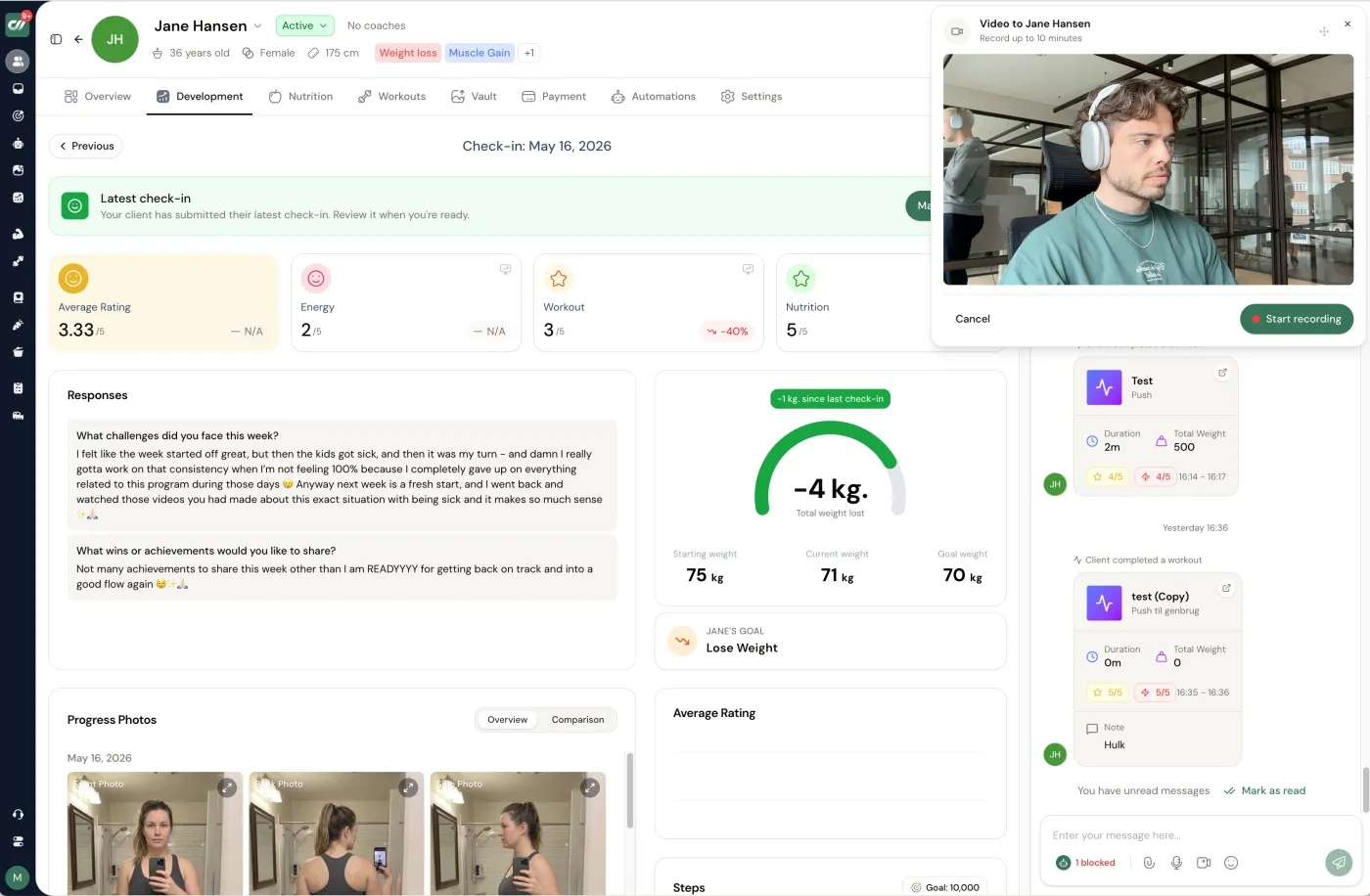
We build Coachway, so treat this as the reference build rather than a neutral verdict. It was built on knowledge from working with 150 online coaches over 6+ years, and the client tracking is shaped around the one-view idea in this guide. The check-in tab shows a client's ratings, their written answers, the weight trend and progress photos side by side with this week's answers, and the Power Panel keeps that client file open next to the conversation, so noticing a drift and sending the message are one motion. You build the check-in form yourself with the fields you care about - measurements, circumference, smiley or star ratings, custom metrics and progression photos - and it reads back as a trend rather than a stack of disconnected submissions.
The pricing is one plan with every feature included: EUR 69 a month with your first 5 clients, then EUR 9 per additional client, no tiers to climb and no binding period. The client app is branded with your logo and colours as standard on iOS and Android, so clients log inside something that feels like your coaching. Payments settle in your own Stripe account and Coachway never holds your money; built-in payments are optional and carry a 2.4% per-transaction fee if you use them. The 14-day free trial charges nothing today, though a card is required to start and you can cancel under Billing before it renews - or book a demo and see the client view first. The coach dashboard is in English.
Frequently asked questions about client tracking software.
What is personal trainer client tracking software?
Personal trainer client tracking software is a tool that holds everything you need to read a remote client in one place: their adherence, their check-in answers, progress photos, the weight trend, measurements and their training history. Instead of a spreadsheet for numbers, a chat app for messages and a separate folder for photos, it puts one client's full picture on a single screen so you can see how the last two weeks actually went in a few seconds. The point is not storage. It is that a coach carrying twenty or forty clients cannot hold each person's context in their head, and tracking software is the memory that lets you notice the one who is drifting before they cancel. Tools that lean on the word tracking usually emphasise progress data, but for a working coach the useful ones also carry the messaging and the check-in review, because you act on what you track through the same screen.
What should good client tracking software show in one place?
Five signals, read together rather than one at a time: adherence as days hit versus days planned, the trend in check-in answers over several weeks, progress photos placed side by side, the weight line as a rolling average rather than a single reading, and the lift or session history. Any one of these on its own misleads. A flat scale week looks like failure until you see photos and lifts moving; a client who says they feel great can still be quietly missing half their sessions. Good software puts the five next to each other so the story is obvious in one glance, and it flags the change that needs a message, rather than showing you a hundred charts that all need interpreting. If reading a client's week takes more than a minute, the tool is working against you.
How does client tracking software help with client retention?
Clients rarely quit at the moment they decide to. They drift first, for two or three weeks, and the coach who notices the drift can save the relationship while the one who notices the cancellation cannot. Client tracking software drives retention by making that drift visible early: falling adherence, a check-in tone that dropped, sessions logged less often, a weight trend flattening while the client goes quiet. When those signals sit on one screen you catch the fade and send the timely message that turns it around, which is worth far more than any streak counter or badge. Retention is a by-product of noticing in time, and noticing is exactly what tracking is for. A dashboard that looks impressive but hides the early warning is worse than a plain list that surfaces it.
Is there free personal trainer client tracking software?
There are free tiers and free apps, and they can work when you are coaching a handful of people, but the trade is usually real: caps on client numbers, no branded client app, weaker check-in and progress views, or your payments and data spread across separate free tools that do not talk to each other. For a coach past the first few clients the hidden cost is your time, because free stacks tend to push the tracking back into spreadsheets and screenshots. Most paid platforms let you try before you pay instead. Coachway runs a 14-day free trial with nothing charged on day one, though a card is required to start and you can cancel under Billing before it renews - so you can put your own clients into it and see whether the tracking actually saves you time before committing.
How much does personal trainer client tracking software cost?
Pricing splits into two shapes. Some tools charge flat tiers that gate features such as a branded app or team access behind higher plans; others charge per active client, which stays cheap at a handful of clients and climbs as you grow. Read the price against how you actually coach, not the headline number. Coachway is EUR 69 a month with your first 5 clients included and EUR 9 per additional client after that, with every feature in one plan and no tiers to climb, and its optional built-in payments carry a 2.4% per-transaction fee while you keep your own Stripe account. Whatever you choose, count the tools the tracking replaces - a separate spreadsheet, a photo folder, a checkout link - because a platform that folds those into one is often cheaper than the stack it retires.
Client tracking is only as good as what feeds it: a check-in that captures the right signals and the retention habit of acting on the early drift. When you are ready to weigh the platforms against each other, the client management comparison ranks them by size of business.
Keep reading
all guidesPT Distinction pricing in 2026: plans and real cost
PT Distinction prices in three USD tiers, from USD 19.90/mo for 3 clients to USD 89.90/mo for 50, each with per-client overage. The catch most coaches miss: a custom-branded client app only starts on the Pro tier, not the cheapest one. Here is the full ladder, the trial, and where Coachway lands for fitness and nutrition coaches.
Read the guideMy PT Hub pricing in 2026: plans and real cost
My PT Hub keeps pricing simple with three plans: Starter at EUR 25/mo (capped at 3 clients), Premium at EUR 59/mo unlimited, and Ultimate at EUR 215/mo. The headline numbers are low, but branding and extra trainers are paid add-ons. Here is the full breakdown, the 30-day trial, and how Coachway compares.
Read the guideKahunas pricing in 2026: plans and real cost
Kahunas prices in three fixed USD tiers capped by client count: USD 35/mo for up to 25 clients, USD 69 for up to 50, and USD 99 for unlimited, with the fully branded white-label app gated to the top USD 99 tier. This guide lays out the full ladder, the 14-day trial, and how Coachway compares for European coaches.
Read the guideSee what Coachway can do for your coaching business
Coachway was built on knowledge from working with 150 online coaches over 6+ years, who all hit the same wall - slow platforms, clunky workflows, wasted hours. Start your 14-day free trial and see what we fixed - the whole platform, no charge today, cancel anytime under Billing.


