Skip to content
systems · scaling

Automate the admin. Never automate the coaching.

A growing roster does not drown you in coaching - it drowns you in admin. The same onboarding steps, the same check-in reminders, the same follow-ups, times fifty. All of it is repetitive and rule-based, which is the exact definition of what a machine should do so you do not have to. Here is what to automate, the one thing you must never automate, and how to build each sequence once so it runs for every client.

By Markus Evers · Updated September 2026

the short answer

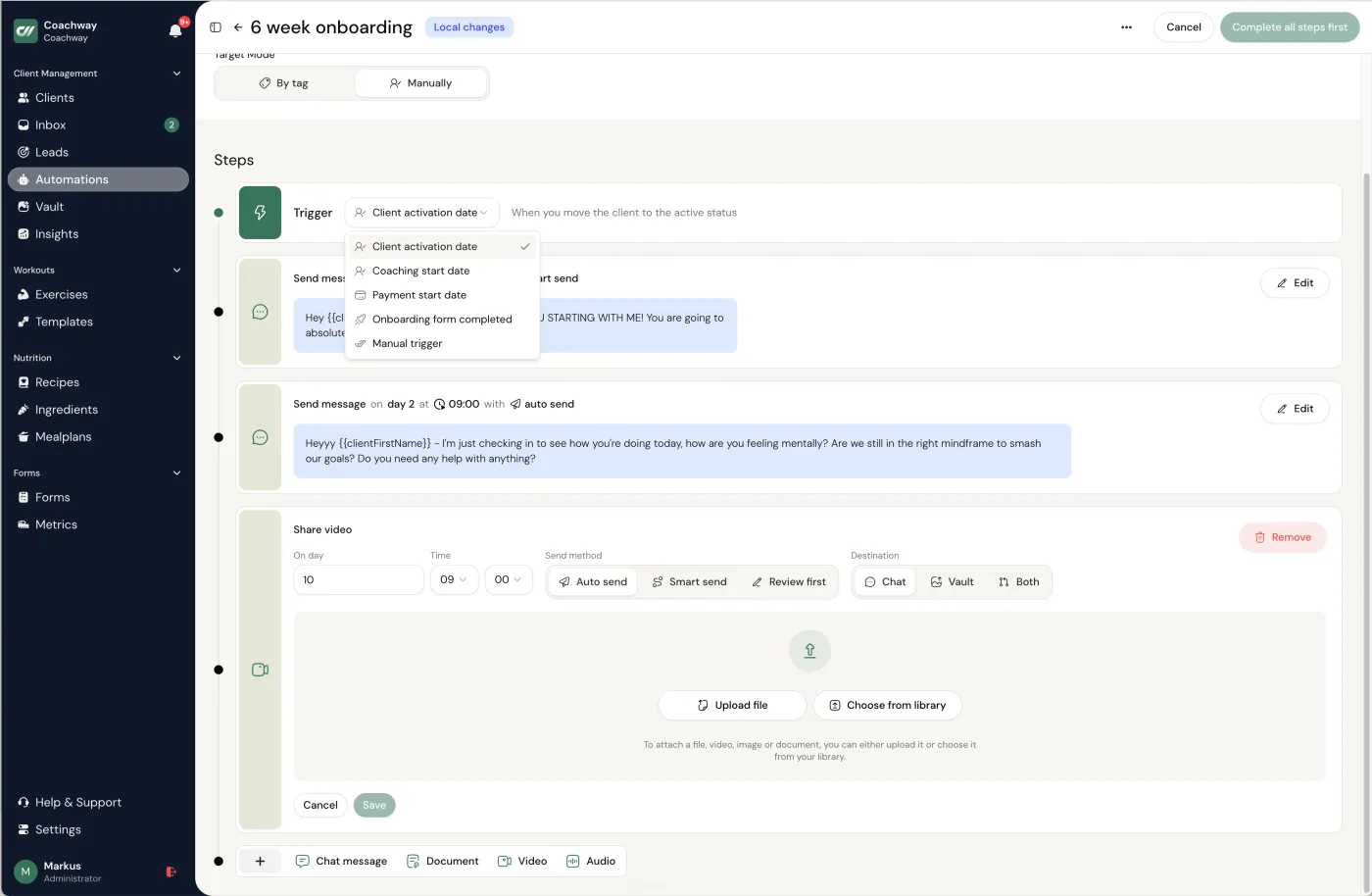
The admin that eats a coach's week - onboarding steps, check-in reminders, content delivery, follow-ups - is repetitive and rule-based, which is exactly what automation is for. Map your recurring sequences, automate the predictable delivery and reminders, and keep the coaching itself manual. In Coachway you set a trigger (client activation, coaching start, or payment start), build the sequence once - a welcome message on day 1, a plan on day 2, a check-in prompt on day 7 - assign it by tag, and it runs for every client. The one rule that matters: automate the rhythm, never the relationship. Replies, feedback and judgement stay yours.
the line

What to automate, and what you must not.

Draw one clean line and everything else follows. Automate anything you would write nearly the same way for every client regardless of who they are: the welcome sequence, the setup instructions, the reminder that a check-in is due, the scheduled bit of education in week three. This is scaffolding, and scaffolding should be identical and effortless.

Never automate the coaching. Personal check-in replies, video and voice feedback, program changes, and any decision about a specific client stay by your hand, always. Think of it as a receptionist, never the coach: the receptionist handles the predictable so your judgement is free for the work clients actually pay for. Cross that line and clients feel it immediately - an automated reply to a hard week is worse than a late one. This is also the difference between the coach who scales and the one who becomes a worse coach at fifty clients than they were at ten.

start here

The three sequences worth automating first.

You do not need to automate everything at once. These three cover most of the repetitive load and are the safest to hand to a machine, because none of them is the coaching.

  1. 1

    Onboarding

    The highest-value thing to automate, because it is the same every time and the moment a client is most likely to stall. Trigger it on activation or coaching start, then deliver the sequence: a welcome message on day 1, account and app setup, the first plan on day 2, and the first check-in prompt around day 7. Every new client gets the same clean first week without you rebuilding it by hand.

  2. 2

    Check-in reminders

    The single most repeated touchpoint, and the one that quietly decides whether a client keeps the habit. A scheduled reminder before each check-in is due means nobody slips through the cracks on a busy week, and you are not the one remembering to chase forty people. This is the automation that most directly protects retention.

  3. 3

    Scheduled content and follow-ups

    Educational drips, a mid-program check-in, a "how is week two feeling" nudge - the touches that make coaching feel attentive but do not need you awake to send them. Mix content types (a text on day 1, a video on day 3, a PDF on day 7), schedule down to the hour, and let the rhythm run while your attention goes to the replies that actually need it.

how it works

Build it once, and it runs per client.

In practice this is a one-time setup in Coachway's automations. You pick a trigger - a client activating their account, their coaching start date, or their payment start date - then build the sequence: a welcome message immediately, a plan the next day, a check-in prompt a week later, with each step scheduled down to the hour. Every step can be a text, a video, an audio note or a PDF, so an onboarding flow can carry your welcome video and your setup guide, not just words.

You assign the flow by tag, so the right clients get the right sequence, and you keep the control level you want - fully automatic, or a queued draft you approve before it sends. Crucially, you write every word, and the messages land inside your branded app like anything else from you. Build it one time and every new client gets the same seamless first weeks, while your hands-on time goes where it belongs - which is the whole logic behind how coaches handle 100+ clients.

before you trust it

Test it with a fake client first.

An automation you have not tested is a way to send the wrong message to fifty people at once. Before you switch a sequence on, run a dummy client through the whole thing yourself - and deliberately test the awkward cases: someone who joins mid-week, someone who does not respond, someone who finishes onboarding early. You are checking that the timing lands right and that nothing fires when it should not.

Then decide your manual exceptions up front. Some moments always deserve a human hand even inside an automated flow - a client who replies to the welcome message with a real concern should reach you, not the next scheduled step. Automation is there to make sure nothing routine slips; it is not there to decide who needs you. The moment it starts making that call, you have automated one thing too many.

Common questions

What should online coaches automate?

+

Automate the predictable, rule-based admin that repeats for every client: onboarding sequences (welcome, setup, first plan, first check-in), check-in reminders so none are missed, and scheduled content or follow-ups. These are the tasks that are identical from client to client and scale badly by hand - manually chasing check-ins is fine at ten clients and breaks at thirty. Set the trigger and timing once and let it run. The test for whether something should be automated is simple: if you would write nearly the same thing every time regardless of the individual client, it is a candidate.

What should you never automate in coaching?

+

The coaching itself. Personal check-in replies, video and voice feedback, program adjustments, and any judgement call about a specific client stay manual - that is the work clients actually pay for, and it is the first thing they notice missing. Automate the rhythm, never the relationship. The right mental model is a receptionist, not a coach: automation handles the predictable reminders and delivery so that your human attention is freed for the decisions and the feedback, not replaced by a bot pretending to be you.

How do coaching automations get triggered?

+

In Coachway you set the trigger once and it fires per client. The options are event-based: a client activating their account, their coaching start date, or their payment start date. From that trigger you build a scheduled sequence - a welcome message immediately, a plan the next day, a check-in a week later - assign it by tag so the right clients get the right flow, and choose the content type for each step, from a text message to a video, an audio note or a PDF. You build it one time and every matching client moves through the same sequence automatically.

Do automated messages feel impersonal to clients?

+

They do not have to, because you write every word and they arrive inside your branded app like any other message from you - not from a third-party tool with its own branding. The clients who feel automated are the ones whose coach automated the wrong things: the replies, the feedback, the check-in responses. Keep those manual and use automation only for the predictable scaffolding - reminders, onboarding steps, scheduled content - and the client experiences a coach who is consistently on top of things, which is exactly the impression you want.

See what Coachway can do for your coaching business

Coachway was built on knowledge from working with 150 online coaches over 6+ years, who all hit the same wall - slow platforms, clunky workflows, wasted hours. Start your 14-day free trial and see what we fixed - the whole platform, no charge today, cancel anytime under Billing.

No charge today - cancel anytime under Billing
Built for efficiency 6 languages DenmarkNorwaySwedenFinlandGermanyUnited Kingdom
The coaching platform you've been waiting for
