


The best health coaching software in 2026.
The best health coach software depends on how you coach - Coachway for lifestyle and behaviour-change coaching with habits, check-ins, and a branded client app in one tool, Practice Better or Healthie if your practice is clinical, CoachAccountable for accountability-led coaching outside fitness. Here is the honest comparison of 10 health coaching software tools and who each one fits.
By Markus Evers · Updated July 2026
How this comparison is made: we check every competitor's pricing and features against their live websites and re-verify them on a recurring basis. Coachway is our product - we flag it where it appears, we credit real competitor strengths, and we say who each platform fits better than us. Browse all platform comparisons.
the short version
Health coaching software runs a wellness practice in one place: intake, activity and habit tracking, weekly check-ins, light nutrition guidance, messaging, progress tracking, and payments. Coachway covers all of it with a branded client app, a unified review view called the Power Panel, and billing through the coach's own Stripe, at predictable per-client pricing of EUR 69/month for up to 5 clients.
The best pick depends on your lane: Coachway for health and wellness coaches who deliver habits, check-ins, and light nutrition through one branded app, Practice Better and Healthie for clinical nutrition practitioners and dietitians who need compliant charting and telehealth, CoachAccountable for accountability-led coaching outside fitness, Everfit for a free start, and PT Distinction or My PT Hub where the practice leans toward training. We also cover Trainerize, Kahunas, and what happened to Nudge Coach, with the honest reasoning below.
What health coaching software is, and what it should do.
Health coaching is a behaviour-change job: helping a client build steadier sleep, more movement, calmer stress, and simpler eating, week after week. The software exists to carry that ongoing relationship - and to replace the patchwork most coaches start with: habits in a notes app, weights in a spreadsheet, intake answers in a separate forms tool, conversations in WhatsApp, and a scheduler somewhere else. One important line before the ranking: a health or wellness coach delivers lifestyle and behaviour guidance, not medical advice, and the right tool is built to support exactly that scope. Here is the checklist that matters:
- Activity and behaviour tracking. Per-client daily step goals with a progress ring, sync from Apple Watch or Garmin, and lifestyle habits like sleep, energy, and stress captured as check-in questions.
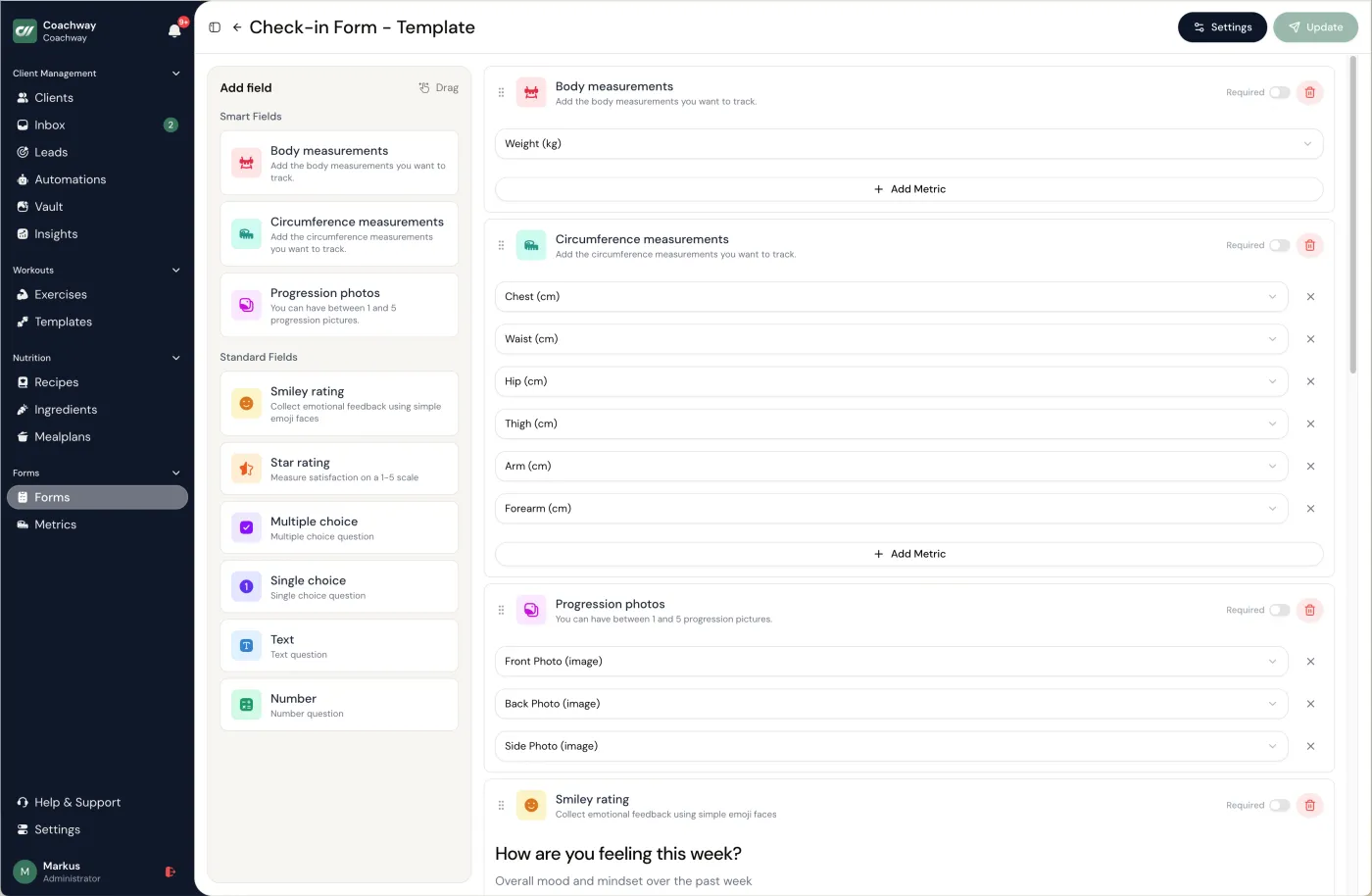
- Structured check-in forms. Built by drag and drop, so an energy-and-stress client, a weight client, and a general-wellness client each get the right questions on the right cadence.
- Progress and measurement tracking. Weight, measurements, and photos stored by date, auto-charted so the trend is obvious before motivation slips.
- Messaging in one inbox. Every conversation, voice note, and check-in reply in the same client thread instead of scattered across WhatsApp, email, and DMs.
- Simple nutrition and meal guidance. Light food direction and habit-based eating, without turning your practice into a full meal-prep service.
- Automations and reminders. Check-in reminders, scheduled messages, and inactivity flags on a custom threshold, so you are not chasing anyone by hand.
- Payments and a branded client app. Billing through your own Stripe next to the client record, and a client app that feels like your practice, not the platform's.
How we compared the health coaching tools.
We judged each platform on: whether it covers the full weekly loop (intake, activity, check-ins, messaging, payments), whether the client app can carry the coach's branding, who owns the payment relationship, whether the tool respects the coaching scope or is really clinical software, and who it genuinely fits. Where a tool is built for dietitians or clinical practices, we say so neutrally - that is a different lane, not a flaw. For the wider field of coaching platforms, see our best coaching apps for online coaches roundup, and if food leads your offer, the best online nutrition coaching platforms guide ranks the nutrition-first options.
The 10 health coaching tools, compared.
| Tool | Best for | Standout | Price signal |
|---|---|---|---|
| Coachway | Health and wellness coaches who want the whole loop in one branded app | Habits, check-ins, light nutrition, messaging, and payments in one client record; own Stripe | EUR 69/month up to 5 clients, then EUR 9 per client |
| Practice Better | Clinical nutrition and wellness practitioners | HIPAA-compliant charting, telehealth, scheduling, and notes | Free 3-client plan, then paid monthly tiers (USD) |
| Healthie | Dietitians and telehealth practices | EHR-grade charting, billing and insurance workflows, telehealth video | Paid monthly plans from ~USD 49 |
| CoachAccountable | Accountability-led coaching outside fitness | Action plans, metrics, worksheets; bills through your own Stripe, Square, or PayPal | Paid monthly plans by active client count (USD) |
| Everfit | A free start and a modern feel | Genuinely useful forever-free tier for small client lists | Free tier, then paid monthly plans (USD) |
| PT Distinction | Habit- and nutrition-led coaching in English markets | Deep habit tracking and nutrition tooling; branded app on higher plans | Paid monthly plans with included client tiers (USD) |
| My PT Hub | A simple, affordable first platform | Flat-rate unlimited-client mid tier; branded app as an add-on | Paid monthly plans (EUR on the live page) |
| Trainerize | Coaches whose health offer leans on training | Mature workout builder and large install base; branded app is a paid add-on | Free tier, then paid monthly plans (USD) |
| Kahunas | A branded app bundled with 1:1 coaching | White-label app on the top tier | Paid monthly plans across published tiers (USD) |
| Nudge Coach | No longer available | Was the habit-and-wellness reference tool; shut down April 30, 2025 | Cannot be bought |
Pricing and feature tiers change often - always confirm current rates on each provider's own pricing page. The full breakdown is below.
01 · best for health & wellness coaches
Coachway
Coachway is the European-built platform for coaches who run behaviour change as a business. Daily step goals with a progress ring (synced from Apple Watch or Garmin), drag-and-drop check-in forms with lifestyle questions like sleep, energy, and stress, auto-charted progress and measurements, one inbox for every client conversation, light meal and nutrition guidance from a 3,900+ ingredient database, automations for reminders and inactivity flags, and payments through your own Stripe - all in one client record. Clients get an app carrying your logo, colors, and name. See the full feature set and run the numbers on the pricing page.
How a health coach runs a week in Coachway.
- 01 Set up intake and the weekly plan. Send a structured intake form to capture goals, lifestyle, health context, and what the client wants to change. From the answers, set a daily step goal and add the lifestyle questions that matter - sleep, energy, stress, movement - to the client's check-in form, so the week has a clear shape.
- 02 Let the client log activity and check in from their app. The client opens their branded Coachway app, sees their step goal and progress ring, logs weight or measurements, and completes the weekly check-in form. Steps can sync automatically from Apple Watch or Garmin, which lifts completion rates for busy wellness clients.
- 03 Review the week in one place. The coach opens Power Panel and sees the client's step progress, charts, check-in answers, notes, and history side by side. Patterns in sleep, energy, stress, and adherence show up as auto-charted trend lines, so the review takes minutes instead of tab-hopping.
- 04 Reply, adjust the plan, and add light nutrition guidance. The coach answers in the same inbox, adjusts the step goal or check-in questions, and adds simple meal or nutrition guidance where it helps. Any change lands back in the client's app, framed as lifestyle and behaviour guidance rather than medical advice.
- 05 Let automations carry the cadence. Automated reminders run the next check-in, scheduled messages, and inactivity alerts on schedule, and broadcasts keep the whole client base moving together. The coach stays on coaching, not admin, as the practice grows.
The trade-off: Coachway is built for behaviour-change coaching, not clinical practice - it is not an EHR and does not aim to be one. If you need compliant clinical charting, telehealth-of-record, or insurance billing, Practice Better or Healthie fit better. Coachway is also one of the younger platforms here, so the catalog of third-party integrations a decade-old tool offers is still growing; in return you get features faster and same-day support, built on knowledge from working with 150 online coaches over 6+ years.
Want to see the whole weekly loop - intake, habits, check-ins, and payments - running on your own clients?
No charge today - cancel anytime under Billing.02 · clinical nutrition & wellness
Practice Better
The strongest pick if your practice is clinical rather than coaching-led. Practice Better is built for nutrition and wellness practitioners who need HIPAA-compliant charting, telehealth, scheduling, and notes, and it does that lane very well. Meal planning is added via a paid That Clean Life integration, and food tracking works as journaling rather than a full planner. If you are weighing a move away from it, our Practice Better alternatives guide goes deeper.
The trade-off: it was not built for coaching delivery - there is no workout builder and no built-in meal planner, so a lifestyle coach pays for clinical depth they will not use.
03 · dietitians & telehealth
Healthie
An EHR-grade platform for dietitians and telehealth practices: charting, scheduling, billing and insurance workflows, telehealth video, food and symptom journaling, and client programs. For a registered dietitian who needs compliant records and a clinical workflow, it is a strong, purpose-built peer to Practice Better rather than a coaching tool.
The trade-off: built for the clinical lane - a behaviour-change coach gets no workout builder and a heavier workflow than the job needs.
04 · accountability-led
CoachAccountable
A general-purpose coaching-business platform (US, since 2012) built around accountability between sessions: action plans, metrics and charts, worksheets, courses, group coaching, and recurring billing. The client experience is a branded web app added to the home screen - with your own logo as the icon - rather than a native app-store app. A good fit for life, wellness, and habit coaches whose work is not fitness-specific.
The trade-off: no fitness or nutrition tooling and an English-only UI; reviewers describe it as feature-dense with a learning curve.
05 · free starter tier
Everfit
A modern-feeling platform with a free tier for small client lists and paid plans that scale up. Habit tracking, check-ins, and program delivery cover the wellness basics, which makes it a sensible starting point for a new health coach who needs to keep costs near zero while building a first client base.
The trade-off: the free tier is genuinely useful, but you will graduate to paid quickly, and the platform leans training-first rather than wellness-first.
06 · habit & nutrition depth
PT Distinction
A UK-built platform with genuine depth in habit tracking and nutrition tooling, plus a self-serve trial. Although the name says personal training, its habit coaching and nutrition planning make it a workable pick for health coaches in English-speaking markets whose clients also train.
The trade-off: the interface is dated compared with newer tools, and Nordic and DACH localization is limited.
07 · simplest entry point
My PT Hub
Affordable, simple, and UK-built. Often the easiest option for a coach moving from spreadsheets to real software for the first time, with a flat-rate unlimited-client mid tier and a branded client app available as an add-on.
The trade-off: built for personal trainers first, so wellness-specific tracking is thinner, and coaches tend to outgrow it as the workflow gets more complex.
08 · training-led health coaching
Trainerize
One of the most established workout-first platforms in North America, with habit coaching bolted onto a mature training core. A reasonable pick if your health coaching leans heavily on structured exercise programming; a branded client app is available as a paid add-on.
The trade-off: wellness and nutrition tools are lighter than the coaching-led platforms, and the pricing stacks up through add-ons.
09 · branded app + 1:1
Kahunas
Built around 1:1 coaching and a branded client app, with group and community features alongside individual clients. A fully white-label app sits on the top tier. It is fitness-led rather than wellness-led, so it earns a look mainly if a branded app bundled with personal coaching is your priority.
The trade-off: health-coaching specifics like lifestyle check-in questions and behaviour tracking are not its centre of gravity, and third-party integrations are fewer than the longest-established platforms.
10 · shut down - included for context
Nudge Coach
For years the reference habit-and-wellness coaching app, with customizable trackers, behaviour-change programs, content delivery, and messaging. Nudge Coach shut down on April 30, 2025, and its data-export window closed in mid-May 2025, so it can no longer be bought - we include it because many health coaches still search for it. If you ran your practice on Nudge, our Nudge Coach alternatives guide covers the migration in full.
The trade-off: the obvious one - it no longer exists. Its habit-and-behaviour focus lives on in the tools above; Coachway and CoachAccountable are the closest homes for that style of coaching.
Pick by your practice, not the marketing.
- You coach habits, lifestyle, and light nutrition, and want one branded app. Coachway - the whole weekly loop from intake to payment sits in one client record, handled from one tab instead of six.
- You are a licensed clinician or dietitian who needs compliant charting. Practice Better or Healthie. That is their lane, and coaching software is not a substitute for it.
- Your coaching is accountability-first and not fitness-specific. CoachAccountable, or Coachway if you also want activity tracking and nutrition guidance built in.
- You are bootstrapping at 0 to 5 clients. Everfit's free tier, then graduate as you grow.
- Your health coaching leans on structured training. Trainerize or PT Distinction, or see the wider field in the best coaching apps for online coaches.
- You are migrating off Nudge Coach. Start with the Nudge Coach alternatives guide, then pick by the lanes above.
If the first lane sounds like your practice, the fastest way to check the fit is to see health coaching software running live.
No charge today - cancel anytime under Billing.What health coaching software really costs.
The pricing model matters more than the list price. The market runs on three: flat per-client pricing (Coachway: EUR 69/month for up to 5 clients, then EUR 9 per additional client - everything included), tiered plans where branding, automations, or client capacity gate at higher tiers, and clinical platforms priced for practices rather than solo coaches. Always calculate the total for YOUR client count with the modules you actually need - a cheap base plan with three required add-ons is rarely cheaper than one all-inclusive price.
Watch payment fees too: some platforms take a percentage of your client payments on top of the subscription. When billing runs through your own Stripe account, you know the fee up front - and your payment history stays yours even if you switch platforms later. Our per-vendor breakdowns live in coaching software pricing compared.
The scope line your software should respect.
No tool changes what you are allowed to do. A health coach supports habits, accountability, and lifestyle - the software should make that work easier, not tempt you across the line into clinical territory. Here is the line, in plain terms.
What coaching software is for
Setting habits and goals, running check-ins, delivering programs and general nutrition guidance, messaging, and tracking progress for healthy clients pursuing lifestyle change.
What it is not for
Storing diagnoses, prescribing therapeutic diets, treating disease, or acting as a medical record. That is physician, dietitian, and licensed-therapist territory - and a different class of software entirely.
When to refer
Eating disorders, depression or anxiety, chronic disease, pregnancy, medication questions, or anything that feels clinical. Have professionals to point clients to, and put it in your client agreement.
A platform that markets itself as an EHR is solving a different problem than yours. Pick software built for behaviour-change coaching, keep your work general and educational, and refer anything clinical out every time. Your scope becomes a trust signal rather than a liability.
Frequently asked.
What is the best health coaching software?
There is no single best health coaching software for every practice - the right pick depends on whether your coaching is lifestyle-led, clinical, or accountability-led. Coachway suits health and wellness coaches who want habits, check-ins, light nutrition guidance, messaging, payments, and a branded client app in one tool. Practice Better and Healthie suit clinical nutrition practitioners and dietitians who need compliant charting and telehealth, and CoachAccountable suits accountability-led coaching outside fitness.
Are health coaching apps the same as health coaching software?
Mostly, though coaches use the two words for slightly different things. Health coaching apps usually means what the CLIENT holds: a phone app for logging habits, following a plan and messaging you. Health coaching software usually means what the COACH runs: the dashboard where client records, intake forms, check-ins, plans and payments live. Most platforms in this guide are both, with a coach side on the web and a client app on the phone, so the practical question is not which word a vendor uses but whether the client-facing app is good enough that your clients actually open it.
Is health coach software different from wellness coach software?
In practice they are the same category, and most tools are sold under both names. Health coach software and wellness coach software both describe a platform for coaching lifestyle change: intake forms, habit and activity tracking, structured check-ins, messaging, progress tracking, payments and a client app. The label usually reflects the coach rather than the tool, with health coaches leaning more towards behaviour change and clinical referral boundaries, and wellness coaches leaning more towards habits, stress, sleep and general lifestyle. Choose on the workflow you actually run rather than on which of the two words a vendor puts on its homepage.
What is health coaching software?
Health coaching software lets a health or wellness coach run an entire practice in one place - intake, activity and behaviour tracking, check-ins, light nutrition guidance, messaging, progress tracking, payments, and a branded client app - instead of stitching together spreadsheets, WhatsApp, a separate scheduler, and a forms tool. The best tools connect activity, check-ins, and notes so the coach reviews each client in minutes and delivers lifestyle and behaviour guidance, not medical advice.
What features do health and wellness coaches need?
Software for health coaches should cover activity and behaviour tracking, structured check-in forms, progress and measurement tracking, secure messaging in one inbox, simple nutrition and meal guidance, automations and reminders, payments through the coach's own Stripe, a branded client app, and client notes and history. If one of those lives in a separate tool, it usually becomes manual admin once you pass a handful of clients.
Do my clients need a separate app?
Most health coaching platforms give your clients their own app or portal to check in, log activity, and message you from. With Coachway, the branded in-app experience is included - clients get an app carrying your own logo, colors, and name inside the Coachway app, so the experience feels like your practice rather than a generic third-party tool.
Is health coaching software the same as an EHR or medical-records system?
No. An EHR or electronic medical-records system is built for licensed clinicians who diagnose and treat, with the regulatory and liability framework that implies. Health coaching software is built for non-clinical behavior-change coaching - habits, accountability, and lifestyle support. A health coach does not need an EHR, and using one would not change what is inside their scope of practice. If you are a dietitian or clinical practitioner, tools like Practice Better and Healthie are built for that lane.
How much does health coaching software cost?
Pricing varies widely - some tools charge a flat monthly fee, others scale per active client, and a few take a cut of your revenue. Coachway is predictable per client: EUR 69 per month for up to 5 clients, then EUR 9 per additional active client, with all features included. Always confirm current pricing and how it scales before you commit, since plans change.
Can I switch health coaching software later?
Yes, but switching has a real cost in re-onboarded clients and rebuilt check-in forms, so choose with your 12-month plan in mind. Before committing, ask each provider whether you can export your client data, notes, and check-in history if you leave. Owning your payments through your own Stripe account also makes any future move far less disruptive.
If nutrition is a bigger part of your offer, our guide on how to do nutrition coaching online goes deeper, and the playbook on check-in software for online coaches covers the weekly review in detail. If you are weighing the wider platform decision, the ranked list of the best client management software for personal trainers shows which tools handle this whole workflow natively.
Keep reading
all guidesMindbody alternatives: 5 best picks for 2026
Mindbody is heavy studio and gym management software, booking, memberships, point of sale, and a marketplace, and for class-based studios it is genuinely excellent. For a 1:1 online coach whose work is programming, nutrition, and weekly check-ins, it is usually more system than the job needs. This guide names the 5 strongest Mindbody alternatives an online fitness coach actually runs a business on, with pricing and honest trade-offs, and is fair about where Mindbody still wins.
Read the guide1FIT alternatives: 5 best picks for 2026
1FIT is a credible UK-built all-in-one coaching platform, and for many English-market coaches it is the right call on price. This fair, fitness-specific roundup names the 5 strongest 1FIT alternatives an online coach actually runs a business on, with honest trade-offs and Coachway as the focused European pick for native-language UI, a branded app, your own Stripe, and everything around one client on one screen.
Read the guideVagaro alternatives: 5 best picks for 2026
Vagaro is excellent booking, POS, and studio software, but online coaching is a different job. Here are the 5 best Vagaro alternatives for personal trainers and 1:1 online coaches who need real programming, nutrition, check-ins, and a branded app, with honest trade-offs for each.
Read the guideSee how a health coaching practice runs in Coachway
Habits, check-ins, light nutrition, messaging, and payments in one branded client app - the whole weekly loop from one tab. Try it free for 14 days: no charge today, cancel anytime under Billing.


