


Coach's Eye alternatives in 2026: the best video analysis apps now that it's gone.
The best Coach's Eye alternatives in 2026 are Coachway, Hudl Technique, OnForm, Kinovea, Dartfish, and V1 Sports. Coach's Eye was discontinued by TechSmith and pulled from the app stores, so the real question is what it did for you. If you only want to slow footage down and draw on it, Hudl Technique is the closest free swap. If the form check was one piece of coaching people online, and it was meant to sit next to a program, a check-in, and a payment, a coaching platform replaces the whole loop instead of just the drawing pad. Here is the honest breakdown for both.
By Markus Evers · Updated September 2026
How this comparison is made: we check every competitor's pricing and features against their live websites and re-verify them on a recurring basis. We build Coachway, so we flag it wherever it appears, we credit real competitor strengths, and we say who each platform fits better than us. Browse all platform comparisons.
the short version
The best Coach's Eye alternatives in 2026 fall into two camps. For a like-for-like tool that slows video down and lets you draw on it, Hudl Technique is the closest free swap, with OnForm and Kinovea close behind. For an online coach who used Coach's Eye as part of the job, Coachway keeps form-check video inside the program and check-ins.
Why you suddenly need a Coach's Eye alternative.
This one is not about outgrowing a tool. Coach's Eye was discontinued by TechSmith and pulled from the app stores, so coaches who ran their technique work through it were left to find a replacement rather than choosing to switch. It was a genuinely good app: slow-motion, frame-by-frame scrubbing, drawing on the screen, side-by-side comparison, and voice-over, all for a small one-time feel. Nothing on this list is a criticism of it. The task now is simply to match the right replacement to the job Coach's Eye actually did for you, and that job comes in two very different shapes. Neither shape is AI video analysis; what an assistant can and cannot do around form-check feedback is covered in how to use AI as an online fitness coach.
- You used it purely to analyse movement. Slow the clip down, draw a line along the bar path or the spine angle, compare two attempts side by side. If that is the whole task, you want another dedicated analysis app, and several are free. Hudl Technique is the closest match.
- You used it inside a coaching relationship. The client filmed a working set, sent it over, and you sent cues back, alongside their program and their weekly check-in. If the form check only mattered because it sat next to everything else, a standalone app leaves the rest scattered across chat threads and camera rolls.
- You want your footage to stay organised. One frustration coaches hit after a shutdown is loose clips everywhere. Whatever you pick, think about where next month's form-check video will live so it does not get buried again.
- You want it to survive the next shutdown. A single-purpose app can disappear. A platform you run your business on, or an open-source tool, is a steadier foundation for a workflow you rely on weekly.
If you are rebuilding the whole remote-coaching side and not just the analysis step, our guide to video coaching software for form checks and feedback covers the two-way loop end to end, and how to film exercise videos for online coaching helps your clients send clips you can actually read. This article ranks the replacements themselves.
The Coach's Eye alternatives, compared.
| Tool | Best for | Video analysis tools | Price |
|---|---|---|---|
| Coachway | Online fitness coaches who want the form check inside the whole workflow | In-context two-way video review (not telestration or drawing) | EUR 69/mo (up to 5 clients) + EUR 9/extra |
| Hudl Technique | The closest free like-for-like swap | Slow-motion, frame-by-frame, drawing, side-by-side | Free core app (see hudl.com) |
| OnForm | Video analysis with light client and library features | Telestration, voice-over, cloud video library | See onform.com |
| Kinovea | Detailed desktop analysis and measurement | Angles, distance, tracking, frame stepping (Windows) | Free, open-source |
| Dartfish | Elite, team, and high-performance analysis | Pro telestration, event tagging, data overlays | See dartfish.com |
| V1 Sports | Golf and other swing-based sports | Swing analysis, side-by-side, drawing | See v1sports.com |
Pricing and features change, and free apps often add paid tiers. Confirm the current numbers on each provider's own site before you commit. Coachway's price is the flat per-client figure above with every feature included, which you can check against current Coachway pricing.
Run this comparison against your own client week with ChatGPT
Paste the table and your client week and the model returns the two rows that pass, the one that fails first as you grow, and the first thing to test in each trial, from the table only; it cannot see current pricing or your clients. Score the trials with the trial scorecard and the five criteria in how to choose an online coaching platform.
Which alternatives pass my client week?
When to use it: After the at-a-glance table, before you start a trial.
What to paste in: The comparison table above, your client count, three must-have features, budget and country.
Below is a comparison table of video analysis and coaching apps, copied from my reference page. My situation: [N] clients now and [N] expected in twelve months, the three features I cannot lose are [FEATURE 1, 2, 3], budget [AMOUNT] a month, and my clients are in [COUNTRY]. Using only the table, tell me which two rows pass and why, which one fails first as I grow, and the single thing to test on day one of each trial. Do not add features or prices that are not in the table; mark anything unsure with (unsure).

TABLE:
[PASTE THE COMPARISON TABLE]
01 · best for the online coach, not just the clip
Coachway
Start with the honest caveat, because it matters here: Coachway is not a telestration tool. It does not draw arrows on the screen frame by frame the way Coach's Eye did. What it does instead is put the form-check video where an online coach actually needs it. We build Coachway as an all-in-one platform for the online fitness coaching workflow, so the client records a working set on their phone, sends it as a video message inside the client app, and the clip lands in that client's thread next to their check-in data, their measurements, and the demo video you pinned to the exercise. You reply with one or two specific cues, often as a quick screen-recorded video, in the same place. The point is in-context review: technique becomes part of the same loop as the program, the nutrition, and next week's before-and-after, rather than a separate pile of clips in a separate app. The rest of the stack sits right there too - workout builder, meal planning, weekly check-ins, payments in your own Stripe, automations, and messaging. If Coach's Eye was one tool in your online coaching business, Coachway replaces the whole loop around it. If you need the drawing pad specifically, keep a free app like Hudl Technique for that one step and let Coachway carry everything else.
The trade-off: If all you ever wanted was to slow a clip down and draw on it, a coaching platform is more than you need, and a free analysis app does that one job. Coachway earns its place when the form check is part of coaching people online week to week, so the clip, the program, the check-in, and the payment all live in one workflow instead of six.
Moving off Coach's Eye: what it actually involves
- There is nothing to migrate from Coach's Eye itself, since the app is gone. If you still have old clips saved to your device or camera roll, keep the ones that matter as reference before you set the new workflow up.
- Your clients get an invite to the client app, in their own language, and start sending form-check videos through the app chat, so the technique review is organised from the first clip instead of scattered again.
- Support is on hand while you set it up, and you can run the free drawing app alongside Coachway for any clip that genuinely needs arrows and angles.
The fastest way to judge the fit is to see your own coaching setup inside the workflow rather than read another feature table.
No charge today - a card is required to start, cancel anytime under Billing.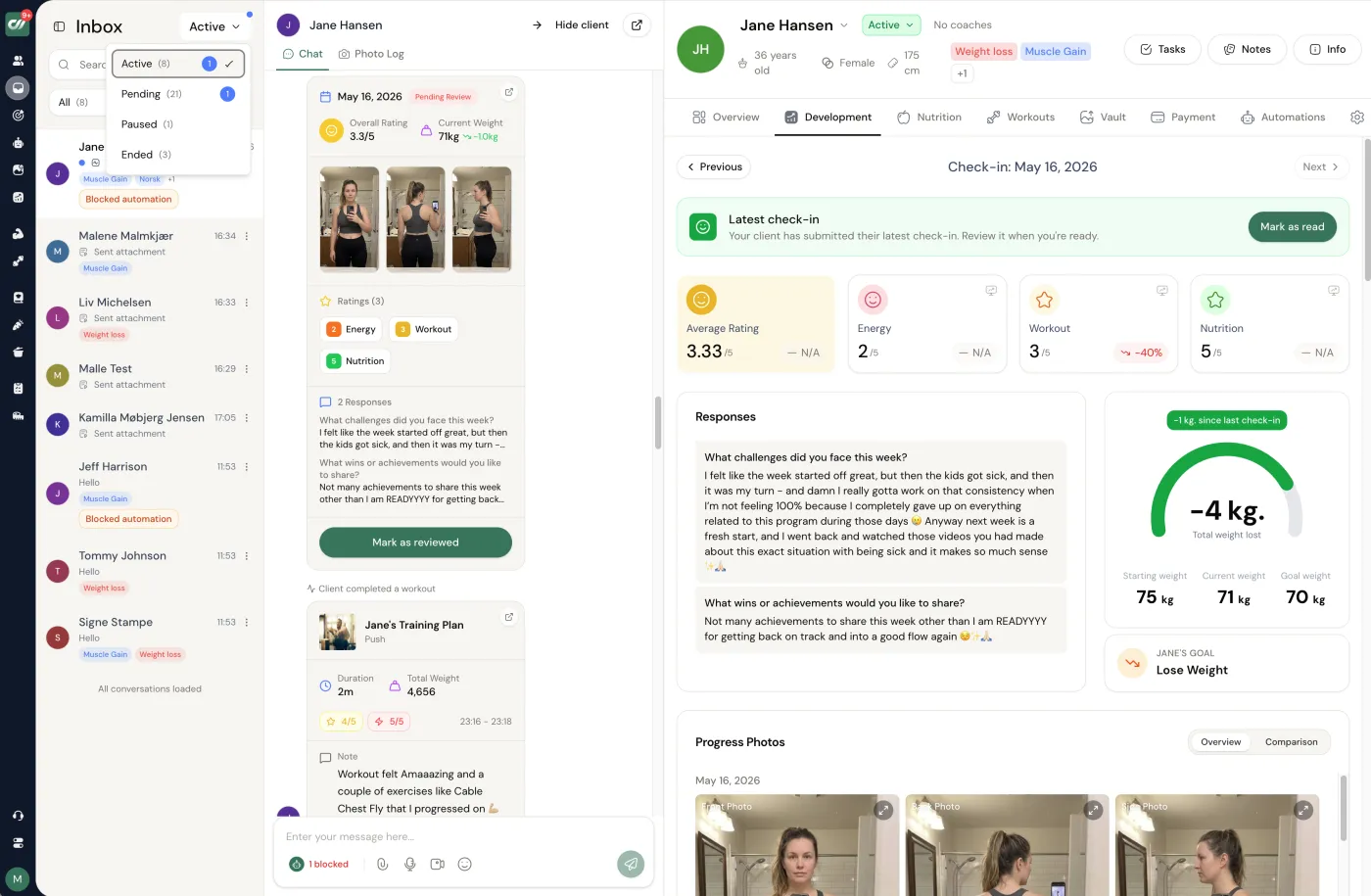
02 · closest free like-for-like swap
Hudl Technique
Formerly known as Ubersense, Hudl Technique is the app most former Coach's Eye users land on first, and for good reason. The core app is free on iPhone and Android and does the exact things you miss: record or import a clip, scrub it frame by frame, play it back in slow motion, draw lines and angles on the screen, and compare two attempts side by side. It is the most direct replacement for the pure analysis job, without a subscription to get started. If the only thing Coach's Eye did for you was slow footage down and let you draw on it, this is where to look first.
The trade-off: It is an analysis app, not a coaching system, so the clip still lives outside your programming, check-ins, and payments. You get the drawing pad back, but the rest of the workflow stays wherever you keep it now.
03 · analysis with a lighter coaching layer
OnForm
OnForm sits a step beyond a pure drawing app. Alongside telestration, slow-motion, and voice-over, it adds a cloud video library and some client and team organisation, so the clips do not just live on one phone. It suits a coach who wants strong analysis tools but also a tidier way to keep footage and share it with athletes than a camera roll allows. Think of it as the middle ground between a single-purpose app and a full coaching platform, weighted toward the analysis side.
The trade-off: The coaching layer is lighter than a dedicated platform, so it organises video well but does not carry programming, nutrition, check-ins, or payments the way an all-in-one does.
04 · best free desktop analysis
Kinovea
Kinovea is a free, open-source desktop program for Windows built for detailed movement analysis. It goes further than a phone app on the measurement side: angles, distances, path tracking, and precise frame stepping, which makes it a favourite for anyone who wants to quantify a movement rather than just eyeball it. Because it is open source, it does not depend on one company keeping an app alive, which is a quiet reassurance right after a shutdown. It lives on a computer rather than a phone, so it fits desk-based analysis better than pitch-side or gym-floor use.
The trade-off: No mobile app and a more technical, less polished interface, so it rewards coaches willing to learn it and is not the quick phone-side tool Coach's Eye was.
05 · best for elite and team performance
Dartfish
Dartfish is the professional end of video analysis, long used in elite sport and high-performance settings. Deep telestration, event tagging, data overlays, and team workflows are all there, and it is built for programmes that analyse a lot of footage systematically. If your context is a squad, an academy, or a performance department rather than one-to-one online coaching, this is the serious option to weigh. It is priced and built for that level, so it is heavier and more expensive than a phone app aimed at individual coaches.
The trade-off: It is overkill and over budget for a solo online coach doing weekly form checks, where a free app plus a coaching platform covers the same need for far less.
06 · best for golf and swing sports
V1 Sports
V1 Sports built its name in golf, with swing analysis, side-by-side comparison, and drawing tools tuned to the way a swing is taught, and it extends to other swing-based sports too. If your coaching is technical and swing-led, its tools and its library of reference material are shaped for exactly that job in a way a general app is not. For a strength or general fitness coach it is more specialised than you need, but for the right sport it is a strong, purpose-built replacement.
The trade-off: It is specialised for swing sports, so a general fitness or strength coach gets more than they need and less of the everyday programming and check-in tooling they actually use.
Pick your Coach's Eye alternative by the job it did.
The fair way to decide is to name what Coach's Eye was really for in your coaching, then match it. The answer falls out almost immediately.
- You just want to draw on video, for free. Hudl Technique. It is the closest like-for-like swap and the core app costs nothing to start.
- You want detailed measurement at a desk. Kinovea, free and open-source, for angles, distances, and tracking.
- You want analysis plus a tidy video library. OnForm, the middle ground between a single app and a full platform.
- You run team or elite performance analysis. Dartfish, built for that level.
- You coach golf or a swing sport. V1 Sports, purpose-built for the swing.
- The form check was part of coaching people online. Coachway, so the clip sits next to the program, the check-in, and the payment, with your own Stripe and a client app in eight languages. Pair it with a free drawing app for the few clips that truly need arrows.
The cost reality is worth naming too. Coach's Eye felt close to free, so a monthly subscription can be a jolt. Two of the strongest analysis options here, Hudl Technique's core app and Kinovea, are genuinely free, so pure analysis need not cost anything. Where money does make sense is when you are paying for a whole business system rather than one feature: a platform that also carries programming, nutrition, check-ins, and payments is a different purchase from a drawing app, and it should be judged against your whole tool stack, not against Coach's Eye alone. If that is the direction you are heading, our roundup of the best coaching apps for online coaches and the wider best online coaching platforms list weigh the full field, and if you are moving your clients across, the guide to migrating clients between coaching platforms shows how to switch in stages.
Frequently asked.
What happened to Coach's Eye?
Coach's Eye was discontinued by TechSmith and pulled from the app stores, which is why coaches who relied on it for slow-motion form checks and drawing on video are now looking for a replacement. The clips and drawing work created inside the app do not carry over automatically, so the practical task is picking a new tool and, if it matters, saving any old footage you still want out of the app before you move on.
What is the best Coach's Eye alternative in 2026?
It depends on what Coach's Eye actually did for you. If you only want a like-for-like tool to slow footage down and draw on it, Hudl Technique is the closest free swap, with OnForm and Kinovea close behind. If Coach's Eye was one piece of running an online coaching business, and the form check was meant to sit next to the client's program, check-ins, and payments, then a coaching platform such as Coachway replaces the whole loop rather than just the drawing pad.
Is there a free Coach's Eye alternative?
Yes. Hudl Technique's core app is free on iPhone and Android and gives you slow-motion, frame-by-frame playback, drawing, and side-by-side comparison, which is the closest free match to what Coach's Eye did. Kinovea is a free, open-source desktop program for Windows with angle and distance measurement for more detailed analysis. Both are genuinely free to start; confirm any paid tiers on the provider's own site.
Do I need a video analysis app or an online coaching platform?
A dedicated video analysis app such as Hudl Technique, OnForm, Kinovea, or Dartfish is built for one job: slowing footage down and drawing on the screen, which suits technique work in sport. A coaching platform such as Coachway is built for the whole client relationship, where a form-check video arrives inside the client's chat and sits next to their program, check-ins, and history. If form analysis is the only thing you do, pick an analysis app. If it is part of coaching people online week to week, the platform keeps it in one place.
Can I do form checks in Coachway without a separate analysis app?
Yes, for in-context technique review. In Coachway the client records a set on their phone and sends it as a video message in the client app, and the clip lands in that client's thread beside their check-in data and the demo video you pinned to the exercise. You reply with cues, often as a quick screen-recorded video. Coachway is not a telestration tool, so if you specifically need to draw arrows and angles frame by frame, pair it with a free app like Hudl Technique for that step.
Which Coach's Eye alternative is best for online fitness coaches?
For an online fitness or strength coach, the honest answer is usually a coaching platform rather than a standalone analysis app, because the form check only matters in the context of the program and the check-in. Coachway keeps the two-way video loop inside the same workflow as programming, nutrition, messaging, and payments, with your own Stripe and a client app in eight languages. If you coach a technical sport where drawing on the screen is the point, keep a free tool like Hudl Technique alongside it for the annotation itself.
Can ChatGPT pick a coaching app for me?
It can filter the table you give it against your client count, must-have features and budget, which is a good way to get from ten rows to two trials. It cannot see current pricing, free-tier limits or your clients, and it will invent a feature if the prompt lets it, so the prompt on this page restricts it to the table. The decision is made in the trial, with your own client week.
Features are not the deciding factor. The workflow is.
Coach's Eye may match or beat Coachway on raw feature count, and that is fine. It is not the question that decides your week. What decides it is how fast you can run the actual work, week after week: following up a client, sending video feedback, and reviewing a weekly check-in. Coachway is built from working hands-on with online fitness coaches scaling past 1,000 clients, where shaving minutes off every client interaction is the whole game.
The entire product is tuned for one outcome: handle more clients, at a higher satisfaction rate, in less time. A smoother workflow is not just cheaper for you, it is a better experience for the client, and that is what keeps clients paying for longer.
check-ins
Review a weekly check-in in 3 to 5 minutes, with notes, data, photos, and exercise history in one view.
follow-up
Messages, video feedback, and plan tweaks happen from one tab, not six different tools.
automation
Automatic reminders run the cadence, and smart send holds a message back if the client has an unread message, so the experience stays personal.
Danish-built, down to the details.
coachway is developed in Denmark and built on more than six years of work with 150 online coaches. Billing runs through the coach's own Stripe account, so payments go directly to the coach, with EU VAT and invoicing handled automatically through Stripe Tax. Client data handling is GDPR-aligned, with export to CSV and PDF at any time, and the client app and the coach dashboard both run in eight languages - English, Danish, Norwegian, Swedish, Finnish, German, Dutch and Spanish. Most international coaching platforms offer none of the Nordic languages.
- - Developed in Denmark, built on work with 150 online coaches over 6+ years
- - Payments direct to your own Stripe, EU VAT and invoicing via Stripe Tax
- - GDPR-aligned data handling, export to CSV and PDF at any time
- - Client app and coach dashboard in eight languages
Keep reading
all guidesOnline coaching platform guide for fitness coaches
The full software stack for online fitness coaches: workouts, meals, check-ins, payments, client app, pricing, migration, and what to compare before switching.
Read the guide6 best workout builder software for online coaches (2026)
Workout builders compared honestly: programming primitives, exercise library quality, alternative-exercise handling, branded app support, and pricing.
Read the guideCoaching platforms without revenue share: the real math
The math at 10, 30, 50, and 100 clients. What revenue-share platforms actually cost European online coaches per year and when the structure starts working against you.
Read the guideFree tools for this: Client Capacity Calculator · Coaching Rate Calculator · Coaching Tool Stack Cost Calculator
Video form review is the one part of programming no assistant can do; for the parts a model can review on a block you wrote, see how to use ChatGPT for program design as a coach.
Replacing Coach's Eye with a full coaching workflow? See it first.
Bring your current setup to a 15-minute demo and we will show you what handling the form check, the program, the check-in, and the payment from one tab looks like in practice. Or start the 14-day free trial and try it yourself - no charge today, a card is required to start, cancel anytime under Billing.


