


Web-based personal training software - why cloud beats installed tools.
Web-based personal training software runs in your browser and hands every client a companion app, so your whole coaching business is current on every device the moment you open it - no installs, no syncing, no version you forgot to update. This guide explains what "web-based" really buys you over installed desktop tools and spreadsheets, the three questions to ask before you trust one with your clients, and where a browser-plus-app platform like Coachway fits.
By Markus Evers · Updated August 2026
the short version
Web-based personal training software lives on a server and opens in a browser, so you coach from any laptop, tablet or phone, everyone is on the current version automatically, and your clients get a real app instead of a shared file. That is the whole case against installed desktop tools and spreadsheets: cloud software removes the update, backup and syncing work that used to be yours, and it turns manual jobs like check-in reminders and scheduled payments into things the system does on its own. Before you trust one, check that you can export your data, that payments settle into your own account, and that the contract has no lock-in.
What is web-based personal training software?
Web-based personal training software is a coaching platform you run inside a browser instead of a program you install on one machine. Your programming, check-ins, client files, messages and payments all live on servers the vendor maintains, and you reach them by logging in from wherever you are. The category is sometimes called cloud coaching software, SaaS for trainers, or simply an online coaching platform - the same idea under different names. The defining trait is that the software is not tied to a single computer. Log in on the gym laptop in the morning and the same live business is there on your phone at a client's session that evening, with nothing to sync between them.
Contrast that with the two setups it usually replaces. An installed desktop tool lives on one hard drive: fast and private, but the moment that machine breaks, travels or falls behind on updates, your business goes with it. A spreadsheet is the other common starting point - free, flexible and totally under your control, right up to the point where a client needs to see their plan on their phone, log a session, or pay you on a schedule. Web-based software is the answer to both limits: it keeps the access-anywhere freedom of the cloud while giving the client an actual app to train from, which neither a desktop program nor a shared sheet does on its own.
Why does web-based beat installed or spreadsheet setups?
Three advantages carry almost the entire argument. Read them as a set, because they compound: access anywhere makes you mobile, always-current means you never manage the software, and the included client app is the thing a spreadsheet or desktop tool structurally cannot give you.
1. Access anywhere, on any device.
Because the software runs on a server, your business is not stored on a laptop - it is stored in an account you can open from anything with a browser. You can write a program on a desktop, review a check-in from your phone on the train, and answer a client from a borrowed computer, all against the same live data. For an online coach, whose whole job is being reachable and up to date, that mobility is not a nice-to-have. It is the difference between running a business and being chained to one machine, and it is the single feature a spreadsheet on your hard drive can never match.
2. Always current, with nothing to maintain.
Cloud software updates centrally, so the version you open is always the newest one - new features, fixes and content arrive without you installing anything, and there is no "which of us has the latest file" problem across your team or your clients. Backups, security patching and syncing all sit with the vendor rather than with you. That is real, unglamorous time back: the hours you would otherwise lose to updating, exporting, re-importing and reconciling versions simply disappear, and they never come back as a maintenance chore. An installed tool asks you to be your own IT department; a web-based platform quietly is one.
3. The client app is included, not an add-on you build.
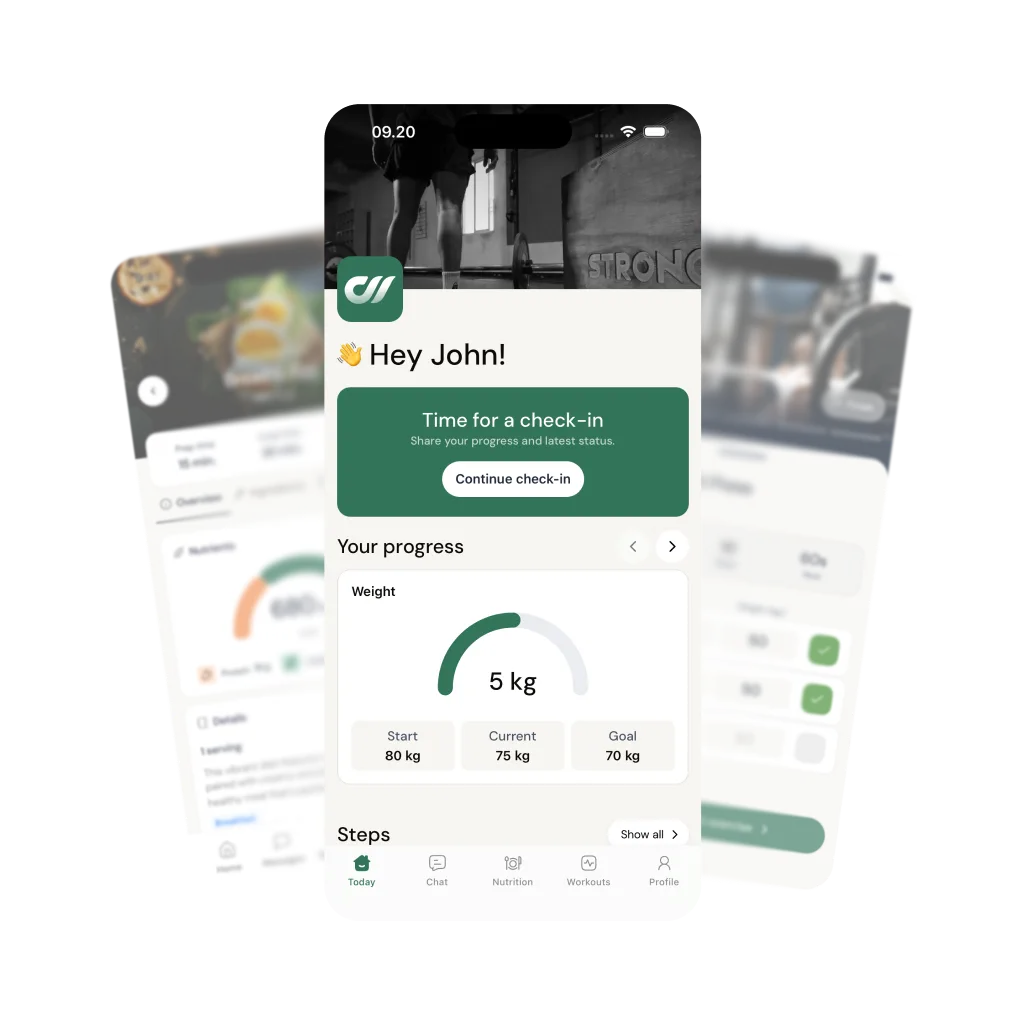
This is the one that decides it for most coaches. A proper web-based platform ships a companion iOS and Android app your clients train from - they open the day's workout, log sets and meals, message you and see their progress, all pulling from the same cloud data you work in. A spreadsheet cannot do that, and an installed desktop tool would have you commission an app yourself. If you have priced building your own client app, you already know why an included one wins on cost and speed alike - and if you are weighing that exact choice, the build-your-own-app versus platform breakdown runs the numbers. The client-facing app is the half of the product a coach cannot fake with a shared file.
What should I check before I trust a web-based tool with my business?
Cloud software asks you to keep your business on someone else's servers, which is a fair trade for the leverage - as long as you are not walking into a trap. Three checks separate a platform that works for you from one you cannot leave. They matter more than any feature list, because a feature you love does not help if the platform holds your data, your money or your contract hostage.
Can you get your data out?
The first question of any cloud tool is whether you can leave it with your clients and their history intact. Software you cannot export from is not a tool, it is a lock-in. Before you commit, know how you would migrate clients out - and if you are moving in from another platform, the client-migration guide covers doing it without losing anyone. A confident platform makes leaving easy because it plans to keep you on merit.
Whose money is it?
Some platforms sit between you and your client's card, hold the funds, and pay you out on their schedule - which puts a middleman on your cash flow. Others let payments settle straight into your own account so you stay in control of your money. Coachway uses your own Stripe account and never holds your funds; optional built-in payments carry a 2.4% per-transaction fee if you choose to use them, and running your own Stripe checkout carries no Coachway fee at all. Ask any platform plainly where the money lands before it reaches you.
What does the contract really say?
Web-based usually means a monthly subscription, which is good news if the terms are clean: look for no binding period, no annual lock-in and no cancellation fee, so the software has to earn your business every month rather than trapping you into a year. If you are still comparing categories and shortlisting options, the wider how-to-choose-a-platform guide walks the full decision, and the personal training software buyer's guide lines up the main tools side by side.
Coachway, a web-based platform with the app built in.
Coachway is a working example of the shape this guide describes: you run the whole business from a browser dashboard, and every client trains from a branded iOS and Android app that pulls from the same cloud. Because it is web-based, there is nothing to install and nothing to keep current - you open a tab and the newest version is already there. The app UI is available in six languages (English, Danish, Norwegian, Swedish, Finnish and German), while the coach dashboard itself is in English. Programming, check-ins, nutrition with a 3.7-million-food logging database, messaging in one Power Panel inbox, automations and payments all live in that single login, and it is built on knowledge from working with 150 online coaches over 6+ years.
Pricing is deliberately flat: EUR 69 a month includes your first 5 clients and every feature, with EUR 9 for each additional client after that - no tiers, no paid modules. Payments settle into your own Stripe account rather than a platform wallet, and there is no binding period or cancellation fee. The 14-day free trial starts with a card held securely by Stripe and cancels under Billing before it renews, so you can run your real coaching week through it rather than judging from a tour. If you would rather see the browser dashboard and the client app walked through live first, you can book a demo.
Frequently asked questions about web-based personal training software.
What is web-based personal training software?
Web-based personal training software is a coaching platform you run inside a browser rather than a program you install on one computer. Your programming, check-ins, client files, messages and payments live on a server the vendor maintains, and you reach them by logging in from any laptop, tablet or phone. Two things follow from that. First, there is nothing to update by hand: everyone is on the current version the moment you open the tab, because the software updates centrally rather than on each machine. Second, the client side is almost always a companion app, so the coach works in the browser while the client trains from an iOS or Android app that pulls from the same cloud data. Installed desktop tools and spreadsheets can do parts of the job, but they tie your business to one device and put backups, updates and syncing on you.
Is web-based personal training software better than a spreadsheet?
For anything past a handful of clients, yes, and the reason is not features but leverage. A spreadsheet is genuinely fine for one or two people you speak to daily, and it costs nothing to start. It breaks the moment you need a client to see their plan on their phone, log a workout, get an automatic check-in reminder, or pay you on a schedule without you chasing an invoice. A web-based platform turns those from manual jobs into things the system does while you sleep, and it gives the client an actual app instead of a shared file they have to remember to open. The honest rule of thumb: a spreadsheet is a plan, a web-based platform is a business. If your income depends on retention and delivery rather than a single sheet of numbers, the platform pays for itself in reclaimed hours.
Does web-based coaching software work offline?
The coach dashboard needs a connection because it lives in the browser, but that is rarely the real question. The part that has to survive a bad signal is the client experience, and a good client app caches the day's workout and lets someone log sets, reps and meals with no bars in a basement gym, then syncs when the phone reconnects. So the practical answer for most coaches is that you build and review online, while your client trains offline and the data catches up automatically. If you personally coach from places with no connectivity for long stretches, weigh that against the convenience of logging in from any device, but for the overwhelming majority of online coaches the always-current, access-anywhere trade is the right one.
What should I check before trusting a web-based platform with my clients?
Three things, in order. First, can you export your data and move clients out without losing history, because software you cannot leave is a trap, not a tool. Second, whose money is it: platforms that hold your client payments and pay you out later control your cash flow, while a platform that settles into your own payment account leaves you in control. Third, the contract: look for no lock-in, no binding period and no cancellation fee, so the software has to keep earning your business every month. Features matter, but these three decide whether the platform is a partner or a hostage situation. Coachway, for the record, keeps payments in your own Stripe account and runs month to month with no binding period, precisely because we think those are the questions that matter most.
How much does web-based personal training software cost?
It ranges from free tiers with tight client caps up to roughly USD 100 to 200 a month for full-featured platforms, and the price usually scales with how many active clients you carry. The number that actually matters is cost per active client, not the headline monthly fee, because a plan that looks cheap at five clients can get expensive fast as you grow. Coachway is EUR 69 a month with your first 5 clients included and EUR 9 for each additional client, with every feature in that one price rather than split across tiers or paid modules. There is a 14-day free trial that starts with a card held securely by Stripe and cancels under Billing before it renews, so you can run your real workflow before you commit rather than judging it from a demo video.
Web-based is a starting point, not the whole decision. Once you have settled on cloud over installed, the real work is comparing tools in the personal training software buyer's guide, working the full checklist in how to choose an online coaching platform, and, when you switch, doing it cleanly with the client-migration guide.
Keep reading
all guidesBest group coaching software for fitness coaches (2026)
Running cohorts, communities and group programs needs different plumbing than 1:1. The platforms compared on group features, honestly - and when group coaching is the wrong model.
Read the guideBest AI coaching apps for online fitness coaches (2026)
What "AI" actually means inside the coaching platforms - program generation, chat assistants, form analysis - compared honestly on what each vendor's own site describes, and what AI still does not replace.
Read the guideHybrid coaching software: 5 tools compared (2026)
One client record across in-person sessions and online weeks, hybrid package billing, and the platforms that handle both sides without duct tape.
Read the guideFree tools for this: Coaching Tool Stack Cost Calculator · Coaching Profit Calculator · Client Capacity Calculator
See what Coachway can do for your coaching business
Coachway was built on knowledge from working with 150 online coaches over 6+ years, who all hit the same wall - slow platforms, clunky workflows, wasted hours. Start your 14-day free trial and see what we fixed - the whole platform, no charge today, cancel anytime under Billing.


