


Online coaching software - the checklist to score any tool before you commit.
Online coaching software is the platform an online coach uses to run coaching remotely - training and nutrition programmes, a branded client app, check-ins, messaging, payments and lead capture in one place. Choosing it is the one decision that shapes every week that follows, so it deserves more than a demo and a gut feeling. This is a pre-purchase checklist you can run against any tool in 2026: six things to score - delivery, check-ins, payments, a branded client app, migration and contract terms - so you buy on the whole workflow, not the feature that looked good in the sales call. Coachway is used as the reference build, and yes, we make it, which is stated plainly wherever it comes up.
By Markus Evers · Updated August 2026
the short version
Online coaching software is the platform that carries your whole client relationship - programmes, the app, check-ins, messaging, payments and leads - in one place. Score any tool on six criteria before you buy: how it delivers training and nutrition, how it runs check-ins and accountability, whether payments settle into an account you control, whether the client app carries your brand on iOS and Android, how realistic the migration is, and what the contract terms actually commit you to. A coaching business rarely fails on one weak feature; it fails in the gaps between tools. Buy for the fewest gaps, not the flashiest demo.
What does online coaching software actually cover?
Online coaching software is the tool an online coach uses to deliver and operate coaching remotely. At minimum it holds the training and nutrition programmes and a client-facing app to receive them. In practice the tools worth buying go further: check-in forms, two-way messaging, progress tracking, payment collection, and often lead capture so the sales side lives in the same system. The word people reach for interchangeably is "platform", and for buying purposes they mean the same thing - a distinction worth knowing only because search splits them, which is why there is a separate 12-point platform checklist aimed at coaches already managing fifty or more clients.
The reason consolidation matters so much is unglamorous. A coaching business does not usually break because a workout builder is average or a chat is plain. It breaks in the seams: the message that sits unread because it is in a different app from the programme, the subscription that lapses silently because the payment link lives somewhere the coach never looks, the meal plan that never connects to the check-in that would have flagged the problem. Every tool you add to a stack adds another seam. So the honest way to read this whole checklist is as a single question asked six ways: how few gaps does this software leave between the moment a client needs something and the moment you see it?
Six criteria to score before you commit to any online coaching software.
Run each tool you are considering through the six cards below. Give every criterion a quick score out of five and note the red flag if you spot it. A tool that scores high on delivery but low on payments or migration will still cost you an evening a week, so add the whole set up rather than falling for the one thing the demo showed off.
1. Delivery - can you build once and reuse?
This is the core job: programming training and nutrition and getting it to the client cleanly. Check whether you can build reusable templates instead of rebuilding a plan for every person, whether the exercise and recipe libraries are deep enough that you are not writing everything from scratch, and whether nutrition is a real feature rather than a PDF bolted on. As a scale reference, Coachway ships with more than 1,800 exercises and over 1,100 recipes, and its food-logging database holds around 3.7 million foods, so the raw material is already there on day one. Red flag: a tool where every new client means an hour of re-entry.
2. Check-ins and accountability - can you see the whole client at once?
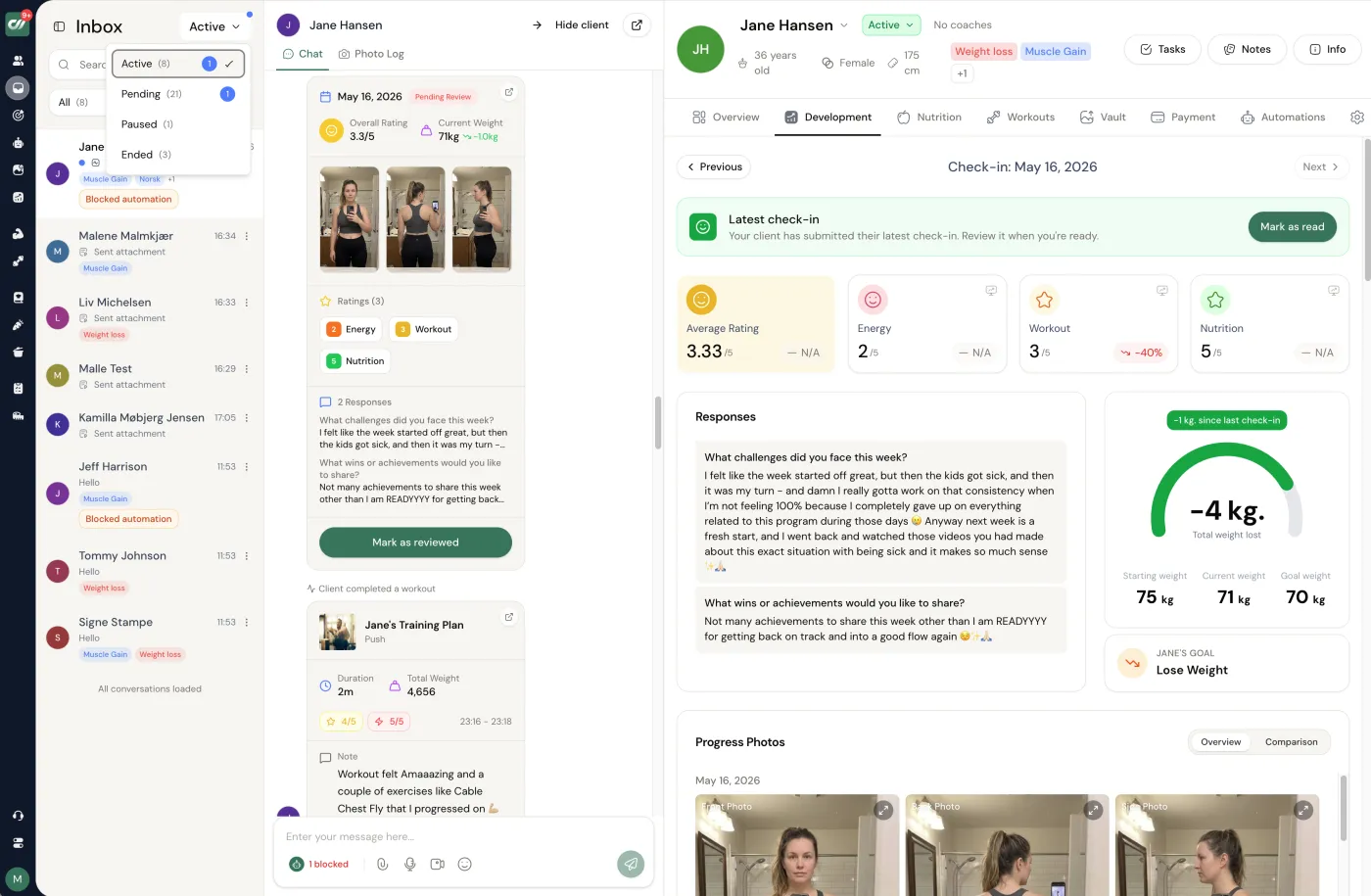
Retention is built here, so weigh it heavily. Look for a form builder you control - ratings, measurements, progression photos, custom metrics - with automatic reminders and per-client assignment. Then look for the review side: this week's answers sitting next to the progress photos, the weight trend and the training log on one screen, so you read a whole person in a minute rather than opening four tabs. A good coaching stack makes the weekly review fast, because a review that is slow is a review that quietly stops happening. Red flag: check-in answers that live somewhere separate from the data they should be read against.
3. Payments - does the money settle into an account you control?
Two questions decide this one. Who holds your money, and what does collection cost. Prefer software that lets you keep your own Stripe account so revenue lands with you and the platform never custodies it - Coachway works this way, and its optional built-in payments carry a 2.4% fee per transaction that you avoid entirely by running your own Stripe checkout. Beyond that, check for the operational pieces: subscriptions, planned invoices, payment plans, automatic reminders, and options like Klarna and SEPA. Red flag: a platform that becomes the merchant of record and sits between you and your own income. Any claim of a totally fee-free processor is worth reading twice - card processing always costs something somewhere.
4. Branded client app - whose name is on it?
The app is what your client opens every day, so it carries your perceived value. Check that it exists on both iOS and Android, and that it can show your logo, colours and header rather than the vendor's. Be precise about the language here, because "white-label" is used loosely: a branded in-app experience inside the vendor's app is one thing, and a fully standalone app published under your own name in the stores is another, usually a paid add-on. Coachway includes the branded in-app experience as standard and offers a fully standalone white-label app as a paid option, and the app itself ships in six languages - English, Danish, Norwegian, Swedish, Finnish and German. Red flag: a client app that looks like the software company, not like you.
5. Migration - can your current clients move without pain?
If you already coach, switching cost is real, and it is the criterion most buyers skip until it hurts. Ask how you get existing clients in, whether you can rebuild your most-used templates before inviting anyone, and whether you can move people in waves rather than in one risky weekend. The danger in a migration is never the data export - it is the client experience during the change, a broken app invite or a missed payment. Plan it in batches and keep the old tool read-only until the last person is settled; the migration walkthrough lays out the order. Red flag: a vendor with no honest answer for how your book comes across.
6. Contract terms - what are you actually committing to?
Read the terms as carefully as the features. Check the billing shape - flat tier, per client, or a percentage of your revenue - and model it at the client count you plan to reach, not the one you have today, because a percentage model that feels cheap at ten clients can be your biggest bill at fifty. Check for lock-in: monthly billing, no binding period and no cancellation fee keep the switching cost low if the tool disappoints. Coachway is monthly with no contracts and no cancellation fees, and it prices per client - EUR 69 a month with your first 5 clients included, then EUR 9 each after that, every feature in the one plan. Red flag: an annual lock-in on a tool you have not used past a demo.
What does online coaching software really cost?
Less than the sticker price suggests, and more too, depending on how you read it. The pricing model matters more than the headline number, because the three common models scale in completely different directions. A flat tier is predictable but tends to gate the features you actually need behind higher plans. A per-client model is transparent and grows with your client base, so it is worth checking at your target client count. A percentage-of-revenue model looks the cheapest at ten clients and can quietly become the most expensive line in your business at fifty. Then there are the costs a plan page keeps quiet: payment-processing fees, a white-label add-on, a nutrition tool you end up buying separately.
The honest way to compare is to run the same client counts through each model rather than trusting the number on the homepage, and the full cost breakdown works the maths at ten, thirty, fifty and one hundred clients so you can see where each model overtakes the others. For a single reference point: Coachway is a per-client plan at EUR 69 a month with your first 5 clients included and EUR 9 per additional client, every feature in one plan and no tiers to climb. If you would rather compare finalists side by side than model it yourself, the shortlist of the best all-in-one platforms scores the full stack of workouts, nutrition, check-ins, payments and app.
How Coachway scores against the same checklist.
We make Coachway, so treat this as the reference build rather than a neutral verdict - hold it to the same six criteria you would hold any tool to. On delivery it carries reusable training and nutrition programmes with deep libraries; on check-ins it puts this week's answers beside progress photos, measurements and the training log on one screen; on payments it settles into your own Stripe account and never holds your money, with optional built-in payments at a 2.4% per-transaction fee you can skip. The client app is branded, on iOS and Android, in six languages, and the coach dashboard you work from is in English. It is built on knowledge from working with 150 online coaches over 6+ years, priced at EUR 69 a month with your first 5 clients included and EUR 9 per additional client, monthly with no contract. The 14-day free trial starts with a card held securely by Stripe and cancels under Billing before it renews, or you can book a demo and walk the checklist live. Where it does not lead: a coach who needs broad wearable integrations will find tools like Trainerize carry more of those than we do.
Frequently asked questions about online coaching software.
What is online coaching software?
Online coaching software is the platform an online coach uses to deliver and run coaching remotely: it holds the training and nutrition programmes, the client-facing app, the check-in forms, the messaging, and usually the payments and lead capture too. The point of it is consolidation. Instead of stitching a workout app to a spreadsheet, a chat thread, a PDF meal plan and a separate payment link, one tool carries the whole client relationship from first enquiry to renewal. That matters because a coaching business does not fail on the quality of any single tool - it fails in the gaps between tools, where a client's message goes unanswered or a payment quietly lapses. The best online coaching software is judged less on any one flashy feature and more on how few of those gaps it leaves.
What features should online coaching software have?
Score any tool on six things before you commit. First, delivery: can you build and reuse training and nutrition programmes without rebuilding them for every client. Second, check-ins and accountability: a form builder plus a place to review answers next to progress photos and measurements. Third, payments: subscriptions, plans and reminders that settle into an account you control. Fourth, a client app: mobile, on iOS and Android, carrying your brand rather than the vendor's. Fifth, migration: a realistic way to move your existing clients in without a messy weekend. Sixth, contract terms: monthly billing, no lock-in, and pricing that does not punish growth. A tool that is strong on delivery but weak on payments or migration will still cost you time every week, so weigh the whole set, not the demo highlight.
How much does online coaching software cost?
It depends on the pricing model, and the model matters more than the sticker price. Flat-tier tools charge a fixed monthly fee and often gate features behind higher tiers. Per-client tools scale with your client base, which is honest but needs checking at the client count you actually plan to reach. Percentage tools take a cut of your revenue, which looks cheap at ten clients and expensive at fifty. Add the hidden costs a plan page hides: payment-processing fees, a white-label add-on, or a separate nutrition tool you end up buying anyway. For a worked comparison across ten, thirty, fifty and one hundred clients, the cost breakdown does the maths. As a reference point, Coachway is a per-client model at EUR 69 a month with your first 5 clients included, then EUR 9 per additional client, with every feature in the one plan.
Can I move my clients to a new coaching platform without losing them?
Yes, if you migrate in waves rather than all at once. The risk in switching software is never the export of data - it is the client experience during the change: a confusing app invite, a broken payment, a programme that arrives late. Move a small group first, confirm their app access, billing and next check-in all land cleanly, then bring the rest across in batches. Rebuild your most-used programme templates in the new tool before you invite anyone, so week one feels finished rather than half-built. Keep the old tool running read-only until the last client is settled. Done this way, most coaches move a full book across a couple of weeks with no lost clients and no lost payments, and the migration walkthrough covers the order to do it in.
Do I need separate software for nutrition, payments and the client app?
You can run a stack of separate tools, and plenty of coaches start that way, but every seam between two tools is a place where work leaks. A separate meal-plan tool means client data lives apart from their training and check-ins, so you never see the whole person on one screen. A separate payment link means a lapsed subscription is invisible until the money simply stops. An all-in-one platform trades a little best-in-class depth in any single area for the thing that actually saves a coach's week: one place where a client's programme, food logging, check-ins, messages and billing sit together. If your tools already talk to each other cleanly and nothing falls through the cracks, a stack is fine. If you spend evenings reconciling apps, that is the signal to consolidate.
This checklist points at three deeper reads: the 12-point platform checklist for coaches already at scale, the real cost of the software across client counts, and how to move a full book of clients without losing anyone in the switch.
Keep reading
all guidesHubFit alternatives for online fitness coaches in 2026
A fair, fitness-specific rundown of the best HubFit alternatives, from Coachway to Trainerize, TrueCoach, Everfit, PT Distinction, and MyPTHub, with honest pricing and trade-offs.
Read the guideCheck-in software for online coaches
The buying guide for client check-in software: custom forms, ratings, progress photos, reminders, trend tracking, drafts, and faster weekly reviews.
Read the guideMeal planning & nutrition software for personal trainers
What nutrition coaching software should include: reusable meal templates, recipes, shopping lists, macro visibility, allergy handling, and client feedback.
Read the guideSee what Coachway can do for your coaching business
Coachway was built on knowledge from working with 150 online coaches over 6+ years, who all hit the same wall - slow platforms, clunky workflows, wasted hours. Start your 14-day free trial and see what we fixed - the whole platform, no charge today, cancel anytime under Billing.


